FANUC Open CNC Basic Operation Package 1 Specifications of Execution Pointer Setting Function Additional Manual Page 5
Additional Manual
EDIT DATE DSGN DESCRIPTION
RELEASE
DSGN RECOG
TITLE
DRAWING No.
Sheet
5/5
FANUC Open CNC Basic Operation Package 1
Execution pointer setting function
A-78536EN
010627
Nakajima
010627 Nakajima New design Kayano01
Kayano
050527 02 Modified of format
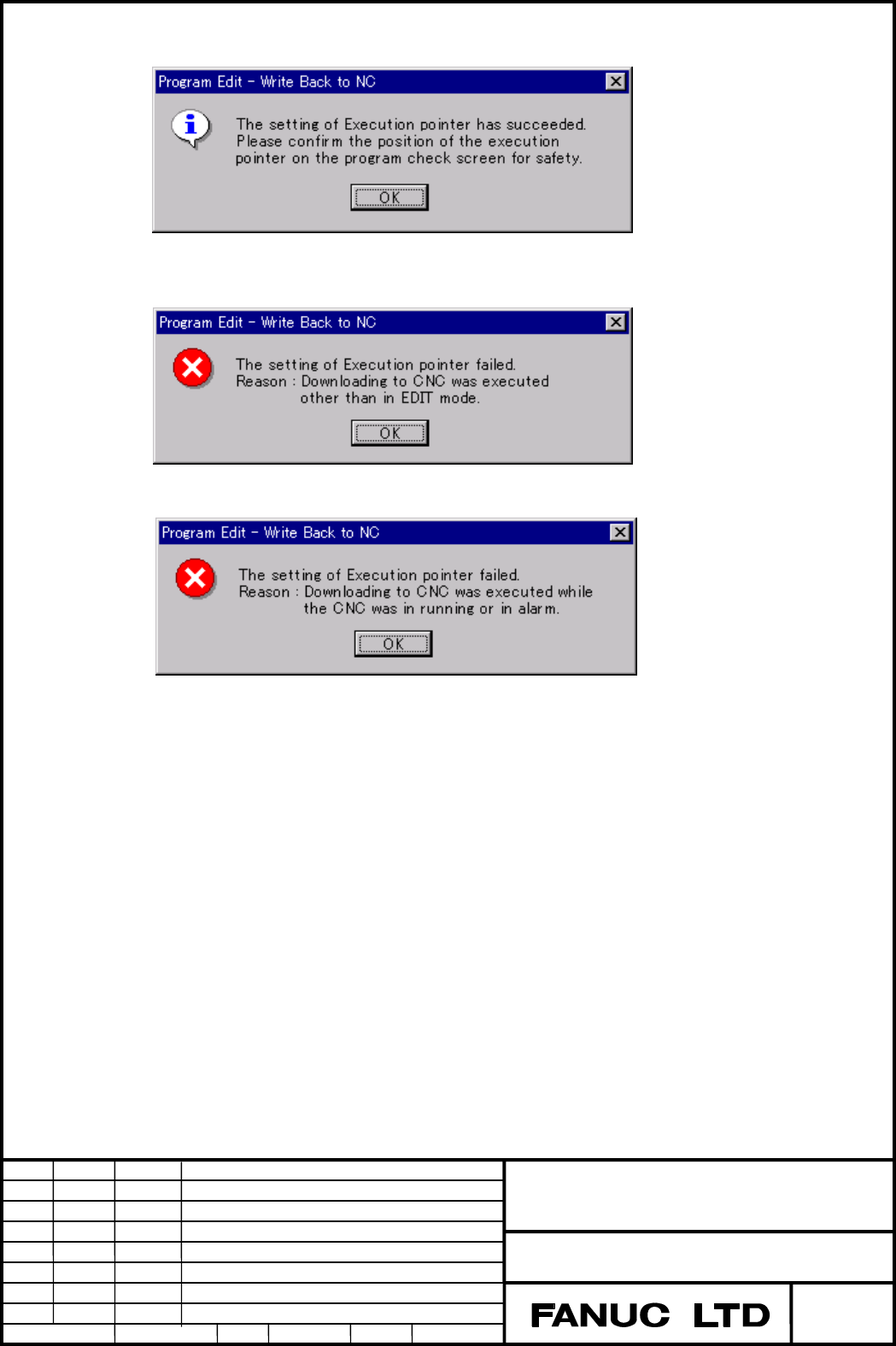
3) Post process after downloading of the NC program.
When the Execution pointer is updated normally, the following message is displayed.
When the setting of the Execution pointer was failed, the following message is displayed.
Downloading to CNC is executed other than in EDIT mode.
Downloading to CNC is executed while the CNC was in running or in alarm state.
Contents Summary of FANUC Open CNC Basic Operation Package 1 Specifications of Execution Pointer Setting Function Additional Manual
- Page 1FANUC Open CNC Basic Operation Package 1 Specifications of Execution pointer setting function Software Technology Laboratory FANUC LTD TITLE FANUC Open CNC Basic Operation Package 1 Execution pointer setting function DRAWING No. A-78536EN 02 050527 Modified of format 01 010627 Nakajima New design Ka
- Page 21. Outline This function is for setting of the execution start pointer (hereafter, "Execution pointer") to an arbitrary position on the NC program by using "Program Edit" screen of the Basic Operation Package 1. This function is effective to 16i-B/18i-B/21i-B, and the following option is required. O
- Page 32.1 “Get from NC” softkey function When the selected NC program on NC is acquired. If this function is disabled : The cursor position is the top of NC program. If this function is enabled : The cursor position becomes one of the execution pointer of the NC program which has been selected on NC. The
- Page 42.2 “Write back to NC” softkey function 1) When “Write back to NC” is executed, the execution pointer can be specified. When the NC program is downloaded to NC, the cursor position of the NC program on "Program edit" screen can be set as an execution pointer. If you like to set the Execution pointer
- Page 53) Post process after downloading of the NC program. When the Execution pointer is updated normally, the following message is displayed. When the setting of the Execution pointer was failed, the following message is displayed. Downloading to CNC is executed other than in EDIT mode. Downloading to CN