Ethernet Re-recognition at start-up on Fanuc PANEL i Additional Manual Page 4
Additional Manual
Ed.
Recog.
Desi
g
.
3
/
3
Date Desi
g
. DESCRIPTION
DATE
Drawing No.
Title
Sheet
Ethernet Re-recognition at start-up
on FANUC PANEL i
A-83136E
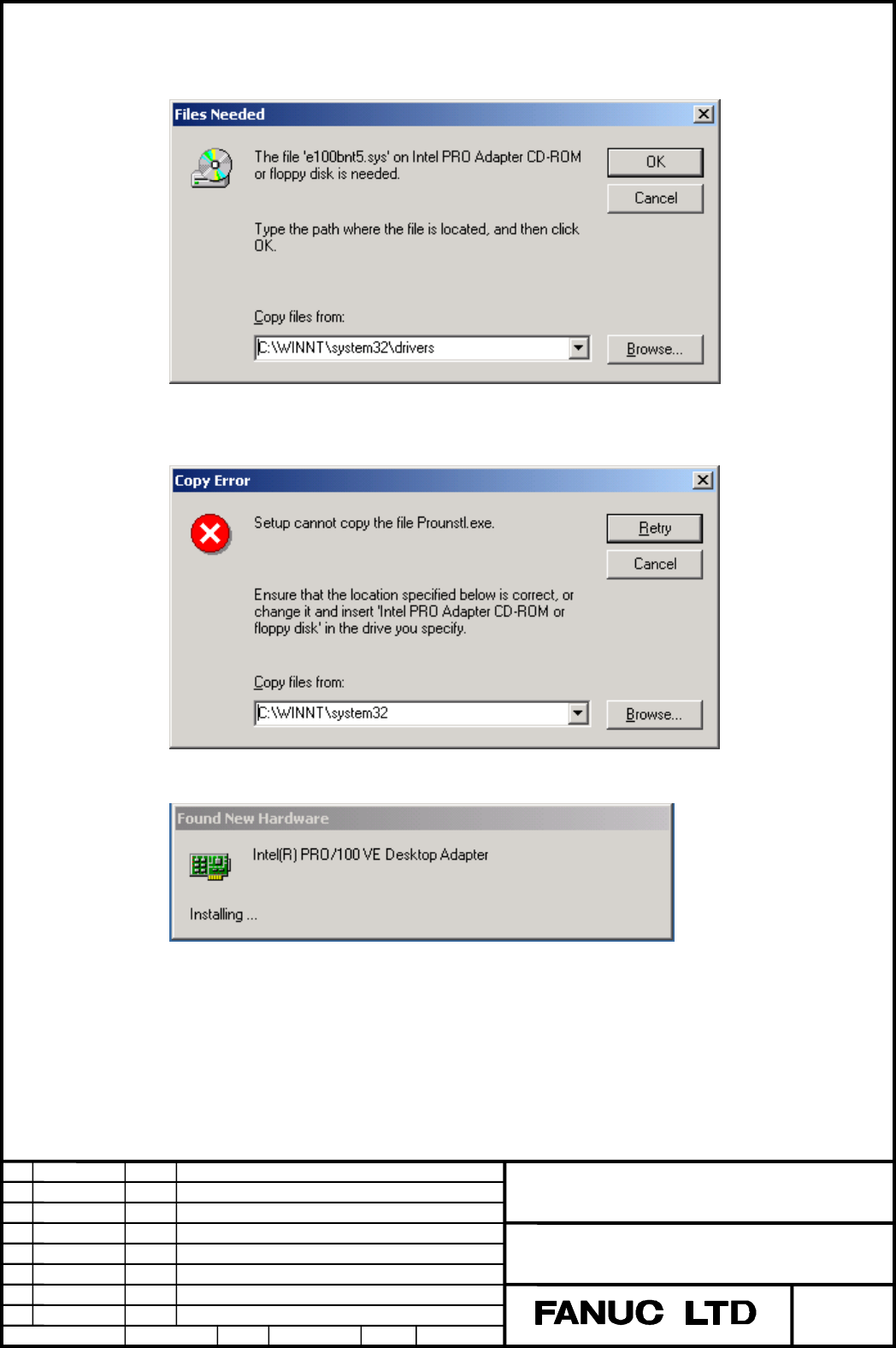
B) When the following message is appeared on the screen,
enter ‘C:\WINNT\system32\drivers’ on [Copy files from] box, then press [OK] button.
C) When the following message is appeared on the screen,
enter ‘C:\WINNT\system32’ on [Copy files from] box, then press [Retry] button.
D) Wait until the following message disappears.
(Note) There is possibility that a mouse or keyboard does not work smoothly between
10 or 15 minutes after displaying the above message. But, please waiting as it is.
(2) We will change the pre-installed HDD image as the above message is not appeared.
Contents Summary of Ethernet Re-recognition at start-up on Fanuc PANEL i Additional Manual
- Page 1TECHNICAL REPORT No. TMN 04/002E Date . , 2004 General Manager of CNC Laboratory Ethernet Re-recognition at start-up on FANUC PANEL i 1. Communicate this report to: Your information O GE Fanuc-N, GE Fanuc-E FANUC Robotics CINCINNATI MILACRON O Machine tool builder Sales agency End user 2. Summary fo
- Page 2Ethernet Re-recognition at start-up on FANUC PANEL i 1. OUTLINE This document describes the phenomenon and countermeasure about Ethernet re-recognition on FANUC PANEL i with Celeron 733MHz / Pentium III 866MHz / Pentium III 1.26GHz CPU when Windows 2000 Professional (We call it “Windows 2000” after
- Page 34. CAUSE EEPROM which is used in PANEL i master circuit board as MAC address storage was discontinued. Therefore, we changed it to the new EEPROM. When PANEL i with the master circuit board mounted the new EEPROM is start up with connecting to the HDD which current OS image is pre-installed, OS reco
- Page 4B) When the following message is appeared on the screen, enter ‘C:\WINNT\system32\drivers’ on [Copy files from] box, then press [OK] button. C) When the following message is appeared on the screen, enter ‘C:\WINNT\system32’ on [Copy files from] box, then press [Retry] button. D) Wait until the follo