FANUC Series 16 i Spindle setting, tuning and monitor screen Supplement to Manual Page 3
Supplement to Manual
EDT DATE
A
-77497-EN
3 / 15
DS0100-04
DESIG.
DESCRIPTION
TITLE
NO.
PAGE
FANUC Series 16 i
Spindle setting, tuning
and monitor screen
01 1998.12.18
newly registered
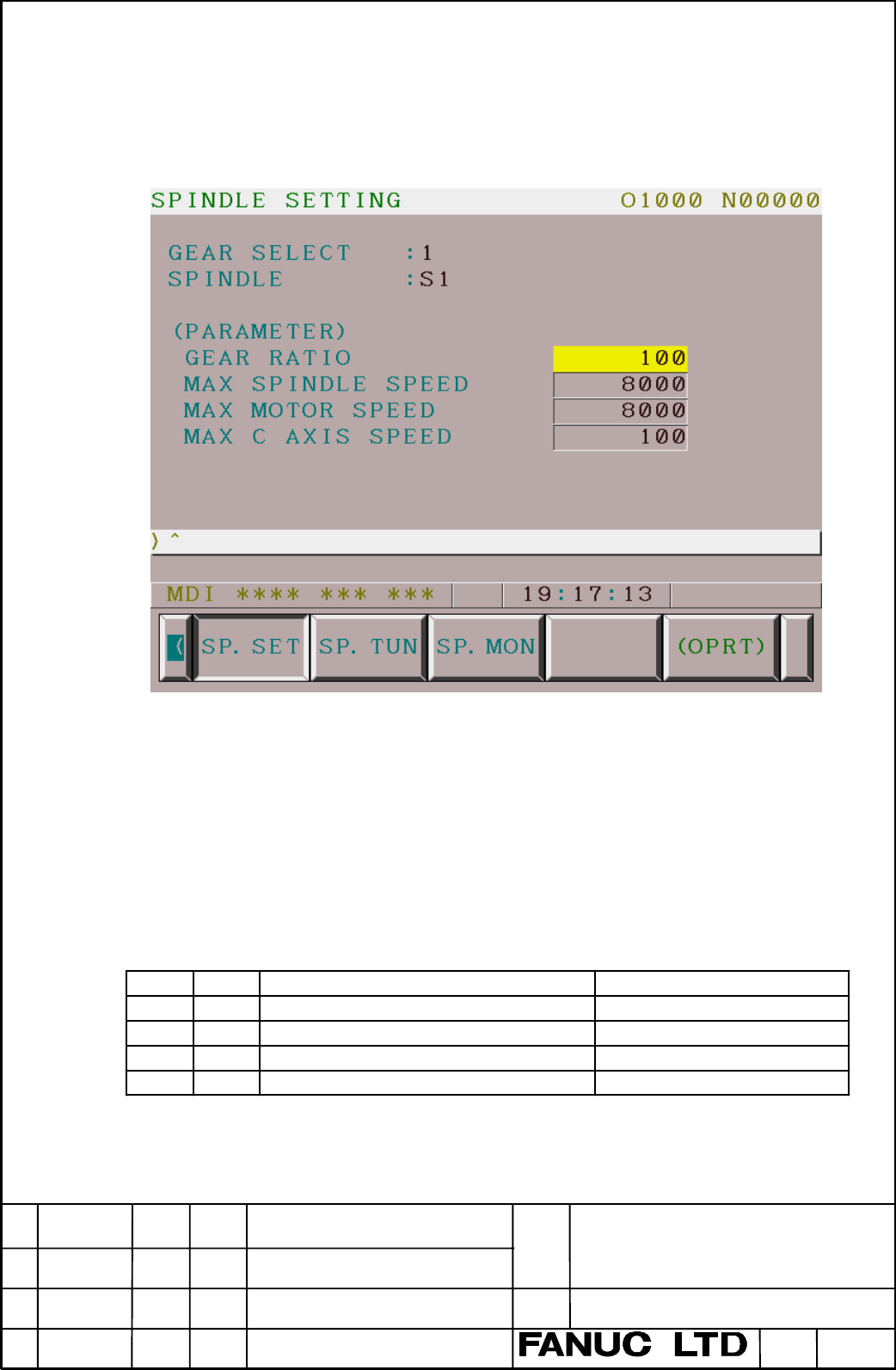
2-2 Spindle setting screen
This screen displays basic parameters related to serial spindle. This screen is displayed
by pressing the soft key “SP.SET” and can be switched to another spindle’s using page
keys and/or cursor keys.
(Note) In case of displaying a screen of the second or third spindle, the max
spindle speed and the max C axis speed are not displayed.
GEAR SELECT ---- The gear select status on the machine side is displayed.
The gear selection is displayed as the following table by a combination of the input
signals CTH1 and CTH2.
⇒
CTH1, CTH2 of the 1st spindle : < G0070#3, #2 >
CTH1, CTH2 of the 2nd spindle : < G0074#3, #2 >
CTH1, CTH2 of the 2nd spindle : < G0204#3, #2 >
CTH1 CTH2 Selected serial spindle p a ram e te r Indication in th is screen
00 HIGH GEAR 1
01 MEDIUM HIGH GEAR 2
10 MEDIUM LO W GEAR 3
11 LOW GEAR 4
Contents Summary of FANUC Series 16 i Spindle setting, tuning and monitor screen Supplement to Manual
- Page 1FANUC Series 16 i Spindle setting screen / Spindle tuning screen Spindle monitor screen Specifications Contents 1. Outline ------------- 2 2. Details ------------- 2 2-1 Display method ------------- 2 2-2 Spindle setting screen ------------- 3 2-3 Spindle tuning screen ------------- 5 2-4 Spindle mo
- Page 21. Outline Spindle setting / tuning / monitor screens enable you to easily set the parameters for serial spindle control. It is also possible to display serial spindle state monitor. These screens are applied to the second and third spindles, as well as the first spindle. And it is applied to main /
- Page 32-2 Spindle setting screen This screen displays basic parameters related to serial spindle. This screen is displayed by pressing the soft key “SP.SET” and can be switched to another spindle’s using page keys and/or cursor keys. (Note) In case of displaying a screen of the second or third spindle, th
- Page 4(Note) Some serial spindle parameters are applied depending on the selected gear by the signals CH1 and CH2 out of 4-type (or 2-type) gears. And, these parameters might be described “HIGH GEAR”, “MEDIUM HIGH”, “MEDIUM LOW” and “LOW GEAR” by the serial spindle parameter manual etc.. “HIGH GEAR” and “
- Page 52-3 Spindle tuning screen This screen displays parameters required for basic tuning of serial spindle and monitoring spindle state as well. This screen is displayed by pressing the soft key “SP.TUN” and can be switched to another spindle’s using page keys and/or cursor keys. OPERATION ---- One of th
- Page 6The displayed (parameter) part varies depending on the operation mode. SPEED CONTROL SPINDLE ORIENTATION SYNCHRONIZATION CONTROL PROP. GAIN PROP. GAIN PROP. GAIN INT. GAIN INT. GAIN INT. GAIN MOTOR VOLT LOOP GAIN LOOP GAIN REGEN.PW MOTOR VOLT MOTOR VOLT ORAR GAIN TIME CONSTANT STOP POINT REF. SHIFT
- Page 7MOTOR ---- Speed of motor revolution (unit : RPM) SPINDLE ---- The same value of the actual spindle speed (SACT) (unit : RPM) (Notes) In order to display the spindle speed, it is necessary to set position coder rightly. Regardless of a choice of position coder, spindle speed is displayed only in the
- Page 82-4 Spindle monitor screen This screen displays information related to spindles. This screen is displayed by pressing the soft key “SP.MON” and can be switched to another spindle’s using page keys and/or cursor keys. (Note) This screen is an example that the 1st spindle is in Cs contour control mode
- Page 9ALARM ---- The serial spindle alarm occurring currently is displayed. The following shows the contents of the display. No. M eaning No. M eaning 1 M O TO R O VERHEAT 25 SERI.TRANS.STO P 2 SPEED ER.EXCESS 26 C-VEL.DISCO N. 3 FUSE IN DC LINK 27 PC DISCO N. 4 FUSE IN AC INPUT 28 C-PO S.DISCO N. 5 FUSE
- Page 10LOAD METER ---- The load meter displays spindle load in a unit of 10%, and maximum displayed value of the load meter varies depending on parameter No.4127. When the spindle switching function is applied and sub spindle is selected, it varies depending on parameter No.4274. Max. 10 control input sign
- Page 113. Parameters of screen display 3-1 Setting of screen display PRM No. 7 6 5 4 3 2 1 0 3111 ESP SVP SPS SPS Spindle setting screen is 1 : displayed. 0 : not displayed. SVP Synchronization errors displayed on the spindle tuning screen 1 : Peak-hold values are displayed. 0 : instantaneous values are di
- Page 124. Parameters of each screen Parameter Nos. to be set / displayed in each screen is showed in the following table. All of these are serial spindle parameters, except for parameters of maximum spindle speed (No.3741-3744) in spindle setting screen. Serial spindle parameters are the axes type. That is
- Page 134-2 Spindle tuning screen SPEED CONTROL S1/S11 S12 S2/S21 S22 S3/S31 S32 PROP. GAIN (HIGH, M.H) 4040 4206 4040 4206 4040 4206 PROP. GAIN (LOW, M.L) 4041 4207 4041 4207 4041 4207 INT. GAIN (HIGH, M.H) 4048 4048 4048 4212 4212 4212 INT. GAIN (LOW, M.L) 4049 4049 4049 MOTOR VOLT 4083 4236 4083 4236 408
- Page 14SYNCHRONIZATION CONTROL S1/S11 S12 S2/S21 S22 S3/S31 S32 PROP. GAIN (HIGH,M.H) 4044 4044 4044 PROP. GAIN (LOW, M.L) 4045 4045 4045 INT. GAIN (HIGH, M.H) 4052 4052 4052 INT. GAIN ((LOW, M.L) 4053 4053 4053 LOOP GAIN (HIGH) 4065 4065 4065 LOOP GAIN (M.H) 4066 4066 4066 LOOP GAIN (M.L) 4067 4067 4067 L
- Page 15SP. CONTOURING CONTROL S1/S11 S12 S2/S21 S22 S3/S31 S32 PROP. GAIN (HIGH,M.H) 4046 4046 4046 PROP. GAIN (LOW, M.L) 4047 4047 4047 INT. GAIN (HIGH, M.H) 4054 4054 4054 INT. GAIN ((LOW, M.L) 4055 4055 4055 LOOP GAIN (HIGH) 4069 4069 4069 LOOP GAIN (M.H) 4070 4070 4070 LOOP GAIN (M.L) 4071 4071 4071 LO