FS 16i-MA/MB Additional Manual Page 2
Additional Manual
2003.9.5
Edit
EditEdit
Edit
2
/
4
Date
DateDate
Date Si
g
nature
Si
g
natureSi
g
nature
Si
g
nature
Descri
p
tion
Descri
p
tionDescri
p
tion
Descri
p
tion
FANUC Series 16
i
–MA/MB
1 path display in 2 path control Sprcifications
A
-79246EN
Drawing No.
Title
Page
1 path display in 2 path control
1 General
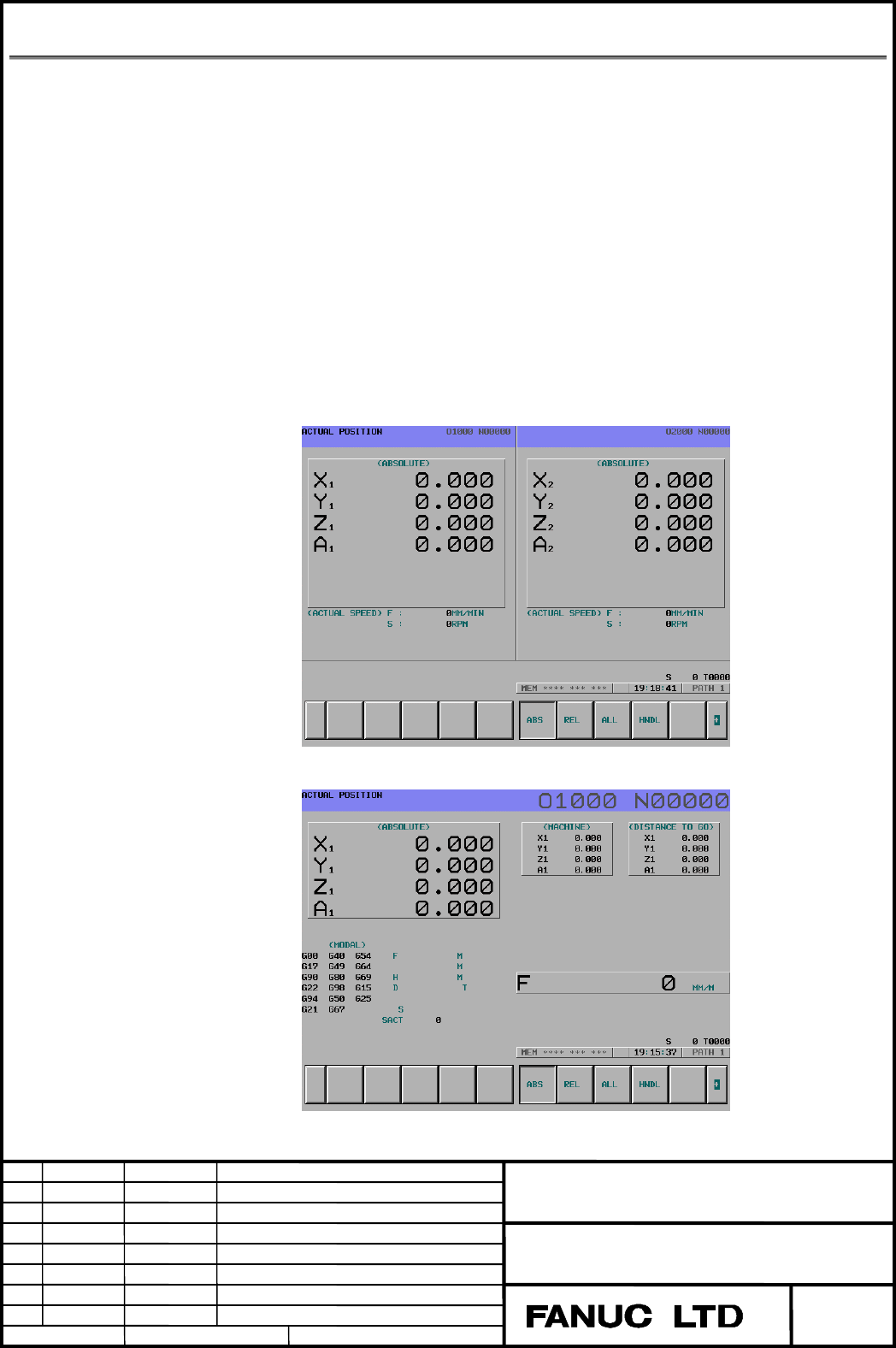
The position screen and the program check screen become 2 path
display type in case of 2 path control with 10.4 inches LCD (Soft key
12 pieces type).
This function enables 1 path display type in these screens.
2 Details
When parameter SDP (No. 3193 # 1) is set to "1", 1 path display
becomes available in the position screen and program check screen.
Display path is selected by the path selection signal HEAD (G63#0).
In case of the program check screen, the program screen (1 path
display type) is displayed instead of the program check screen.
2 path display (the position screen)
1 path display (the position screen)
Contents Summary of FS 16i-MA/MB Additional Manual
- Page 1FANUC Series 16i-MA/MB 1 path display in 2 path control Specifications Contents 1 GENERAL................................ GENERAL ................................................................ ................................................................................................ ........
- Page 21 path display in 2 path control 1 General The position screen and the program check screen become 2 path display type in case of 2 path control with 10.4 inches LCD (Soft key 12 pieces type). This function enables 1 path display type in these screens. 2 Details When parameter SDP (No. 3193 # 1) is
- Page 32 path display (the program check screen) 1 path display (the program screen) Note The alarm screen always become 2 path display type independently of parameter SDP (No. 3193 # 1). Limitation This function is available only in case of 2 path control with 10.4 inches LCD (Soft key 12 pieces type). Ti
- Page 43 Signal Path selection signal (Tool post selectionsignal) HEAD