FANUC AC Servo Software 90D3 Series, 90E3 Series Learning FUNCTION, Operator Additional Manual Page 41
Additional Manual
Title 90D3 / 90E3
Learning Control Operator’s Manual
Draw No.
A - 63639E – 108
01 ’05.04.20 N.Sonoda Newly designed Sheet 041
Edit Date Design Description / 064
To LOAD Learning Data (HD → Servo )
1) Set No.2511 of the Profile number to zero in case of the lump deal method.
Learning Data saved by the lump deal method must be loaded by the lump deal method.
Check No.2510 of the total number of Profile to be same value as saved before. (It must be so!)
Set No.2511 =0 when the Learning Data was saved by the lump deal method before.
Set No.2511=Profile number when it was saved by the partial deal method.
Note) You can load Learning Data to the number different from it when saved before in just case of the partial
deal method.
2) Set CNC to EDIT mode and transmit Learning Data from HD to servo memory through your application
software. Blinking RESET indicates on transmission.
Note) When loading, No.2510 of total profile number is checked automatically whether it is the same or not as
it was saved beforehand. If they are not identical, the transmission alarm occurs
3) Set No.2511 to an appropriate value and then start to run Learning function.
Caution
It is necessary for you to manage the Learning Data together with its parts program
(:command). It would be dangerous because of the unexpected movement if you ran the parts
program different from correspondent Learning Data. Furthermore you must be conscious of
the profile number No.2511 which have Learning data that should be handle always together
with the command data.
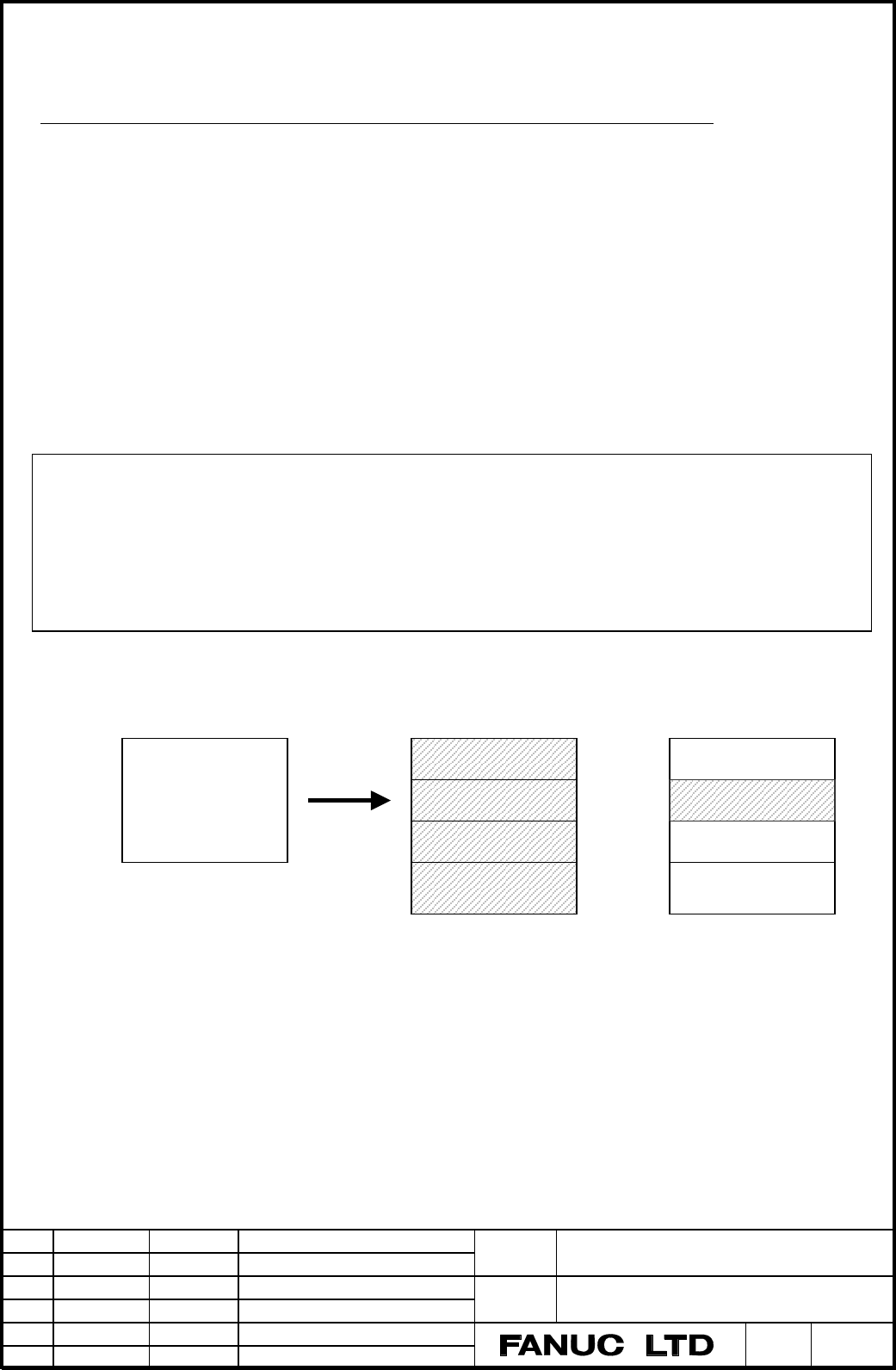
Profile No 1
Profile No 2
Profile No 3
….
Learning Memory
Profile No 1
Profile No 2
Profile No 3
….
Learning Memory
Lump deal method
Partial deal method
LOAD
(Write)
Hard Disk
Learning Data
file
Fig 7.2 To load Learning Data by two ways of
the Lump deal method (No.2511=0) and the Partial deal method (No2511=2)
Contents Summary of FANUC AC Servo Software 90D3 Series, 90E3 Series Learning FUNCTION, Operator Additional Manual
- Page 1FANUC AC SERVO SOFTWARE 90D3 Series 90E3 Series LEARNING FUNCTION Operator’s Manual 1. Overview 2. System Configuration 3. Application Examples 4. Explanation of Learning Control 5. Servo parameters 6. Learning Control functions 7. Functions detail 8. Tuning 9. Attentions Appendix 1. Notes on the or
- Page 2Contents 1. Overview ……………………………………………………………………………………. 3 2. System Configuration ………..…………………………………………….…….………... 5 3. Application Examples ………..…………………………………………….…….………... 6 3.1 Lead Cutting ……..……………………………………………………….…….…….. 6 3.2 Piston Lathe …….…..…………………………………………………….…….…..… 7 3.3 Cam grinder ……
- Page 31. Overview This manual only describes the special functions and parameters in FANUC Digital AC Servo applied to Learning control with High-speed Cutting (G05). • High-speed Cutting (G05) means "Memory operation” by High-speed Cycle Cutting, “DNC operation” by Personal Computer through HSSB, or “Dat
- Page 4Note 1) Learning control requires Servo software 90D3 or 90E3 called Learning series. This manual doesn’t mention about 90E3 series because it is developing. 90E3 series corresponding to 90E0 series enables to control 4-axes per one DSP. Learning control only works during G05 execution, which is Hig
- Page 52. System Configuration There are three below cases about High-speed cutting (G05). Fig.2-1 shows a system configuration. (1) Memory operation by High-speed cycle cutting a) Produce cutting data by Open CNC or personal computer and down load to P-code area in CNC. b) Produce cutting data by Macro ex
- Page 63. Application example 3.1 Lead cutting machine * Cutting Sequence (1) The surface running tape is finished synchronizing with C-axis rotation, moving the tool 1 back and forth along the Y-axis. By feeding the tool along the Z-axis, the lead surface is gradually cut deeper. (Process A) (2) To finish
- Page 73.2 Piston Lathe C-axis Piston axis Y axis Oval cross Section Piston Work X axis Double slide mechanism Z axis Fig. 3.2.1 Configuration example of piston lathe * Cutting Sequence (1) The piston outline is finished by rotating C-axis moving the tool back / forth along Y-axis. By feeding the tool alon
- Page 83.3 Cam Grinding Machine Profile 1 Profile 3 A A - A' cross section C axis Profile 2 Profile 4 CAM work Grinder Grinding tool A' X axis Spiral grinding CAM work Z axis Single slide mechanism Fig. 3.3.1 Example of Configuration of Cam Grinding Machine. * Grinding Sequence (1) The cam form is ground b
- Page 91'st cutting step 2'nd cutting step 3'rd cutting step G05 start G05 end Approach LESTTM L2 PRIOD2 L1 X axis L1 PRIOD Learning start The 2'nd Repetitive count Repetitive count RPTCT2 RPTCT 1/L1 Average speed C axis 1/ L2 Average speed L1 , L2 : C axis rotation period Fig. 3.3.3 Cutting Chart (when pr
- Page 104. Explanation of Learning Control 4.1 Summary of Learning Control FANUC Learning function Learning control Preview Repetitive control Learning Learning Adaptive Preview controller controller controller What is “Learning Function” ? It is a function for realizing high-speed and high-precision cuttin
- Page 114.2 Learning Control Learning controller Suspension Continuation G0(s) + Command 1 Kp + + s - Position Error Position Motor Gain Position feedback [ Merit ] Replacing the mechanical cam tracing method with the electric master cam. Minimized position error for repetitive command with specified period
- Page 12used for the cam grinding machine, which the shortening of cycle time is required, or the command within one profile gradually change due to cutting feed such as single slide mechanism. Note Compensation data mode means that Learning data isn’t clear at the end of G05. Both Suspension and Continuati
- Page 135. Servo parameters 5.1 Setting parameters 5.1.1 Setting CNC parameters The following explanation is CNC parameters setting related to High-speed Cutting (G05). For the detail, refer to Parameter Manual of CNC. (1) Set the following parameter. • No.1004 (Bit type) B1=1, B0=0 (IS-C : 0.1μm setting).
- Page 14(Example 2) In the following configuration with αis 300 or αis 500, set 1, 3, 5 and 6 for No.1023. Axis name Servo axis number X axis 1st axis (Learning axis) Z axis 3rd axis (Learning axis) C1 axis 5th axis (Tandem axis) C2 axis 6th axis (High speed axis) Note • αis 300 or αis 500 must be set to Ta
- Page 155.1.3 Setting servo parameters For the detail, refer to “FANUC AC SERVO MOTOR α is / α i / β is series Parameter Manual”. You should set it for each axis because all servo parameters (No.2000 - No.2269) are axis type. (1) Set the following parameters fitted each motor and machine. • No.2000#1 - #0 s
- Page 16(2) Turn off the power supply, then turn it on. (Auto loading of parameter for each motor) Note 1) In case of Learning axis, set the following parameters and turn off / on the power supply. • No.2019#6 set to 1 for Learning axis • No.2019#5 set to 1 for Preview repetitive axis. 2) In case of Linear
- Page 175.2 Setting High gain parameter In case of using Learning control for Cam grinder etc, if the position error does not converge due to the influence of big disturbance, you apply Learning HRV2 control for the High gain by the following procedure. Refer to “Appendix 3. Parameter table for Learning con
- Page 185.3 Setting Learning HRV3, HRV4 control Servo HRV3, HRV4 control is available with Learning series 90D3. The setting bases on standard series, refer to "FANUC AC SERVO MOTOR αis / αi / βis series Parameter Manual" (B-65270E). The following describes about the special points in Learning series. 5.3.1
- Page 195.3.4 FSSB connection (1) Case of one FSSB path All axes connected with one FSSB path require setting to the same HRV control. Therefore, if Learning HRV3 control is applied in one axis at least, other all axes require Servo HRV3 control. Servo axis control card Servo Amplifier Servo Amplifier Servo
- Page 205.4 Servo parameters List The following parameters are for FS30i. The shaded parameters are detailed in this manual. B7 B6 B5 B4 B3 B2 B1 B0 2000 PGEX PRMC DGPR PLC0 2003 VOFS OVSC BLEN NPSP PIEN OBEN TGAL TIA1 2004 DLY1 DLY0 TIB1 DLY2 TRW1 TRW0 TIB0 TIA0 2005 SFCM BRKC 36RPC FEED 2010 BLTE LINE TLI
- Page 212443 ICM LCON EXGX MSCHK LSTP 2444 2445 2066 Acceleration feedback gain (negative value) 2067 Torque command filter 2112 AMR1 conversion coefficient 2139 AMROFS AMR offset 2156 Torque command filter (at cutting) 2165 Maximum amplifier current 2185 PSMPYL Position feedback pulses conversion coefficie
- Page 222518 RPTCT2 2nd repetition count (cycle) 2519 PRIOD2 2nd Learning period (msec) 2520 RPTCT3 3rd repetition count (cycle) 2521 PRIOD3 3rd Learning period (msec) 2522 RPTCT4 4th repetition count (cycle) 2523 PRIOD4 4th Learning period (msec) 2524 RPTCT5 5th repetition count (cycle) 2525 PRIOD5 5th Lea
- Page 232545 FORW2 Feed forward coefficient W2 2546 FORW3 Feed forward coefficient W3 2547 FORW4 Feed forward coefficient W4 2548 FORW5 Feed forward coefficient W5 2549 FORW6 Feed forward coefficient W6 2550 LERRLV Error monitoring level (detection unit) 2551 ERMOST Error monitoring start time (msec.) 2552
- Page 245.5 Servo parameter detail If not necessary, don’t change the standard parameters of Auto loading by motor ID. In case of specifying series and edition, you can use the function from that edition or later. 2013 APTG VFBH HRV3 HRV3 Servo HRV3 control is 1 : useful. 0 : not useful. (normal) (Note) Aft
- Page 252201 RUNLVL CROF CROF At emergency stop, current offset is 1 : re-taken in. 0 : not re-taken in. (standard) 2227 ANGLNG SNGREF GOKAN ERRCHK PARTLE GOKAN When the velocity loop proportional high-speed processing is applied, 1 : servo characteristic is compatible with 90B3 series 0 : servo characteris
- Page 262067 FILTER Torque command filter coefficient (for cutting) 2156 FILTER Torque command filter coefficient (for rapid traverse) Standard : 0 Set by the following expression. fc : Cut-off frequency [Hz], τ : Sampling time [sec.] (Setting value) = 4096 × exp(-2π×fc×τ) (Example 1) Case of normal axis (τ
- Page 276. Learning Control function 6.1 Learning Control parameters 2019 DPFBCT SLEN INSYS SUPRSY LEBFEX TANDEC SLEN Learning control (Option) is 1 : Available. 0 : Not available. 2442 STPRED ADERSL VCMDCL UNTSL TRASMT ADAPT 2443 ICM LCON EXGX MSCHK LSTP ICM Compensation data mode is ICM LCON Learning Mode
- Page 282229 TAWAMI STPRED HSSATU RCNEG TIMADJ ABSEN STPRED The first period subsequent to Learning step switching, 1 : Doesn’t renew Learning data in Learning memory. 0 : Renew Learning data in Learning memory. (standard) (Note) In case of Compensation mode, this function reduces a mechanical shock at swit
- Page 292515 STPRPT Step repetition count When this parameter is set, Learning controller repeats the learning steps. (Example) In case No.2232 = 2, Learning steps exist up to the 3rd Learning step. 1st → 2nd →3rd → 1st → 2nd → 3rd → 1st → 2nd → 3rd 0 1 2 2510 PRFALL Total profile number Data range : 0 to 1
- Page 30cycle. Servo software judges the final cycle by the Learning count (No.2516, No.2518, or etc). 2512 FBND Frequency band of low pass filter [Hz] Data range : 0 to 700 stepping up every 50 (When Velocity 0.5msec) 0 to 350 stepping up every 25 (When Velocity 1msec) Standard : Refer to Appendix 3. Param
- Page 31In case of Expanded Gx chosen with EXGX (No.2443#3 ) one set, you need to set for the following parameters. 2529 EXGXK2 Coefficient 2 of expanded Gx 2530 EXGXK 3 Coefficient 3 of expanded Gx 2531 EXGXK 4 Coefficient 4 of expanded Gx 2532 EXGXK 5 Coefficient 5 of expanded Gx 2533 EXGXK 6 Coefficient
- Page 32Profile 1 Profile 5 Command Command G05 G05 Learning Controller When ICM=0, MC is Memory clear switch (MC) available at time of G05 finish. Profile 1 (Memory) Low pass filter Profile 2 + No.2512 (Memory) All profile number No.2510 F(z-1) + Suspens ion Profile 5 (LCON) (Memory) Dynamic characteristic
- Page 336.2 Adaptive Preview Control Parameters 2019 DPFBCT SLEN INVSYS SUPRSY LBUFEX TRANDE INVSYS Adaptive Preview Control (Option) is 1 : Available. ♦ CNC software option is necessary 0 : Not available. 2442 ADERSL VCMDCL UNTSL TRASMT ADAPT ADAPT Feed-forward coefficient FORW1-6 is 1 : Adapted by using A
- Page 34fi PULCO SMDR2 1 FORWi = × 216 × × × 100 PPLS SMDR1 80 fi PULCO = × 216 × 100 L fi is feed-forward coefficient (%). And PULCO is No.2023, PPLS is No.2024, SMDR1 is No.2084, SDMR2 is No.2085. L is movable distance (detection unit) per one rotation of motor. Above formula is for semi-closed system or
- Page 356.3 Adaptive method The feed-forward coefficients of the Adaptive preview control are decided with the following procedure. A-1 Validate the Adaptive preview control and the Adaptive mode. ( No.2019#5 = 1 and No.2442#1 =1 ) A-2 Set the parameter of the adaptation coefficient to standard setting. (No
- Page 367. Functions detail 7.1 Learning Memory expanded function Learning Memory expanded function allows the application to take advantage of many profiles up to Max. Profile number and many learning steps up to Max. Learning step number as the following table. (Option) Max. Profile number Max. Learning S
- Page 377.1.2 Processing flow Grinding start Grinding condition change Select Grinding program Set Total profile number according to camshaft G10 ∗ Set Change Total profile number Profile number, or ? No Command data period, Compensation mode invalid G10 Repetition count, Memory clear bit Yes etc. Clear out
- Page 387.1.3 Cautions Learning memory-expanded function realizes the expansion of learning memory by altering a sample rate. It has automatically the sampler gather the data roughly every 2 to Nth power in case of long Learning period or many profiles and Learning steps, because of which case many compensa
- Page 397.2 Learning Data Transmission Function 7.2.1 Overview For the purpose of preserving Learning data after NC powered off, Learning data can be preserved in nonvolatile flash ROM, which store Learning data through CNC and load it the memory of servo control. (Learning data transmission function) This
- Page 407.2.4 How to transmit Learning Data To SAVE Learning Data (Servo → HD) 1) All of the first, you must confirm the error of Learning control converged well. 2) Set No.2511 of Profile number to zero in case of the lump deal method. Check No.2510 of Total Profile number beforehand. Note) You can SAVE Le
- Page 41To LOAD Learning Data (HD → Servo ) 1) Set No.2511 of the Profile number to zero in case of the lump deal method. Learning Data saved by the lump deal method must be loaded by the lump deal method. Check No.2510 of the total number of Profile to be same value as saved before. (It must be so!) Set No
- Page 427.2.5 Examples (1) Correspondence with processing program and Work Total profile number O0001 ; Profile i Profile j G10 L50 ; C axis N2510 P (Axis) R (Total profile number) ; G11 ; G10 L50 ; Grinding N2511 P (Axis) R (Profile number i) ; X axis CAM work N2516 P (Axis) R (Learning count) ; N2517 P (A
- Page 43(2) Example of file management by Partial deal method We describe the case that Work 1 and Work 2 on right figure is processed in that order. This case supposes PC has already Learning data in the HD of A,B,C,D,E,F. A B C D 1) At first you should fix Total profile number PRFALL to 4 . 2) According t
- Page 447.3 Torsion compensation during High-speed cycle cutting function This function adds the compensation at the point of the command reversing sign during High-speed cycle cutting (G05), This function is useful for the case that the reverse point of work piece has sharp drop because it is easy to bend
- Page 457.4 Tandem Learning control function 7.4.1 Summary Tandem Learning control is Learning control combined with Tandem control. By means that two motors are controlled as one axis and Learning control is added, this function can achieve high precision processing in the special applications. Note This f
- Page 467.4.2 Parameters 1817 TANDEM TANDEM Tandem control (Power must be off) (NC Option) 0 : Available. 1 : Not available In case of Torque Tandem Learning control that main and sub motors don’t disconnect mechanically, set this bit to 1. But in case of the application that both motors disconnect by the o
- Page 472228 SYSLRN SYNLRN Synchronous Learning function (Set only Main axis) 0 : Ignore coupling flag, which is external user signal through PMC 1 : Learning control for both Main and Sub axes executes by coupling flag. This bit is used in Position Tandem control. Synchronous Learning function works with M
- Page 487.4.4 Mode table TANDEM SBDYCH SYSLRN SYNx Mode Remark (N1817#6) (N2007#2) (N2228#0) (G321) main main 0 0 0 X Independence normal 1 0 0 X Tandem Fixed, N2018#7=1 0 X 1 1 Independence Main-axis learning / Tandem disturbance elimination filter OFF 0 Synchronism Synchronous Learning / Tandem disturbanc
- Page 497.5 Error monitoring function Error monitoring function is useful for watching accuracy of work during processing and for judging convergence of position error. 2550 LERRLV Error monitoring level (detective unit) Data range : 0 to 32767 (Note) If this value is 0, position error monitoring function i
- Page 508. Tuning Regarding Learning control, you don’t need to tune parameters basically. But servo system needs to be stable before the application of Learning control. If oscillation occurs, you need to make stable by tuning Load inertia ratio (No.2021), Acceleration feedback (No.2066), Tcmd filter (No.2
- Page 519. Attentions 9-1. ITP Delay Alarm In case that CNC operation is delayed during G05 (High-speed cycle cutting or High-speed DNC operation), work piece is not processed normally. For this reason, High-speed axis checks this delay (ITP delay) during G05. You can confirm whether this delay happened by
- Page 529-5. Servo parameter alarm for Learning control If you set the value out of appropriate range in parameters for learning control, the illegal parameter alarm occurs immediately after G05 was executed, and the detail number 83 is displayed on N352 in DGN. In this case, if the following parameters are
- Page 539-7. Difference between Standard and Learning servo software series in velocity loop proportional high-speed processing function When 90B3 series replaces 90D3 series on series 30i, there is a case that you can’t set the same velocity gain in state of HRV2 + No.2017#7=1. In this case, you should set
- Page 54Appendix 1. Notes on the order 1-1. Servo axis Card (i-series) You must specify the following Servo axis card for 90D3 series. • 8 axes A02B-0303-H088 (A20B-3300-0450) 1-2. CPU card CPU card for CNC is required 128MB DRAM type. B3 (High-speed) A02B-0303-H005 1-3. Servo software series You need to sp
- Page 55Appendix 2. Making method for cutting data Title 90D3 / 90E3 Learning Control Operator’s Manual Draw No. A - 63639E - 108 01 ’05.04.20 N.Sonoda Newly designed Sheet 055 Edit Date Design Description / 064
- Page 56Appendix 3. Parameter table for Learning control Standard Parameter for Learning Control for Piston (1/4) Motor type αL9 αL9 αL9 αis8/4000 Motor spec. 0564 0564 0564 0235 Motor ID 74 74 (74) (285) Velocity 0.5ms(HS) 0.5ms(HS) 250us(HS) 0.5ms(HS) Remarks Piston Lead Cam Piston Piston Amplifiler 80Ap
- Page 57Standard Parameter for Learning Control for Linear motor (2/4) Motor type Lis6000B2 Lis600A1 Lis900A1 Motor spec. 0412 422 423 Motor ID (92) (125) (126) Velocity 0.5ms 0.5ms 0.5ms Remarks Piston Ring Amplifiler 80Ap 40Ap 40Ap Pg No.1825 5000 5000 5000 PI No.2003 00001000 00001000 00001000 Interrupt
- Page 58Standard Parameter for Learning Control for HRV2 (3/4) Motor type HRV2 IP HRV2 PI LearningHRV2 Motor spec. − − − Motor ID − − − Velocity 1ms 1ms 0.5ms Remarks − − − Amplifiler − − − Pg No.1825 3000 3000 6000 PI No.2003 xxxx0xx0 xxxx1xx0 xxxx1xx0 Interrupt No.2004 xx0x0011 xx0x0011 xx1x0001 HS Veloc.
- Page 59Standard Parameter for Learning Control for HRV3, HRV4 (4/4) Motor type HRV3 LearningHRV3 HRV4 LearningHRV4 Motor spec. − − − − Motor ID − − − − Velocity 1ms 0.5ms 0.25ms 0.25ms Remarks − − − − Amplifiler − − − − Pg No.1825 3000 6000 3000 6000 PI No.2003 xxxx1xx0 xxxx1xx0 xxxx1xx0 xxxx1xx0 Interrupt
- Page 60Appendix 4. Functions table for Servo edition Standard Special Servo Software series 9 9 9 9 9 9 9 9 9 0 0 0 0 0 0 0 0 0 Functions 9 A B D A A B B D 0 0 0 0 3 7 3 7 3 [Learning control ontrol] Stopping motor function at alarm happened - - - - A A A A A Learning buffer expanding function - - - - A A
- Page 61Appendix 5. Method of changing parameter in CNC Program 1. Overview Learning control is available only during High-speed cycle cutting (G05). You can change some parameters for Learning control in program by using G10 code (Programmable data input) before G05 execution. For example, by changing Comm
- Page 62Appendix 6. Parameter number difference between series 16i and 30i 16i 30i Remarks [90Bx] [90Dx] Learning control No.2008#5 No.2019#6 Adaptive Preview control No.2008#7 No.2019#5 No.2007 No.2442 Function bits 3 No.2008 No.2443 exept #5, #7 No.2228 ← Function bits 1 No.2229 ← No.2226 ← Function bits
- Page 631. Difference of velocity loop characteristic between 90D3 series and 90B3 series There are the difference between 90D3 and 90B3 in the characteristic of velocity loop as follows. In 90D3 series, PK1V (No.2043) and PK4V (No.2046) are calculated automatically according to velocity sampling period. Fu
- Page 64Index • Adaptive preview control ....................................................................................................…..…. 33, 55 • Backup module for power failure ........................................................................................…............. 51 • Command data