Setting addition on connection panel I/O module for i Series CNC (A-73278E/02) Additional Manual Page 2
Additional Manual
1. Summary
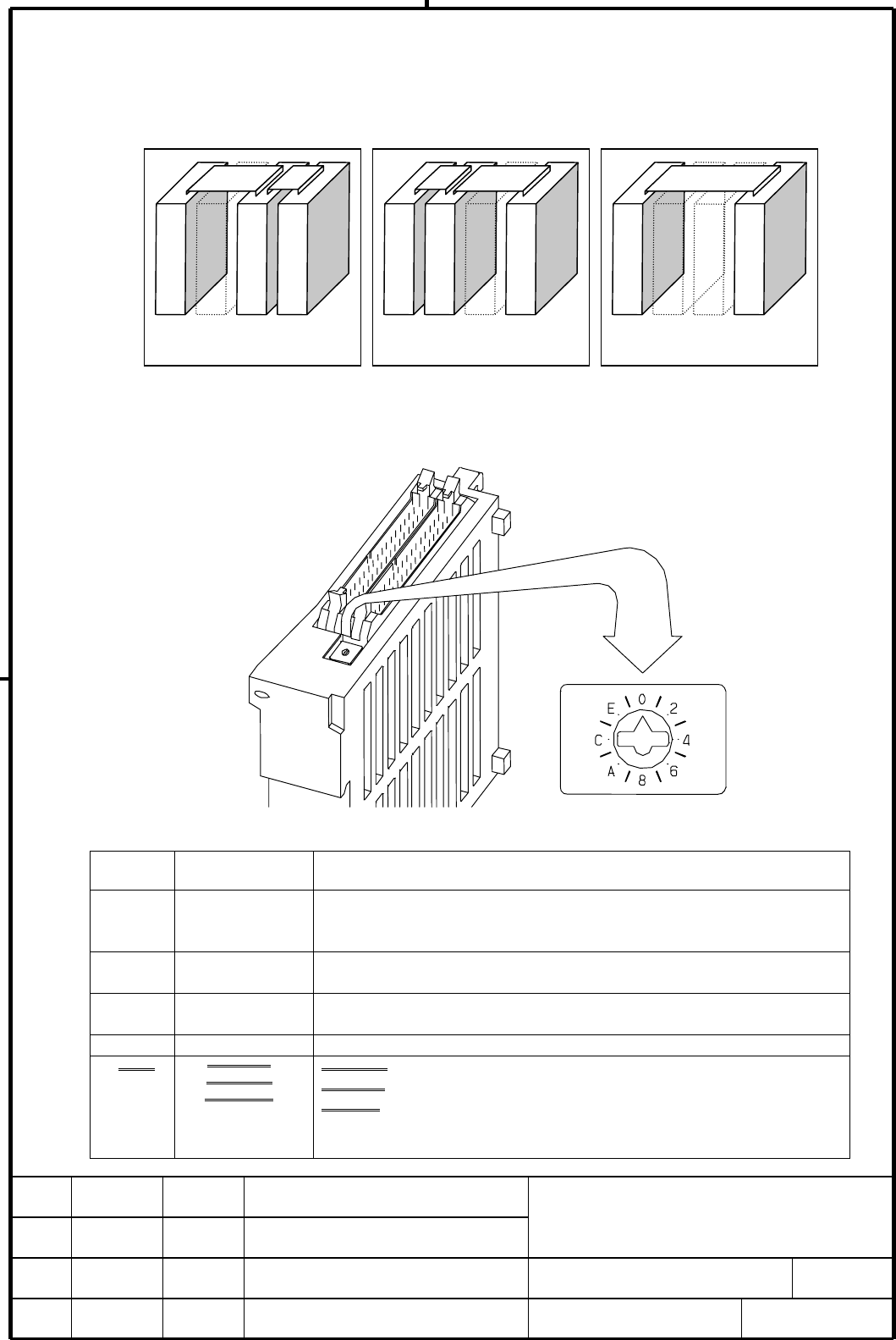
As for the connection panel I/O module for i Series CNC, it is not available to skip 1 or 2 expansion
module and connect between the I/O modules such as below figures at the moment. FANUC will add
a setting (rotary switch) on each expansion modules. After that, below configurations will be
available.
2. Setting (place and method)
Setting (rotary switch) is on the following part of an expansion module. When you change a
setting, you should use a screwdriver which point is minus shape and width about 2.5mm.
Meaning of each position of the rotary switch is as follows.
Position
Actual mark on
a rotary switch
Meaning
00
“0” is default setting. When it will be shipped from FANUC, a rotary
switch is set default value. “0” setting means no skip expansion
modules.
1
-
When 1 expansion module is skipped, just next expansion module
must be set “1” position.
22
When 2 expansion modules are skipped, just next expansion module
must be set “2” position.
②
3
-
Prohibition of setting
②
3
~F
4~F
-
、4、-、6、
-、8、-、A、
-、C、-、E、
4、-、6、-、
8、-、A、-、
C、-、E、-、
3
、6、9、C 4,8,C position meaning is same as 0.
4,7
、A、E 5,9,D position meaning is same as 1.
5,8
、B,F 6,A,E position meaning is same as 2.
7,B,F position meaning is same as 3 (Prohibition of setting).
In case of skipping
expansion module 2
In case of skipping expa-
nsion module 1 and 2
In case of skipping
expansion module 1
EDIT.
FANUC LTD
SHEET
DRAW. NO. CUST.
TITLE
02 980403 Ko
j
ima
001/2
DESCRIPTIONDESIG.DATE
01 980309 Jinnai Jinnai
Page 001(Correction at marked ②)
Setting addition on connection panel
I/O module for i Series CNC
A-73278E
Base module
Ex. module 1
Ex. module 2
Ex. module 3
Base module
Ex. module 1
Ex. module 2
Ex. module 3
Base module
Ex. module 1
Ex. module 2
Ex. module 3
Contents Summary of Setting addition on connection panel I/O module for i Series CNC (A-73278E/02) Additional Manual
- Page 1TECHNICAL REPORT (MANUAL) No.TMN98/052E Date 3 April, 1998 General Manager of Hardware Laboratory Setting addition on connection panel I/O module for i Series CNC 1. Communicate this report to: ○ Your information ○ GE Fanuc-N, GE Fanuc-E FANUC Robotics CINCINNATI MILACRON ○ Machine tool builder Sale
- Page 21. Summary As for the connection panel I/O module for i Series CNC, it is not available to skip 1 or 2 expansion module and connect between the I/O modules such as below figures at the moment. FANUC will add a setting (rotary switch) on each expansion modules. After that, below configurations will b
- Page 33. Example of the setting (In case of skipping expansion module 1) Base module Ex. module 1 Ex. module 2 Ex. module 3 Set the expansion module 2 “1” And set the expansion module 3 “0”. (In case of skipping expansion module 2) Base module Ex. module 1 Ex. module 2 Ex. module 3 Set the expansion modul