Setting addition on connection panel I/O module for i Series CNC (A-73278E/02) Additional Manual Page 3
Additional Manual
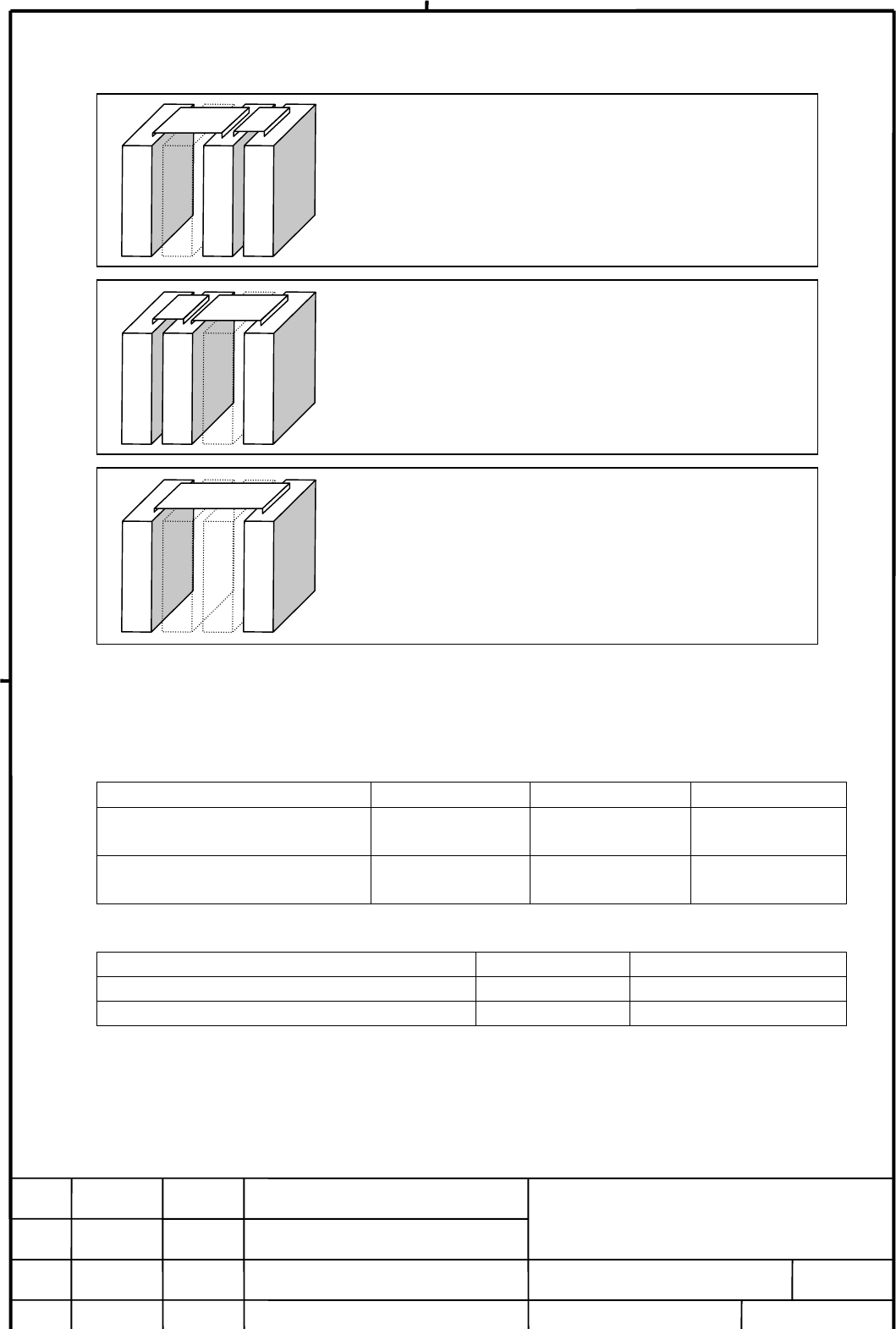
3. Example of the setting
4. Specification number
This skip function will be available from revised PCB. Order specification of I/O module is not
changed. PCB specifications in expansion module A and B are changed as follows. PCB
specifications in expansion module C(2A output module) and expansion module D(Analog input
module) are not changed.
Module Order spec. Present PCB spec. New PCB spec.
Expansion module A
(DI/DO=24/16, with MPG interface) A03B-0815-C002 A20B-2002-0400 A20B-2100-0410
Expansion module B
(DI/DO=24/16, No MGP interface) A03B-0815-C003 A20B-2002-0401 A20B-2100-0411
5. Date of apply
Expansion module B(DI/DO=24/16, No MPG I/F) A03B-0815-C003 from end of Jun. 1998
Expansion module C(DO=16,2A output) A03B-0815-C004 from end of Aug. 1998
Expansion module D(Analog input) A03B-0815-C005 from end of Aug. 1998
Note) Expansion module A(DI/DO=24/16, with MPG interface) A03B-0815-C002 is also added
rotary switch because PCB A20B-2002-040x is revised. But if expansion module A is used,
it must be mounted on the expansion 1 place. So this module does not need to change
the setting of rotary switch.
EDIT.
FANUC LTD
SHEET
DRAW. NO. CUST.
TITLE
002/2DESCRIPTIONDESIG.DATE
Setting addition on connection panel
I/O module for i Series CNC
A-73278E
(In case of skipping expansion module 1 and 2)
Set the expansion module 3 “2”.
(In case of skipping expansion module 2)
Set the expansion module 3 “1”.
And set the expansion module 1 “0”.
(In case of skipping expansion module 1)
Set the expansion module 2 “1”
And set the expansion module 3 “0”.
Base module
Ex. module 1
Ex. module 2
Ex. module 3
Base module
Ex. module 1
Ex. module 2
Ex. module 3
Base module
Ex. module 1
Ex. module 2
Ex. module 3
Contents Summary of Setting addition on connection panel I/O module for i Series CNC (A-73278E/02) Additional Manual
- Page 1TECHNICAL REPORT (MANUAL) No.TMN98/052E Date 3 April, 1998 General Manager of Hardware Laboratory Setting addition on connection panel I/O module for i Series CNC 1. Communicate this report to: ○ Your information ○ GE Fanuc-N, GE Fanuc-E FANUC Robotics CINCINNATI MILACRON ○ Machine tool builder Sale
- Page 21. Summary As for the connection panel I/O module for i Series CNC, it is not available to skip 1 or 2 expansion module and connect between the I/O modules such as below figures at the moment. FANUC will add a setting (rotary switch) on each expansion modules. After that, below configurations will b
- Page 33. Example of the setting (In case of skipping expansion module 1) Base module Ex. module 1 Ex. module 2 Ex. module 3 Set the expansion module 2 “1” And set the expansion module 3 “0”. (In case of skipping expansion module 2) Base module Ex. module 1 Ex. module 2 Ex. module 3 Set the expansion modul