Series 30i-MODEL A, Tool management function oversize tools support Specifications Additional Manual Page 17
Additional Manual
A-79346E
Title
Draw
No.
Ed. Date Design Description
Date
Jan.06.’04 Design. Apprv.
15/22
page
FANUC Series 30i-MODEL A
Tool management function oversize
tools su
pp
ort
Cartridge management table
Display of occupied pots
The pots occupied by the tool stored in a pot are indicated with *.
When a tool registered in a cartridge interferes with other tools, the warning message "TOOL
INTERFERENCE CHECK ERROR: xxxx,xxxx" is displayed. In a pair of xxxx, the tool
numbers of interfering tools are indicated. If a tool interferes with multiple tools, only the
tool first found in an interference check by the NC is displayed.
If a tool interferes with the frame of the cartridge, the tool number of the tool to be stored and
the words "FRAME" are displayed.
Search for free pots for an oversize tool
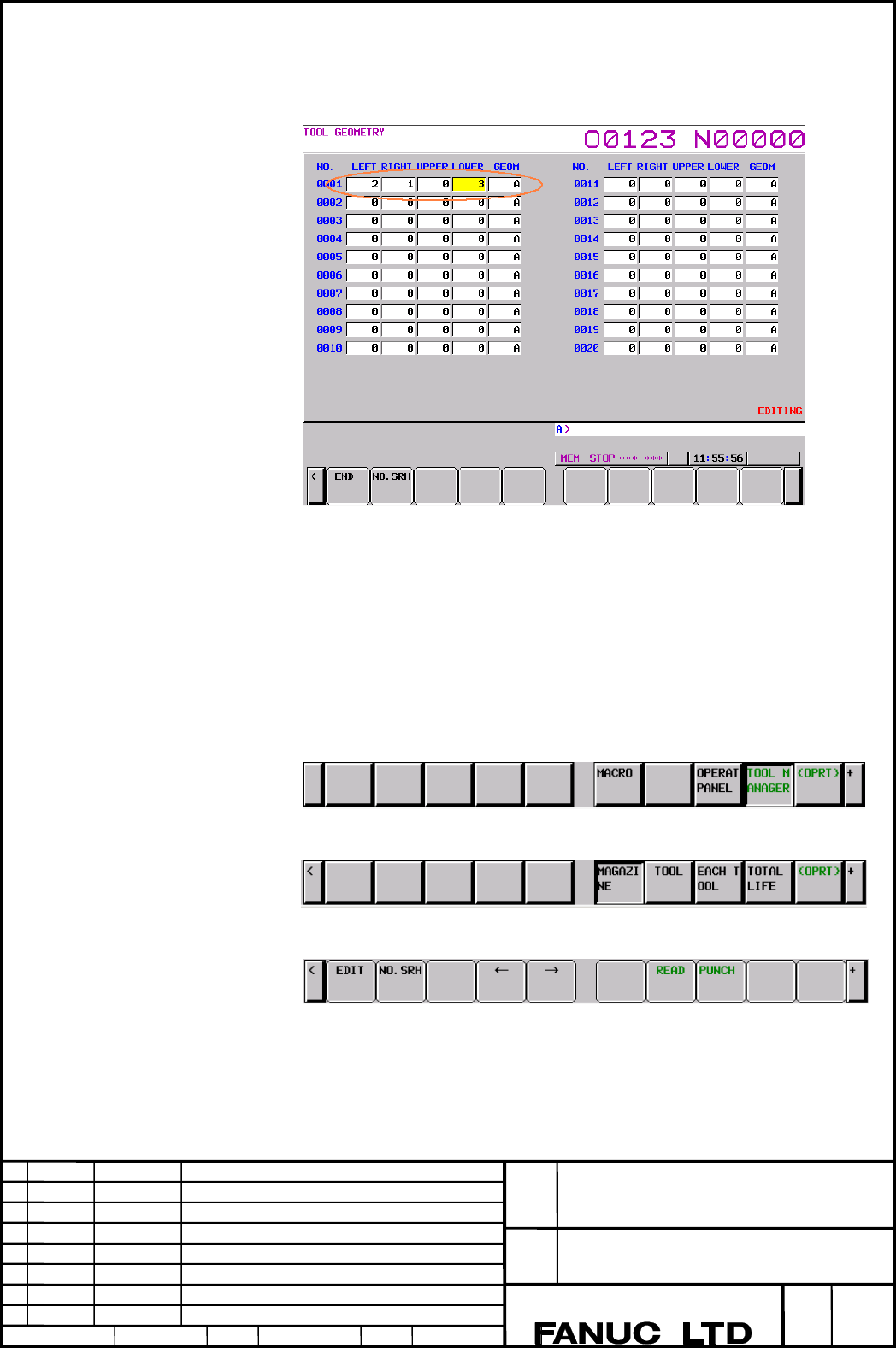
Select the function key OFFSET/SETTING then press the [TOOL MANAGEMENT DATA]
soft key.
Press the [MAGAZINE] soft key then press the [(OPRT)] soft key.
Pressing the [+] soft key displays soft keys for search.
Contents Summary of Series 30i-MODEL A, Tool management function oversize tools support Specifications Additional Manual
- Page 1TECHNICAL REPORT NO. TMN 04/020E Date :Mar .30, 2004 General Manager of Software Laboratory FANUC Series 30i-A Newly additional functions 1. Communicate this report to: Your information only GE Fanuc-N, GE Fanuc-E FANUC Robotics MILACRON Machine tool builder Sales agency End user 2. Summary for Sale
- Page 2FANUC Series30i –A newly additional functions Drawing number Functions 1 A-79227E External Data Input 2 A-79226E One Touch Macro call 3 A-79196E Temporary absolute coordinate setting 4 A-79354E System alarm 5 A-79349E Touch Panel Control 6 A-79253E Distance coded linear scale interface 7 A-79364E Li
- Page 3FANUC Series 30i-MODEL A Tool management function oversize tools support Specifications FANUC Series 30i-MODEL A Title Tool management function oversize tools support Draw A-79346E No. Ed. Date Design Description page 1/22 Date Jan.06.’04 Design. Apprv.
- Page 4Overview Tool management function oversize tools support is added to the tool management function. The figure of an oversize tool can be defined freely, and the figure of each oversize tool is registered. When an oversize tool is stored in a cartridge, interference with tools stored in other pots is
- Page 5When pattern start number is 21 Pot start number 21 22 23 24 25 26 27 28 29 30 31 32 33 34 35 36 37 38 39 40 41 42 43 44 45 Pot end number Cartridge Tool management table 1 2 3 4 5 Tool Tool Tool 1 Normal tool manage- information figure No. ment No. 1 0000UBCR 1 2 2 0000UNCR 0 3 0000UBCR 4 Oversize
- Page 6Cartridge management table Pot No. Tool management Pot No. Tool management Pot No. Tool management (Row-Column) No. (Row-Column) No. (Row-Column) No. 1(01-01) * 11(03-01) * 21(05-01) 8 2(01-02) * 12(03-02) * 22(05-02) 0 3(01-03) * 13(03-03) * 23(05-03) 0 4(01-04) 0 14(03-04) 0 24(05-04) 4 5(01-05) 5
- Page 7Cartridge of matrix type The area occupied by a tool stored in a cartridge of matrix type is described below. Set left, right, upper, and lower pots occupied relative to a reference pot in steps of 0.5 pot. The maximum specifiable value is 4 (for 2 pots). (See Fig. 1.) As shown in Fig. 2, the pots l
- Page 82 3 Pots in slant directions are automatically set as occupied pots to form rectangular occupied area. 1 Fig. 2 : For tool figure pattern number 1 in Table 1 When 3 is set for left/right/upper/lower directions When 4 is set for left/right/upper/lower Occupied area Nonoccupied area Fig. 3 : Occupied
- Page 9Cartridge of chain type The area occupied by a tool stored in a cartridge of chain type is described below. As with the matrix type, input data on the tool figure setting screen. In this case, set pots to be occupied only in the left and right directions. The specification of pots in the upper and l
- Page 10P4 R_ ; Customize data 4 N_ ; Tool management data number : G11; N_ Tool management data number 1 to 64 (to 240 or to 1000) T_ Tool type number (T) 0 to 99,999,999 C_ Tool life counter 0 to 99,999,999 L_ Maximum tool life value 0 to 99,999,999 I_ Notice life value 0 to 99,999,999 B_ Tool life status
- Page 11NOTE ・If a target tool is registered in a cartridge and interferes with other tools in registration or modification of tool figure data of the tool management data, PS alarm 5360 is issued. (The data is not input.) ・If a tool interferes with other tools in registration or modification to the cartrid
- Page 12Tool management data protection signal TKEY1
- Page 1313241 Number of rows of the first cartridge (when the cartridge is of matrix type) [Input type] Parameter input [Data type] Word [Valid data range] 0 to 1000 When the first cartridge is of matrix type (with bit 0 of parameter No. 13240 set to 1), set the number of pot rows in this parameter. In this
- Page 1413244 Number of columns of the second cartridge (when the cartridge is of matrix type) [Input type] Parameter input [Data type] Word [Valid data range] 0 to 1000 When the second cartridge is of matrix type (with bit 1 of parameter No. 13240 set to 1), set the number of pot columns in this parameter.
- Page 1513247 Number of rows of the fourth cartridge (when the cartridge is of matrix type) [Input type] Parameter input [Data type] Word [Valid data range] 0 to 1000 When the fourth cartridge is of matrix type (with bit 3 of parameter No. 13240 set to 1), set the number of pot rows in this parameter. In th
- Page 16Screen configuration Tool figure setting screen Press the function key OFFSET/SETTING then select the [TOOL MANAGER] soft key. Press the [+] soft key. Press the [TOOL-GEOM] soft key. The following screen is displayed: ・Before data can be edited, the [EDIT] soft key must be selected to switch to the
- Page 17Cartridge management table Display of occupied pots The pots occupied by the tool stored in a pot are indicated with *. When a tool registered in a cartridge interferes with other tools, the warning message "TOOL INTERFERENCE CHECK ERROR: xxxx,xxxx" is displayed. In a pair of xxxx, the tool numbers
- Page 18Input a desired tool figure number into the key-in buffer then press a soft key for search. The cursor moves to a free pot suitable for the figure. EMPTY-SRCH.N: Searches for an empty pot in ascending order. EMPTY-SRCH.P: Searches for an empty pot in descending order. EMPTY-SRCH: Searches for the po
- Page 19FANUC Series 30i-MODEL A Title Tool management function oversize tools support Draw A-79346E No. Ed. Date Design Description page 17/22 Date Jan.06.’04 Design. Apprv.
- Page 20Input to and output from external device Tool management data and tool figure data can be input to and output from an external device by using the ALL IO screen or the tool management screen. For output to an external device, data is output in the G10 format. For input/output of tool figure numbers
- Page 211.1 ALARM Alarm and message Number Message Description 5312 ILLEGAL COMMAND IN In commands from G10 L75/L76/L77 G10 L75/76/77 to G11, there is a format error, or a value beyond the specifiable range is specified. Correct the program. 5360 TOOL INTERFERENCE This alarm is issued when interference CHEC
- Page 22Warning message Message Description EMPTY POT IS NOT There are no pots for storing a specified FOUND tool figure. INPUT IS REJECTED An attempt was made to modify the tool figure data of a tool registered in the cartridge. INTERFERENCE ERROR: When a tool is registered in the cartridge xxxx,xxxx from
- Page 23FANUC Series 30i-MODEL A Title Tool management function oversize tools support Draw A-79346E No. Ed. Date Design Description page 21/22 Date Jan.06.’04 Design. Apprv.
- Page 241.2 Notes This function is optional function. FANUC Series 30i-MODEL A Title Tool management function oversize tools support Draw A-79346E No. Ed. Date Design Description page 22/22 Date Jan.06.’04 Design. Apprv.