FANUC Series 30i/31i/32i -MODEL A Overwrite to the Same Name File on Memory Card Additional Manual Page 4
Additional Manual
A-90101E
Title
Draw
No.
Ed. Date Design Description
Date Aug..04.’05 Design. Apprv.
3/ 7
page
FANUC Series 30i/31i/32i -MODEL A
Overwrite to the same name file
on memory card
1.2 Explanation
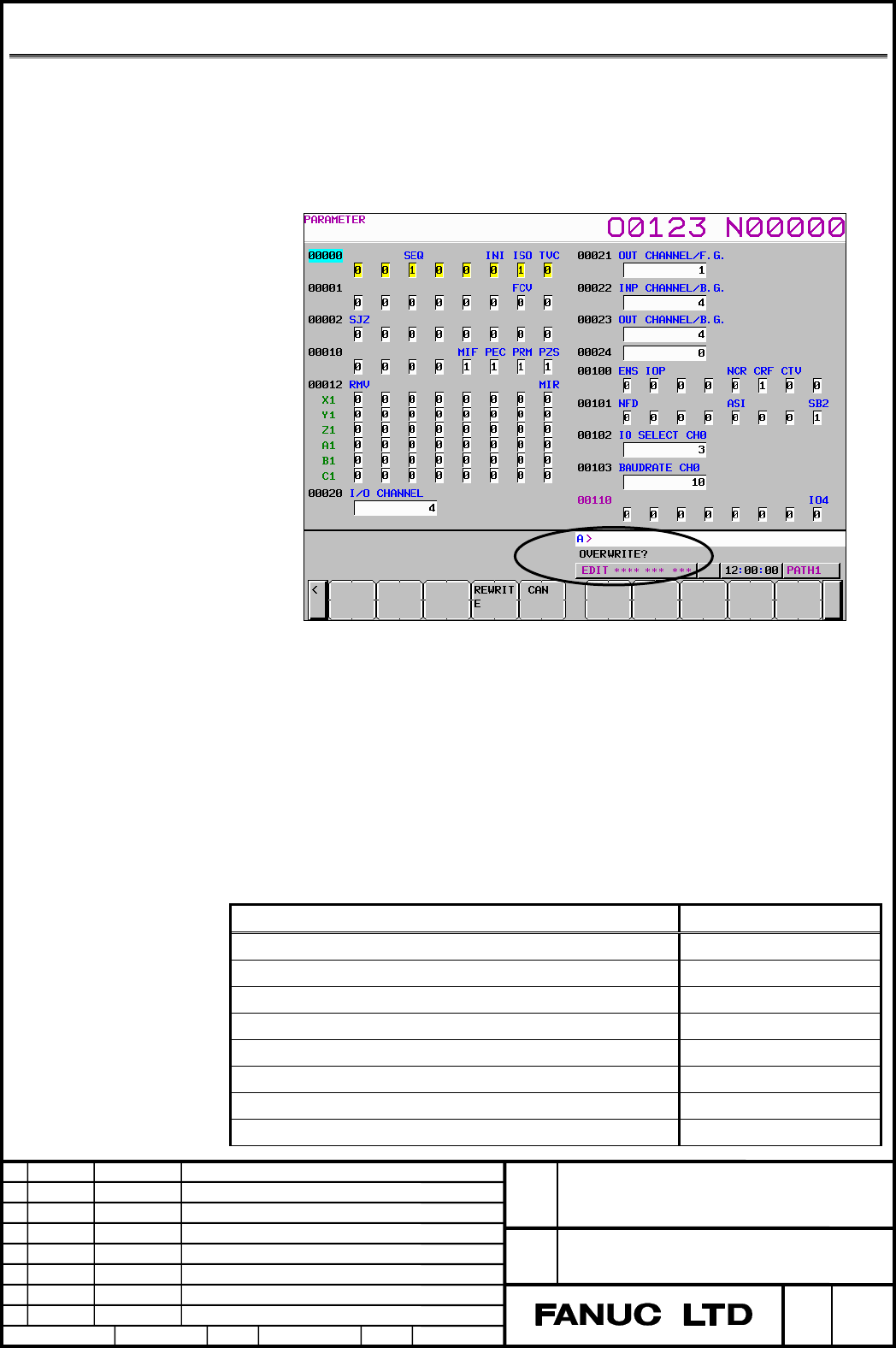
Display on screen
When the outputting of CNC data to the memory card is executed, the
confirmation message of "OVERWRITE?" is displayed when the specified
file name or the default file name accords to the file name in the memory
card.
Fig1.2 (a) Example of screen display
Data that can be output
Data that can be output is as follows.
Default file name is used when the file name is not specified.
Fig1.2 (a) Data that can be output
Kind of data Default file name
Program ALL-PROG.TXT
Offset data TOOLOFST.TXT
Parameter CNC-PARA.TXT
Pitch error compensation data PITCH.TXT
Custom macro common variable MACRO.TXT
Workpiece coordinate system data EXT_WKZ.TXT
Operation history data OPRT_HIS.TXT
Maintenance data MAINTINF.TXT
Contents Summary of FANUC Series 30i/31i/32i -MODEL A Overwrite to the Same Name File on Memory Card Additional Manual
- Page 1TECHNICAL REPORT (MANUAL) NO.TMN 06/006E Date 13th, January, 2006 General Manager of Software Research Laboratory FANUC Series 30i/300i/300is-A FANUC Series 31i/310i/310is-A FANUC Series 31i/310i/310is-A5 FANUC Series 32i/320i/320is-A Function of overwrite to the same name file on memory card 1.Comm
- Page 2FANUC Series 30i/31i/32i-MODEL A Overwrite to the same name file on memory card Specifications <Table of contents> 1.1 OUTLINE ....................................................................................................................................... 2 1.2 EXPLANATION ...................
- Page 31.1 Outline Outline When the operator tries to output the CNC data like parameter or program, and the file of the specified name already exists on the memory card, the operator can select whether the file is overwritten or not by the operation. This function becomes available by setting of parameter
- Page 41.2 Explanation Display on screen When the outputting of CNC data to the memory card is executed, the confirmation message of "OVERWRITE?" is displayed when the specified file name or the default file name accords to the file name in the memory card. Fig1.2 (a) Example of screen display Data that ca
- Page 5Periodical maintenance data MAINTENA.TXT (Periodical maintenance : status screen) Tool management data(Tool management function) TOOL_MNG.TXT Magazine data (Tool management function) MAGAZINE.TXT Tool life status name data (Tool management function) STATUS.TXT Name data of customize data CUSTOMIZ.TX
- Page 61.3 Operation Procedure The procedure to output data is as follows on the screen of each function. 1. Press soft key [PUNCH]. 2. Press soft key [EXEC]. When the file of same name doesn't exist in the memory card, it is output at this time. 3. When the file of same name exists in the memory card, sof
- Page 7Fig1.3 (c) Display of soft key after pressing [EXEC] Ex.) Outputting on parameter screen(In case of 15” display unit) 1. Press function key
. 2. Press vertical soft key [PARAM]. 3. Press the EDIT switch on the machine operator’s panel or enter emergency stop state. 4. Press horizontal soft k - Page 81.4 Parameter #7 #6 #5 #4 #3 #2 #1 #0 11308 COW [Input type] parameter input [Data type] Bit #1 COW When the file of specified name already exists on memory card, 0: It is not overwritten Alarm (SR1973 FILE ALREADY EXIST) is generated. 1: It is overwritten. Note When the overwritten file is read onl