FS16i/18i/21i - TB/MA/MB Additional Manual Page 59
Additional Manual
FANUC Series 16i/18i/21i-MA/MB/TB TOOL MANAGEMENT FUNCTION A-78614EN
2002.08.08 Edition 04
59
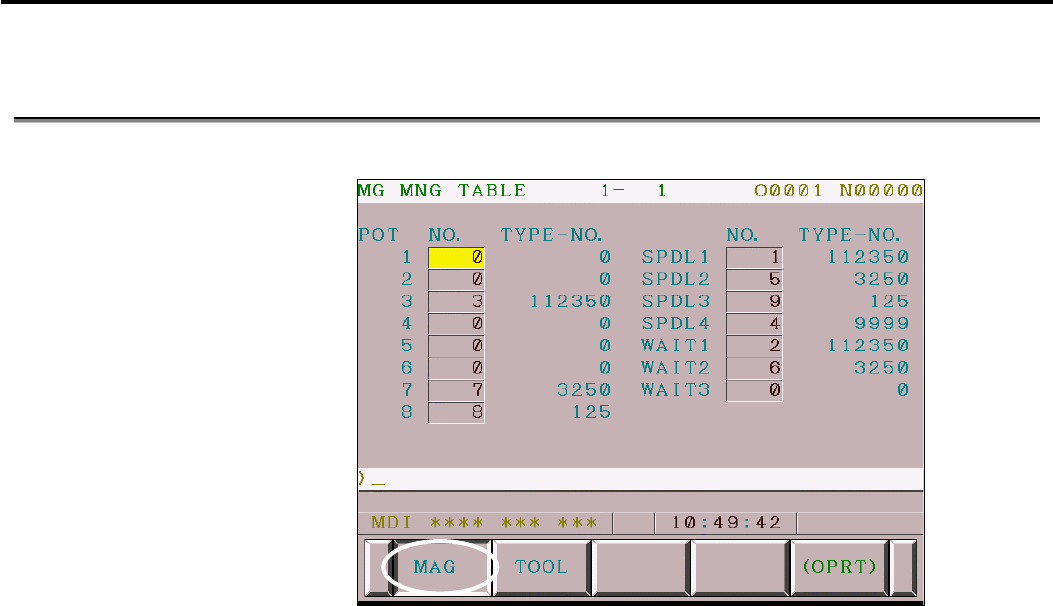
7.5 Magazine Management Table Screen ( 7 soft key type )
Press the soft key <MAG> .
It is the screen to confirm or set the tool data number stored at the 1-4
th
magazine, the spindle magazine and wait magazine.
The figure at the right of the title sequentially shows the magazine number
and the page number. The data of the first page of the first magazine is
displayed now.
Display items
POT : The pot number of each magazine decided by parameter
No.13222, 13227, 13232, and 13237. It is not possible to
change from the screen because they are decided by the
parameter.
NO. : The data number of the tool management data. 0 to ( number
of effective pairs : parameter 13220 ) can be set. The same
data number can’t be input to two or more pots. First of all,
please input 0 to move data.
TYPE-NO. : Tool type number corresponding to the input tool
management data number. The value can’t be set from this
screen.
SPDL : Display the tool management data number and the tool type
number at the spindle position.
WAIT : Display the tool management data number and the tool type
number at the wait position.
Contents Summary of FS16i/18i/21i - TB/MA/MB Additional Manual
- Page 1FANUC Series 16i/18i/21i-MA/MB/TB TOOL MANAGEMENT FUNCTION A-78614EN FANUC Series 16i/18i/21i-MA/MB FANUC Series 16i/18i/21i-TB Tool Management Function Specifications 1 2002.08.08 Edition 04
- Page 2FANUC Series 16i/18i/21i-MA/MB/TB TOOL MANAGEMENT FUNCTION A-78614EN Contents 1 General ................................................................ ................................................................................................ ..................................................
- Page 3FANUC Series 16i/18i/21i-MA/MB/TB TOOL MANAGEMENT FUNCTION A-78614EN 13.3 Read Tool management data data................................ ................................................................ ................................................................................................ .
- Page 4FANUC Series 16i/18i/21i-MA/MB/TB TOOL MANAGEMENT FUNCTION A-78614EN General This function integrates and manages the tool data such as tool offset or tool life. T code specifies tool type number. MTB can decide tool type number at will. Therefore, it is possible to group tools by various conditions
- Page 5FANUC Series 16i/18i/21i-MA/MB/TB TOOL MANAGEMENT FUNCTION A-78614EN Data structure for tool management Tool inforamation in CNC is managed by tool management data table and magazine management table which includes spindle position table and wait position table. 5 2002.08.08 Edition 04
- Page 6FANUC Series 16i/18i/21i-MA/MB/TB TOOL MANAGEMENT FUNCTION A-78614EN 2.1 Tool management data table The information on each tool on each data number is registered with the tool management data table. 6 2002.08.08 Edition 04
- Page 7FANUC Series 16i/18i/21i-MA/MB/TB TOOL MANAGEMENT FUNCTION A-78614EN The tool number of the tool management data can be expanded by options as shown in the table below. Tool management function Max 64 pairs 64 pairs Tool management function Max 240 pairs 240 pairs Tool management function Max 1000 p
- Page 8FANUC Series 16i/18i/21i-MA/MB/TB TOOL MANAGEMENT FUNCTION A-78614EN Data details Data details of each data number are shown in the table below. •Tool type number(T code) Item Content Data length 4byte Valid data range 0,1 to 99,999,999 •Tool life counter Item Content Data length 4byte Data unit cou
- Page 9FANUC Series 16i/18i/21i-MA/MB/TB TOOL MANAGEMENT FUNCTION A-78614EN •Tool life state Item Content Data length 1byte Details 0: Tool is not managed 1: Unused tool 2: Enable to use 3: Life is over 4: Tool is broken (Notice) Machine (PMC) judges tool breakage and informs CNC through PMC window. Tool m
- Page 10FANUC Series 16i/18i/21i-MA/MB/TB TOOL MANAGEMENT FUNCTION A-78614EN •Tool geometric compensation number (G) (Lathe system) Item Content Data length 2byte Valid data range 0 to 999 •Tool wear compensation number (W) (Lathe system) Item Content Data length 2byte Valid data range 0 to 999 •Spindle spe
- Page 11FANUC Series 16i/18i/21i-MA/MB/TB TOOL MANAGEMENT FUNCTION A-78614EN 2.2 Magazine management table The state of the tool storage in the magazine is managed with the magazine management table. • Two or more magazine numbers can be defined.(1 to 4 magazines) • The number of maximum pots of all magazin
- Page 12FANUC Series 16i/18i/21i-MA/MB/TB TOOL MANAGEMENT FUNCTION A-78614EN 2.3 Multipath system and compound system Multipath system The tool management data and the magazine management table are common to all path. But the spindle position table and wait position table are individual at each path. When t
- Page 13FANUC Series 16i/18i/21i-MA/MB/TB TOOL MANAGEMENT FUNCTION A-78614EN Compound system The tool management data and the magazine management table are common between T-mode and M-mode. And, the spindle position table and the wait position table are also common between T-mode and M-mode. 13 2002.08.08 E
- Page 14FANUC Series 16i/18i/21i-MA/MB/TB TOOL MANAGEMENT FUNCTION A-78614EN Tool life management and tool exchange CNC manages the tool life by which the tool group with the same tool type number is considered to be one group. The tool with the same tool type number, whose life is the shortest in the tool
- Page 15FANUC Series 16i/18i/21i-MA/MB/TB TOOL MANAGEMENT FUNCTION A-78614EN Example of tool management This is the example of the operation of the tool life management which tool management data table and magazine management table are set as the figure below. Tool management data table Data No. Tool type T
- Page 16FANUC Series 16i/18i/21i-MA/MB/TB TOOL MANAGEMENT FUNCTION A-78614EN Selection of the shortest life tool with the tool type number This is the example of the selection procedure of the tool with tool type number commanded by T code. N10 T11111111 ; (1) The shortest life tool is searched from the too
- Page 17FANUC Series 16i/18i/21i-MA/MB/TB TOOL MANAGEMENT FUNCTION A-78614EN T code output
Tool function strobe signal TF - Page 18FANUC Series 16i/18i/21i-MA/MB/TB TOOL MANAGEMENT FUNCTION A-78614EN When the shortest life tool is installed in the spindle position This is the example operation of T code commanding when the shortest life tool has already been installed in the spindle position. Spindle number Magazine number Data
- Page 19FANUC Series 16i/18i/21i-MA/MB/TB TOOL MANAGEMENT FUNCTION A-78614EN Operations when the life of current tool ends The following is the example when the life of current tool ends. Data No. Tool type Tool life Maximum Tool life Tool information Tool length compensation Cutter compensation number (T)
- Page 20FANUC Series 16i/18i/21i-MA/MB/TB TOOL MANAGEMENT FUNCTION A-78614EN N999 M30; (1) For instance the lives of all tools with the same tool type number become over, the tool change signal TLCH
- Page 21FANUC Series 16i/18i/21i-MA/MB/TB TOOL MANAGEMENT FUNCTION A-78614EN When a tool life is specified by time The following is the explanation of the case when the life count is specified by time. The tool management data table is assumed to be the following states. The magazine management table is ass
- Page 22FANUC Series 16i/18i/21i-MA/MB/TB TOOL MANAGEMENT FUNCTION A-78614EN NOTE The time is counted up during cutting feed after M06 or restart M code is commaned. The spindle condition has no relation. The target tool is 1st to 4th spindle position tool. Whed the following condition satisfy, the time is
- Page 23FANUC Series 16i/18i/21i-MA/MB/TB TOOL MANAGEMENT FUNCTION A-78614EN When the tool in use is broken Tool breakage is detected on the machine, and reported from PMC to CNC. The method of reporting tool breakage from PMC to CNC is the following three kinds. • The tool life state is changed to four (to
- Page 24FANUC Series 16i/18i/21i-MA/MB/TB TOOL MANAGEMENT FUNCTION A-78614EN T code command by which specific tool is specified To specify a tool directly without executing tool life management by tool type number, program in the following format. M_ T_ ; (NOTE) It is necessary to command in a single block.
- Page 25FANUC Series 16i/18i/21i-MA/MB/TB TOOL MANAGEMENT FUNCTION A-78614EN Search sequence of tool Tool kind number (T) instructed by the program is retrieved and the tool is retrieved while sequentially checking the content of the registration data from the first of the tool control data numbers. The sea
- Page 26FANUC Series 16i/18i/21i-MA/MB/TB TOOL MANAGEMENT FUNCTION A-78614EN Is tool life state "life is over (3)" ? Yes (over) No (not over) Is tool life state "broken (4)" ? Yes (broken) No (not broken) the small data becomes candidacy either left life or customizing data. PRM No.13203#6 SWC 0: check left
- Page 27FANUC Series 16i/18i/21i-MA/MB/TB TOOL MANAGEMENT FUNCTION A-78614EN System variable The following tool management data, the tool of spindle position and the next tool which is commanded by T code, is possible to read by Custom Macro. Number Item #8401 Data number #8402 Tool type number #8403 Tool l
- Page 28FANUC Series 16i/18i/21i-MA/MB/TB TOOL MANAGEMENT FUNCTION A-78614EN Information at a pertinent position can be read by specifying the magazine number of the spindle position (11 to 14) and the wait position (21 to 24) for # 8400. When the spindle position table and the wait position table are empty
- Page 29FANUC Series 16i/18i/21i-MA/MB/TB TOOL MANAGEMENT FUNCTION A-78614EN READ/WRITE of tool management data table and magazine management table As for the tool management data table and the magazine management table, reading/writing is possible by using CNC/PMC data window library (FOCAS1). So, by using
- Page 30FANUC Series 16i/18i/21i-MA/MB/TB TOOL MANAGEMENT FUNCTION A-78614EN G10 format By this progarm, it is possible to register/alter/delete the data of the tool management data table and the magazine management table. To use this function, the option function of "Programmable data input" is necessary.
- Page 31FANUC Series 16i/18i/21i-MA/MB/TB TOOL MANAGEMENT FUNCTION A-78614EN New registration of tool management data The following is the new registration of the tool management data. When PUNCH is done from the tool management data screen to an external equipment, the data is output at this format. G10 L7
- Page 32FANUC Series 16i/18i/21i-MA/MB/TB TOOL MANAGEMENT FUNCTION A-78614EN Example) G10 L75 P1; N1 ; Tool management data number No.1 T10000001 C0 L1000 B1 Q00000001 H1 D1 S4000 F10000 ; P0 R11101101 ; Customizing data 0 P4 R99999999 ; Customizing data 4 N2 ; Tool management data number No.2 : G11; Modifi
- Page 33FANUC Series 16i/18i/21i-MA/MB/TB TOOL MANAGEMENT FUNCTION A-78614EN New registration of the magazine management table The data number is registered to an empty pot of the magazine management table. G10 L76 P1 ; N(magazine number) P(pot number) R(tool management data number) ; N(magazine number) P(p
- Page 34FANUC Series 16i/18i/21i-MA/MB/TB TOOL MANAGEMENT FUNCTION A-78614EN Deletion of the magazine management table Delete the data number of the magazine management table. G10 L76 P3 ; N(magazine number) P(pot number) R(tool management data number) ; N(magazine number) P(pot number) R(tool management da
- Page 35FANUC Series 16i/18i/21i-MA/MB/TB TOOL MANAGEMENT FUNCTION A-78614EN Setting of name of the customizing data Specify the name of customizing data ( 0 to 20 ). G10 L77 P1; N_ ; P_ R_ ; P_ R_ ; ; N_ ; P_ R_ ; P_ R_ ; G11 ; N : customizing data number ( 0 to 20 ) P : character number ( 1 to 16 ) R : ch
- Page 36FANUC Series 16i/18i/21i-MA/MB/TB TOOL MANAGEMENT FUNCTION A-78614EN Setting of name of the tool life state Specify the state name of the tool life state ( 0 to 4 ). G10 L77 P2 ; N_ ; P_ R_ ; P_ R_ ; ; N_ ; P_ R_ ; P_ R_ ; G11 ; N : Tool life state ( 0 to 4 ) P : character number ( 1 to 16 ) R : cha
- Page 37FANUC Series 16i/18i/21i-MA/MB/TB TOOL MANAGEMENT FUNCTION A-78614EN When the name of tool state 2 (ENABLE) changes to “NORMAL”, the procedure is the folloing. G10 L77 P2 ; N2 ; specify the tool life state 2 P1 R78 ; character “N” ASCII code 4Eh P2 R79 ; character “O” ASCII code 4Fh P3 R82 ; charact
- Page 38FANUC Series 16i/18i/21i-MA/MB/TB TOOL MANAGEMENT FUNCTION A-78614EN Output to external equipment Input/output to the external devices is possible by the [ALL I/O screen] or [tool management screen] when the I/O device number is 4, 6 or 7. Move to the
screen and press soft key [ALL IO]. Pre - Page 39FANUC Series 16i/18i/21i-MA/MB/TB TOOL MANAGEMENT FUNCTION A-78614EN Composition of screen 39 2002.08.08 Edition 04
- Page 40FANUC Series 16i/18i/21i-MA/MB/TB TOOL MANAGEMENT FUNCTION A-78614EN 7.1 Display procedure of Tool Management Screen ( 12 soft key type ) Press the function key
. Press the chapter selection soft key. Press the soft key . 40 2002.08.08 Edition 04 - Page 41FANUC Series 16i/18i/21i-MA/MB/TB TOOL MANAGEMENT FUNCTION A-78614EN 7.2 Magazine Management Table Screen (12 soft key type) Press the soft key
. It is the screen to confirm or set the tool data number stored at the 1-4th magazine, the spindle magazine and the wait magazine. The figure at the r - Page 42FANUC Series 16i/18i/21i-MA/MB/TB TOOL MANAGEMENT FUNCTION A-78614EN Key operation Key operation at the normal mode 1. MDI key operation Number key input number value PAGE UP return to the previous page PAGE DOWN move to the following page <↑> cursor move above <↓> cursor move down <←> cursor move l
- Page 43FANUC Series 16i/18i/21i-MA/MB/TB TOOL MANAGEMENT FUNCTION A-78614EN Key operation at the tool management data edit mode To edit the data, it is necessary to enter the tool management data edit mode by pushing the soft key [EDIT]. In the tool management data edit mode, the string “EDITING” is displa
- Page 44FANUC Series 16i/18i/21i-MA/MB/TB TOOL MANAGEMENT FUNCTION A-78614EN In the tool management data edit mode, the following key operations are added to the key operation of the above-mentioned. The value input by number key is actually written. soft key [CLEAR] [CURDAT] clear the tool manageme
- Page 45FANUC Series 16i/18i/21i-MA/MB/TB TOOL MANAGEMENT FUNCTION A-78614EN 7.3 Tool Management Data Screen (12 soft key type) The tool management data table switches the table by cursor movement or soft key [←][→]. The kind of data is displayed in the horizontal direction on the screen, and the data numbe
- Page 46FANUC Series 16i/18i/21i-MA/MB/TB TOOL MANAGEMENT FUNCTION A-78614EN Tool Management Data Table (Tool life information) Display the information related to the tool life. Display items NO. : Data number of the tool management data. This value cannot be set from this screen. TYPE-NO. : Tool type numbe
- Page 47FANUC Series 16i/18i/21i-MA/MB/TB TOOL MANAGEMENT FUNCTION A-78614EN Tool Management Data Table (Spindle speed / Feedrate) Display the spindle speed ( S ) and the feedrate ( F ). Display items S : Spindle speed. The value of 0 to 99,999 can be set. F : Feedrate. The value of 0 to 99,999,999 can be s
- Page 48FANUC Series 16i/18i/21i-MA/MB/TB TOOL MANAGEMENT FUNCTION A-78614EN Tool Management Data Table (Tool offset) Display the tool offset information.
48 2002.08.08 Edition 04 - Page 49FANUC Series 16i/18i/21i-MA/MB/TB TOOL MANAGEMENT FUNCTION A-78614EN
Display items H : Tool length compensation number. (Machining and Lathe(compound) system) The value of 0 to 999 can be set. D : Cutter compensation number. (Machining and Lathe(compound) system) The - Page 50FANUC Series 16i/18i/21i-MA/MB/TB TOOL MANAGEMENT FUNCTION A-78614EN Tool Management Data Table (Customizing data) Display the customizing data. 50 2002.08.08 Edition 04
- Page 51FANUC Series 16i/18i/21i-MA/MB/TB TOOL MANAGEMENT FUNCTION A-78614EN 51 2002.08.08 Edition 04
- Page 52FANUC Series 16i/18i/21i-MA/MB/TB TOOL MANAGEMENT FUNCTION A-78614EN Display items CUSTOM0 : Customizing data on the bit form. 1 or 0 of each bits can be set. CUSTOM1-4 : Customizing data. The value of –99,999,999 to 99,999,999 can be set. CUSTOM5-20 : Customizing data. These items are displayed whe
- Page 53FANUC Series 16i/18i/21i-MA/MB/TB TOOL MANAGEMENT FUNCTION A-78614EN Key operation Key operation at the normal mode 1. MDI key operation Number key input number value PAGE UP return to the previous page PAGE DOWN move to the following page <↑> cursor move above <↓> cursor move down <←> cursor move l
- Page 54FANUC Series 16i/18i/21i-MA/MB/TB TOOL MANAGEMENT FUNCTION A-78614EN Key operation at the tool management data edit mode To edit the data, it is necessary to enter the tool management data edit mode by pushing the software key [EDIT]. In the tool management data edit mode, the string "EDITING" is di
- Page 55FANUC Series 16i/18i/21i-MA/MB/TB TOOL MANAGEMENT FUNCTION A-78614EN In the tool management data edit mode, the following key operations are added to the key operation of the above-mentioned. The value input by number key is actually written. soft key [CLEAR] [CURDAT] clear the tool manageme
- Page 56FANUC Series 16i/18i/21i-MA/MB/TB TOOL MANAGEMENT FUNCTION A-78614EN • Tool information (BDT) Big tool ( B ) / Normal tool ( N ) can be set. • Tool information (TIM) Tool life count type can be set by time ( T ) / counts ( C ). When the tool life count type is changed, the display form is changed, a
- Page 57FANUC Series 16i/18i/21i-MA/MB/TB TOOL MANAGEMENT FUNCTION A-78614EN • Tool information (RGS) Tool management data effective ( R ) / invalid ( - ) can be set. < case : tool management data invalid ( - ) > • This tool management data number can’t be registered in the magazine. • Removed from the sear
- Page 58FANUC Series 16i/18i/21i-MA/MB/TB TOOL MANAGEMENT FUNCTION A-78614EN 7.4 Display procedure of Tool Management Screen ( 7 soft key type ) Press the function key
. Press the chapter selection soft key. Press the soft key . 58 2002.08.08 Edition 04 - Page 59FANUC Series 16i/18i/21i-MA/MB/TB TOOL MANAGEMENT FUNCTION A-78614EN 7.5 Magazine Management Table Screen ( 7 soft key type ) Press the soft key
. It is the screen to confirm or set the tool data number stored at the 1-4th magazine, the spindle magazine and wait magazine. The figure at the rig - Page 60FANUC Series 16i/18i/21i-MA/MB/TB TOOL MANAGEMENT FUNCTION A-78614EN Key operation Key operation at the normal mode 1. MDI key operation Number key input number value PAGE UP return to the previous page PAGE DOWN move to the following page <↑> cursor move above <↓> cursor move down <←> cursor move l
- Page 61FANUC Series 16i/18i/21i-MA/MB/TB TOOL MANAGEMENT FUNCTION A-78614EN Key operation at the tool management data edit mode To edit the data, it is necessary to enter the tool management data edit mode by pushing the soft key [EDIT]. In the tool management data edit mode, the string “EDITING” is displa
- Page 62FANUC Series 16i/18i/21i-MA/MB/TB TOOL MANAGEMENT FUNCTION A-78614EN In the tool management data edit mode, the following key operations are added to the key operation of the above-mentioned. The value input by number key is actually written. soft key [CLEAR] [CURDAT] clear the tool manageme
- Page 63FANUC Series 16i/18i/21i-MA/MB/TB TOOL MANAGEMENT FUNCTION A-78614EN 7.6 Tool Management Data Screen ( 7 soft key type ) The tool management data table switches the table by cursor movement, PAGE UP or PAGE DOWN. The kind of data is displayed in the vertical direction of the screen, and the data num
- Page 64FANUC Series 16i/18i/21i-MA/MB/TB TOOL MANAGEMENT FUNCTION A-78614EN Tool Management Data Table (Tool life information) Display the information related to the tool life. Display items NO. : Data number of the tool management data. This value cannot be set from this screen. TYPE-NO. : Tool type numbe
- Page 65FANUC Series 16i/18i/21i-MA/MB/TB TOOL MANAGEMENT FUNCTION A-78614EN Tool Management Data Table (Spindle speed / Feedrate) Display the spindle speed ( S ) and the feedrate ( F ). Display items S : Spindle speed. The value of 0 to 99,999 can be set. F : Feedrate. The value of 0 to 99,999,999 can be s
- Page 66FANUC Series 16i/18i/21i-MA/MB/TB TOOL MANAGEMENT FUNCTION A-78614EN Tool Management Data Table (Tool offset) Display the tool offset information.
66 2002.08.08 Edition 04 - Page 67FANUC Series 16i/18i/21i-MA/MB/TB TOOL MANAGEMENT FUNCTION A-78614EN
Display items H : Tool length compensation number. (Machining and Lathe(compound) system) The value of 0 to 999 can be set. D : Cutter compensation number. (Machining and Lathe(compound) system) Th - Page 68FANUC Series 16i/18i/21i-MA/MB/TB TOOL MANAGEMENT FUNCTION A-78614EN Tool Management Data Table (Customizing data) Display the customizing data. 68 2002.08.08 Edition 04
- Page 69FANUC Series 16i/18i/21i-MA/MB/TB TOOL MANAGEMENT FUNCTION A-78614EN 69 2002.08.08 Edition 04
- Page 70FANUC Series 16i/18i/21i-MA/MB/TB TOOL MANAGEMENT FUNCTION A-78614EN Display items CUSTOM0 : Customizing data on the bit form. 1 or 0 of each bits can be set. CUSTOM1-4 : Customizing data. The value of –99,999,999 to 99,999,999 can be set. CUSTOM5-20 : Customizing data. These items are displayed whe
- Page 71FANUC Series 16i/18i/21i-MA/MB/TB TOOL MANAGEMENT FUNCTION A-78614EN Key operation Key operation at the normal mode 1. MDI key operation Number key input number value PAGE UP return to the previous table PAGE DOWN move to the following table <↑> cursor move to previous kind of data at the same tool
- Page 72FANUC Series 16i/18i/21i-MA/MB/TB TOOL MANAGEMENT FUNCTION A-78614EN Key operation at the tool management data edit mode To edit the data, it is necessary to enter the tool management data edit mode by pushing the software key [EDIT]. In the tool management data edit mode, the string "EDITING" is di
- Page 73FANUC Series 16i/18i/21i-MA/MB/TB TOOL MANAGEMENT FUNCTION A-78614EN In the tool management data edit mode, the following key operations are added to the key operation of the above-mentioned. The value input by number key is actually written. soft key [CLEAR] [CURDAT] clear the tool manageme
- Page 74FANUC Series 16i/18i/21i-MA/MB/TB TOOL MANAGEMENT FUNCTION A-78614EN • Tool information (BDT) Big tool ( B ) / Normal tool ( N ) can be set. • Tool information (TIM) Tool life count type can be set by use time ( T ) / counts ( C ). When the tool life count type is changed, the display form is change
- Page 75FANUC Series 16i/18i/21i-MA/MB/TB TOOL MANAGEMENT FUNCTION A-78614EN • Tool information (RGS) Tool management data effective ( R ) / invalid ( - ) can be set. < case : tool management data invalid ( - ) > • This tool management data number can’t be registered in the magazine. • Removed from the sear
- Page 76FANUC Series 16i/18i/21i-MA/MB/TB TOOL MANAGEMENT FUNCTION A-78614EN 7.7 Change procedure to the other NC screen Press function key such as
or . 76 2002.08.08 Edition 04 - Page 77FANUC Series 16i/18i/21i-MA/MB/TB TOOL MANAGEMENT FUNCTION A-78614EN 7.8 Notices • Total pot number of all magazines is as shown in the table below. Maximum of the pot number Tool management function 64 Tool management function 240 pairs 240 Tool management function 1000 pairs 1,000 The number of po
- Page 78FANUC Series 16i/18i/21i-MA/MB/TB TOOL MANAGEMENT FUNCTION A-78614EN Signal Tool change signal TLCH
- Page 79FANUC Series 16i/18i/21i-MA/MB/TB TOOL MANAGEMENT FUNCTION A-78614EN Tool skip signal TLSKP
- Page 80FANUC Series 16i/18i/21i-MA/MB/TB TOOL MANAGEMENT FUNCTION A-78614EN Tool life count override signal *TLV0∼ ∼*TLV9
- Page 81FANUC Series 16i/18i/21i-MA/MB/TB TOOL MANAGEMENT FUNCTION A-78614EN Tool management data changing signal TLSG10
- Page 82FANUC Series 16i/18i/21i-MA/MB/TB TOOL MANAGEMENT FUNCTION A-78614EN The previous notice of tool life attainment signal TLCHB
- Page 83FANUC Series 16i/18i/21i-MA/MB/TB TOOL MANAGEMENT FUNCTION A-78614EN Tool life end signal TMFNFD
- Page 84FANUC Series 16i/18i/21i-MA/MB/TB TOOL MANAGEMENT FUNCTION A-78614EN Signal address #7 #6 #5 #4 #3 #2 #1 #0 G048 TLRST TLRSTI TLSKP #7 #6 #5 #4 #3 #2 #1 #0 G049 *TLV7 *TLV6 *TLV5 *TLV4 *TLV3 *TLV2 *TLV1 *TLV0 #7 #6 #5 #4 #3 #2 #1 #0 G050 *TLV9 *TLV8 #7 #6 #5 #4 #3 #2 #1 #0 G328 TLRSI4 TLRSI3 TLRSI2
- Page 85FANUC Series 16i/18i/21i-MA/MB/TB TOOL MANAGEMENT FUNCTION A-78614EN Parameter #7 #6 #5 #4 #3 #2 #1 #0 3108 PCT [Data type] Bit PCT On the 7–pieces type soft key display program check screen and12– pieces type soft key display position screen, T code displayed 0 : is a T code specified in a program
- Page 86FANUC Series 16i/18i/21i-MA/MB/TB TOOL MANAGEMENT FUNCTION A-78614EN #7 #6 #5 #4 #3 #2 #1 #0 13200 NFD NAM T0O TP2 ETE TRT THN TCF [Data type] Bit TCF When a T code of the tool management function is commanded: 0 : Output the magazine number and the pot number. 1 : Output the commanded T code. THN T
- Page 87FANUC Series 16i/18i/21i-MA/MB/TB TOOL MANAGEMENT FUNCTION A-78614EN #7 #6 #5 #4 #3 #2 #1 #0 13201 TMD [Data type] Bit TMD Display type of tool management data screen is: 0 : color type. 1 : monochrome type. This is effective since the 2nd edition of screen display application (BY30). #7 #6 #5 #4 #3
- Page 88FANUC Series 16i/18i/21i-MA/MB/TB TOOL MANAGEMENT FUNCTION A-78614EN #7 #6 #5 #4 #3 #2 #1 #0 13203 TCN SWC NM4 NM3 NM2 NM1 [Data type] Bit NMx The x-th magazine 0 : can be searched by CNC. 1 : can not be searched by CNC. TCN Tool life count starts by 0 : M06 or Tool count restart M code. (Tool life
- Page 89FANUC Series 16i/18i/21i-MA/MB/TB TOOL MANAGEMENT FUNCTION A-78614EN 13221 Tool life count restart M code [Data type] Word [Valid data range] 0 to 65535 (not including 01, 02, 30, 98, 99) When zero is specified, it is ignored. When M code for tool life count to restart is specified, the life count o
- Page 90FANUC Series 16i/18i/21i-MA/MB/TB TOOL MANAGEMENT FUNCTION A-78614EN 13227 Data number of second magazine [Data type] Word [Valid data range] 1 to 64 (additional option : 1 to 240, 1 to 1000) Sets the range of data number used in second magazine. 13228 First pot number of the second magazine [Data t
- Page 91FANUC Series 16i/18i/21i-MA/MB/TB TOOL MANAGEMENT FUNCTION A-78614EN 13250 Valid number of spindle position [Data type] Byte [Valid data range] 0 to 4 Sets the number of the spindle position valid for tool management function. 13251 Valid number of wait position [Data type] Byte [Valid data range] 0
- Page 92FANUC Series 16i/18i/21i-MA/MB/TB TOOL MANAGEMENT FUNCTION A-78614EN Alarm and message Number Message Description 154 NOT USING TOOL IN Even though the tool management LIFE GROUP number is not allocated to the spindle position, H99 or D99 was commanded. Please modify the program. 5312 ILLEGAL COMMAN
- Page 93FANUC Series 16i/18i/21i-MA/MB/TB TOOL MANAGEMENT FUNCTION A-78614EN Restrictions When this function is used, the following options can't be used. Tool life management Tool life management B Tool pair for tool life management :512pair FACTOLINK If this function is available, the address D is used fo
- Page 94FANUC Series 16i/18i/21i-MA/MB/TB TOOL MANAGEMENT FUNCTION A-78614EN PMC WINDOWS PMC windows for tool management data are prepared as follows. List of PMC window functions No. Function Function code Type Read/Write 1 Exchange of tool management data number in the 329 Low W magazine management table
- Page 95FANUC Series 16i/18i/21i-MA/MB/TB TOOL MANAGEMENT FUNCTION A-78614EN 12.1 Exchange of tool management data number in the magazine management table [Description] This function exchanges tool management data number in a pair of pots of specified magazine. [Input data structure] 0 (Function code) 329 2
- Page 96FANUC Series 16i/18i/21i-MA/MB/TB TOOL MANAGEMENT FUNCTION A-78614EN [Completion code] 0: Normal end 5: Specified magazine number / pot number is not registered. 6: No required option [Detail completion code] This code is 0 except completion code is 5. Completion code = 5 21: Error of magazine No.1
- Page 97FANUC Series 16i/18i/21i-MA/MB/TB TOOL MANAGEMENT FUNCTION A-78614EN 12.2 Search of empty pot [Description] This function searches the nearest empty pot, which is expressed as tool management data is 0, from specified pot in the magazine. Spindle and waiting position are not searched as empty pot. [
- Page 98FANUC Series 16i/18i/21i-MA/MB/TB TOOL MANAGEMENT FUNCTION A-78614EN [Detail completion code] This code is 0 except completion code is 3. Completion code = 3 21: Error of magazine number 22: Error of pot number [Output data structure] 0 (Function code) 330 2 (Completion code) Refer to above descript
- Page 99FANUC Series 16i/18i/21i-MA/MB/TB TOOL MANAGEMENT FUNCTION A-78614EN 12.3 New-register of a tool management data [Description] This function registers new tool data according to specified magazine and pot number. The tool data was registered at the first vacant area from the top of the database in N
- Page 100FANUC Series 16i/18i/21i-MA/MB/TB TOOL MANAGEMENT FUNCTION A-78614EN 32 Tool information (2byte) 34 Cutter compensation number H (2byte) Machining and 36 Tool length compensation number D Lathe (Compound) system (2byte) 38 Spindle speed S (4byte) 42 Feedrate F (4byte) 46 dummy(magazine number) (2byt
- Page 101FANUC Series 16i/18i/21i-MA/MB/TB TOOL MANAGEMENT FUNCTION A-78614EN [Completion code] 0: Normal end 2: Error of data length 3: Error of magazine or pot number 5: There is an error in data area. 6: No required option 7: Protected area 8: There is no space. 13: Already allocated. [Detail completion c
- Page 102FANUC Series 16i/18i/21i-MA/MB/TB TOOL MANAGEMENT FUNCTION A-78614EN [Output data structure] 0 (Function code) 331 2 (Completion code) Refer to above description 4 (Data length) 76,140 6 (Data number) Magazine number 8 (Data attribute) - 10 (Data number2) Pot number 12 (Detail completion code) Refer
- Page 103FANUC Series 16i/18i/21i-MA/MB/TB TOOL MANAGEMENT FUNCTION A-78614EN 12.4 Writing a tool management data [Description] This function writes a tool data according to specified magazine and pot number. If the pot has no tool (if tool management data number is not allocated), error 9 is output. - Data
- Page 104FANUC Series 16i/18i/21i-MA/MB/TB TOOL MANAGEMENT FUNCTION A-78614EN 46 dummy(magazine number) (2byte) 48 dummy(pot number) (2byte) 50 Tool geometric compensation number G (2byte) Lathe system 52 Tool wear compensation number W (2byte) 54 (reserve) (20byte) ∼ 0 74 Customizing data 1 (4byte) 78 Custo
- Page 105FANUC Series 16i/18i/21i-MA/MB/TB TOOL MANAGEMENT FUNCTION A-78614EN [Completion code] 0: Normal end 2: Error of data length 3: Error of magazine or pot number 5: There is an error in data area. 6: No required option 7: protected area 9: The pot has no tool. [Detail completion code] This code is 0 e
- Page 106FANUC Series 16i/18i/21i-MA/MB/TB TOOL MANAGEMENT FUNCTION A-78614EN [Output data structure] 0 (Function code) 332 2 (Completion code) Refer to above description 4 (Data length) 76,140 6 (Data number) Magazine number 8 (Data attribute) - 10 (Data number2) Pot number 12 (Detail completion code) Refer
- Page 107FANUC Series 16i/18i/21i-MA/MB/TB TOOL MANAGEMENT FUNCTION A-78614EN 12.5 Deletion of a tool management data [Description] This function deletes a tool management data according to specified magazine and pot number. If the pot has no tool (if tool management data number is not allocated), error 9 is
- Page 108FANUC Series 16i/18i/21i-MA/MB/TB TOOL MANAGEMENT FUNCTION A-78614EN [Output data structure] 0 (Function code) 333 2 (Completion code) Refer to above description 4 (Data length) 0 6 (Data number) Magazine number 8 (Data attribute) - 10 (Data number2) Pot number 12 (Detail completion code) Refer to a
- Page 109FANUC Series 16i/18i/21i-MA/MB/TB TOOL MANAGEMENT FUNCTION A-78614EN 12.6 Reading a tool management data [Description] This function reads a tool management data according to specified magazine and pot number. If the pot has no tool (if tool management data number is not allocated), error 9 is outpu
- Page 110FANUC Series 16i/18i/21i-MA/MB/TB TOOL MANAGEMENT FUNCTION A-78614EN [Detail completion code] This code is 0 except completion code is 3. Completion code = 3 21: Error of magazine number 22: Error of pot number [Output data structure] 0 (Function code) 334 2 (Completion code) Refer to above descript
- Page 111FANUC Series 16i/18i/21i-MA/MB/TB TOOL MANAGEMENT FUNCTION A-78614EN 46 dummy(magazine number) (2byte) 48 dummy(pot number) (2byte) 50 Tool geometric compensation number G (2byte) Lathe system 52 Tool wear compensation number W (2byte) 54 (reserve) (20byte) ∼ 0 74 Customizing data 1 (4byte) 78 Custo
- Page 112FANUC Series 16i/18i/21i-MA/MB/TB TOOL MANAGEMENT FUNCTION A-78614EN 12.7 Writing each tool data [Description] This function writes specified data into tool management data. [Input data structure] 0 (Function code) Data attribute = Data type 335 1:Tool type number 2 (Completion code) 2:Tool life cou
- Page 113FANUC Series 16i/18i/21i-MA/MB/TB TOOL MANAGEMENT FUNCTION A-78614EN Data attribute = 7 Tool information (2byte) Data attribute = 8 Tool length compensation number (H) (2byte) Machining and Data attribute = 9 Lathe (Compound) system Cutter compensation number (D) (2byte) Data attribute = 10 Spindle
- Page 114FANUC Series 16i/18i/21i-MA/MB/TB TOOL MANAGEMENT FUNCTION A-78614EN [Completion code] 0: Normal end 3: Invalid magazine number, pot number or tool management data number 4: Error of data type 5: Error of data area 6: No required option 7: Protected area [Detail completion code] This code is 0 excep
- Page 115FANUC Series 16i/18i/21i-MA/MB/TB TOOL MANAGEMENT FUNCTION A-78614EN [Output data structure] 0 (Function code) 335 2 (Completion code) Refer to above structure 4 (Data length) 1,2,4 6 (Data number) Magazine number 8 (Data attribute) Data type 10 (Data number2) Pot number 12 (Detail completion code)
- Page 116FANUC Series 16i/18i/21i-MA/MB/TB TOOL MANAGEMENT FUNCTION A-78614EN 12.8 Search of tool management data [Description] This function searches the tool by customizing data. This function searches whether there is corresponding data to the specified customizing data for the tool registered in the maga
- Page 117FANUC Series 16i/18i/21i-MA/MB/TB TOOL MANAGEMENT FUNCTION A-78614EN [Output data structure] 0 (Function code) 366 2 (Completion code) Refer to above description 4 (Data length) 0 or 4 6 (Data number) - 8 (Data attribute) - 10 (Data number2) - 12 (Detail completion code) Refer to above description 1
- Page 118FANUC Series 16i/18i/21i-MA/MB/TB TOOL MANAGEMENT FUNCTION A-78614EN 12.9 Shift of tool management data [Description] This function shifts the magazine management table. This function shifts tool management table for the fixed pot number type magazine. [Input data structure] 0 (Function code) 367 2
- Page 119FANUC Series 16i/18i/21i-MA/MB/TB TOOL MANAGEMENT FUNCTION A-78614EN [Output data structure] 0 (Function code) 367 2 (Completion code) - 4 (Data length) 0 6 (Data number) Magazine number 8 (Data attribute) Shift direction 10 (Data number2) Shift amount 12 (Detail completion code) Refer to above desc
- Page 120FANUC Series 16i/18i/21i-MA/MB/TB TOOL MANAGEMENT FUNCTION A-78614EN FOCAS1/HSSB, FOCAS1/Ethernet Library At the FOCAS1, library function handles the tool data at the “Tool management data” specified by the “data number” as the C function structure, and you can access each data of the tool data as t
- Page 121FANUC Series 16i/18i/21i-MA/MB/TB TOOL MANAGEMENT FUNCTION A-78614EN List of FOCAS1 library functions No. Function name Brief description (1) cnc_regtool New registration of Tool management data (2) cnc_deltool Delete Tool management data (3) cnc_rdtool Read Tool management data (4) cnc_wrtool Write
- Page 122FANUC Series 16i/18i/21i-MA/MB/TB TOOL MANAGEMENT FUNCTION A-78614EN The specification description (for FOCAS1/HSSB) for each function is as follows. As for FOCAS1/Ethernet, the function interface itself is the same with the one of FOCAS1/HSSB, but the method of getting library handle, the other ret
- Page 123FANUC Series 16i/18i/21i-MA/MB/TB TOOL MANAGEMENT FUNCTION A-78614EN 13.1 New registration of Tool management data Function Name: cnc_regtool Declaration: #include "fwlib32.h" FWLIBAPI short WINAPI cnc_regtool(unsigned short FlibHndl, short s_number, short *data_num, IODBTLMNG *tool); Description: R
- Page 124FANUC Series 16i/18i/21i-MA/MB/TB TOOL MANAGEMENT FUNCTION A-78614EN short mgz_no; /* magazine number READ ONLY */ short pot_no; /* pot number READ ONLY */ short G_code; /* tool geometric compensation number G */ short W_code; /* tool wear compensation number W */ long reserved[5]; /* reserved */ lo
- Page 125FANUC Series 16i/18i/21i-MA/MB/TB TOOL MANAGEMENT FUNCTION A-78614EN EW_DATA The member in the IODBTLMNG structure is invalid. In order to get more information for this err_no return value, execute cnc_getdtailerr() function. The following detail status will be set onto the member, err_no of OBDERR
- Page 126FANUC Series 16i/18i/21i-MA/MB/TB TOOL MANAGEMENT FUNCTION A-78614EN 13.2 Delete Tool management data Function Name: cnc_deltool Declaration: #include "fwlib32.h" FWLIBAPI short WINAPI cnc_deltool(unsigned short FlibHndl, short s_number, short *data_num); Description: Deletes the Tool management dat
- Page 127FANUC Series 16i/18i/21i-MA/MB/TB TOOL MANAGEMENT FUNCTION A-78614EN EW_NOOPT No option The Tool management function is necessary. EW_PROT Write protection The Tool management data table is write protected. Others: EW_BUS, EW_SYSTEM2, EW_HSSB, EW_HANDLE, EW_VERSION, EW_UNEXP, EW_SYSTEM, EW_PARITY, E
- Page 128FANUC Series 16i/18i/21i-MA/MB/TB TOOL MANAGEMENT FUNCTION A-78614EN 13.3 Read Tool management data Function Name: cnc_rdtool Declaration: #include "fwlib32.h" FWLIBAPI short WINAPI cnc_rdtool(unsigned short FlibHndl, short s_number, short *data_num, IODBTLMNG *tool); Description: Reads the Tool man
- Page 129FANUC Series 16i/18i/21i-MA/MB/TB TOOL MANAGEMENT FUNCTION A-78614EN data table(s_number) is invalid. Or, valid number of the data on the Tool management data table exceeds. EW_NOOPT No option The Tool management function (preliminary) is necessary. Others: EW_BUS, EW_SYSTEM2, EW_HSSB, EW_HANDLE, EW
- Page 130FANUC Series 16i/18i/21i-MA/MB/TB TOOL MANAGEMENT FUNCTION A-78614EN 13.4 Write Tool management data Function Name: cnc_wrtool Declaration: #include "fwlib32.h" FWLIBAPI short WINAPI cnc_wrtool(unsigned short FlibHndl, short number, IODBTLMNG *tool); Description: Writes the specified Tool management
- Page 131FANUC Series 16i/18i/21i-MA/MB/TB TOOL MANAGEMENT FUNCTION A-78614EN 7: error of tool information 8: error of tool length compensation number 9: error of cutter compensation number 10: error of spindle speed 11: error of feed rate 12: error of tool geometric compensation number 13: error of tool wea
- Page 132FANUC Series 16i/18i/21i-MA/MB/TB TOOL MANAGEMENT FUNCTION A-78614EN 13.5 Write individual data of Tool management data Function Name: cnc_wrtool2 Declaration: #include "fwlib32.h" FWLIBAPI short WINAPI cnc_wrtool2(unsigned short FlibHndl, short number, IDBTLM *wrtool); Description: Writes the indiv
- Page 133FANUC Series 16i/18i/21i-MA/MB/TB TOOL MANAGEMENT FUNCTION A-78614EN Spindle speed (S) 10 data4 Feed rate (F) 11 data4 Tool geometric compensation number (G) 12 data2 Tool wear compensation number (W) 13 data2 Customizing data 1 31 data4 Customizing data 2 32 data4 Customizing data 3 33 data4 Custom
- Page 134FANUC Series 16i/18i/21i-MA/MB/TB TOOL MANAGEMENT FUNCTION A-78614EN 10: error of spindle speed 11: error of feed rate 12: error of tool geometric compensation number 13: error of tool wear compensation number 31..50: error of customizing data 1 ..20, respectively EW_NOOPT No option The Tool managem
- Page 135FANUC Series 16i/18i/21i-MA/MB/TB TOOL MANAGEMENT FUNCTION A-78614EN 13.6 New registration of Magazine management data Function Name: cnc_regmagazine Declaration: #include "fwlib32.h" FWLIBAPI short WINAPI cnc_regmagazine(unsigned short FlibHndl, short *data_num, IODBTLMAG *mag); Description: Regist
- Page 136FANUC Series 16i/18i/21i-MA/MB/TB TOOL MANAGEMENT FUNCTION A-78614EN data window. Try this function again. EW_DATA The member in the IODBTLMAG structure is invalid. In order to get more information for this err_no return value, execute cnc_getdtailerr() function. The following detail status will be
- Page 137FANUC Series 16i/18i/21i-MA/MB/TB TOOL MANAGEMENT FUNCTION A-78614EN 13.7 Delete Magazine management data Function Name: cnc_delmagazine Declaration: #include "fwlib32.h" FWLIBAPI short WINAPI cnc_delmagazine(unsigned short FlibHndl, short *data_num, IODBTLMAG2 *mag); Description: Deletes the regist
- Page 138FANUC Series 16i/18i/21i-MA/MB/TB TOOL MANAGEMENT FUNCTION A-78614EN EW_DATA The member in the IODBTLMAG2 structure is invalid. In order to get more information for this err_no return value, execute cnc_getdtailerr() function. The following detail status will be set onto the member, err_no of OBDERR
- Page 139FANUC Series 16i/18i/21i-MA/MB/TB TOOL MANAGEMENT FUNCTION A-78614EN 13.8 Read Magazine management data Function Name: cnc_rdmagazine Declaration: #include "fwlib32.h" FWLIBAPI short WINAPI cnc_rdmagazine(unsigned short FlibHndl, short *data_num, IODBTLMAG *mag); Description: Reads the registered To
- Page 140FANUC Series 16i/18i/21i-MA/MB/TB TOOL MANAGEMENT FUNCTION A-78614EN EW_BUSY Other users (such as PMC) have accessed to the same data window. Try this function again. EW_DATA The argument is invalid. In order to get more information for this err_no return value, execute cnc_getdtailerr() function. T
- Page 141FANUC Series 16i/18i/21i-MA/MB/TB TOOL MANAGEMENT FUNCTION A-78614EN 13.9 Write individual data of Magazine management data Function Name: cnc_wrmagazine Declaration: #include "fwlib32.h" FWLIBAPI short WINAPI cnc_wrmagazine(unsigned short FlibHndl, short magazine, short pot, short tool_index); Desc
- Page 142FANUC Series 16i/18i/21i-MA/MB/TB TOOL MANAGEMENT FUNCTION A-78614EN EW_PROT Write protection The Magazine management data table is write protected. Others: EW_BUS, EW_SYSTEM2, EW_HSSB, EW_HANDLE, EW_VERSION, EW_UNEXP, EW_SYSTEM, EW_PARITY, EW_MMCSYS CNC option: This function needs the Tool manageme