Series 16i/160i-LA Parameter manual Page 8
Parameter manual
B–63200EN/03
2. SETTING PARAMETERS FROM MDI
2
2
SETTING PARAMETERS FROM MDI
Follow the procedure below to set parameters.
(1) Place the CNC in the MDI mode or the emergency stop state.
(2) Follow the substeps below to enable writing of parameters.
1. To display the setting screen, press the <OFFSET/SETTING>
function key as many times as required, or alternatively press the
<OFFSET/SETTING> function key once, then the <OFFSET/
SETTING> section select soft key. The first page of the setting
screen appears.
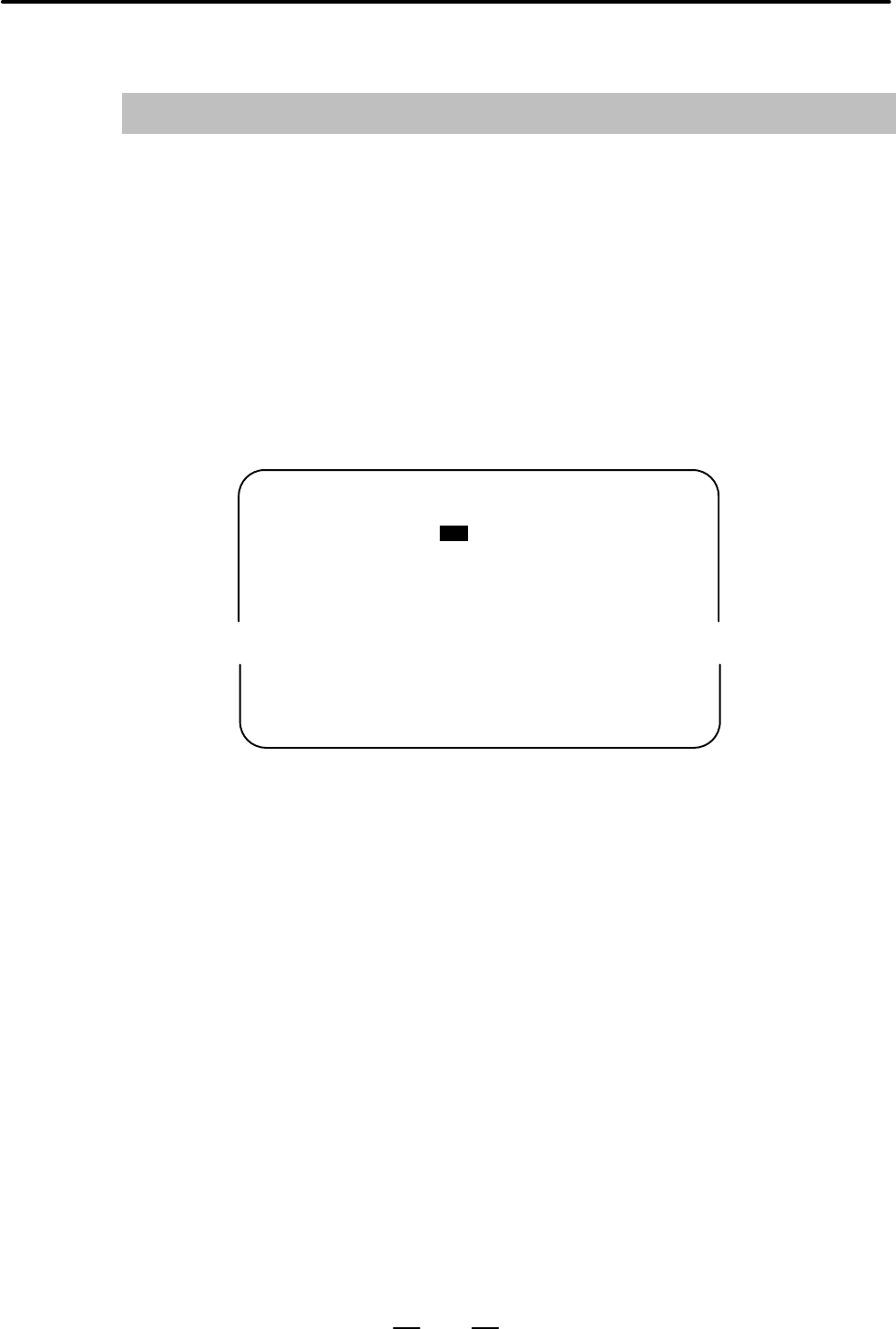
2. Position the cursor on “PARAMETER WRITE” using the cursor
move keys.
SETTING (HANDY) O0001 N00010
PARAMETER WRITE = (0:DISABLE 1:ENABLE)
TV CHECK = 0 (0:OFF 1:ON)
PUNCH CODE = 0 (0:EIA 1:ISO)
INPUT UNIT = 0 (0:MM 1:INCH)
I/O CHANNEL = 0 (0–3:CHANNEL NO.)
0
3. Press the [(OPRT)] soft key to display operation select soft keys.
>
MDI STOP *** *** *** 10:03:02
[NO.SRH] [ ON:1 ] [ OFF:0 ] [+INPUT] [INPUT]
← Soft key display
(section select)
4. To set “PARAMETER WRITE=” to 1, press the ON:1 soft key,
or alternatively enter 1 and press the [INPUT] soft key. From now
on, the parameters can be set. At the same time an alarm condi-
tion (P/S100 PARAMETER WRITE ENABLE) occurs in the
CNC.
(3) To display the parameter screen, press the <SYSTEM> function key
as many times as required, or alternatively press the <SYSTEM>
function key once, then the [PARAM] section select soft key.
(See “1. Displaying Parameters.”)
(4) Display the page containing the parameter you want to set, and
position the cursor on the parameter. (See “1. Displaying
Parameters.”)
(5) Enter data, then press the [INPUT] soft key. The parameter indicated
by the cursor is set to the entered data.
Contents Summary of Series 16i/160i-LA Parameter manual
- Page 1PARAMETER MANUAL B-63200EN/03
- Page 2Ȧ No part of this manual may be reproduced in any form. Ȧ All specifications and designs are subject to change without notice. The export of this product is subject to the authorization of the government of the country from where the product is exported. In this manual we have tried as much as possi
- Page 3PREFACE B–63200EN/03 PREFACE Applicable Models The mode covered by this manual, and their abbreviations are : Product Name Abbreviations FANUC Series 16i–LA 16i–LA FANUC Series 160i–LA 160i–LA Related Manuals The table below lists manuals related to Series 16i–LA and 160i–LA. In the table, this manu
- Page 4
- Page 5B–63200EN/03 Table of Contents PREFACE . . . . . . . . . . . . . . . . . . . . . . . . . . . . . . . . . . . . . . . . . . . . . . . . . . . . . . . . . . . . . . . . p–1 1. DISPLAYING PARAMETERS . . . . . . . . . . . . . . . . . . . . . . . . . . . . . . . . . . . . . . . . . . . . 1 2. SETTING PAR
- Page 6Table of Contents B–63200EN/03 4.32 STEP FEED FUNCTION AND RETURN FUNCTION . . . . . . . . . . . . . . . . . . . . . . . . . . . . . . . . . . 75 4.33 PARAMETERS RELATED TO GAS PRESSURE CONTROL (2) . . . . . . . . . . . . . . . . . . . . . . . . . 76 5. DESCRIPTION OF PARAMETERS (YP SERIES) . . . .
- Page 7B–63200EN/03 1. DISPLAYING PARAMETERS 1 DISPLAYING PARAMETERS Follow the procedure below to display parameters. (1) Press the
function key on the MDI as many times as required, or alternatively, press the function key once, then the [PARAM] section display soft key. The parameter s - Page 82. SETTING PARAMETERS FROM MDI B–63200EN/03 2 SETTING PARAMETERS FROM MDI Follow the procedure below to set parameters. (1) Place the CNC in the MDI mode or the emergency stop state. (2) Follow the substeps below to enable writing of parameters. 1. To display the setting screen, press the
- Page 9B–63200EN/03 2. SETTING PARAMETERS FROM MDI [Example] 12000 [INPUT] PARAMETER (FEEDRATE) O0001 N00010 1401 RDR JZR RPD Cursor 0 0 0 0 0 0 0 0 1402 JRV 0 0 0 0 0 0 0 0 1410 DRY RUN FEEDRATE 12000 1412 0 1420 RAPID FEEDRATEX 15000 Y 15000 Z 15000 > MDI STOP *** *** ALM 10:03:10 [NO.SRH] [ ON:1 ] [ OFF
- Page 103. INPUTTING AND OUTPUTTING PARAMETERS THROUGH THE READER/PUNCHER INTERFACE B–63200EN/03 INPUTTING AND OUTPUTTING PARAMETERS THROUGH THE 3 READER/PUNCHER INTERFACE This section explains the parameter input/output procedures for input/output devices connected to the reader/puncher interface. The foll
- Page 113. INPUTTING AND OUTPUTTING PARAMETERS THROUGH B–63200EN/03 THE READER/PUNCHER INTERFACE 3.1 (1) Select the EDIT mode or set to Emergency stop. OUTPUTTING (2) To select the parameter screen, press the
function key as PARAMETERS many times as required, or alternatively press the THR - Page 123. INPUTTING AND OUTPUTTING PARAMETERS THROUGH THE READER/PUNCHER INTERFACE B–63200EN/03 3.2 (1) Place the CNC in the emergency stop state. INPUTTING (2) Enable parameter writing. PARAMETERS 1. To display the setting screen, press the
THROUGH THE function key as many times as requir - Page 13B–63200EN/03 4. DESCRIPTION OF PARAMETERS 4 DESCRIPTION OF PARAMETERS The parameters for the C and Y Series lasers are explained in Chapter 4. The parameters for the YP Series lasers are explained in Chapter 5. Parameter No. 15500 and later are common to all the series. Parameters are classified by
- Page 144. DESCRIPTION OF PARAMETERS B–63200EN/03 4.1 SETTINGS FOR ENABLING/DISABLIN #7 #6 #5 #4 #3 #2 #1 #0 G FUNCTIONS 15000 FLT CLB BMO AGA LGC LPC [Data type] Bit LPC Power control is: 0 : Disabled. (Normal operation) 1 : Enabled. LGC The in–tube pressure control gain selection of two types is: 0 : Disa
- Page 15B–63200EN/03 4. DESCRIPTION OF PARAMETERS #7 #6 #5 #4 #3 #2 #1 #0 15002 PSH ADC BMA [Data type] Bit BMA When the shutter is closed in automatic operation, beam output is: 0 : Disabled. (Normal operation) 1 : Enabled. (Maintenance) ADC AD conversion–2 data is judged with: 0 : The select signal. 1 : T
- Page 164. DESCRIPTION OF PARAMETERS B–63200EN/03 #7 #6 #5 #4 #3 #2 #1 #0 15005 DLY ITR GNS BPV TTD INB [Data type] Bit INB Beam output is stopped: 0 : Upon the completion of distribution. 1 : After an in–position check. TTD A single laser power supply unit drives: 0 : A single discharge tube. 1 : Two disch
- Page 17B–63200EN/03 4. DESCRIPTION OF PARAMETERS #7 #6 #5 #4 #3 #2 #1 #0 15007 STO XSC ECK ESE [Data type] Bit ESE If piercing is to be executed in edge machining, it is: 0 : Executed upon the completion of distribution. 1 : Executed after a smoothing error check is performed upon the completion of distrib
- Page 184. DESCRIPTION OF PARAMETERS B–63200EN/03 #7 #6 #5 #4 #3 #2 #1 #0 15009 TEM BCG BEM AFZ BS2 BS1 AS2 AS1 [Data type] Bit These parameters are related to the laser gas mixture function, which store and monitor the operating states of the mixer. The parameters are automatically set and need not be set
- Page 19B–63200EN/03 4. DESCRIPTION OF PARAMETERS #7 #6 #5 #4 #3 #2 #1 #0 15011 OPV CSC LVE EDS [Data type] Bit EDS The cutting conditions to be assumed during the execution for the return distance in edge machining and start–up machining are: 0 : The same as usual. 1 : Not the same as usual. For the laser
- Page 204. DESCRIPTION OF PARAMETERS B–63200EN/03 4.2 DISCHARGE TUBE #7 #6 #5 #4 #3 #2 #1 #0 SELECTION 15025 PS8 PS7 PS6 PS5 PS4 PS3 PS2 PS1 15026 PS16 PS15 PS14 PS13 PS12 PS11 PS10 PS9 [Data type] Bit PS1 to PS16 Discharge tube selection when half of the discharge tubes are used Four of eight discharge tub
- Page 21B–63200EN/03 4. DESCRIPTION OF PARAMETERS 4.3 CONTOURING CONDITIONS 15040 Output power [Data type] Word [Unit of data] W [Valid data range] 0 to 7000 15041 Pulse frequency [Data type] Word [Unit of data] Hz [Valid data range] 5 to 2000 15042 Pulse duty ratio [Data type] Word [Unit of data] % [Valid
- Page 224. DESCRIPTION OF PARAMETERS B–63200EN/03 4.4 EDGE MACHINING 15050 Edge detection angle CONDITIONS [Data type] Word [Unit of data] Degree [Valid data range] 0 to 180 When an angle formed by two blocks is smaller than this setting, the portion is assumed to be a corner. 15051 Piercing peak power [Dat
- Page 23B–63200EN/03 4. DESCRIPTION OF PARAMETERS 15057 Return distance [Data type] Two–word [Unit of data] Increment system Unit IS–A IS–B IS–C Metric input mm 0.01 0.001 0.0001 Inch input inch 0.001 0.0001 0.00001 [Valid data range] 0 to 65000 Specify the return distance of movement from the vertex of a c
- Page 244. DESCRIPTION OF PARAMETERS B–63200EN/03 4.5 PIERCING CONDITIONS 15080 Piercing power [Data type] Word [Unit of data] W [Valid data range] 0 to 7000 Specify a piercing power. 15081 Initial frequency of piercing [Data type] Word [Unit of data] Hz [Valid data range] 5 to 2000 Specify the initial freq
- Page 25B–63200EN/03 4. DESCRIPTION OF PARAMETERS 15086 Piercing step count [Data type] Word [Unit of data] [Valid data range] 0 to 32767 Specify the number of piercing steps. 15087 Piercing end time [Data type] Two–word [Unit of data] Millisecond [Valid data range] 0 to 99999999 Specify a piercing end time
- Page 264. DESCRIPTION OF PARAMETERS B–63200EN/03 4.6 POWER CONTROL #7 #6 #5 #4 #3 #2 #1 #0 (1) 15089 LP8 LP7 LP6 LP5 LP4 LPZ LPY LPX [Data type] Bit LP* The speed calculation of the power control function: 0 : Does not use the * axis. 1 : Uses the * axis. When nothing is specified, the system assumes that
- Page 27B–63200EN/03 4. DESCRIPTION OF PARAMETERS 15095 Allowable variation in power control speed [Data type] Byte [Unit of data] mm/min (in B8F1–08 or earlier, specified unit) [Valid data range] 0 to 255 Specify the allowable variation in power control speed. This parameter is effective when parameter No.
- Page 284. DESCRIPTION OF PARAMETERS B–63200EN/03 15097 Reference value for calculating the output inclination (output when feedrate F is 0) [Data type] Word [Unit of data] W [Valid data range] 0 to 7000 15098 Reference value for calculating the frequency inclination (frequency when feedrate F is 0) [Data t
- Page 29B–63200EN/03 4. DESCRIPTION OF PARAMETERS 4.7 SETTINGS RELATED TO ASSIST GAS PRESSURE AND TIME 15100 Assist gas selection [Data type] Word [Unit of data] [Valid data range] 0 to 7 (when bit 0 of parameter No. 15001 is set to 1) 0 to 3 (when bit 0 of parameter No. 15001 is set to 0) Specify an assist
- Page 304. DESCRIPTION OF PARAMETERS B–63200EN/03 15114 Pre–flow pressure 1 15115 Pre–flow pressure 2 15116 Pre–flow pressure 3 [Data type] Word [Unit of data] 0.01 MPa or 0.1 kg/cm2 [Valid data range] 0 to 255 Specify the pre–flow pressure of the assist gas. 15120 Machining flow pressure 1 15121 Machining
- Page 31B–63200EN/03 4. DESCRIPTION OF PARAMETERS 15136 Assist gas pressure [Data type] Word [Unit of data] 0.01 MPa or 0.1 kg/cm2 [Valid data range] 0 to 255 Specify an assist gas pressure. 15137 Stabilization time of the assist gas pressure for piercing [Data type] Word [Unit of data] 10 milliseconds [Val
- Page 324. DESCRIPTION OF PARAMETERS B–63200EN/03 4.8 LASER MAINTENANCE/ INSPECTION TIME DISPLAY FUNCTION 15150 Laser RUN–ON period [Data type] Two–word [Unit of data] 0.1 hour [Valid data range] 0 to 99999999 The total RUN–ON time is automatically specified. 15151 Vacuum pump operation period [Data type] T
- Page 33B–63200EN/03 4. DESCRIPTION OF PARAMETERS #7 #6 #5 #4 #3 #2 #1 #0 15160 MDS MNT [Data type] Bit MNT The laser maintenance screen is: 0 : Not displayed. 1 : Displayed. Even if the screen is not displayed, the storage of compensation coefficients and the totaling of operation time are performed, so th
- Page 344. DESCRIPTION OF PARAMETERS B–63200EN/03 4.9 PARAMETERS RELATED TO OSCILLATOR CONTROL 15200 Power specified for power calibration when half of the discharge tubes are used [Data type] Word [Unit of data] W [Valid data range] 0 to 32767 Specify the power to be specified to obtain a power calibration
- Page 35B–63200EN/03 4. DESCRIPTION OF PARAMETERS 15206 Time constant of power sensor input filter [Data type] Word [Unit of data] Millisecond [Valid data range] 8 to 32767 The time constant is used when the primary delay filter is applied to the laser power monitor value input from the power sensor. 15207
- Page 364. DESCRIPTION OF PARAMETERS B–63200EN/03 15212 Upper limit on power when the duty ratio is not clamped [Data type] Word [Unit of data] W [Valid data range] 0 to 32767 When the duty ratio is not clamped to 50% according to parameter No. 15213 and when the specified power exceeds this setting after p
- Page 37B–63200EN/03 4. DESCRIPTION OF PARAMETERS 15217 Beam stop delay time [Data type] Word [Unit of data] Millisecond [Valid data range] 0 to 32767 Specify the period from when an in–position check is completed until the beam stops. 15218 Power for clamping the duty ratio of the CW–YAG laser [Data type]
- Page 384. DESCRIPTION OF PARAMETERS B–63200EN/03 4.10 PARAMETERS RELATED TO 15220 Maximum specifiable bias value at the start of discharge DISCHARGE [Data type] Word [Unit of data] mV [Valid data range] 0 to 32767 Specify the maximum bias value that can be specified at the start of discharge. 15221 Dischar
- Page 39B–63200EN/03 4. DESCRIPTION OF PARAMETERS 4.11 PARAMETERS RELATED TO GAS PRESSURE CONTROL (1) 15240 Negative pressure for completing evacuation [Data type] Word [Unit of data] (1=13 Pa) [Valid data range] 0 to 32767 The negative pressure is applied to evacuate the discharge tube during the laser sta
- Page 404. DESCRIPTION OF PARAMETERS B–63200EN/03 15245 In–tube pressure control gain 2 [Data type] Word [Unit of data] [Valid data range] 0 to 32767 Specify a gas pressure control gain for reference discharge. This setting is valid when bit 1 (LGC) of parameter No. 15000 is set to 1. 15246 Pressure control
- Page 41B–63200EN/03 4. DESCRIPTION OF PARAMETERS 15250 Gas pressure rise time 2 [Data type] Word [Unit of data] Second [Valid data range] 0 to 45 Set the time required to change from the negative pressure for completing evacuation (parameter No. 15240) to the in–tube pressure at the start of discharge (par
- Page 424. DESCRIPTION OF PARAMETERS B–63200EN/03 15259 RUN–ON evacuation time [Data type] Word [Unit of data] Second [Valid data range] 0 to 32767 Specify a RUN–ON evacuation time. 15260 Discharge valve open time for external piping [Data type] Byte [Unit of data] Second [Valid data range] 0 to 60 Specify
- Page 43B–63200EN/03 4. DESCRIPTION OF PARAMETERS 4.12 HIGHLY REFLECTIVE MATERIAL ALARMS 15265 Maximum permissible output increase [Data type] Word [Unit of data] W [Valid data range] 0 to 32767 When the difference between the specified power and actual power exceeds this value, an alarm 4068 (beam reflecti
- Page 444. DESCRIPTION OF PARAMETERS B–63200EN/03 4.13 LASER POWER/VOLTAGE DECREASE 15270 Normal discharge tube voltage [Data type] Word [Unit of data] V [Valid data range] 0 to 32767 Specify a discharge tube voltage in normal reference discharge. This parameter is automatically rewritten after the discharg
- Page 45B–63200EN/03 4. DESCRIPTION OF PARAMETERS 4.14 POWER TABLE SETTINGS 15280 Power table interval when half of the discharge tubes are used 15281 Power table interval when all of the discharge tubes are used [Data type] Word [Unit of data] [Valid data range] 0 to 32767 [Standard setting] Refer to the a
- Page 464. DESCRIPTION OF PARAMETERS B–63200EN/03 15300 Value 0 when all of the discharge tubes are used 15301 Value 1 when all of the discharge tubes are used 15302 Value 2 when all of the discharge tubes are used 15303 Value 3 when all of the discharge tubes are used 15304 Value 4 when all of the discharg
- Page 47B–63200EN/03 4. DESCRIPTION OF PARAMETERS 4.15 AUTOMATIC AGING FUNCTION 15320 Laser power in normal calibration [Data type] Word [Unit of data] W [Valid data range] 0 to 7000 15321 Oscillation frequency in normal calibration [Data type] Word [Unit of data] Hz [Valid data range] 5 to 2000 15322 Pulse
- Page 484. DESCRIPTION OF PARAMETERS B–63200EN/03 15327 Oscillation frequency in aging [Data type] Word [Unit of data] Hz [Valid data range] 5 to 2000 15328 Pulse duty ratio in aging [Data type] Word [Unit of data] % [Valid data range] 0 to 100 15329 Calibration time in aging [Data type] Word [Unit of data]
- Page 49B–63200EN/03 4. DESCRIPTION OF PARAMETERS 15334 Aging count [Data type] Word [Unit of data] [Valid data range] 0 to 32767 (automatically specified by the CNC) 15335 Time data 1 at HVOFF after LSTR [Data type] Two–word [Unit of data] [Valid data range] 0 to 99999999 (automatically specified by the CN
- Page 504. DESCRIPTION OF PARAMETERS B–63200EN/03 4.16 PARAMETERS RELATED TO THE PMC–WINDOW 15350 M code for reading a comment [Data type] Word [Unit of data] [Valid data range] 0 to 999 Specify an M code for reading the comment of function code 140. 15360 Start address of the R area of the PMC [Data type]
- Page 51B–63200EN/03 4. DESCRIPTION OF PARAMETERS 4.17 POWER CONTROL (2) 15450 Allowable variation in power control speed [Data type] Word [Unit of data] mm/min [Valid data range] 0 to 32767 [Standard setting] 4 Specify the allowable variation in power control speed. If this parameter is 0, parameter No. 15
- Page 524. DESCRIPTION OF PARAMETERS B–63200EN/03 4.18 SETTINGS RELATED TO TRACING 15500 Detection gain coefficient (DETECTION) [Data type] Word [Unit of data] [Valid data range] 0 to 65536 Specify the gain coefficient of the displacement detector in Z–axis tracing control. NOTE This parameter can be set on
- Page 53B–63200EN/03 4. DESCRIPTION OF PARAMETERS 4.19 SETTING RELATED TO TRACING (DISPLAY) #7 #6 #5 #4 #3 #2 #1 #0 15505 TAC TRS TRA EBS [Data type] Bit EBS The process of establishing the tracing displacement amount standard: 0 : Is of the conventional type. (Data is processed one word at a time.) 1 : Can
- Page 544. DESCRIPTION OF PARAMETERS B–63200EN/03 4.20 SETTINGS RELATED TO TRACING (INTEGRATION) 15510 Integral time constant [Data type] Word [Unit of data] Millisecond [Valid data range] 0 to 32767 [Standard setting] 0 The integral time constant is used for displacement integration in Z–axis tracing contr
- Page 55B–63200EN/03 4. DESCRIPTION OF PARAMETERS 4.21 SETTINGS RELATED TO TRACING (PHASE COMPENSATION) 15520 Phase compensation time constant [Data type] Word [Unit of data] Millisecond [Valid data range] 0 to 32767 [Standard setting] 0 (A value lower than 2 is invalid.) This setting is the time constant f
- Page 564. DESCRIPTION OF PARAMETERS B–63200EN/03 4.22 SETTINGS RELATED TO TRACING (DISPLACEMENT) 15530 Reference displacement [Data type] Word [Unit of data] 0.001 mm [Valid data range] Parameter No. 15531 to parameter No. 15532 The setting determines the reference distance from the tip of the quill to the
- Page 57B–63200EN/03 4. DESCRIPTION OF PARAMETERS 15535 Lower limit on gap [Data type] Word [Unit of data] 0.001 mm [Valid data range] 0 to 32767 Specify the minimum value that can be specified for the gap in tracing control. 15536 Upper limit on gap [Data type] Word [Unit of data] 0.001 mm [Valid data rang
- Page 584. DESCRIPTION OF PARAMETERS B–63200EN/03 4.23 SETTINGS RELATED TO TRACING (VELOCITY 15540 Velocity control voltage conversion factor of Z–axis tracing control COMMAND) 15541 Velocity control voltage conversion factor of W–axis tracing control [Data type] Word [Unit of data] [Valid data range] 0 to
- Page 59B–63200EN/03 4. DESCRIPTION OF PARAMETERS 4.24 SETTINGS RELATED TO TRACING (APPROACH) 15550 Approach completion detection range [Data type] Word [Unit of data] 0.001 mm [Valid data range] 0 to 32767 [Standard setting] 50 This setting is the displacement at which the completion of approach is assumed
- Page 604. DESCRIPTION OF PARAMETERS B–63200EN/03 15554 Constant for clamping Z–axis tracing speed [Data type] Word [Unit of data] [Valid data range] 0 to 32767 The setting is used as the constant for clamping the tracing speed. Specify the value obtained using the following expression: Tracing speed clamp
- Page 61B–63200EN/03 4. DESCRIPTION OF PARAMETERS 4.25 SETTINGS RELATED TO THREE–DIMENSIONA L AXIAL MOVEMENT (ANGULAR AXIS) #7 #6 #5 #4 #3 #2 #1 #0 15600 TDA NFX NCT RNC MIA NPC [Data type] Bit NPC During a stroke check before movement, movement in the G31 block is: 0 : Checked. 1 : Not checked. MIA During
- Page 624. DESCRIPTION OF PARAMETERS B–63200EN/03 #7 #6 #5 #4 #3 #2 #1 #0 15601 OFC RAT PCK RDC RFD PA5 PA4 [Data type] Bit PA4 The rotation around the fourth axis is: 0 : Counterclockwise. 1 : Clockwise. PA5 The rotation around the fifth axis is: 0 : Counterclockwise. 1 : Clockwise. RFD When only the fourt
- Page 63B–63200EN/03 4. DESCRIPTION OF PARAMETERS #7 #6 #5 #4 #3 #2 #1 #0 15602 FMX ZTC OSL TGC [Data type] Bit TGC For interaction control, the rotation of the α axis is specified in a command: 0 : Using a sign different from that used for the β axis rotation command. 1 : Using the same sign as that used f
- Page 644. DESCRIPTION OF PARAMETERS B–63200EN/03 15615 Length of the first arm 15616 Length of the second arm [Data type] Two–word [Unit of data] Increment system Unit IS–A IS–B IS–C Millimeter machine mm 0.01 0.001 0.0001 Inch machine inch 0.001 0.0001 0.00001 [Valid data range] 0 to 500000 (Millimeter ma
- Page 65B–63200EN/03 4. DESCRIPTION OF PARAMETERS 15619 Nozzle length [Data type] Two–word [Unit of data] Increment system Unit IS–A IS–B IS–C Millimeter machine mm 0.01 0.001 0.0001 Inch machine inch 0.001 0.0001 0.00001 [Valid data range] Parameter No. 15616 + parameter No. 15619 x 500000 (Millimeter mach
- Page 664. DESCRIPTION OF PARAMETERS B–63200EN/03 Angle at which rotation is assumed to be only plane rotation in three–dimensional 15623 conversion [Data type] Two–word [Unit of data] 0.001 deg [Valid data range] 0 to 89999 If, in three–dimensional conversion, the difference between the inclination of the
- Page 67B–63200EN/03 4. DESCRIPTION OF PARAMETERS 4.26 PROGRAM RESUMPTION/NEIGH BORING POINT SEARCH #7 #6 #5 #4 #3 #2 #1 #0 15630 NMT NMC NSC PRT NRE NSR PRZ PRS [Data type] Bit PRS The program resume function of: 0 : The standard type is used. 1 : The laser type is used. PRZ While the program resume functi
- Page 684. DESCRIPTION OF PARAMETERS B–63200EN/03 15635 Neighboring point distance of neighboring point search [Data type] Two–word [Unit of data] Increment system Unit IS–A IS–B IS–C Metric input mm 0.01 0.001 0.0001 Inch input inch 0.001 0.0001 0.00001 [Valid data range] 0 to 99999999 Specify the neighbor
- Page 69B–63200EN/03 4. DESCRIPTION OF PARAMETERS 4.27 TEACHING BOX 15638 Start address of teaching box DI area 15639 Start address of teaching box DO area [Data type] Word [Unit of data] [Valid data range] 1 to 999 The DI/DO area can be assigned to a desired address of the internal relay area (R area). Whe
- Page 704. DESCRIPTION OF PARAMETERS B–63200EN/03 15642 Output address of transfer status from TB to extended battery–powered memory [Data type] Word [Unit of data] [Valid data range] 0 to 65528 When an R or S command is specified in the teaching box, the start address, byte count, completion code, and cont
- Page 71B–63200EN/03 4. DESCRIPTION OF PARAMETERS 4.28 SETTINGS RELATED TO MACHINING 15650 Z–axis retraction amount RESUMPTION [Data type] Two–word [Unit of data] Increment system Unit IS–A IS–B IS–C Metric input mm 0.01 0.001 0.0001 Inch input inch 0.001 0.0001 0.00001 [Valid data range] 1 to 99999999 Spec
- Page 724. DESCRIPTION OF PARAMETERS B–63200EN/03 #7 #6 #5 #4 #3 #2 #1 #0 15669 STH N2S [Data type] Bit N2S The piercing conditions for the resumed non–inverted movement are: 0 : As specified in the program. 1 : Determined by the values of parameters Nos. 15670 to 15682. STH In the machining resume function
- Page 73B–63200EN/03 4. DESCRIPTION OF PARAMETERS 15674 Incremental value of piercing duty ratio [Data type] Word [Unit of data] % [Valid data range] 0 to 100 Specify the value by which the duty ratio of piercing is incremented when the machining resume function or a skip is executed. 15675 Piercing step ti
- Page 744. DESCRIPTION OF PARAMETERS B–63200EN/03 15679 Assist gas selection [Data type] Word [Unit of data] [Valid data range] 0 to 7 (when bit 0 of parameter No. 15001 is set to 1) 0 to 3 (when bit 0 of parameter No. 15001 is set to 0) Specify the assist gas type to be selected when the machining resume f
- Page 75B–63200EN/03 4. DESCRIPTION OF PARAMETERS 4.29 CONSTANT OPTICAL PATH CONTROL #7 #6 #5 #4 #3 #2 #1 #0 15700 8 7 6 5 4 z y x [Data type] Bit X to 8 When a move command for the axis of mirror movement is calculated, the corresponding axis is: 0 : Not used. 1 : Used. NOTE Specify 0 for the bit correspon
- Page 764. DESCRIPTION OF PARAMETERS B–63200EN/03 15703 Mirror block axis selection [Data type] Byte [Unit of data] [Valid data range] 4 to 8 Specify the axis number of an axis of mirror movement. The axis must not be the X–axis, Y–axis or Z–axis. 15704 Mirror block axis reference position calibration [Data
- Page 77B–63200EN/03 4. DESCRIPTION OF PARAMETERS 4.30 LASER GAS MIXTURE FUNCTION 15710 Cylinder level check wait time [Data type] Word [Unit of data] Second [Valid data range] 0 to 32767 Specify a wait time for checking the cylinder level. 15711 Gas mixture wait time [Data type] Word [Unit of data] Minute
- Page 784. DESCRIPTION OF PARAMETERS B–63200EN/03 15715 Degree of vacuum of gas pressure [Data type] Word [Unit of data] (1=13 Pa) [Valid data range] 0 to 32767 The degree of vacuum of the laser gas pressure in the gas mixer is measured. When the laser gas pressure is below the setting, an alarm is raised.
- Page 79B–63200EN/03 4. DESCRIPTION OF PARAMETERS 4.31 THE STEP CONTROL FUNCTION 15730 Distance of a single ramp–up step [Data type] Word [Unit of data] Increment system Unit IS–A IS–B IS–C Metric input mm 0.01 0.001 0.0001 Inch input inch 0.001 0.0001 0.00001 [Valid data range] 0 to 65000 Specify the dista
- Page 804. DESCRIPTION OF PARAMETERS B–63200EN/03 15746 Laser power of ramp–down step 1 15747 Laser power of ramp–down step 2 15748 Laser power of ramp–down step 3 15749 Laser power of ramp–down step 4 15750 Laser power of ramp–down step 5 15751 Laser power of ramp–down step 6 15752 Laser power of ramp–down
- Page 81B–63200EN/03 4. DESCRIPTION OF PARAMETERS 4.32 STEP FEED FUNCTION AND RETURN FUNCTION 15770 Feedrate of step feed or return [Data type] Two–word [Unit of data, valid data range] Valid data range Increment system Unit of data IS–A, IS–B IS–C Millimeter machine system 1 mm/min 0 to 240000 0 to 100000
- Page 824. DESCRIPTION OF PARAMETERS B–63200EN/03 4.33 PARAMETERS RELATED TO GAS PRESSURE #7 #6 #5 #4 #3 #2 #1 #0 CONTROL (2) 15800 TPC [Data type] Bit TPC The turbo blower constant–power drive control function is: 0 : Disabled. 1 : Enabled. Maximum in–tube pressure when the turbo blower constant–power driv
- Page 835. DESCRIPTION OF PARAMETERS B–63200EN/03 (YP SERIES) 5 DESCRIPTION OF PARAMETERS (YP SERIES) This chapter explains in detail the parameters for pulse YAG lasers (FANUC YP series lasers). For some parameters, the data and numbers differ from those of FANUC C series lasers. Parameter data is not comp
- Page 845. DESCRIPTION OF PARAMETERS (YP SERIES) B–63200EN/03 5.1 SETTINGS FOR #7 #6 #5 #4 #3 #2 #1 #0 ENABLING/ 15000 CLBON BMON AGOUT DISABLING FUNCTIONS [Data type] Bit AGOUT The assist gas is: 0 : Disabled. (Maintenance) 1 : Enabled. (Normal operation) BMON When the shutter is closed, the function to tu
- Page 855. DESCRIPTION OF PARAMETERS B–63200EN/03 (YP SERIES) #7 #6 #5 #4 #3 #2 #1 #0 15004 STC AGC [Data type] Bit AGC The “G32 P_;” command is used as: 0 : A flow pattern command. 1 : A direct gas pressure control command. STC The shutter is controlled by: 0 : A G code. 1 : An external signal. #7 #6 #5 #4
- Page 865. DESCRIPTION OF PARAMETERS (YP SERIES) B–63200EN/03 5.2 SETTINGS RELATED TO ASSIST GAS 15100 Assist gas selection PRESSURE [Data type] Word AND TIME [Unit of data] [Valid data range] 0 to 7 Specify an assist gas type. 15101 Flow pattern selection [Data type] Word [Unit of data] [Valid data range]
- Page 875. DESCRIPTION OF PARAMETERS B–63200EN/03 (YP SERIES) 15120 Machining flow pressure 1 15121 Machining flow pressure 2 15122 Machining flow pressure 3 [Data type] Word [Unit of data] 0.1 kg/cm2 or 0.01 MPa [Valid data range] 0 to 255 Specify the machining flow pressure of the assist gas 15126 After–f
- Page 885. DESCRIPTION OF PARAMETERS (YP SERIES) B–63200EN/03 15137 Stabilization time of the assist gas pressure for piercing [Data type] Word [Unit of data] 10 msec [Valid data range] 0 to 32767 Specify the stabilization time of the assist gas pressure for piercing. 15138 Assist gas pressure for piercing
- Page 895. DESCRIPTION OF PARAMETERS B–63200EN/03 (YP SERIES) 5.3 LASER MAINTENANCE/ INSPECTION TIME DISPLAY FUNCTION 15150 Laser RUN–ON period [Data type] Two–word [Unit of data] 0.1 hour [Valid data range] 0 to 99999999 The total RUN–ON time is automatically specified. 15152 Shutter alarm mask time [Data
- Page 905. DESCRIPTION OF PARAMETERS (YP SERIES) B–63200EN/03 5.4 PARAMETERS RELATED TO 15200 Power specified for power calibration OSCILLATOR [Data type] Word CONTROL [Unit of data] W [Valid data range] 0 to 32767 Specify the power to be specified to obtain a power calibration coefficient. 15203 Power cali
- Page 915. DESCRIPTION OF PARAMETERS B–63200EN/03 (YP SERIES) 15208 Number of steps for power calibration [Data type] Byte [Unit of data] 0.1 msec [Valid data range] 0 to 20 Set the number of steps for power calibration. 15209 Frequency for power calibration [Data type] Word [Unit of data] Hz [Valid data ra
- Page 925. DESCRIPTION OF PARAMETERS (YP SERIES) B–63200EN/03 15219 Minimum current value [Data type] Word [Unit of data] A [Valid data range] 0 to 1000 If the specified current value is less than this value, an alarm is generated. 15220 Minimum waveform magnification [Data type] Word [Unit of data] % [Vali
- Page 935. DESCRIPTION OF PARAMETERS B–63200EN/03 (YP SERIES) 5.5 LOW POWER ALARMS 15270 Low power detection value [Data type] Word [Unit of data] W [Valid data range] 0 to 32767 [Standard setting] 0 If the actual laser output is less than this setting, an alarm is generated. If the setting is 0, the alarm
- Page 945. DESCRIPTION OF PARAMETERS (YP SERIES) B–63200EN/03 15274 Alarm monitor start wait time (during power calibration operation) [Data type] Word [Unit of data] msec [Valid data range] 0 to 32767 [Standard setting] 5000 Set the time from the start of beam output until the start of the low power alarm
- Page 95B–63200EN/03 Index [A] Automatic Aging Function, 41 [P] Parameters Related to Discharge, 32 [C] Parameters Related to Gas Pressure Control (1), 33 Constant Optical Path Control, 69 Parameters Related to Gas Pressure Control (2), 76 Contouring Conditions, 15 Parameters Related to Oscillator Control,
- Page 96
- Page 97Revision Record FANUCĄSeriesĄ16i/160i – LA PARAMETER MANUAL (B–63200EN) Addition of parameters for YP series Laser 03 Mar., 2002 Correction of errors Addition of following parameters – Position control B speed clamp function 02 Jul., 2000 – Gas pressure control – Other functions Correction of errors
- Page 98