Manual Guide for Lathe Programming manual Page 111
Programming manual
B-63343EN/02 USER PROGRAM 7.PMC CUSTOMIZING TOOLS
- 103 -
7.8 OPERATION FOR STARTING PLAYBACK MACHINING
1) Start Playback Machining Program by soft-key [EXEC]
By pushing a soft-key [EXEC], MANUAL GUIDE system
software will turn the signal to '1' to start the playback
machining.
R959.0(ANMM) = 1 : Request to change mode to MEM
In response to this request, PMC program changes mode to
MEM and begin the sequence for starting machine operation. By
these procedure, executing of machining program will start.
2) Start Playback Machining Program by the button on Machine
Operator's Panel
In order to start executing of a playback machining program by
pushing a button on a machine operator's panel, the following
signal can be used.
R952.7(EXE) = 1 : Request to turn on (GST) to start executing
of playback machining program.
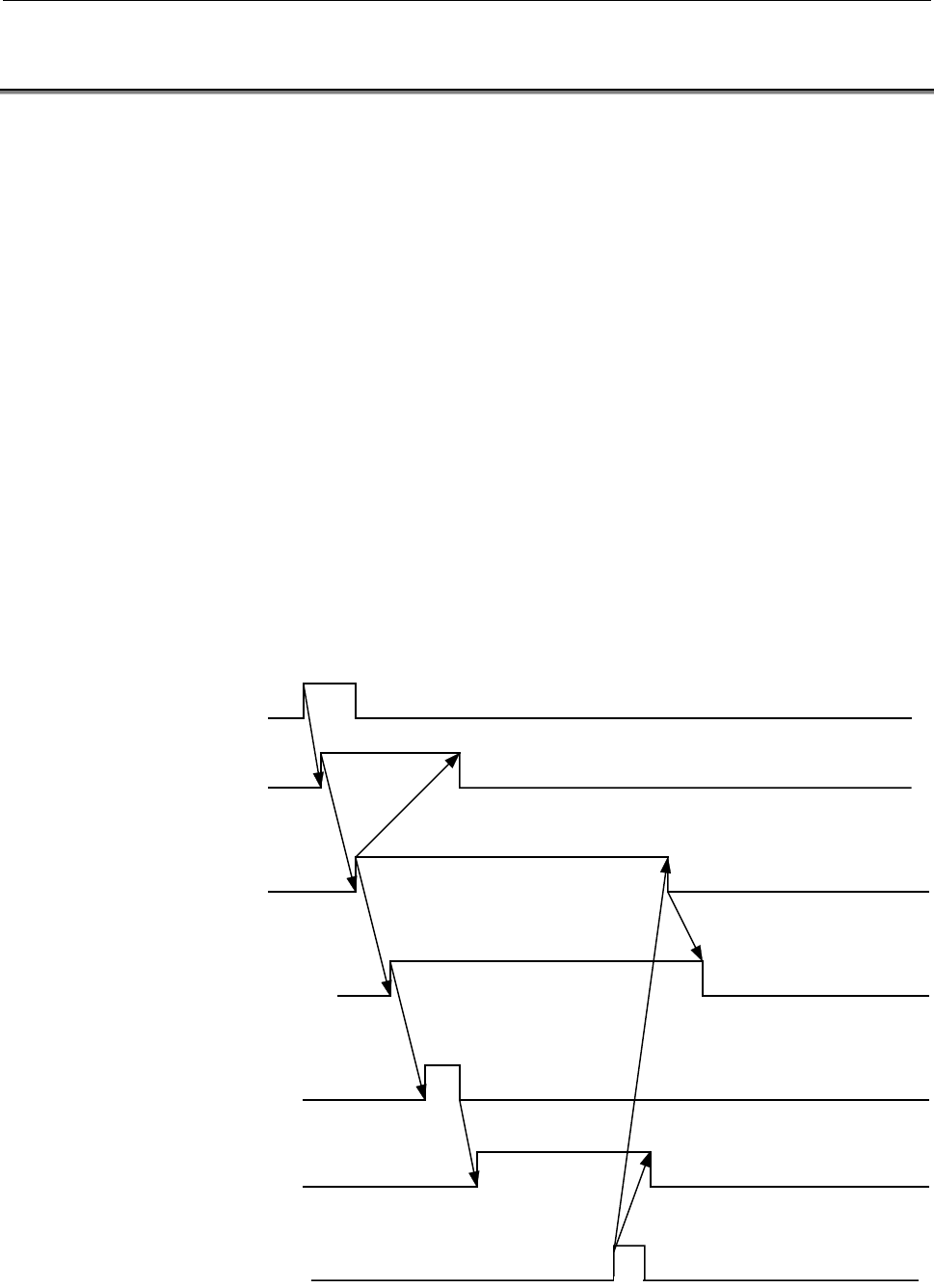
<Timing Chart>
Start key on a machine
opeator’s panel
R952.7<EXE>
(PMC -> CNC)
GST
(CNC->PMC)
MD1-3 : MEM mode
(PMC -> CNC)
ST
(PMC -> CNC)
STL
(CNC -> PMC)
Execution Machining
ERS
(PMC -> CNC)
M02, M30
Contents Summary of Manual Guide for Lathe Programming manual
- Page 1FOR LATHE PROGRAMMING MANUAL B-63343EN/02
- Page 2Ȧ No part of this manual may be reproduced in any form. Ȧ All specifications and designs are subject to change without notice. In this manual we have tried as much as possible to describe all the various matters. However, we cannot describe all the matters which must not be done, or which cannot be
- Page 3B-63343EN/02 SAFETY PRECAUTIONS SAFETY PRECAUTIONS This manual includes safety precautions for protecting the user and preventing damage to the machine. Precautions are classified into Warnings and Cautions according to their bearing on safety. Also, supplementary information is described as Notes.
- Page 4
- Page 5B-63343EN/02 TABLE OF CONTENTS TABLE OF CONTENTS SAFETY PRECAUTIONS .......................................................................... s-1 I. USER PROGRAM 1 OUTLINE OF USER PROGRAM............................................................3 1.1 SCOPE OF CUSTOMIZING .........................
- Page 6TABLE OF CONTENTS B-63343EN/02 3.9 CHARACTER STRINGS IN THE MOLDING MATERIAL INPUT WINDOW .....................................................................................................35 4 DATA STRUCTURE OF MACHINING PROGRAM ..............................36 4.1 DETAILS OF DATA ATTRIBUTE .....
- Page 7B-63343EN/02 TABLE OF CONTENTS 5.4 USER PROGRAMS FOR DISPLAYING GUIDANCE DRAWING FOR GUIDANCE CUTTING ........................................................................88 5.5 USER PROGRAMS FOR GUIDANCE CUTTING EXECUTING..................89 5.6 USER PROGRAM FOR EXECUTING PLAYBACK MACHINING.....
- Page 8TABLE OF CONTENTS B-63343EN/02 II. SAMPLE PROGRAM 1 USER PROGRAMS FOR SETTING DATA FORMAT OF MACHINING PROCESS...............................................................137 2 USER PROGRAMS FOR DISPLAYING GUIDANCE DRAWING FOR GUIDANCE CUTTING ......................................................
- Page 9I. USER PROGRA
- Page 10
- Page 11B-63343EN/02 USER PROGRAM 1.OUTLINE OF USER PROGRAM 1 OUTLINE OF USER PROGRAM In MANUAL GUIDE, MTB can modify the FANUC standard specification, and also can make their own features by using Custom Macro Program. In order to carry out this modification, the software package named "User Program for MA
- Page 121.OUTLINE OF USER PROGRAM USER PROGRAM B-63343EN/02 1.1 SCOPE OF CUSTOMIZING By using this "User Program", MTB make their own features as follows. 1) Comment on a MANUAL GUIDE All-in-one screen • All of the comment can be changed. 2) Data item of FANUC standard machining process • Data attribute can
- Page 13B-63343EN/02 USER PROGRAM 1.OUTLINE OF USER PROGRAM 1.2 USABLE SOFTWARE RESOURCE FOR USER PROGRAM Since a part of P-code custom macro program and variables are used for FANUC standard processes already, usable resource of User Programs are limited as follows. 1) P-code Program Numbers • O2500 - O299
- Page 141.OUTLINE OF USER PROGRAM USER PROGRAM B-63343EN/02 1.3 LINK DEFINITION FILES A link definition file is used to link a user program to the macro executor. The following three types of link definition file are available. The contents of the following link definition files are mere examples. Items oth
- Page 15B-63343EN/02 USER PROGRAM 1.OUTLINE OF USER PROGRAM BH8x_nn.LNK The following is a sample link control file used to create a manual guide control module. /* /* Conversation MACRO Sample program LINK control file. /* ~~~~~~~~~~~~~~~~~~~~~~~~~~~~~~~~~~~~~~~~~~~~~~~~~~~~~~~ /* /* executer file 'MANUAL
- Page 161.OUTLINE OF USER PROGRAM USER PROGRAM B-63343EN/02 BH8x_nnS.LNK The following is a sample link control file used to create user module 1. /* /* Conversation MACRO Sample program LINK control file. /* ~~~~~~~~~~~~~~~~~~~~~~~~~~~~~~~~~~~~~~~~~~~~~~~~~~~~~~~ /* /* executer file 'FS18i-TA ' for MANUAL
- Page 17B-63343EN/02 USER PROGRAM 1.OUTLINE OF USER PROGRAM BH8x_nnU.LNK The following is a sample link control file used to create user module 2. /* /* Conversation MACRO Sample program LINK control file. /* ~~~~~~~~~~~~~~~~~~~~~~~~~~~~~~~~~~~~~~~~~~~~~~~~~~~~~~~ /* /* executer file 'FS18i/21i-TA' for MANU
- Page 182.RESTRICTIONS FOR CUSTOMIZINGUSER PROGRAM B-63343EN/02 2 RESTRICTIONS FOR CUSTOMIZING The following part of MANUAL GUIDE cannot be modified by MTB. 1) Status Indicator Window • Excepting data name comment, contents of data displayed in a Status Indicator Window cannot be changed. 2) Contour inputti
- Page 19B-63343EN/02 USER PROGRAM 3.COMMENT ON A MANUAL GUIDE ALL-IN-ONE SCREEN 3 COMMENT ON A MANUAL GUIDE ALL- IN-ONE SCREEN All of the comment displayed in an All-in-one screen of MANUAL GUIDE can be modified by changing the comment data in the "FANUC Standard Comment Table Program". - 11 -
- Page 203.COMMENT ON A MANUAL GUIDE ALL-IN-ONE SCREEN USER PROGRAM B-63343EN/02 3.1 COMMENT IN A TITLE BAR O740n ; N9999 ( maximum 50 ch. ); Alphanumeric letters for Title Bar Comment NOTE 1 By selecting "n" in O740n, Displaying language can be automatically changed. And, in the similar description coming o
- Page 21B-63343EN/02 USER PROGRAM 3.COMMENT ON A MANUAL GUIDE ALL-IN-ONE SCREEN 3.2 COMMENT IN A STATUS INDICATOR WINDOW ACTUAL POSITION DIST TO GO G01 X 0.000 SPINDLE O01 P01 Z 0.000 TOOL NEXT BLOCK FEEDRATE G01 X 0.000 Z 0.000 MM/MIN. (1) (2) (3) (4) (6) (7) (5) O740n ; N1001 ( maximum 20ch. ); Alphanumer
- Page 223.COMMENT ON A MANUAL GUIDE ALL-IN-ONE SCREEN USER PROGRAM B-63343EN/02 3.3 COMMENT IN A PROGRAM WINDOW 3.3.1 Comment of a Data items O740n ; N1020 ( maximum 9ch. ); Alphanumeric letters for comment (2) (1) Process Process Name Name (machining type) (2) AREA = NOTE As to Other comments displayed in
- Page 23B-63343EN/02 USER PROGRAM 3.COMMENT ON A MANUAL GUIDE ALL-IN-ONE SCREEN 3.3.2 Name of Machining Type O740n ; N5000 ( dummy for displaying 40ch. with blank ); N5001 ( maximum 40ch. ); Alphanumeric letters for "Guidance Cutting" N5002 ( maximum 40ch. ); Alphanumeric letters for "Single Cutting" N5003
- Page 243.COMMENT ON A MANUAL GUIDE ALL-IN-ONE SCREEN USER PROGRAM B-63343EN/02 N5014 ( maximum 40ch. ); Alphanumeric letters for "Tapping" N5051 ( maximum 40ch. ); Alphanumeric letters for "Custom-made (1)" N5052 ( maximum 40ch. ); Alphanumeric letters for "Custom-made (2)" N5053 ( maximum 40ch. ); Alphanu
- Page 25B-63343EN/02 USER PROGRAM 3.COMMENT ON A MANUAL GUIDE ALL-IN-ONE SCREEN 3.4 COMMENT IN A CONTOUR INPUTTING WINDOWS In Bar machining cycle, free form made up with line and circle can be inputted by using Contour Inputting Windows. Contents of data items displayed in them are cannot be changed, but co
- Page 263.COMMENT ON A MANUAL GUIDE ALL-IN-ONE SCREEN USER PROGRAM B-63343EN/02 3.4.2 Circle (CW) (1) CONTR FORM (CIRCLE CW) (2) END POINT X X= (3) END POINT Z Z= (4) RADIUS R= (5) CENTER X I= (6) CENTER Z K= (7) OVERRIDE P= O740n ; N1221 ( maximum 30ch. ); Alphanumeric letters for comment (1) N1222 ( maxim
- Page 27B-63343EN/02 USER PROGRAM 3.COMMENT ON A MANUAL GUIDE ALL-IN-ONE SCREEN 3.4.3 Circle (CCW) (1) CONTR FORM (CIRCLE CCW) (2) END POINT X X= (3) END POINT Z Z= (4) RADIUS R= (5) CENTER X I= (6) CENTER Z K= (7) OVERRIDE P= O740n ; N1231 ( maximum 30ch. ); Alphanumeric letters for comment (1) N1232 ( max
- Page 283.COMMENT ON A MANUAL GUIDE ALL-IN-ONE SCREEN USER PROGRAM B-63343EN/02 3.4.4 Corner-R (1) CONTR FORM (CORNER-R) (2) RADIUS R= (3) OVERRIDE P= O740n ; N1241 ( maximum 30ch. ); Alphanumeric letters for comment (1) N1242 ( maximum 18ch. ); Alphanumeric letters for comment (2) N1243 ( maximum 18ch. );
- Page 29B-63343EN/02 USER PROGRAM 3.COMMENT ON A MANUAL GUIDE ALL-IN-ONE SCREEN 3.4.6 Select Cross Point (1) CONTR FORM (SELECT CROSS) (2) CROSS PT NUMBER C= O740n ; N1261 ( maximum 30ch. ); Alphanumeric letters for comment (1) N1262 ( maximum 18ch. ); Alphanumeric letters for comment (2) 3.4.7 Select Tange
- Page 303.COMMENT ON A MANUAL GUIDE ALL-IN-ONE SCREEN USER PROGRAM B-63343EN/02 3.4.8 DIN509E (1) CONTR FORM (DIN509-E) (2) WIDTH WT= (3) DEPTH DT= (4) RADIUS R= (5) OVERRIDE P= O740n ; N1281 ( maximum 30ch. ); Alphanumeric letters for comment (1) N1282 ( maximum 18ch. ); Alphanumeric letters for comment (2
- Page 31B-63343EN/02 USER PROGRAM 3.COMMENT ON A MANUAL GUIDE ALL-IN-ONE SCREEN 3.4.9 DIN76 (1) CONTR FORM (DIN76) (2) WIDTH WT= (3) DEPTH DT= (4) OVERRIDE P= O740n ; N1291 ( maximum 30ch. ); Alphanumeric letters for comment (1) N1292 ( maximum 18ch. ); Alphanumeric letters for comment (2) N1293 ( maximum 1
- Page 323.COMMENT ON A MANUAL GUIDE ALL-IN-ONE SCREEN USER PROGRAM B-63343EN/02 3.5 COMMENT IN A FIGURE DATA INPUTTING WINDOWS FOR SINGLE CUTTING In Single cutting, tool moving path made up with positioning, line and circle can be inputted by using Figure Data Inputting Windows. Contents of data items displ
- Page 33B-63343EN/02 USER PROGRAM 3.COMMENT ON A MANUAL GUIDE ALL-IN-ONE SCREEN 3.5.2 Line (1) SINGLE CUT (LINE) (2) END POINT X= (3) END POINT Z= (4) ANGLE A= (5) FEEDRATE F= O711n ; N1211 ( maximum 30ch. ); Alphanumeric letters for comment (1) N1212 ( maximum 18ch. ); Alphanumeric letters for comment (2)
- Page 343.COMMENT ON A MANUAL GUIDE ALL-IN-ONE SCREEN USER PROGRAM B-63343EN/02 3.5.3 Circle (CW) (1) SINGLE CUT (CIRCLE CW) (2) END POINT X= (3) END POINT Z= (4) RADIUS R= (5) CENTER X I= (6) CENTER Z K= (7) FEEDRATE F= O711n ; N1221 ( maximum 30ch. ); Alphanumeric letters for comment (1) N1222 ( maximum 1
- Page 35B-63343EN/02 USER PROGRAM 3.COMMENT ON A MANUAL GUIDE ALL-IN-ONE SCREEN 3.5.4 Circle (CCW) (1) SINGLE CUT (CIRCLE CCW) (2) END POINT X= (3) END POINT Z= (4) RADIUS R= (5) CENTER X I= (6) CENTER Z K= (7) FEEDRATE F= O711n ; N1231 ( maximum 30ch. ); Alphanumeric letters for comment (1) N1232 ( maximum
- Page 363.COMMENT ON A MANUAL GUIDE ALL-IN-ONE SCREEN USER PROGRAM B-63343EN/02 3.6 COMMENT IN A PROGRAM LIST WINDOW PROGRAM LIST O740n ; N1025 ( maximum 20ch. ); Alphanumeric letters for "PROGRAM LIST" PROGRAM LIST BLANK SIZE LENGTH 112.500 OUTER DIA 110.000 INNER DIA 0.000 REMOVAL 0.000 WORK BAR [PRGRM ][
- Page 37B-63343EN/02 USER PROGRAM 3.COMMENT ON A MANUAL GUIDE ALL-IN-ONE SCREEN 3.7 COMMENT IN A PROCESS LIST WINDOW PROGRAM LIST PROC TYPE AREA TOOL O740n ; N1050 ( maximum 20ch. ); Alphanumeric letters of "PROCESS LIST" N1051 ( maximum 4ch. ); Alphanumeric letters of "PROC" N1052 ( maximum 4ch. ); Alphanu
- Page 383.COMMENT ON A MANUAL GUIDE ALL-IN-ONE SCREEN USER PROGRAM B-63343EN/02 3.8 WARNING MESSAGES In MANUAL GUIDE, various warning message on operations and inputted data are displayed. These messages are set in the comment table program as follows, and can be modified by M.T.B. O740n ; N6001 ( maximum 3
- Page 39B-63343EN/02 USER PROGRAM 3.COMMENT ON A MANUAL GUIDE ALL-IN-ONE SCREEN N6011 ( maximum 38ch. ); Alphanumeric letters for "0802 Selected incorrect figure" N6012 ( maximum 38ch. ); Alphanumeric letters for "0803 Crossing point cannot be obtained" N6016 ( maximum 38ch. ); Alphanumeric letters for "000
- Page 403.COMMENT ON A MANUAL GUIDE ALL-IN-ONE SCREEN USER PROGRAM B-63343EN/02 N6033 ( maximum 38ch. ); Alphanumeric letters for "0402 Insufficient data" N6034 ( maximum 38ch. ); Alphanumeric letters for "0401 Inadequate cutting condition" N6035 ( maximum 38ch. ); Alphanumeric letters for "0900 This proces
- Page 41B-63343EN/02 USER PROGRAM 3.COMMENT ON A MANUAL GUIDE ALL-IN-ONE SCREEN N6046 ( maximum 38ch. ); Alphanumeric letters for "0905 Cant be moved after end process" N6047 ( maximum 38ch. ); Alphanumeric letters for "0906 Cant be copied after end process" N6049 ( maximum 38ch. ); Alphanumeric letters for
- Page 423.COMMENT ON A MANUAL GUIDE ALL-IN-ONE SCREEN USER PROGRAM B-63343EN/02 N6062 ( maximum 38ch. ); Alphanumeric letters for "Execute No.3 operation" N6063 ( maximum 38ch. ); Alphanumeric letters for "Retry No.1 operation or push [RETURN]" N6064 ( maximum 38ch. ); Alphanumeric letters for "This process
- Page 43B-63343EN/02 USER PROGRAM 3.COMMENT ON A MANUAL GUIDE ALL-IN-ONE SCREEN 3.9 CHARACTER STRINGS IN THE MOLDING MATERIAL INPUT WINDOW SPECIFYING ROUGH SHAPE OUTER X1 Z1 1 2 X2 Z2 12 X3 Z3 X4 Z4 2 1 12 X5 Z5 : : : : X11 Z11 X12 Z12 [DLTALL][FIGEND][ ] ..... [RETURN] [ ][ ] O740n ; N1078 ( maximum 30ch.
- Page 444.DATA STRUCTURE OF MACHINING PROGRAM USER PROGRAM B-63343EN/02 4 DATA STRUCTURE OF MACHINING PROGRAM All of the comment displayed in Program Window can be modified by changing the comment data in the "FANUC Standard Comment Table Program". And, if necessary, attribute of each data items can be modi
- Page 45B-63343EN/02 USER PROGRAM 4.DATA STRUCTURE OF MACHINING PROGRAM 4.1 DETAILS OF DATA ATTRIBUTE Macro Variable of each data items = ABCDEFG (numerical value) 1) ABCDEFG = -1 This data item is not used, and it will never displayed on a screen. Next data item will be displayed on this place. 2) ABCDEFG
- Page 464.DATA STRUCTURE OF MACHINING PROGRAM USER PROGRAM B-63343EN/02 5) C = Displaying window At the time of C = 0, this data item is displayed in a Process Data Window in a Program Window, and it will be displayed always when the corresponding process is selected. The available maximum number displayed
- Page 47B-63343EN/02 USER PROGRAM 4.DATA STRUCTURE OF MACHINING PROGRAM = 5: Basic Color Palette #5 (D=0, 2, 4, 6) Extended Color Palette #13 (D=1, 3, 7) = 6: Basic Color Palette #6 (D=0, 2, 4, 6) Extended Color Palette #14 (D=1, 3, 7) = 7: Basic Color Palette #7 (D=0, 2, 4, 6) Extended Color Palette #15 (D
- Page 484.DATA STRUCTURE OF MACHINING PROGRAM USER PROGRAM B-63343EN/02 13) ABCDEFG = 6B0000G This data item is especially assigned to Cutting Amount/Number for Threading. At the time of B = 1 this data is Cutting Amount, and if B = 0, this data is Cutting Number. The end figure (G) means the figures under
- Page 49B-63343EN/02 USER PROGRAM 4.DATA STRUCTURE OF MACHINING PROGRAM 4.2 DETAILS OF DATA STRUCTURE FOR EACH MACHINING TYPE 4.2.1 Initial Setting Block This data block is automatically allocated at the top of each machining program, and includes common data used for each program. +0 Reserved + 30 Reserved
- Page 504.DATA STRUCTURE OF MACHINING PROGRAM USER PROGRAM B-63343EN/02 Molding material figure block +0 Outside diameter point X1 (Molding material) + 30 Inside diameter point X4 (Molding material) +1 Outside diameter point Z1 (Molding material) + 31 Inside diameter point Z4 (Molding material) +2 Outside d
- Page 51B-63343EN/02 USER PROGRAM 4.DATA STRUCTURE OF MACHINING PROGRAM 4.2.2 Guidance Cutting Process 1) Process data structure +0 System data (Process number) + 30 Tool type (type) (Data item #13) +1 Reserved + 31 Tool type data (Data item #13) +2 System data + 32 Tool direct. Type (Data item #14) +3 Mach
- Page 524.DATA STRUCTURE OF MACHINING PROGRAM USER PROGRAM B-63343EN/02 2) Comment Table program O710n ; N0901 ( maximum 45ch. ) ; Alphanumeric letters for Figure Data Input Window [LINE] N0902 ( maximum 45ch. ) ; Alphanumeric letters for Figure Data Input Window [CIRCLE] N1101 ( maximum 9ch. ); Alphanumeri
- Page 53B-63343EN/02 USER PROGRAM 4.DATA STRUCTURE OF MACHINING PROGRAM 4.2.3 Single Cutting Process 1) Process data structure +0 System data (Process number) + 30 Tool type (type) (Data item #13) +1 Reserved + 31 Tool type data (Data item #13) +2 System data + 32 Tool direct. Type Data item #14) +3 Machini
- Page 544.DATA STRUCTURE OF MACHINING PROGRAM USER PROGRAM B-63343EN/02 2) Comment Table program O711n ; N1101( maximum 9ch. ); Alphanumeric letters for Data item #1 N1102 ( maximum 9ch. ); Alphanumeric letters for Data item #2 N1103 ( maximum 9ch. ); Alphanumeric letters for Data item #3 ⋅ ⋅ ⋅ N1123 ( maxi
- Page 55B-63343EN/02 USER PROGRAM 4.DATA STRUCTURE OF MACHINING PROGRAM 4.2.4 Bar Machining Process (Roughing) 1) Process data structure +0 System data (Process number) + 30 Data type #13 (Data item #13) +1 Reserved + 31 Data #13 (Data item #13) +2 System data + 32 Rlse. Amount type (Data item #14) +3 Machi
- Page 564.DATA STRUCTURE OF MACHINING PROGRAM USER PROGRAM B-63343EN/02 2) Comment Table program O712n ; N1101 ( maximum 9ch. ); Alphanumeric letters for Data item #1 N1102 ( maximum 9ch. ); Alphanumeric letters for Data item #2 N1103 ( maximum 9ch. ); Alphanumeric letters for Data item #3 ⋅ ⋅ ⋅ N1123 ( max
- Page 57B-63343EN/02 USER PROGRAM 4.DATA STRUCTURE OF MACHINING PROGRAM 4.2.5 Bar Machining Process (Finishing) 1) Process data structure +0 System data (Process number) + 30 Data type #13 (Data item #13) +1 Reserved + 31 Data #13 (Data item #13) +2 System data + 32 Data type #14 (Data item #14) +3 Machinin
- Page 584.DATA STRUCTURE OF MACHINING PROGRAM USER PROGRAM B-63343EN/02 2) Comment Table program O713n ; N1101 ( maximum 9ch. ); Alphanumeric letters for Data item #1 N1102 ( maximum 9ch. ); Alphanumeric letters for Data item #2 N1103 ( maximum 9ch. ); Alphanumeric letters for Data item #3 ⋅ ⋅ ⋅ N1123 ( max
- Page 59B-63343EN/02 USER PROGRAM 4.DATA STRUCTURE OF MACHINING PROGRAM 4.2.6 Threading Process 1) Process data structure +0 System data (Process number) + 30 Multi. Thread type (Data item #13) +1 Reserved + 31 Multi. Thread data (Data item #13) +2 System data + 32 Thread Height type (Data item #14) +3 Mach
- Page 604.DATA STRUCTURE OF MACHINING PROGRAM USER PROGRAM B-63343EN/02 2) Comment Table program O714n ; N1101 ( maximum 9ch. ); Alphanumeric letters for Data item #1 N1102 ( maximum 9ch. ); Alphanumeric letters for Data item #2 N1103 ( maximum 9ch. ); Alphanumeric letters for Data item #3 ⋅ ⋅ ⋅ N1123 ( max
- Page 61B-63343EN/02 USER PROGRAM 4.DATA STRUCTURE OF MACHINING PROGRAM 4.2.7 Grooving Process (Standard) 1) Process data structure +0 System data (Process number) + 30 Pitch type (Data item #13) +1 Reserved + 31 Pitch data (Data item #13) +2 System data + 32 Number of Grv.type (Data item #14) +3 Machining
- Page 624.DATA STRUCTURE OF MACHINING PROGRAM USER PROGRAM B-63343EN/02 2) Comment Table program O715n ; N1101 ( maximum 9ch. ); Alphanumeric letters for Data item #1 N1102 ( maximum 9ch. ); Alphanumeric letters for Data item #2 N1103 ( maximum 9ch. ); Alphanumeric letters for Data item #3 ⋅ ⋅ ⋅ N1123 ( max
- Page 63B-63343EN/02 USER PROGRAM 4.DATA STRUCTURE OF MACHINING PROGRAM 4.2.8 Grooving Process (Roughing of Trapezoidal Groove) 1) Process data structure +0 System data (Process number) + 30 Pitch type (Data item #13) +1 Reserved + 31 Pitch data (Data item #13) +2 System data + 32 Number of Grv.type (Data i
- Page 644.DATA STRUCTURE OF MACHINING PROGRAM USER PROGRAM B-63343EN/02 2) Comment Table program O716n ; N1101 ( maximum 9ch. ); Alphanumeric letters for Data item #1 N1102 ( maximum 9ch. ); Alphanumeric letters for Data item #2 N1103 ( maximum 9ch. ); Alphanumeric letters for Data item #3 ⋅ ⋅ ⋅ N1123 ( max
- Page 65B-63343EN/02 USER PROGRAM 4.DATA STRUCTURE OF MACHINING PROGRAM 4.2.9 Grooving Process (Finishing of Trapezoidal Groove) 1) Process data structure +0 System data (Process number) + 30 Pitch type (Data item #13) +1 Reserved + 31 Pitch data (Data item #13) +2 System data + 32 Number of Grv.type (Data
- Page 664.DATA STRUCTURE OF MACHINING PROGRAM USER PROGRAM B-63343EN/02 2) Comment Table program O717n ; N1101 ( maximum 9ch. ); Alphanumeric letters for Data item #1 N1102 ( maximum 9ch. ); Alphanumeric letters for Data item #2 N1103 ( maximum 9ch. ); Alphanumeric letters for Data item #3 ⋅ ⋅ ⋅ N1123 ( max
- Page 67B-63343EN/02 USER PROGRAM 4.DATA STRUCTURE OF MACHINING PROGRAM 4.2.10 Figure Data of Trapezoidal Groove 1) Figure data structure +0 Start Point X data (Data item #1) + 30 Not used +1 Start Point Z data (Data item #2) + 31 Not used +2 Point 1 X data (Data item #3) + 32 Not used +3 Point 1 Z data (Da
- Page 684.DATA STRUCTURE OF MACHINING PROGRAM USER PROGRAM B-63343EN/02 2) Comment Table program O716n ; (Trapezoidal Grooving, Roughing) N0500 ( maximum 9ch. ); Alphanumeric letters for Data item #1 ⋅ ⋅ N0519 ( maximum 9ch. ); Alphanumeric letters for Data item #20 O717n ; (Trapezoidal Grooving, Finishing)
- Page 69B-63343EN/02 USER PROGRAM 4.DATA STRUCTURE OF MACHINING PROGRAM 4.2.11 Center Drilling Process 1) Process data structure +0 System data (Process number) + 30 Data type #13 (Data item #13) +1 Machining type (2) + 31 Data #13 (Data item #13) +2 System data + 32 Data type #14 (Data item #14) +3 Machini
- Page 704.DATA STRUCTURE OF MACHINING PROGRAM USER PROGRAM B-63343EN/02 2) Comment Table program O721n ; N1101 ( maximum 9ch. ); Alphanumeric letters for Data item #1 N1102 ( maximum 9ch. ); Alphanumeric letters for Data item #2 N1103 ( maximum 9ch. ); Alphanumeric letters for Data item #3 ⋅ ⋅ N1123 ( maxim
- Page 71B-63343EN/02 USER PROGRAM 4.DATA STRUCTURE OF MACHINING PROGRAM 4.2.12 Drilling Process 1) Process data structure +0 System data (Process number) + 30 Depth Dcrs. type (Data item #13) +1 Machining type (2) + 31 Depth Dcrs. data (Data item #13) +2 System data + 32 Return Amnt. type (Data item #14) +3
- Page 724.DATA STRUCTURE OF MACHINING PROGRAM USER PROGRAM B-63343EN/02 2) Comment Table program O722n ; N1101 ( maximum 9ch. ); Alphanumeric letters for Data item #1 N1102 ( maximum 9ch. ); Alphanumeric letters for Data item #2 N1103 ( maximum 9ch. ); Alphanumeric letters for Data item #3 ⋅ N1123 ( maximum
- Page 73B-63343EN/02 USER PROGRAM 4.DATA STRUCTURE OF MACHINING PROGRAM 4.2.13 Reaming Process 1) Process data structure +0 System data (Process number) + 30 Return Speed type (Data item #13) +1 Machining type (2) + 31 Return Speed data (Data item #13) +2 System data + 32 Start Feed type (Data item #14) +3
- Page 744.DATA STRUCTURE OF MACHINING PROGRAM USER PROGRAM B-63343EN/02 2) Comment Table program O723n ; N1101 ( maximum 9ch. ); Alphanumeric letters for Data item #1 N1102 ( maximum 9ch. ); Alphanumeric letters for Data item #2 N1103 ( maximum 9ch. ); Alphanumeric letters for Data item #3 ⋅ ⋅ N1123 ( maxim
- Page 75B-63343EN/02 USER PROGRAM 4.DATA STRUCTURE OF MACHINING PROGRAM 4.2.14 Boring Process 1) Process data structure +0 System data (Process number) + 30 Data type #13 (Data item #13) +1 Machining type (2) + 31 Data #13 (Data item #13) +2 System data + 32 Data type #14 (Data item #14) +3 Machining Type +
- Page 764.DATA STRUCTURE OF MACHINING PROGRAM USER PROGRAM B-63343EN/02 2) Comment Table program O724n ; N1101 ( maximum 9ch. ); Alphanumeric letters for Data item #1 N1102 ( maximum 9ch. ); Alphanumeric letters for Data item #2 N1103 ( maximum 9ch. ); Alphanumeric letters for Data item #3 ⋅ ⋅ ⋅ N1123 ( max
- Page 77B-63343EN/02 USER PROGRAM 4.DATA STRUCTURE OF MACHINING PROGRAM 4.2.15 Tapping Process 1) Process data structure +0 System data (Process number) + 30 Data type #13 (Data item #13) +1 Machining type (2) + 31 Data #13 (Data item #13) +2 System data + 32 Data type #14 (Data item #14) +3 Machining Type
- Page 784.DATA STRUCTURE OF MACHINING PROGRAM USER PROGRAM B-63343EN/02 2) Comment Table program O725n ; N1101 ( maximum 9ch. ); Alphanumeric letters for Data item #1 N1102 ( maximum 9ch. ); Alphanumeric letters for Data item #2 N1103 ( maximum 9ch. ); Alphanumeric letters for Data item #3 ⋅ ⋅ N1123 ( maxim
- Page 79B-63343EN/02 USER PROGRAM 4.DATA STRUCTURE OF MACHINING PROGRAM 4.2.16 Custom-made Process (1) - (5) 1) Process data structure +0 System data (Process number) + 30 Data type #13 (Data item #13) +1 Reserved + 31 Data #13 (Data item #13) +2 System data + 32 Data type #14 (Data item #14) +3 Machining T
- Page 804.DATA STRUCTURE OF MACHINING PROGRAM USER PROGRAM B-63343EN/02 2) Comment Table program O790n ; Custom-made Process (1) ⋅ ⋅ O794n ; Custom-made Process (5) N1101 ( maximum 9ch. ); Alphanumeric letters for Data item #1 N1102 ( maximum 9ch. ); Alphanumeric letters for Data item #2 N1103 ( maximum 9ch
- Page 81B-63343EN/02 USER PROGRAM 4.DATA STRUCTURE OF MACHINING PROGRAM 4.2.17 C-Axis Center Drilling Process 1) Process data structure +0 System data (Process number) + 30 Data type #13 (Data item #13) +1 Machining type (14) + 31 Data #13 (Data item #13) +2 System data + 32 Data type #14 (Data item #14) +3
- Page 824.DATA STRUCTURE OF MACHINING PROGRAM USER PROGRAM B-63343EN/02 2) Figure data structure
+0 Start point X +0 Start point X +1 Start point Z +1 Start point Z +2 Start point C +2 Start point C +3 Hole depth (radius amount) / End point Z +3 Hole depth (radius amount) - Page 83B-63343EN/02 USER PROGRAM 4.DATA STRUCTURE OF MACHINING PROGRAM 4.2.18 C-Axis Drilling Process 1) Process data structure +0 System data (Process number) + 30 Data type #13 (Data item #13) +1 Machining type 2 (1) + 31 Data #13 (Data item #13) +2 System data + 32 Data type #14 (Data item #14) +3 Machi
- Page 844.DATA STRUCTURE OF MACHINING PROGRAM USER PROGRAM B-63343EN/02 4.2.19 C-Axis Reaming Process 1) Process data structure +0 System data (Process number) + 30 Return speed type (Data item #13) +1 Machining type 2 (2) + 31 Return speed data (Data item #13) +2 System data + 32 Start feed type (Data item
- Page 85B-63343EN/02 USER PROGRAM 4.DATA STRUCTURE OF MACHINING PROGRAM 4.2.20 C-Axis Boring Process 1) Process data structure +0 System data (Process number) + 30 Orientation type (Data item #13) +1 Machining type 2 (3) + 31 Orientation data (Data item #13) +2 System data + 32 Shift direction type (Data it
- Page 864.DATA STRUCTURE OF MACHINING PROGRAM USER PROGRAM B-63343EN/02 4.2.21 C-Axis Tapping Process 1) Process data structure +0 System data (Process number) + 30 Data type #13 (Data item #13) +1 System data + 31 Data #13 (Data item #13) +2 System data + 32 Data type #14 (Data item #14) +3 Machining Type
- Page 87B-63343EN/02 USER PROGRAM 4.DATA STRUCTURE OF MACHINING PROGRAM 4.2.22 C-Axis Grooving Process (Roughing) 1) Process data structure +0 System data (Process number) + 30 Data type #13 (Data item #13) +1 System data + 31 Data #13 (Data item #13) +2 System data + 32 Data type #14 (Data item #14) +3 Mac
- Page 884.DATA STRUCTURE OF MACHINING PROGRAM USER PROGRAM B-63343EN/02 4.3 COMMENT ON SOFT-KEYS MENU FOR PROCESS DATA For each data item of program, maximum 7 Custom Soft-keys can be used. And, comment for them can be made by making Comment Table Programs as follows. 1) Comment Table program O (Same number
- Page 89B-63343EN/02 USER PROGRAM 4.DATA STRUCTURE OF MACHINING PROGRAM N0232 (' LOW ') ; MAX 18 CHARA DATA ITEM 23 SOFTKEY 2 N0233 ('MIDIUM 1') ; MAX 18 CHARA DATA ITEM 23 SOFTKEY 3 N0234 ('MIDIUM 2') ; MAX 18 CHARA DATA ITEM 23 SOFTKEY 4 N0235 (' HIGH ') ; MAX 18 CHARA DATA ITEM 23 SOFTKEY 5 3) Displaying
- Page 904.DATA STRUCTURE OF MACHINING PROGRAM USER PROGRAM B-63343EN/02 4.4 USER PROGRAMS FOR READING/WRITING PROCESS DATA As described in 4.2, every process data can be read and written by custom macro program. #20800 : The top custom macro variable of the process in executing #22120 : The top custom macro
- Page 91B-63343EN/02 USER PROGRAM 5.USER PROGRAMS FOR MACHINING PROGRAM 5 USER PROGRAMS FOR MACHINING PROGRAM - 83 -
- Page 925.USER PROGRAMS FOR MACHINING PROGRAM USER PROGRAM B-63343EN/02 5.1 USER PROGRAMS FOR SETTING DATA FORMAT OF MACHINING PROCESS DATA As described in Chapter 4, each data item excepting 'Machining Type' and 'Machining Area' of whole machining process has its own data attribute. By using these data att
- Page 93B-63343EN/02 USER PROGRAM 5.USER PROGRAMS FOR MACHINING PROGRAM 5.2 USER PROGRAMS FOR DISPLAYING GUIDANCE WINDOW For each data items of machining program, Guidance Window, a kind of Pop-up Window, can be displayed for explanation. Program No. Machining Process O7551 Guidance Cutting O7552 Single Cut
- Page 945.USER PROGRAMS FOR MACHINING PROGRAM USER PROGRAM B-63343EN/02 Program No. Machining Process O7601 Guidance Cutting O7602 Single Cutting O7603 Bar Machining (Roughing) O7604 Bar Machining (Finishing) O7605 Threading O7606 Grooving (Standard) O7607 Grooving (Roughing of Trapezoidal Groove) O7608 Gro
- Page 95B-63343EN/02 USER PROGRAM 5.USER PROGRAMS FOR MACHINING PROGRAM 5.3 USER PROGRAMS FOR DISPLAYING GUIDANCE DRAWING IN FIGURE DATA WINDOW In each figure data window, guidance drawings are prepared. Basically their standard program are prepared, but they can be modified by M.T.B. for their own purpose.
- Page 965.USER PROGRAMS FOR MACHINING PROGRAM USER PROGRAM B-63343EN/02 5.4 USER PROGRAMS FOR DISPLAYING GUIDANCE DRAWING FOR GUIDANCE CUTTING Especially for Guidance Cutting, in order to support an operator's handling, some guidance drawings are prepared. Basically their standard program are prepared, but
- Page 97B-63343EN/02 USER PROGRAM 5.USER PROGRAMS FOR MACHINING PROGRAM 5.5 USER PROGRAMS FOR GUIDANCE CUTTING EXECUTING In order to execute a Guidance Cutting, some form data necessary for it must be set into PMC data area. For this purpose, the following User Programs are prepared. Program No. Contents of
- Page 985.USER PROGRAMS FOR MACHINING PROGRAM USER PROGRAM B-63343EN/02 5.6 USER PROGRAM FOR EXECUTING PLAYBACK MACHINING At the time of executing a playback machining or graphic simulation, for custom-made machining processes, the following User Program are called. So, by inputting custom macro program for
- Page 99B-63343EN/02 USER PROGRAM 6.MTB'S OWN POWER-ON DESCRIPTION AND COMPANY LOGO 6 MTB'S OWN POWER-ON DESCRIPTION AND COMPANY LOGO MTB can make their own Power-on Description and Company Logo display. By using the former one, MTB can make a screen for describing some cautions necessary for machine operat
- Page 1006.MTB'S OWN POWER-ON DESCRIPTION AND COMPANY LOGO USER PROGRAM B-63343EN/02 6.1 USER PROGRAMS FOR POWER-ON DESCRIPTION DISPLAY Program No. Contents of Program O1029 Power-on Description Display In the Custom Macro Program "O1029", FANUC standard power on description program is prepared, and it will
- Page 101B-63343EN/02 USER PROGRAM 6.MTB'S OWN POWER-ON DESCRIPTION AND COMPANY LOGO 6.2 USER PROGRAMS FOR COMPANY LOGO DISPLAY Program No. Contents of Program O1030 Company Logo Display This custom macro program will be called from the above O1029, but as a standard program, only 'M99' is include in it. By
- Page 1027.PMC CUSTOMIZING TOOLS USER PROGRAM B-63343EN/02 7 PMC CUSTOMIZING TOOLS MTB can make their own Machine Operating Panel and Particular Operations by themselves by using following specially prepared PMC signals and User Programs. • External Menu Signals for Standard Machining Processes (DI : 16) • A
- Page 103B-63343EN/02 USER PROGRAM 7.PMC CUSTOMIZING TOOLS 7.1 EXTERNAL MENU SIGNALS In order to select machining type, besides soft-keys menu on screen, external menu keys on a machine operator's panel can be used. An operator can select machining type by pushing corresponding menu keys instead of soft-keys
- Page 1047.PMC CUSTOMIZING TOOLS USER PROGRAM B-63343EN/02 7.2 SIGNALS FOR USER PROGRAMS CALLING Maximum 24 PMC DI signals are prepared for corresponding User Program calling. By using these signals as buttons for machine control function on an operator's panel, proper custom macro programs, User Programs, w
- Page 105B-63343EN/02 USER PROGRAM 7.PMC CUSTOMIZING TOOLS 2) Shaking Hands Signal for User Program Calling At the time that one of the above signals (DI) is turned to '1' as a result of pushing corresponding key on a machine operator's panel, MANUAL GUIDE system software will turn the following signal (DO)
- Page 1067.PMC CUSTOMIZING TOOLS USER PROGRAM B-63343EN/02 7.3 OPERATION FOR MACHINING SIMULATION At the time that an operator push a soft-key for [CHECK], [PATH]. [ANIMAT] in order to do a machining simulation, MANUAL GUIDE system software will turn the following signal (DO) to '1'. R959.0(ANMM) = 1 : Reque
- Page 107B-63343EN/02 USER PROGRAM 7.PMC CUSTOMIZING TOOLS 7.4 OPERATION FOR OUTPUTTING / INPUTTING MACHINING PROGRAMS At the time that an operator make display soft-keys for programs inputting / outputting operations in a MANUAL GUIDE program list screen, MANUAL GUIDE system software will turn the following
- Page 1087.PMC CUSTOMIZING TOOLS USER PROGRAM B-63343EN/02 7.5 SIGNAL FOR ISO / GUIDE SCREEN CHANGING ISO screen means the programming screen in which conventional command codes such as G-code are used. On the other hand, GUIDE screen means the operating screen in which particular functions such as Guidance
- Page 109B-63343EN/02 USER PROGRAM 7.PMC CUSTOMIZING TOOLS 7.6 INFORMATION SIGNALS FOR MACHINING TYPE In order to inform the actual executing machining type to PMC, 16 signals (DO) for FANUC standard machining type and 5 signals (DO) for custom-made machining type are prepared. 1) 16 Information Signals for
- Page 1107.PMC CUSTOMIZING TOOLS USER PROGRAM B-63343EN/02 7.7 INTERLOCK REQUESTING SIGNAL AT TEACH-IN For safety operation at teach-in, it is necessary to lock a moving axis. So, for this purpose, a signal (DO) for requesting PMC to lock a necessary axis is prepared. R959.2 (TCH) = 1 : Request to lock a nec
- Page 111B-63343EN/02 USER PROGRAM 7.PMC CUSTOMIZING TOOLS 7.8 OPERATION FOR STARTING PLAYBACK MACHINING 1) Start Playback Machining Program by soft-key [EXEC] By pushing a soft-key [EXEC], MANUAL GUIDE system software will turn the signal to '1' to start the playback machining. R959.0(ANMM) = 1 : Request to
- Page 1127.PMC CUSTOMIZING TOOLS USER PROGRAM B-63343EN/02 CAUTION EXE signal must be turned “0” after GST signal is turned “0”. But, if GST signal is not turned “1”, EXE signal must be turned “0” by using TIMER function. - 104 -
- Page 113B-63343EN/02 USER PROGRAM 7.PMC CUSTOMIZING TOOLS 7.9 GUIDANCE HANDWHEEL CONTROL SIGNALS 1) Custom macro program <--> CNC interface Address Size Line Circle R961 1 byte 0 : Not execute line nor circle 1 : Line 2 : Circle (CW) 3 : Circle (CCW) R962 to R965 4 bytes X-axis approaching direction X-axis
- Page 1147.PMC CUSTOMIZING TOOLS USER PROGRAM B-63343EN/02 • Set 0 to R961 when line/circle cutting are not necessary. R962 to R974 may have any value. • R979 (information of setting change) is a signal to inform CNC that the data for line/circle cutting were changed. Sequence i) Set data for R961 - R974 ii)
- Page 115B-63343EN/02 USER PROGRAM 7.PMC CUSTOMIZING TOOLS Moving axis selecting signal of handwheel Moving axis HSnD HSnC HSnB HSnA 0 0 0 0 No axis is selected 0 0 0 1 1st axis 0 0 1 0 2nd axis 0 0 1 1 3rd axis 1 1 1 0 i) Simultaneous 2 axes moving along the line or circle ii) Synchronous feed at automatic
- Page 1168.COMMENT OF SOFT-KEYS IN ALL-IN-ONE SCREEN USER PROGRAM B-63343EN/02 8 COMMENT OF SOFT-KEYS IN ALL-IN- ONE SCREEN Besides soft-key menu for each data item in a process data window, comment of all soft-keys displayed in an all-in-one screen can be changed by MTB. - 108 -
- Page 117B-63343EN/02 USER PROGRAM 8.COMMENT OF SOFT-KEYS IN ALL-IN-ONE SCREEN 8.1 MENU FOR MACHINING TYPE SELECTING As a menu for selecting a machining type, following soft-keys are displayed. 1) Soft-key menu #1 for FANUC standard machining type GUIDNC SINGLE CYCLE 2) Soft-key menu #2 for FANUC standard ma
- Page 1188.COMMENT OF SOFT-KEYS IN ALL-IN-ONE SCREEN USER PROGRAM B-63343EN/02 4) Comment table program for soft-key menu O730n ; N1001 ( maximum 18ch. ) ; Alphanumeric letters for "GUIDNC" N1002 ( maximum 18ch. ) ; Alphanumeric letters for "SINGLE" N1005 ( maximum 18ch. ) ; Alphanumeric letters for "CYCLE"
- Page 119B-63343EN/02 USER PROGRAM 8.COMMENT OF SOFT-KEYS IN ALL-IN-ONE SCREEN N1020 ( maximum 18ch. ) ; Alphanumeric letters for "BORE" N1021 ( maximum 18ch. ) ; Alphanumeric letters for "TAP" N1051 ( maximum 18ch. ) ; Alphanumeric letters for "CUST.1" N1052 ( maximum 18ch. ) ; Alphanumeric letters for "CUS
- Page 1208.COMMENT OF SOFT-KEYS IN ALL-IN-ONE SCREEN USER PROGRAM B-63343EN/02 8.2 POP-UP WINDOW CALLING Besides soft-key menu for machining type selecting, in an all-in-one screen, following soft-keys used for calling various pop-up windows are displayed. PRESET TOOL PROGRN USER PRESET : Call workpiece end
- Page 121B-63343EN/02 USER PROGRAM 8.COMMENT OF SOFT-KEYS IN ALL-IN-ONE SCREEN 8.3 TOOL DATA WINDOW 1) Soft-key used in a Tool Data Window At the time of displaying a tool data window, following soft-keys used for carrying out a necessary operation are displayed. RETURN +INPUT INPUT RETURN : Close a tool dat
- Page 1228.COMMENT OF SOFT-KEYS IN ALL-IN-ONE SCREEN USER PROGRAM B-63343EN/02 8.4 MEASURING WORK COORDINATE SHIFT AMOUNT WINDOW (PRESET) 1) Soft-key used in this window RETURN Z-FACE X-OUTR RETURN : Close a setup guidance window Z-FACE : Read Z-axis work coordinate X-OUTR : Read X-axis work coordinate 2) Co
- Page 123B-63343EN/02 USER PROGRAM 8.COMMENT OF SOFT-KEYS IN ALL-IN-ONE SCREEN 8.5 PROGRAM LIST WINDOW At the time of displaying a program list window, following soft-keys used for carrying out a necessary operation are displayed. PATH ANIMAT ANIMAT CNVNC EDIT COPY RETURN EXEC By pushing a soft-key [+], the
- Page 1248.COMMENT OF SOFT-KEYS IN ALL-IN-ONE SCREEN USER PROGRAM B-63343EN/02 2) Soft-keys used for Animated Drawing Simulation with solid model SPD UP SPD DW PLOT ROTATE CIRC HEAD PROCES EXEC SINGLE SPD UP : Increase the simulation speed SPD DW : Reduce the simulation speed PLOT : Display inputted figure o
- Page 125B-63343EN/02 USER PROGRAM 8.COMMENT OF SOFT-KEYS IN ALL-IN-ONE SCREEN NORMAL : Set the scale magnification and coordinate of the drawing center to the standard values and draws the figure by applying these standard values. SCL UP : Increase the scale magnification SCL DW : Reduce the scale magnifica
- Page 1268.COMMENT OF SOFT-KEYS IN ALL-IN-ONE SCREEN USER PROGRAM B-63343EN/02 N1155 ( maximum 18ch. ) ; Alphanumeric letters for "ANIMAT" (with tool path drawing) N1156 ( maximum 18ch. ) ; Alphanumeric letters for "COPY" N1157 ( maximum 18ch. ) ; Alphanumeric letters for "EXEC" N1161 ( maximum 18ch. ) ; Alp
- Page 127B-63343EN/02 USER PROGRAM 8.COMMENT OF SOFT-KEYS IN ALL-IN-ONE SCREEN N1180 ( maximum 18ch. ) ; Alphanumeric letters for "PROT" N1182 ( maximum 18ch. ) ; Alphanumeric letters for "ZOOM" N1183 ( maximum 18ch. ) ; Alphanumeric letters for "NORMAL" N1184 ( maximum 18ch. ) ; Alphanumeric letters for "SC
- Page 1288.COMMENT OF SOFT-KEYS IN ALL-IN-ONE SCREEN USER PROGRAM B-63343EN/02 N1302 ( maximum 18ch. ) ; Alphanumeric letters for "READ" N9010 ( maximum 18ch. ) ; Alphanumeric letters for "EDIT" in a process list window N9011 ( maximum 18ch. ) ; Alphanumeric letters for "RETURN" in a process list window N901
- Page 129B-63343EN/02 USER PROGRAM 8.COMMENT OF SOFT-KEYS IN ALL-IN-ONE SCREEN 8.6 GUIDANCE CUTTING PROCESS In case of guidance cutting process being done, following soft-keys are displayed as occasion demand. 1) Soft-key group #1 displayed before selecting a guidance cutting of line or circle LINE CIRCLE AU
- Page 1308.COMMENT OF SOFT-KEYS IN ALL-IN-ONE SCREEN USER PROGRAM B-63343EN/02 3) Soft-key group #3 for editing or executing taught-in blocks By pushing a [+] at the time of the above soft-key group #1 or #2 being displayed, following soft-key group is displayed. SAVE TOOL CHECK HEAD EXEC SAVE : Save the cur
- Page 131B-63343EN/02 USER PROGRAM 8.COMMENT OF SOFT-KEYS IN ALL-IN-ONE SCREEN 6) Comment table program for soft-key menu O730n ; N1192 ( maximum 18ch. ) ; Alphanumeric letters for "RETURN" in one-shot machining simulation mode N2001 ( maximum 18ch. ) ; Alphanumeric letters for "LINE" N2002 ( maximum 18ch. )
- Page 1328.COMMENT OF SOFT-KEYS IN ALL-IN-ONE SCREEN USER PROGRAM B-63343EN/02 N2041 ( maximum 18ch. ) ; Alphanumeric letters for "HEAD" N2043 ( maximum 18ch. ) ; Alphanumeric letters for "EXEC" N2044 ( maximum 18ch. ) ; Alphanumeric letters for "CHECK" N9001 ( maximum 18ch. ) ; Alphanumeric letters for "NEW
- Page 133B-63343EN/02 USER PROGRAM 8.COMMENT OF SOFT-KEYS IN ALL-IN-ONE SCREEN 8.7 SINGLE CUTTING PROCESS In case of single cutting process being done, following soft-keys are displayed as occasion demand. 1) Soft-key group #1 displayed in single cutting process POS. LINE CIRCLE CIRCLE AUX RAPID CUT CW CCW P
- Page 1348.COMMENT OF SOFT-KEYS IN ALL-IN-ONE SCREEN USER PROGRAM B-63343EN/02 4) Soft-key group #4 displayed in a program list window By pushing a [SAVE] in the soft-key group #3, a program list is displayed in a pop-up window, and the following soft-key group for saving taught-in blocks are displayed. NEW
- Page 135B-63343EN/02 USER PROGRAM 8.COMMENT OF SOFT-KEYS IN ALL-IN-ONE SCREEN 8.8 BAR MACHINING In case of contour figure being inputted, following soft-keys are displayed as occasion demand. 1) Soft-key group #1 for contour figure menu LINE CW CCW ROUND CHAMF TANGNT CALC. LINE : Call a Line data inputting
- Page 1368.COMMENT OF SOFT-KEYS IN ALL-IN-ONE SCREEN USER PROGRAM B-63343EN/02 5) Comment table program for soft-key menu O712n ; N1201 ( maximum 18ch. ) ; Alphanumeric letters for "LINE" in Bar Roughing and Finishing N1202 ( maximum 18ch. ) ; Alphanumeric letters for "CW" in Bar Roughing and Finishing N1203
- Page 137B-63343EN/02 USER PROGRAM 8.COMMENT OF SOFT-KEYS IN ALL-IN-ONE SCREEN O713n ; N1228 ( maximum 18ch. ) ; Alphanumeric letters for "DIN509" in Bar Roughing and Finishing N1230 ( maximum 18ch. ) ; Alphanumeric letters for "DIN76" in Bar Roughing and Finishing - 129 -
- Page 1389.USER POP-UP WINDOW IN AN INITIAL SCREEN USER PROGRAM B-63343EN/02 9 USER POP-UP WINDOW IN AN INITIAL SCREEN By setting the following parameter, an user pop-up window becomes available in an initial screen. This window can be used for MTB's own purpose such as displaying a tool measurement guidance
- Page 139B-63343EN/02 USER PROGRAM 9.USER POP-UP WINDOW IN AN INITIAL SCREEN 9.1 SOFT-KEY FOR CALLING AN USER WINDOW When this function is available, the following soft-keys are displayed in the initial screen. The hatched soft-key [USER WINDOW] is used for calling a user pop-up window. GUIDNC SINGLE CYCLE P
- Page 1409.USER POP-UP WINDOW IN AN INITIAL SCREEN USER PROGRAM B-63343EN/02 9.2 CUSTOM MACRO PROGRAMS FOR ACTIVATING AN USER WINDOW 1) O1005 : Initiating a window This program is used to define the size and position of a window, and is called only one time at opening a window. By inputting necessary data fo
- Page 141B-63343EN/02 USER PROGRAM 9.USER POP-UP WINDOW IN AN INITIAL SCREEN 9.3 WATCHING KEY OPERATIONS 1) Custom Macro Variables for watching key operations In order to watch key operations, the following custom macro variables can be used. #8501 : Pushed key identifier excepting numeric keys. #8503 : Inpu
- Page 142
- Page 143II. SAMPL E PROGRAM NOTE In this chapter, sample programs for various user programs described in the former chapter are described. As to the sample programs described in this chapter, they are subject to change without prior notice for improvement.
- Page 144
- Page 145B-63343EN/02 SAMPLE PROGRAM 1.USER PROGRAMS FOR SETTING DATA FORMAT OF MACHINING PROCESS 1 USER PROGRAMS FOR SETTING DATA FORMAT OF MACHINING PROCESS /* /* /* User Programs for Machining program /* O7501 For GUIDANCE Cutting Item type definition /* /* O7501 #[22120+3]=28 ;Guidance Cutting #[22120+4]
- Page 1461.USER PROGRAMS FOR SETTING DATA FORMAT OF MACHINING PROCESS SAMPLE PROGRAM B-63343EN/02 IF[#[22120+8]EQ#0]GOTO10 ;IF NOT DATA SET THEN DATA SET IF[#[22120+8]NE-1]GOTO11 ;IF DATA TYPE -1 ELSE SKIP DATA SET N10 #[22120+8]=4004053 ;Data item #2 Feedrate type N11 IF[#[22120+10]EQ#0]GOTO110 ;IF NOT DATA
- Page 147B-63343EN/02 SAMPLE PROGRAM 1.USER PROGRAMS FOR SETTING DATA FORMAT OF MACHINING PROCESS #[22120+40]=-1 ;Data item #18 /* #[22120+42]=1214050 ;Data item #19 Release type #[22120+42]=-1 ;Data item #19 -X area machining type IF [P9970 AND 16 EQ 0] GOTO 100 #[22120+42]=1214050 ;Data item #19 -X area ma
- Page 1481.USER PROGRAMS FOR SETTING DATA FORMAT OF MACHINING PROCESS SAMPLE PROGRAM B-63343EN/02 IF[#[22120+20]EQ#0]GOTO120 ;IF NOT DATA SET THEN DATA SET IF[#[22120+20]NE-1]GOTO121 ;IF DATA TYPE -1 ELSE SKIP DATA SET N120 #[22120+20]=6104053 ;Data item #8 Cutting amnt./number of thread type N121 #[22120+22
- Page 149B-63343EN/02 SAMPLE PROGRAM 1.USER PROGRAMS FOR SETTING DATA FORMAT OF MACHINING PROCESS #[22120+33]=1 ;Data item #14 Groove number =1 default N130 #[22120+34]=0024053 ;Data item #15 Groove start point X #[22120+36]=0024053 ;Data item #16 Groove start point Z #[22120+38]=0024053 ;Data item #17 Groov
- Page 1501.USER PROGRAMS FOR SETTING DATA FORMAT OF MACHINING PROCESS SAMPLE PROGRAM B-63343EN/02 /* /* User Programs for Machining program /* O7508 For CYCLE Cutting Item type definition /* /* **** Grooving trapezoid finish machining **** /* O7508 #[22120+3]=6 ;process Grooving (trapezoid) #[22120+5]=2 ;cyc
- Page 151B-63343EN/02 SAMPLE PROGRAM 1.USER PROGRAMS FOR SETTING DATA FORMAT OF MACHINING PROCESS IF[#[22120+22]EQ#0]GOTO120 ;IF NOT DATA SET THEN DATA SET IF[#[22120+22]NE-1]GOTO121 ;IF DATA TYPE -1 ELSE SKIP DATA SET N120 #[22120+22]=8104053 ;Data item #9 End Z / Hole depth type N121 #[22120+24]=-1 ;Data i
- Page 1521.USER PROGRAMS FOR SETTING DATA FORMAT OF MACHINING PROCESS SAMPLE PROGRAM B-63343EN/02 #[22120+36]=0014053 ;Data item #16 Start feed type #[22120+38]=0014053 ;Data item #17 Start clearance type N300 IF[#[22120+29]NE124]GOTO400 ;IF Machining is trough hole #[22120+30]=0014053 ;Data item #13 Depth d
- Page 153B-63343EN/02 SAMPLE PROGRAM 1.USER PROGRAMS FOR SETTING DATA FORMAT OF MACHINING PROCESS /* O7513 For CYCLE Cutting Item type definition /* /* **** Boring machining **** /* O7513 #[22120+1]=3 ;process (2) boreing #[22120+3]=9 ;process Drilling #[22120+4]=-1 ;Machining area None #[22120+5]=1 ;cycle c
- Page 1541.USER PROGRAMS FOR SETTING DATA FORMAT OF MACHINING PROCESS SAMPLE PROGRAM B-63343EN/02 #[22120+30]=-1 ;Data item #13 #[22120+32]=-1 ;Data item #14 #[22120+34]=-1 ;Data item #15 #[22120+36]=-1 ;Data item #16 #[22120+38]=-1 ;Data item #17 #[22120+40]=-1 ;Data item #18 #[22120+42]=-1 ;Data item #19 #
- Page 155B-63343EN/02 SAMPLE PROGRAM 2.USER PROGRAMS FOR DISPLAYING GUIDANCE DRAWING FOR GUIDANCE CUTTING 2 USER PROGRAMS FOR DISPLAYING GUIDANCE DRAWING FOR GUIDANCE CUTTING /************************************************************* /* Copyright (C) 1997 by FANUC LTD. ALL rights reserved. * /***********
- Page 1562.USER PROGRAMS FOR DISPLAYING GUIDANCE DRAWING FOR GUIDANCE CUTTING SAMPLE PROGRAM B-63343EN/02 /* line N050 G242 X-32 Y224 G01 X[-91*COS[45]-32] Y[-91*SIN[45]+224] /* arrow on arc N060 G242 X[20*COS[-135]-48] Y[20*SIN[-135]+208] G01 X[[20-5]*COS[-135]-[0+8]*SIN[-135]-48] Y[[20-5]*SIN[-135]+[0+8]*C
- Page 157B-63343EN/02 SAMPLE PROGRAM 2.USER PROGRAMS FOR DISPLAYING GUIDANCE DRAWING FOR GUIDANCE CUTTING WRK_VAR2= 1 ; /* set default cos data ENDIF ; ELSE ; WRK_VAR= -WRK_VAR/L_WRK ; /* calculate sin WRK_VAR2= WRK_VAR2/L_WRK ; /* calculate cos ENDIF; /* N350 IF [DSP_FWRK EQ 1] THEN /* DISPLAY GRAPHIC? DSP_
- Page 1582.USER PROGRAMS FOR DISPLAYING GUIDANCE DRAWING FOR GUIDANCE CUTTING SAMPLE PROGRAM B-63343EN/02 IF [[WRK_VAR AND 1] EQ 0 && COS_CCW LT 0] GOTO 635 /* /* IF [[WRK_VAR AND 1] EQ 1 && COS_CCW GT 0] GOTO 635 /* /* GOTO 685 /* /* N635 IF [WORK_APR EQ 1] THEN /* WORK_APR=2 /* ELSE /* WORK_APR=1 /* ENDIF
- Page 159B-63343EN/02 SAMPLE PROGRAM 2.USER PROGRAMS FOR DISPLAYING GUIDANCE DRAWING FOR GUIDANCE CUTTING F_AP1 = RIGHT ; /* F_AP2 = LEFT ; /* F_RM1 = RIGHT ;/* F_RM2 = LEFT ; /* GOTO 30 ENDIF; /* N320 IF [WORK_SET EQ 270]THEN; WORK_FAB = 1 ; /* TOOL POS IS BELOW LINE F_AP1 = RIGHT ; /* F_AP2 = LEFT ; /* F_R
- Page 1602.USER PROGRAMS FOR DISPLAYING GUIDANCE DRAWING FOR GUIDANCE CUTTING SAMPLE PROGRAM B-63343EN/02 N33 WORK_FAB = 1 /* above line ENDIF GOTO 100 ENDIF ENDIF /* N32 WORK_X = COFI_A*#5042+COFI_B /* IF[ROUND[[#5041*WORK_D]*WORK_AMT] GE ROUND[WORK_X*WORK_AMT]]THEN /* tool position is above line? N34 WORK_
- Page 161B-63343EN/02 SAMPLE PROGRAM 2.USER PROGRAMS FOR DISPLAYING GUIDANCE DRAWING FOR GUIDANCE CUTTING ENDIF /* /* N800 IF [WORK_FAB EQ 1 && F_DNOW EQ 0] THEN /* WORK_ARW=1 /*CUTTING DIRECTION IS UPPER ENDIF /* /* N850 WORK_ALR=F_AP1 /*ALONG HANDLE WORK_APU=F_RM1 /*APPROACH HANDLE /* WORK_S=SIN[WORK_SET]
- Page 1622.USER PROGRAMS FOR DISPLAYING GUIDANCE DRAWING FOR GUIDANCE CUTTING SAMPLE PROGRAM B-63343EN/02 /* arrow on line G242 X[48*W_COS+W_CXPOS] Y[48*W_SIN+W_CYPOS] G01 X[[48-12]*W_COS-[0-6]*W_SIN+W_CXPOS] Y[[48-12]*W_SIN+[0-6]*W_COS+W_CYPOS] G01 X[[48-12]*W_COS-[0+6]*W_SIN+W_CXPOS] Y[[48-12]*W_SIN+[0+6]*
- Page 163B-63343EN/02 SAMPLE PROGRAM 2.USER PROGRAMS FOR DISPLAYING GUIDANCE DRAWING FOR GUIDANCE CUTTING W_REG1Y = 48*COS[-60]*WORK_S+48*SIN[-60]*WORK_C G01 X[W_REG1X-48*WORK_C+W_CXPOS] Y[W_REG1Y-48*WORK_S+W_CYPOS] W_REG1X = [48*COS[-60]-[0+6]*SIN[-60]]*WORK_C-[48*SIN[-60]+[0+6]*COS[-60]]*WORK_S W_REG1Y = [
- Page 1642.USER PROGRAMS FOR DISPLAYING GUIDANCE DRAWING FOR GUIDANCE CUTTING SAMPLE PROGRAM B-63343EN/02 IF [WORK_ALU EQ 2] THEN ; IF [CUNT EQ 1] THEN; GOTO 30 /* left rotation ENDIF; IF [CUNT EQ 3] THEN; GOTO 20 /* right rotation ENDIF ; ENDIF ; GOTO 40 ; N0020 /* right rotatetion arrow G242 X[W_HDCXP] Y[W
- Page 165B-63343EN/02 SAMPLE PROGRAM 2.USER PROGRAMS FOR DISPLAYING GUIDANCE DRAWING FOR GUIDANCE CUTTING G242 X[W_CXPOS+4] Y[W_CYPOS] G03 X[W_CXPOS+4] Y[W_CYPOS] I[W_CXPOS] J[W_CYPOS] Q4 G206 P11 X[W_CXPOS] Y[W_CYPOS] M99 /************************************************************* /* Copyright (C) 1997 b
- Page 1662.USER PROGRAMS FOR DISPLAYING GUIDANCE DRAWING FOR GUIDANCE CUTTING SAMPLE PROGRAM B-63343EN/02 G242 X[W_HDCXP-10] Y[W_HDCYP] G03 I[W_HDCXP] J[W_HDCYP] Q4 G242 X[W_HDCXP-7] Y[W_HDCYP] G03 I[W_HDCXP] J[W_HDCYP] Q4 G206 X[W_HDCXP-9] Y[W_HDCYP] G242 X[W_HDCXP+4] Y[W_HDCYP-4] G02 I[W_HDCXP+2] J[W_HDCYP
- Page 167B-63343EN/02 SAMPLE PROGRAM 2.USER PROGRAMS FOR DISPLAYING GUIDANCE DRAWING FOR GUIDANCE CUTTING /* arc G242 X[W_HDCXP] Y[W_HDCYP+14] G02 X[W_HDCXP+14] Y[W_HDCYP] I[W_HDCXP] J[W_HDCYP] Q0 N0040 IF [WORK_LMT EQ 1] THEN ; /* if limit set ? IF [DRCT_CUT EQ 1] THEN ; /* if drawing cutter direction ? /*
- Page 1682.USER PROGRAMS FOR DISPLAYING GUIDANCE DRAWING FOR GUIDANCE CUTTING SAMPLE PROGRAM B-63343EN/02 Z_WRK=#[ARC_OF+2] R_WRK=#[ARC_OF+4] /* /* set actual position /* IF [ X_WRK EQ #0 ] THEN ; /* center i=null ? ; X_WRK= 0 ; X_WRK= #5041; ENDIF ; /* IF [ Z_WRK EQ #0 ] THEN ; /* center i=null ? ; Z_WRK= 0
- Page 169B-63343EN/02 SAMPLE PROGRAM 2.USER PROGRAMS FOR DISPLAYING GUIDANCE DRAWING FOR GUIDANCE CUTTING WRK_VAR= 1 ; ENDIF ; /* G310 R962 Q[[Z_WRK+RN_DZ]*WRK_VAR] L4 ; /* center Z G310 R966 Q[[X_WRK+RN_DX]*WRK_VAR] L4 ; /* center X /* /* check actual position for command circle /* R_WRK= ABS[R_WRK] ; /* se
- Page 1702.USER PROGRAMS FOR DISPLAYING GUIDANCE DRAWING FOR GUIDANCE CUTTING SAMPLE PROGRAM B-63343EN/02 RN_DX = RN + RN /* N25 RN_DZ = RN IF [TIP EQ 4||[TIP] EQ 3||[TIP] EQ 8] THEN RN_DX = -RN_DX ENDIF IF [TIP EQ 5||[TIP] EQ 7] THEN RN_DX = 0 ENDIF IF [TIP EQ 2||[TIP] EQ 3||[TIP] EQ 7] THEN RN_DZ = -RN_DZ
- Page 171B-63343EN/02 SAMPLE PROGRAM 2.USER PROGRAMS FOR DISPLAYING GUIDANCE DRAWING FOR GUIDANCE CUTTING /* #21827 /* WORK /* /*@W_MUDV #21828 /* /*@W_1004 #21829 /* /*@W_UNIT1 #21830 /* /*@LINE_CUT 1 /*@SET_FLAG 0 /*@LINE_OF 22135 /* /*; /*; Output LINE CUT data to PMC R area /*; /*O1105 M98 P1107 /* SET U
- Page 1722.USER PROGRAMS FOR DISPLAYING GUIDANCE DRAWING FOR GUIDANCE CUTTING SAMPLE PROGRAM B-63343EN/02 IF [SET_Z1 NE #0 && SET_Z2 NE #0]THEN; IF [SET_X1 NE #0 && SET_X2 NE #0]THEN; LINE_KID = 2 GOTO 2000 ENDIF; ENDIF; IF [SET_Z1 NE #0] THEN; LINE_KID = 0 GOTO 2000 ENDIF; IF [SET_Z2 NE #0] THEN; LINE_KID =
- Page 173B-63343EN/02 SAMPLE PROGRAM 2.USER PROGRAMS FOR DISPLAYING GUIDANCE DRAWING FOR GUIDANCE CUTTING ELSE; WORK_Z = WORK_Z2 ; ENDIF; ELSE; WORK_Z = WORK_Z1 ; ENDIF ; /* /* IF [[#5042-RN_DZ] LT WORK_Z] THEN WORK_Z = WORK_Z-RN WORK_Z = WORK_Z+RN_DZ /* #20235 = WORK_Z /* Z coordinate WORK_POS = WORK_Z /* Z
- Page 1742.USER PROGRAMS FOR DISPLAYING GUIDANCE DRAWING FOR GUIDANCE CUTTING SAMPLE PROGRAM B-63343EN/02 VERT_LEN = WORK_X*W_MUDV; GOTO 400 /* /* OBLIQUE LINE. /* N300 IF [SET_A NE #0] THEN ; /* SET ANGLE IF [WORK_X1 NE 0 && WORK_X1 NE #0]GOTO 310 IF [WORK_X2 NE 0 && WORK_X2 NE #0]GOTO 310 IF [WORK_Z1 NE 0
- Page 175B-63343EN/02 SAMPLE PROGRAM 2.USER PROGRAMS FOR DISPLAYING GUIDANCE DRAWING FOR GUIDANCE CUTTING #21822=1000 ; #21823=0.001 ; IF [#3005 AND 4 EQ 4] THEN ;METRICK THEN #21822=10000 ;INCH #21823=0.0001 ; ENDIF /* N3 IF [ROUND[ABS[CROS_Z]*#21822]/#21822 LT #21823] THEN; IF [ROUND[ABS[CROS_X]*#21822]/#2
- Page 1762.USER PROGRAMS FOR DISPLAYING GUIDANCE DRAWING FOR GUIDANCE CUTTING SAMPLE PROGRAM B-63343EN/02 /* N360 WORK_SET = ATAN[COFI_A]/[1]; IF[#21821 EQ 1 ]THEN #21821 = 0 /* flag clear GOTO 395; ENDIF /* WORK_X = COFI_A*[#5042-RN_DZ]+COFI_B COFI_BO=COFI_B /* SAVE FIRST B WORK_XO=WORK_X /* SAVE FIRST CROS
- Page 177B-63343EN/02 SAMPLE PROGRAM 2.USER PROGRAMS FOR DISPLAYING GUIDANCE DRAWING FOR GUIDANCE CUTTING /* CENTER X < CROSS POINT X? IF [ABS[COFI_BO] LT #21823 && COFI_B GT #21823]GOTO 395/* BO=0 & B>0 GOTO 470 ENDIF; /* IF [ROUND[ABS[COFI_BO]*#21822]/#21822 LT #21823]GOTO 395 /* BO=0 ? IF [ROUND[ABS[COFI_
- Page 1782.USER PROGRAMS FOR DISPLAYING GUIDANCE DRAWING FOR GUIDANCE CUTTING SAMPLE PROGRAM B-63343EN/02 G310 R975 Q128 L1 /* LIMIT:effective ELSE G310 R975 Q0 L1 /* LIMIT :: ineffective ENDIF /* /* SEND TO P.M.C /* N500 G310 R961 Q[LINE_CUT] ; /* G310 R962 Q[WORK_COS] L4 ; /* G310 R966 Q[WORK_SIN] L4 ; /*
- Page 179B-63343EN/02 SAMPLE PROGRAM 2.USER PROGRAMS FOR DISPLAYING GUIDANCE DRAWING FOR GUIDANCE CUTTING ENDIF; ELSE ; IF [[P1004 AND 1] EQ 0 && W_1004 EQ 0]THEN W_UNIT1 = 7.4 GOTO 100 ENDIF; IF [[P1004 AND 1] EQ 1 && W_1004 EQ 0]THEN W_UNIT1= 7.3 GOTO 100 ENDIF; IF [[P1004 AND 1] EQ 0 && W_1004 EQ 1]THEN W
- Page 1803.USER PROGRAMS CALLED BY USER PROGRAM CALLING SIGNALS SAMPLE PROGRAM B-63343EN/02 3 USER PROGRAMS CALLED BY USER PROGRAM CALLING SIGNALS /* /* Execution Macro for Auxriary function /* /************************************************ /* CSS ON * /************************************************ O10
- Page 181B-63343EN/02 SAMPLE PROGRAM 3.USER PROGRAMS CALLED BY USER PROGRAM CALLING SIGNALS /************************************************ O1053 G98 IF [#22129 EQ #0 ]GOTO 99 F#22129 N99 #21974=#21974 AND 128 ; /* 97/09/01 #21974=#21974 OR 128 M02; M99 /************************************************ /*
- Page 1823.USER PROGRAMS CALLED BY USER PROGRAM CALLING SIGNALS SAMPLE PROGRAM B-63343EN/02 S#2M04 ; GOTO99 ; N50 IF [#22131 EQ #0 ] THEN ; S#2M04 ; ELSE S#22131 M04 ; ENDIF ; /* 98/01/07 END N99 #21974=#21974 AND 2 ; /* 97/09/01 #21974=#21974 OR 2 M02 ; M99; /************************************************
- Page 183B-63343EN/02 SAMPLE PROGRAM 3.USER PROGRAMS CALLED BY USER PROGRAM CALLING SIGNALS M02; M99 /************************************************ /* CLSP15 User Program SUB#15 * /************************************************ O1064 N99 #21974=#21974 AND 32768 ; /* 97/09/01 #21974=#21974 OR 32768 M02;
- Page 1844.USER PROGRAMS FOR POWER-ON DESCRIPTION DISPLAY SAMPLE PROGRAM B-63343EN/02 4 USER PROGRAMS FOR POWER-ON DESCRIPTION DISPLAY /* /* /* company logo USER MACRO SAMPLE PROGRAM /* for MANUAL GUIDE /* this program runs only case of compile parameter 9002#5=1 9006#3=1 /* and set 9038=1030(program No.) O1
- Page 185B-63343EN/02 SAMPLE PROGRAM 4.USER PROGRAMS FOR POWER-ON DESCRIPTION DISPLAY Y52 ; X-37 ; Y54 ; X-50 ; G206 P1X-49Y53;PAINT RED /* DRAW "A" BY GRAPHIC LINE G240 P1L0 ; COLOR IS WHITE G244 P0 ; LINE KIND G242 X-30Y54; START LINE G01 X-35Y42; Y41 ; X-32 ; X-31Y44; X-24 ; X-23Y41; X-20 ; Y42 ; X-25Y54;
- Page 1864.USER PROGRAMS FOR POWER-ON DESCRIPTION DISPLAY SAMPLE PROGRAM B-63343EN/02 /* DRAW "C" BY GRAPHIC LINE G240 P1L0 ; COLOR IS RED G244 P0 ; LINE KIND G242 X18Y54; START LINE G01 Y53 ; X16 ; Y52 ; X15 ; Y50 ; X14 ; Y45 ; X15 ; Y43 ; X16 ; Y42 ; X18 ; Y41 ; X24 ; Y42 ; X26 ; Y43 ; X27 ; Y44 ; X28 ; Y4
- Page 187B-63343EN/02 SAMPLE PROGRAM 5.USER PROGRAMS FOR DISPLAYING GUIDANCE DRAWING AT FIGURE DATA INPUTTING 5 USER PROGRAMS FOR DISPLAYING GUIDANCE DRAWING AT FIGURE DATA INPUTTING /************************************************************* /* Copyright (C) 1997 by FANUC LTD. ALL rights reserved. * /***
- Page 1885.USER PROGRAMS FOR DISPLAYING GUIDANCE DRAWING AT FIGURE DATA INPUTTING SAMPLE PROGRAM B-63343EN/02 G242 X[-16+32+5] Y[192-32+5] G01 X[-16+32+2] Y[192-32+5] G01 X[-16+32+5] Y[192-32] G01 X[-16+32+8] Y[192-32+5] G01 X[-16+32+5] Y[192-32+5] G206 P4 X[-16+32+5] Y[192-32+3] N050 G240 P0 C11 ; /* color
- Page 189B-63343EN/02 SAMPLE PROGRAM 5.USER PROGRAMS FOR DISPLAYING GUIDANCE DRAWING AT FIGURE DATA INPUTTING /* #10001=32 /* LINE START POINT X /* #10002=224 /* LINE START POINT Y /* top dot line /*N010 G244 P1 ; /* line kind = dot /* G242 X-112 Y208 ; /* G01 X16 Y208 ; G244 P0 ; /* line kind = solid /* (x1
- Page 1905.USER PROGRAMS FOR DISPLAYING GUIDANCE DRAWING AT FIGURE DATA INPUTTING SAMPLE PROGRAM B-63343EN/02 /* G206 P4 X-48 Y208 /* #10005=32 /* T.LINE START POINT X /* #10006=224 /* T.LINE START POINT Y /* arrow on line /*N030 G242 X[-91*COS[45]+#10005] Y[-91*SIN[45]+#10006] N030 G242 X[-91*COS[45]+32] Y[
- Page 191B-63343EN/02 SAMPLE PROGRAM 5.USER PROGRAMS FOR DISPLAYING GUIDANCE DRAWING AT FIGURE DATA INPUTTING G206 P4 X-16 Y[192-32] /* arrow on circle /*N030 G242 X[32*COS[-45]+#10008] Y[32*SIN[-45]+#10009-32] /* G01 X[[32-8]*COS[-45]-[0-3]*SIN[-45]+#10008] Y[[32-8]*SIN[-45]+[0-3]*COS[-45]+#10009-32] /* G01
- Page 1925.USER PROGRAMS FOR DISPLAYING GUIDANCE DRAWING AT FIGURE DATA INPUTTING SAMPLE PROGRAM B-63343EN/02 /* arrow on line /*N030 G242 X[32*COS[45]+#10010] Y[32*SIN[45]+#10011] N030 G242 X[32*COS[45]-16] Y[32*SIN[45]+160] /* G01 X[[32-8]*COS[45]-[0-3]*SIN[45]+#10010] Y[[32-8]*SIN[45]+[0-3]*COS[45]+#10011
- Page 193B-63343EN/02 SAMPLE PROGRAM 5.USER PROGRAMS FOR DISPLAYING GUIDANCE DRAWING AT FIGURE DATA INPUTTING /* G01 X[[-32]*COS[45]+#10012] Y[32*SIN[45]+#10013] ; /* R line G242 X[0-40-16+3] Y[170-32-3] ; G01 X[16*COS[-45]+0-40-16+3] Y[16*SIN[-45]+170-32-3] G01 X[16*COS[-45]+0-40-16+3] Y[16*SIN[-45]+170-32+
- Page 1945.USER PROGRAMS FOR DISPLAYING GUIDANCE DRAWING AT FIGURE DATA INPUTTING SAMPLE PROGRAM B-63343EN/02 G01 X[0-88-16] Y[170-16] ; /* right arrow on line G01 X[0-104+3] Y[170-16+3] G242 X[0-104] Y[170-16] G01 X[0-104+3] Y[170-16-3] /* left arrow on line G242 X[0-3] Y[170-16+3] ; G01 X0 Y[170-16] G01 X[
- Page 195B-63343EN/02 SAMPLE PROGRAM 6.GUIDANCE WINDOW FOR DATA ITEM 6 GUIDANCE WINDOW FOR DATA ITEM - 187 -
- Page 1966.GUIDANCE WINDOW FOR DATA ITEM SAMPLE PROGRAM B-63343EN/02 6.1 COMMENTS IN A GUIDANCE WINDOW /* /************************************************************* /* Copyright (C) 1998 by FANUC LTD. ALL rights reserved. * /************************************************************* /* ******* ENGLISH
- Page 197B-63343EN/02 SAMPLE PROGRAM 6.GUIDANCE WINDOW FOR DATA ITEM O7358 /* 12345678901234567890123456789012345678 N1001 ('THIS ITEM IS SET AUTOMATICALLY ') N1002 (' ') N1003 ('STNDRD') /* STANDARD N1004 ('RAPID ') /* RAPID M99 /* /* ******* RESERVE 3 ******** O7359 /* 1234567890123456789012345678901234567
- Page 1986.GUIDANCE WINDOW FOR DATA ITEM SAMPLE PROGRAM B-63343EN/02 6.2 USER PROGRAMS FOR DISPLAYING GUIDANCE WINDOW /* /************************************************************* /* Copyright (C) 1998 by FANUC LTD. ALL rights reserved. * /************************************************************* /*
- Page 199B-63343EN/02 SAMPLE PROGRAM 6.GUIDANCE WINDOW FOR DATA ITEM W_CYPOS = 0 ; /* offset y pos G244 P0 ; /* set solid line G240 P10 ; /* set color /* work (left) G204 X[-296+W_CXPOS] Y[216+W_CYPOS] I[-296+24+W_CXPOS] J[216-144+W_CYPOS] P10 ; [NEW] G240 P4 ; /* set color G242 X[-272+W_CXPOS] Y[216+W_CYPOS
- Page 2006.GUIDANCE WINDOW FOR DATA ITEM SAMPLE PROGRAM B-63343EN/02 G01 X[-24+W_CXPOS] Y[168+W_CYPOS] ; G242 X[-24+W_CXPOS] Y[184+W_CYPOS] ; G01 X[-16+W_CXPOS] Y[176+W_CYPOS] ; G240 P15 ; /* set color G242 X[-96+W_CXPOS] Y[168+W_CYPOS] ; /* tool angle scale G03 X[-66+W_CXPOS] Y[160+W_CYPOS] I[-80+W_CXPOS] J
- Page 201B-63343EN/02 SAMPLE PROGRAM 6.GUIDANCE WINDOW FOR DATA ITEM /* /* /* /* #8509=0 /* MD0056 GOTO999 N999 M99; /************************************************************* /* Copyright (C) 1998 by FANUC LTD. ALL rights reserved. * /************************************************************* /* /* B
- Page 2026.GUIDANCE WINDOW FOR DATA ITEM SAMPLE PROGRAM B-63343EN/02 G240 P14 ; /* set color G242 X[-144+W_CXPOS] Y[168+W_CYPOS] ; /* work face G01 X[-16+W_CXPOS] Y[168+W_CYPOS] ; G242 X[-144+W_CXPOS] Y[176+W_CYPOS] ; G01 X[-136+W_CXPOS] Y[168+W_CYPOS] ; G242 X[-136+W_CXPOS] Y[184+W_CYPOS] ; G01 X[-120+W_CXP
- Page 203B-63343EN/02 SAMPLE PROGRAM 6.GUIDANCE WINDOW FOR DATA ITEM G240 P0 C11 /* SET COLOR ENDIF /* G243 X31 Y6 ('N') /* /* /* #8509=0 /* MD0056 /* GOTO999 N999 M99; /************************************************************* /* Copyright (C) 1998 by FANUC LTD. ALL rights reserved. * /*****************
- Page 2046.GUIDANCE WINDOW FOR DATA ITEM SAMPLE PROGRAM B-63343EN/02 /* /* GOTO999; N100 #20498=#22124; #20499=#22143; G240 P0 C11 ; /* set color G202X1Y1I38J12P3; clear graphic in window. IF[#22124 EQ 1 ]GOTO1000; if outer processing IF[#22124 EQ 2 ]GOTO2000; if inner processing GOTO999; /* OUTER N1000 IF[#
- Page 205B-63343EN/02 SAMPLE PROGRAM 6.GUIDANCE WINDOW FOR DATA ITEM G242 X[-24+W_CXPOS] Y[216+W_CYPOS] ; G01 X[-28+W_CXPOS] Y[212+W_CYPOS] ; /* x coord axis G242 X[-40+W_CXPOS] Y[224+W_CYPOS] ; G01 X[-40+W_CXPOS] Y[48+W_CYPOS] ; G01 X[-44+W_CXPOS] Y[52+W_CYPOS] ; G242 X[-40+W_CXPOS] Y[48+W_CYPOS] ; G01 X[-3
- Page 2066.GUIDANCE WINDOW FOR DATA ITEM SAMPLE PROGRAM B-63343EN/02 /* /* GENERAL OUTER DISPLAY CURSOR /* N1180 IF [#9200 EQ 5 || #9200 EQ 6] THEN /* CUT START POINT G240 P[CSRFRT] C[CSRBAK] L0 /* SET COLOR G243 X1 Y12 P1001 /* ELSE /* G240 P0 C11 L0 /* SET COLOR G243 X1 Y12 P1002 /* ENDIF /* /* /* IF [#920
- Page 207B-63343EN/02 SAMPLE PROGRAM 6.GUIDANCE WINDOW FOR DATA ITEM G01 X[-256+W_CXPOS] Y[168+W_CYPOS] ; G01 X[-256+W_CXPOS] Y[56+W_CYPOS] ; G01 X[-296+W_CXPOS] Y[56+W_CYPOS] ; G01 X[-296+W_CXPOS] Y[224+W_CYPOS] ; G206 P0 X[-290+W_CXPOS] Y[200+W_CYPOS] ; G240 P4 ; /* set color G242 X[-96+W_CXPOS] Y[224+W_CY
- Page 2086.GUIDANCE WINDOW FOR DATA ITEM SAMPLE PROGRAM B-63343EN/02 G242 X[-208+W_CXPOS] Y[80+W_CYPOS] ; [NEW] G01 X[-208+W_CXPOS] Y[72+W_CYPOS] ; [NEW] G242 X[-112+W_CXPOS] Y[80+W_CYPOS] ; [NEW] G01 X[-112+W_CXPOS] Y[72+W_CYPOS] ; [NEW] G242 X[-208+W_CXPOS] Y[76+W_CYPOS] ; [NEW] G01 X[-112+W_CXPOS] Y[76+W_
- Page 209B-63343EN/02 SAMPLE PROGRAM 6.GUIDANCE WINDOW FOR DATA ITEM G240 P[CSRFRT] C[CSRBAK] L1 /* SET COLOR ELSE /* G240 P0 C11 /* SET COLOR ENDIF /* G243 X29 Y8 ('S') /* START /* /* IF [#9200 EQ 105] THEN /* G240 P[CSRFRT] C[CSRBAK] L1 /* SET COLOR ELSE /* G240 P0 C11 /* SET COLOR ENDIF /* G243 X31 Y4 ('D
- Page 2106.GUIDANCE WINDOW FOR DATA ITEM SAMPLE PROGRAM B-63343EN/02 G242 X[-40+W_CXPOS] Y[224+W_CYPOS] ; G01 X[-40+W_CXPOS] Y[48+W_CYPOS] ; G01 X[-44+W_CXPOS] Y[52+W_CYPOS] ; G242 X[-40+W_CXPOS] Y[48+W_CYPOS] ; G01 X[-36+W_CXPOS] Y[52+W_CYPOS] ; /* dia G242 X[-80+W_CXPOS] Y[224+W_CYPOS] ; G01 X[-80+W_CXPOS]
- Page 211B-63343EN/02 SAMPLE PROGRAM 6.GUIDANCE WINDOW FOR DATA ITEM G242 X[-240+W_CXPOS] Y[112+W_CYPOS] ; G01 X[-240+W_CXPOS] Y[96+W_CYPOS] ; G242 X[-72+W_CXPOS] Y[120+W_CYPOS] ; G01 X[-88+W_CXPOS] Y[120+W_CYPOS] ; GOTO 999 /* MD0056 /* /* UNIFY OUTER DISPLAY CURSOR /* N1380 IF [#9200 EQ 5 || #9200 EQ 6] TH
- Page 2126.GUIDANCE WINDOW FOR DATA ITEM SAMPLE PROGRAM B-63343EN/02 G242 X[-296+W_CXPOS] Y[184+W_CYPOS] ; G01 X[-96+W_CXPOS] Y[184+W_CYPOS] ; G01 X[-96+W_CXPOS] Y[152+W_CYPOS] ; G01 X[-112+W_CXPOS] Y[120+W_CYPOS] ; G01 X[-128+W_CXPOS] Y[152+W_CYPOS] ; G01 X[-144+W_CXPOS] Y[120+W_CYPOS] ; G01 X[-160+W_CXPOS]
- Page 213B-63343EN/02 SAMPLE PROGRAM 6.GUIDANCE WINDOW FOR DATA ITEM G242 X[-144+W_CXPOS] Y[108+W_CYPOS] ; [NEW] G01 X[-140+W_CXPOS] Y[112+W_CYPOS] ; [NEW] G242 X[-144+W_CXPOS] Y[108+W_CYPOS] ; [NEW] G01 X[-140+W_CXPOS] Y[104+W_CYPOS] ; [NEW] G242 X[-112+W_CXPOS] Y[108+W_CYPOS] ; [NEW] G01 X[-116+W_CXPOS] Y[
- Page 2146.GUIDANCE WINDOW FOR DATA ITEM SAMPLE PROGRAM B-63343EN/02 IF [#9200 EQ 104] THEN /* G240 P[CSRFRT] C[CSRBAK] L1 /* SET COLOR ELSE /* G240 P0 C11 /* SET COLOR ENDIF /* G243 X11 Y9 ('E') /* END /* /* IF [#9200 EQ 101 || #9200 EQ 102] THEN /* G240 P[CSRFRT] C[CSRBAK] L1 /* SET COLOR ELSE /* G240 P0 C
- Page 215B-63343EN/02 SAMPLE PROGRAM 6.GUIDANCE WINDOW FOR DATA ITEM G01 X[-24+W_CXPOS] Y[216+W_CYPOS] ; G01 X[-28+W_CXPOS] Y[220+W_CYPOS] ; G242 X[-24+W_CXPOS] Y[216+W_CYPOS] ; G01 X[-28+W_CXPOS] Y[212+W_CYPOS] ; /* x coord axis G242 X[-40+W_CXPOS] Y[224+W_CYPOS] ; G01 X[-40+W_CXPOS] Y[48+W_CYPOS] ; G01 X[-
- Page 2166.GUIDANCE WINDOW FOR DATA ITEM SAMPLE PROGRAM B-63343EN/02 G242 X[-240-3+W_CXPOS] Y[104+W_CYPOS] ; G02 X[-240-3+W_CXPOS] Y[104+W_CYPOS] I[-240+W_CXPOS] J[104+W_CYPOS] Q4 ; G240 P15 ; /* set color G242 X[-96+W_CXPOS] Y[128+W_CYPOS] ; G01 X[-96+W_CXPOS] Y[112+W_CYPOS] ; G242 X[-240+W_CXPOS] Y[96+W_CY
- Page 217B-63343EN/02 SAMPLE PROGRAM 6.GUIDANCE WINDOW FOR DATA ITEM /* /* GENERAL INNER /* N2100 W_CXPOS = 0 ; /* offset x pos W_CYPOS = 0 ; /* offset y pos CUNT = 0 ; /* counter clear ASET = 0 ; /* init angle G240 P7 C4 ; /* set color /* window title G243 X1 Y0 ('GENERAL (INNER)') ; G244 P0 ; /* set solid
- Page 2186.GUIDANCE WINDOW FOR DATA ITEM SAMPLE PROGRAM B-63343EN/02 G01 X[-72+W_CXPOS] Y[156+W_CYPOS] ; [NEW] G242 X[-76+W_CXPOS] Y[128+W_CYPOS] ; [NEW] G01 X[-80+W_CXPOS] Y[132+W_CYPOS] ; [NEW] G242 X[-76+W_CXPOS] Y[128+W_CYPOS] ; [NEW] G01 X[-72+W_CXPOS] Y[132+W_CYPOS] ; [NEW] G242 X[-144+W_CXPOS] Y[172+W
- Page 219B-63343EN/02 SAMPLE PROGRAM 6.GUIDANCE WINDOW FOR DATA ITEM G243 X19 Y2 ('N') /* /* /* IF [#9200 EQ 14] THEN /* HEIGHT G240 P[CSRFRT] C[CSRBAK] L1 /* SET COLOR ELSE /* G240 P0 C11 /* SET COLOR ENDIF /* G243 X32 Y6 ('H') /* /* /* IF [#9200 EQ 103 || #9200 EQ 104] THEN /* G240 P[CSRFRT] C[CSRBAK] L1 /
- Page 2206.GUIDANCE WINDOW FOR DATA ITEM SAMPLE PROGRAM B-63343EN/02 G01 X[-224+W_CXPOS] Y[112+W_CYPOS] ; G01 X[-256+W_CXPOS] Y[112+W_CYPOS] ; G01 X[-256+W_CXPOS] Y[224+W_CYPOS] ; G240 P15 ; /* set color /* z coord axis G242 X[-304+W_CXPOS] Y[216+W_CYPOS] ; G01 X[-24+W_CXPOS] Y[216+W_CYPOS] ; G01 X[-28+W_CXP
- Page 221B-63343EN/02 SAMPLE PROGRAM 6.GUIDANCE WINDOW FOR DATA ITEM G243 X37 Y2 ('Z') ; G240 P4 ; /* set color /* start pos G242 X[-96-3+W_CXPOS] Y[160+W_CYPOS] ; G02 X[-96-3+W_CXPOS] Y[160+W_CYPOS] I[-96+W_CXPOS] J[160+W_CYPOS] Q4 ; /* end pos G242 X[-240-3+W_CXPOS] Y[160+W_CYPOS] ; G02 X[-240-3+W_CXPOS] Y
- Page 2226.GUIDANCE WINDOW FOR DATA ITEM SAMPLE PROGRAM B-63343EN/02 /* N2300 W_CXPOS = 0 ; /* offset x pos W_CYPOS = 0 ; /* offset y pos CUNT = 0 ; /* counter clear ASET = 0 ; /* init angle G240 P7 C4 ; /* set color /* window title G243 X1 Y0 ('UNIFI (INNER) ') ; G244 P0 ; /* set solid line G240 P10 ; /* se
- Page 223B-63343EN/02 SAMPLE PROGRAM 6.GUIDANCE WINDOW FOR DATA ITEM G01 X[-72+W_CXPOS] Y[128+W_CYPOS] ; [NEW] G242 X[-72+W_CXPOS] Y[160+W_CYPOS] ; [NEW] G01 X[-76+W_CXPOS] Y[156+W_CYPOS] ; [NEW] G242 X[-72+W_CXPOS] Y[160+W_CYPOS] ; [NEW] G01 X[-68+W_CXPOS] Y[156+W_CYPOS] ; [NEW] G242 X[-72+W_CXPOS] Y[128+W_
- Page 2246.GUIDANCE WINDOW FOR DATA ITEM SAMPLE PROGRAM B-63343EN/02 IF [#9200 EQ 12] THEN /* LEAD, NUM G240 P[CSRFRT] C[CSRBAK] L1 /* SET COLOR ELSE /* G240 P0 C11 /* SET COLOR ENDIF /* G243 X24 Y4 ('L') /* G243 X19 Y2 ('N') /* /* /* IF [#9200 EQ 14] THEN /* HEIGHT G240 P[CSRFRT] C[CSRBAK] L1 /* SET COLOR E
- Page 225B-63343EN/02 SAMPLE PROGRAM 6.GUIDANCE WINDOW FOR DATA ITEM G242 X[-96+W_CXPOS] Y[96+W_CYPOS] ; G01 X[-96+W_CXPOS] Y[128+W_CYPOS] ; G01 X[-112+W_CXPOS] Y[160+W_CYPOS] ; G01 X[-128+W_CXPOS] Y[128+W_CYPOS] ; G01 X[-144+W_CXPOS] Y[160+W_CYPOS] ; G01 X[-160+W_CXPOS] Y[128+W_CYPOS] ; G01 X[-176+W_CXPOS]
- Page 2266.GUIDANCE WINDOW FOR DATA ITEM SAMPLE PROGRAM B-63343EN/02 G242 X[-208+W_CXPOS] Y[196+W_CYPOS] ; [NEW] G01 X[-204+W_CXPOS] Y[192+W_CYPOS] ; [NEW] G242 X[-112+W_CXPOS] Y[196+W_CYPOS] ; [NEW] G01 X[-116+W_CXPOS] Y[200+W_CYPOS] ; [NEW] G242 X[-112+W_CXPOS] Y[196+W_CYPOS] ; [NEW] G01 X[-116+W_CXPOS] Y[
- Page 227B-63343EN/02 SAMPLE PROGRAM 6.GUIDANCE WINDOW FOR DATA ITEM ELSE /* G240 P0 C11 /* SET COLOR ENDIF /* G243 X32 Y3 ('D') ; /* /* #8509=0 /* MD0056 GOTO999 /* /* PT INNER /* N2500 W_CXPOS = 0 ; /* offset x pos W_CYPOS = 0 ; /* offset y pos CUNT = 0 ; /* counter clear ASET = 0 ; /* init angle G240 P7 C
- Page 2286.GUIDANCE WINDOW FOR DATA ITEM SAMPLE PROGRAM B-63343EN/02 G242 X[-76+W_CXPOS] Y[140+W_CYPOS] ; [NEW] G01 X[-68+W_CXPOS] Y[140+W_CYPOS] ; [NEW] G242 X[-76+W_CXPOS] Y[112+W_CYPOS] ; [NEW] G01 X[-68+W_CXPOS] Y[112+W_CYPOS] ; [NEW] G242 X[-72+W_CXPOS] Y[140+W_CYPOS] ; [NEW] G01 X[-72+W_CXPOS] Y[112+W_
- Page 229B-63343EN/02 SAMPLE PROGRAM 6.GUIDANCE WINDOW FOR DATA ITEM ELSE /* G240 P0 C11 L0 /* SET COLOR G243 X1 Y12 P1002 /* ENDIF /* /* /* IF [#9200 EQ 12] THEN /* LEAD, NUM G240 P[CSRFRT] C[CSRBAK] L1 /* SET COLOR ELSE /* G240 P0 C11 /* SET COLOR ENDIF /* G243 X24 Y4 ('L') /* G243 X19 Y2 ('N') /* /* /* IF
- Page 2306.GUIDANCE WINDOW FOR DATA ITEM SAMPLE PROGRAM B-63343EN/02 ENDIF /* /* /* N64 IF [[P3102 AND 4] EQ 4] THEN /* #8509=7354 /* FRENCH GOTO 80 /* ENDIF /* /* /* N66 IF [[P3102 AND 16] EQ 16] THEN /* #8509=7355 /* ITALIA GOTO 80 /* ENDIF /* /* N68 IF [[P3102 AND 64] EQ 64] THEN /* #8509=7356 /* SPANISH
- Page 231B-63343EN/02 SAMPLE PROGRAM 6.GUIDANCE WINDOW FOR DATA ITEM G242 X[-144+W_CXPOS] Y[224+W_CYPOS] ; G01 X[-144+W_CXPOS] Y[136+W_CYPOS] ; G01 X[-168+W_CXPOS] Y[136+W_CYPOS] ; G01 X[-176+W_CXPOS] Y[144+W_CYPOS] ; G01 X[-176+W_CXPOS] Y[176+W_CYPOS] ; G01 X[-208+W_CXPOS] Y[176+W_CYPOS] ; G01 X[-208+W_CXPO
- Page 2326.GUIDANCE WINDOW FOR DATA ITEM SAMPLE PROGRAM B-63343EN/02 G01 X[-168+W_CXPOS] Y[88+W_CYPOS] ; G242 X[-280+W_CXPOS] Y[96+W_CYPOS] ; G01 X[-276+W_CXPOS] Y[100+W_CYPOS] ; G242 X[-280+W_CXPOS] Y[96+W_CYPOS] ; G01 X[-276+W_CXPOS] Y[92+W_CYPOS] ; G242 X[-212+W_CXPOS] Y[100+W_CYPOS] ; G01 X[-204+W_CXPOS]
- Page 233B-63343EN/02 SAMPLE PROGRAM 6.GUIDANCE WINDOW FOR DATA ITEM ENDIF /* G243 X24 Y6 ('DP') /* DEPTH /* /* IF [#9200 EQ 17] THEN /* G240 P[CSRFRT] C[CSRBAK] L1 /* SET COLOR ELSE /* G240 P0 C11 /* SET COLOR ENDIF /* G243 X27 Y3 ('EX') /* END X /* /* IF [#9200 EQ 15] THEN /* G240 P[CSRFRT] C[CSRBAK] L1 /*
- Page 2346.GUIDANCE WINDOW FOR DATA ITEM SAMPLE PROGRAM B-63343EN/02 G01 X[-232+W_CXPOS] Y[88+W_CYPOS] ; G01 X[-232+W_CXPOS] Y[144+W_CYPOS] ; G01 X[-240+W_CXPOS] Y[144+W_CYPOS] ; G01 X[-248+W_CXPOS] Y[136+W_CYPOS] ; G01 X[-248+W_CXPOS] Y[104+W_CYPOS] ; G01 X[-280+W_CXPOS] Y[104+W_CYPOS] ; G01 X[-280+W_CXPOS]
- Page 235B-63343EN/02 SAMPLE PROGRAM 6.GUIDANCE WINDOW FOR DATA ITEM G01 X[-100+W_CXPOS] Y[104+W_CYPOS] ; G01 X[-104+W_CXPOS] Y[108+W_CYPOS] ; G242 X[-100+W_CXPOS] Y[104+W_CYPOS] ; G01 X[-96+W_CXPOS] Y[108+W_CYPOS] ; G242 X[-280+W_CXPOS] Y[72+W_CYPOS] ; G01 X[-160+W_CXPOS] Y[72+W_CYPOS] ; G242 X[-280+W_CXPOS
- Page 2366.GUIDANCE WINDOW FOR DATA ITEM SAMPLE PROGRAM B-63343EN/02 G240 P[CSRFRT] C[CSRBAK] L1 /* SET COLOR ELSE /* G240 P0 C11 /* SET COLOR ENDIF /* G243 X28 Y3 ('D') /* DEPTH /* /* IF [#9200 EQ 12] THEN /* G240 P[CSRFRT] C[CSRBAK] L1 /* SET COLOR ELSE /* G240 P0 C11 /* SET COLOR ENDIF /* G243 X25 Y6 ('DP
- Page 237B-63343EN/02 SAMPLE PROGRAM 6.GUIDANCE WINDOW FOR DATA ITEM G01 X[-152+W_CXPOS] Y[192+W_CYPOS] ; G01 X[-192+W_CXPOS] Y[192+W_CYPOS] ; G01 X[-192+W_CXPOS] Y[160+W_CYPOS] ; G01 X[-168+W_CXPOS] Y[160+W_CYPOS] ; G01 X[-160+W_CXPOS] Y[152+W_CYPOS] ; G01 X[-160+W_CXPOS] Y[144+W_CYPOS] ; G01 X[-240+W_CXPOS
- Page 2386.GUIDANCE WINDOW FOR DATA ITEM SAMPLE PROGRAM B-63343EN/02 G01 X[-116+W_CXPOS] Y[156+W_CYPOS] ; G242 X[-116+W_CXPOS] Y[164+W_CYPOS] ; G01 X[-108+W_CXPOS] Y[156+W_CYPOS] ; G242 X[-112+W_CXPOS] Y[192+W_CYPOS] ; G01 X[-116+W_CXPOS] Y[188+W_CYPOS] ; G242 X[-112+W_CXPOS] Y[192+W_CYPOS] ; G01 X[-108+W_CX
- Page 239B-63343EN/02 SAMPLE PROGRAM 6.GUIDANCE WINDOW FOR DATA ITEM /* /* IF [#9200 EQ 13] THEN /* G240 P[CSRFRT] C[CSRBAK] L1 /* SET COLOR ELSE /* G240 P0 C11 /* SET COLOR ENDIF /* G243 X27 Y7 ('PT') /* /* /* IF [#9200 EQ 11] THEN /* G240 P[CSRFRT] C[CSRBAK] L1 /* SET COLOR ELSE /* G240 P0 C11 /* SET COLOR
- Page 2406.GUIDANCE WINDOW FOR DATA ITEM SAMPLE PROGRAM B-63343EN/02 GOTO 80 /* ENDIF /* /* /* N70 #8509=7351 /* ENGLISH /* /* N80 IF [#22124 EQ 1]GOTO 1500 /* IF OUTER MD0056 IF [#22124 EQ 2]GOTO 2500 /* IF INNER IF [#22124 EQ 3]GOTO 3500 /* IF FACE /* MD0056 END /* GOTO999; N100 #20498=#22124; G240 P0 C11
- Page 241B-63343EN/02 SAMPLE PROGRAM 6.GUIDANCE WINDOW FOR DATA ITEM G242 X[-40+W_CXPOS] Y[224+W_CYPOS] ; G01 X[-40+W_CXPOS] Y[48+W_CYPOS] ; G01 X[-44+W_CXPOS] Y[52+W_CYPOS] ; G242 X[-40+W_CXPOS] Y[48+W_CYPOS] ; G01 X[-36+W_CXPOS] Y[52+W_CYPOS] ; G242 X[-288+W_CXPOS] Y[64+16+W_CYPOS] ; G01 X[-256+W_CXPOS] Y[
- Page 2426.GUIDANCE WINDOW FOR DATA ITEM SAMPLE PROGRAM B-63343EN/02 IF [#9200 GE 107 && #9200 LE 110] THEN /* G240 P[CSRFRT] C[CSRBAK] L1 /* SET COLOR ELSE /* G240 P0 C11 /* SET COLOR ENDIF /* G243 X17 Y4 ('2') /* P2 /* /* IF [#9200 GE 111 && #9200 LE 114] THEN /* G240 P[CSRFRT] C[CSRBAK] L1 /* SET COLOR EL
- Page 243B-63343EN/02 SAMPLE PROGRAM 6.GUIDANCE WINDOW FOR DATA ITEM G01 X[-268+W_CXPOS] Y[56+16+W_CYPOS] ; G01 X[-284+W_CXPOS] Y[56+16+W_CYPOS] ; G01 X[-288+W_CXPOS] Y[64+16+W_CYPOS] ; G01 X[-296+W_CXPOS] Y[64+16+W_CYPOS] ; G01 X[-296+W_CXPOS] Y[48+16+W_CYPOS] ; G206 P0 X[-294+W_CXPOS] Y[60+16+W_CYPOS] ; G2
- Page 2446.GUIDANCE WINDOW FOR DATA ITEM SAMPLE PROGRAM B-63343EN/02 N2500 IF [#9200 EQ 5 || #9200 EQ 6] THEN /* CUT START POINT G240 P[CSRFRT] C[CSRBAK] L0 /* SET COLOR G243 X1 Y12 P1001 /* ELSE /* G240 P0 C11 L0 /* SET COLOR G243 X1 Y12 P1002 /* ENDIF /* /* /* IF [#9200 EQ 101 || #9200 EQ 102] THEN /* G240
- Page 245B-63343EN/02 SAMPLE PROGRAM 6.GUIDANCE WINDOW FOR DATA ITEM /* window title G243 X1 Y0 ('GROOVE TR (FACE) ') ; G244 P0 ; /* set solid line G240 P10 ; /* set color /* work figure G242 X[-184+W_CXPOS] Y[224+W_CYPOS] ; G01 X[-88+W_CXPOS] Y[224+W_CYPOS] ; G01 X[-88+W_CXPOS] Y[184+W_CYPOS] ; G01 X[-136+W
- Page 2466.GUIDANCE WINDOW FOR DATA ITEM SAMPLE PROGRAM B-63343EN/02 G240 P4 ; /* set color /* start pos G242 X[-88-3+W_CXPOS] Y[208+W_CYPOS] ; G02 X[-88-3+W_CXPOS] Y[208+W_CYPOS] I[-88+W_CXPOS] J[208+W_CYPOS] Q4 ; /* 1st pos G242 X[-88-3+W_CXPOS] Y[184+W_CYPOS] ; G02 X[-88-3+W_CXPOS] Y[184+W_CYPOS] I[-88+W_
- Page 247B-63343EN/02 SAMPLE PROGRAM 6.GUIDANCE WINDOW FOR DATA ITEM G240 P[CSRFRT] C[CSRBAK] L1 /* SET COLOR ELSE /* G240 P0 C11 /* SET COLOR ENDIF /* G243 X30 Y10 ('E') /* END /* /* IF [#9200 EQ 13] THEN /* G240 P[CSRFRT] C[CSRBAK] L1 /* SET COLOR ELSE /* G240 P0 C11 /* SET COLOR ENDIF /* G243 X10 Y9 ('PT'
- Page 2486.GUIDANCE WINDOW FOR DATA ITEM SAMPLE PROGRAM B-63343EN/02 G240 P0 C11 ; /* set color G202X1Y1I38J12P3; clear graphic in window. IF [#22124 EQ 1]GOTO1000; IF [#22124 EQ 2]GOTO2000; IF [#22124 EQ 3]GOTO3000; GOTO999; N1000 W_CXPOS = 0 ; /* offset x pos W_CYPOS = 0 ; /* offset y pos CUNT = 0 ; /* cou
- Page 249B-63343EN/02 SAMPLE PROGRAM 6.GUIDANCE WINDOW FOR DATA ITEM G01 X[-284+W_CXPOS] Y[68+16+W_CYPOS] ; G242 X[-288+W_CXPOS] Y[64+16+W_CYPOS] ; G01 X[-284+W_CXPOS] Y[60+16+W_CYPOS] ; G242 X[-256+W_CXPOS] Y[64+16+W_CYPOS] ; G01 X[-260+W_CXPOS] Y[68+16+W_CYPOS] ; G242 X[-256+W_CXPOS] Y[64+16+W_CYPOS] ; G01
- Page 2506.GUIDANCE WINDOW FOR DATA ITEM SAMPLE PROGRAM B-63343EN/02 G240 P0 C11 /* SET COLOR ENDIF /* G243 X24 Y4 ('3') /* P3 /* /* IF [#9200 GE 115 && #9200 LE 118] THEN /* G240 P[CSRFRT] C[CSRBAK] L1 /* SET COLOR ELSE /* G240 P0 C11 /* SET COLOR ENDIF /* G243 X27 Y7 ('4') /* P4 /* /* IF [#9200 EQ 119 || #
- Page 251B-63343EN/02 SAMPLE PROGRAM 6.GUIDANCE WINDOW FOR DATA ITEM G01 X[-120+W_CXPOS] Y[128+W_CYPOS] ; G01 X[-184+W_CXPOS] Y[128+W_CYPOS] ; G01 X[-200+W_CXPOS] Y[176+W_CYPOS] ; G01 X[-232+W_CXPOS] Y[176+W_CYPOS] ; G240 P15 ; /* set color /* z coord axis G242 X[-304+W_CXPOS] Y[216+W_CYPOS] ; G01 X[-24+W_CX
- Page 2526.GUIDANCE WINDOW FOR DATA ITEM SAMPLE PROGRAM B-63343EN/02 G240 P[CSRFRT] C[CSRBAK] L1 /* SET COLOR ELSE /* G240 P0 C11 /* SET COLOR ENDIF /* G243 X10 Y3 ('S') /* START /* /* IF [#9200 GE 103 && #9200 LE 106] THEN /* G240 P[CSRFRT] C[CSRBAK] L1 /* SET COLOR ELSE /* G240 P0 C11 /* SET COLOR ENDIF /*
- Page 253B-63343EN/02 SAMPLE PROGRAM 6.GUIDANCE WINDOW FOR DATA ITEM G01 X[-136+W_CXPOS] Y[120+W_CYPOS] ; G01 X[-88+W_CXPOS] Y[104+W_CYPOS] ; G01 X[-88+W_CXPOS] Y[64+W_CYPOS] ; G01 X[-184+W_CXPOS] Y[64+W_CYPOS] ; G01 X[-184+W_CXPOS] Y[224+W_CYPOS] ; G206 P0 X[-180+W_CXPOS] Y[220+W_CYPOS] ; G242 X[-272+W_CXPO
- Page 2546.GUIDANCE WINDOW FOR DATA ITEM SAMPLE PROGRAM B-63343EN/02 G02 X[-136-3+W_CXPOS] Y[168+W_CYPOS] I[-136+W_CXPOS] J[168+W_CYPOS] Q4 ; /* 3rd pos G242 X[-136-3+W_CXPOS] Y[120+W_CYPOS] ; G02 X[-136-3+W_CXPOS] Y[120+W_CYPOS] I[-136+W_CXPOS] J[120+W_CYPOS] Q4 ; /* 4th pos G242 X[-88-3+W_CXPOS] Y[104+W_CY
- Page 255B-63343EN/02 SAMPLE PROGRAM 6.GUIDANCE WINDOW FOR DATA ITEM G240 P0 C11 /* SET COLOR ENDIF /* G243 X10 Y9 ('PT') /* PITCH /* /* #8509=0 /* MD0056 GOTO999; N999 M99; /* /* CENTER DRILL (ONCE) /* O7560 W_CXPOS = 0 ; /* offset x pos W_CYPOS = 0 ; /* offset y pos G244 P0 ; /* set solid line G240 P10 ; /
- Page 2566.GUIDANCE WINDOW FOR DATA ITEM SAMPLE PROGRAM B-63343EN/02 G01 X[-64+W_CXPOS] Y[160+W_CYPOS] ; G244 P0 ; /* set solid line G242 X[-64+W_CXPOS] Y[160+W_CYPOS] ; G01 X[-16+W_CXPOS] Y[160+W_CYPOS] ; G242 X[-16+W_CXPOS] Y[160+W_CYPOS] ; G01 X[-20+W_CXPOS] Y[164+W_CYPOS] ; G242 X[-16+W_CXPOS] Y[160+W_CY
- Page 257B-63343EN/02 SAMPLE PROGRAM 6.GUIDANCE WINDOW FOR DATA ITEM /* /* N70 #8509=7351 /* ENGLISH /* /* N80 IF [#9200 EQ 5 || #9200 EQ 6] THEN /* CUT START POINT G240 P[CSRFRT] C[CSRBAK] L0 /* SET COLOR G243 X1 Y12 P1001 /* ELSE /* G240 P0 C11 L0 /* SET COLOR G243 X1 Y12 P1002 /* ENDIF /* /* MD0056 END /*
- Page 2586.GUIDANCE WINDOW FOR DATA ITEM SAMPLE PROGRAM B-63343EN/02 G01 X[-132+W_CXPOS] Y[216+W_CYPOS] ; G01 X[-132+W_CXPOS] Y[184+W_CYPOS] ; G01 X[-208+W_CXPOS] Y[184+W_CYPOS] ; G01 X[-220+W_CXPOS] Y[160+W_CYPOS] ; G01 X[-208+W_CXPOS] Y[136+W_CYPOS] ; G01 X[-132+W_CXPOS] Y[136+W_CYPOS] ; G01 X[-132+W_CXPOS
- Page 259B-63343EN/02 SAMPLE PROGRAM 6.GUIDANCE WINDOW FOR DATA ITEM G242 X[-52+W_CXPOS] Y[136+W_CYPOS] ; G01 X[-56+W_CXPOS] Y[140+W_CYPOS] ; G240 P0 C11 /* SET COLOR G243 X37 Y6 ('Z') /* AXIS NAME G243 X37 Y9 ('X') /* /* GOTO999; N999 M99 /* /* DRILL (EVERY TIME) /* O7611 /* SELECT LANGUAGE N60 IF [[P3102 A
- Page 2606.GUIDANCE WINDOW FOR DATA ITEM SAMPLE PROGRAM B-63343EN/02 /* /* IF [#9200 EQ 9] THEN /* G240 P[CSRFRT] C[CSRBAK] L1 /* SET COLOR ELSE /* G240 P0 C11 /* SET COLOR ENDIF /* G243 X12 Y10 ('E') /* END M99 /* /* REAMER (ONCE) /* O7562 W_CXPOS = 0 ; /* offset x pos W_CYPOS = 0 ; /* offset y pos G244 P0
- Page 261B-63343EN/02 SAMPLE PROGRAM 6.GUIDANCE WINDOW FOR DATA ITEM G01 X[-162+W_CXPOS] Y[132+W_CYPOS] ; [NEW] G240 P15 ; /* set color /* z coord axis G242 X[-304+W_CXPOS] Y[160+W_CYPOS] ; G01 X[-256+W_CXPOS] Y[160+W_CYPOS] ; G244 P2 ; /* set break line G242 X[-256+W_CXPOS] Y[160+W_CYPOS] ; G01 X[-64+W_CXPO
- Page 2626.GUIDANCE WINDOW FOR DATA ITEM SAMPLE PROGRAM B-63343EN/02 ENDIF /* /* /* N62 IF [[P3102 AND 2] EQ 2] THEN /* #8509=7353 /* GERMAN GOTO 80 /* ENDIF /* /* /* N64 IF [[P3102 AND 4] EQ 4] THEN /* #8509=7354 /* FRENCH GOTO 80 /* ENDIF /* /* /* N66 IF [[P3102 AND 16] EQ 16] THEN /* #8509=7355 /* ITALIA
- Page 263B-63343EN/02 SAMPLE PROGRAM 6.GUIDANCE WINDOW FOR DATA ITEM /* /* BORE (ONCE) /* O7563 W_CXPOS = 0 ; /* offset x pos W_CYPOS = 0 ; /* offset y pos G244 P0 ; /* set solid line G240 P10 ; /* set color /* work figure G242 X[-256+W_CXPOS] Y[216+W_CYPOS] ; G01 X[-132+W_CXPOS] Y[216+W_CYPOS] ; G01 X[-132+
- Page 2646.GUIDANCE WINDOW FOR DATA ITEM SAMPLE PROGRAM B-63343EN/02 G01 X[-64+W_CXPOS] Y[160+W_CYPOS] ; G244 P0 ; /* set solid line G242 X[-64+W_CXPOS] Y[160+W_CYPOS] ; G01 X[-16+W_CXPOS] Y[160+W_CYPOS] ; G242 X[-16+W_CXPOS] Y[160+W_CYPOS] ; G01 X[-20+W_CXPOS] Y[164+W_CYPOS] ; G242 X[-16+W_CXPOS] Y[160+W_CY
- Page 265B-63343EN/02 SAMPLE PROGRAM 6.GUIDANCE WINDOW FOR DATA ITEM N66 IF [[P3102 AND 16] EQ 16] THEN /* #8509=7355 /* ITALIA GOTO 80 /* ENDIF /* /* N68 IF [[P3102 AND 64] EQ 64] THEN /* #8509=7356 /* SPANISH GOTO 80 /* ENDIF /* /* /* N70 #8509=7351 /* ENGLISH /* /* N80 IF [#9200 EQ 5 || #9200 EQ 6] THEN /
- Page 2666.GUIDANCE WINDOW FOR DATA ITEM SAMPLE PROGRAM B-63343EN/02 G01 X[-220+W_CXPOS] Y[184+W_CYPOS] ; G01 X[-228+W_CXPOS] Y[160+W_CYPOS] ; G01 X[-220+W_CXPOS] Y[136+W_CYPOS] ; G01 X[-132+W_CXPOS] Y[136+W_CYPOS] ; G01 X[-132+W_CXPOS] Y[104+W_CYPOS] ; G01 X[-256+W_CXPOS] Y[104+W_CYPOS] ; G01 X[-256+W_CXPOS
- Page 267B-63343EN/02 SAMPLE PROGRAM 6.GUIDANCE WINDOW FOR DATA ITEM G01 X[-164+W_CXPOS] Y[200+W_CYPOS] ; G01 X[-172+W_CXPOS] Y[184+W_CYPOS] ; G01 X[-180+W_CXPOS] Y[200+W_CYPOS] ; G01 X[-188+W_CXPOS] Y[184+W_CYPOS] ; G01 X[-196+W_CXPOS] Y[200+W_CYPOS] ; G01 X[-204+W_CXPOS] Y[184+W_CYPOS] ; G01 X[-204+W_CXPOS
- Page 2686.GUIDANCE WINDOW FOR DATA ITEM SAMPLE PROGRAM B-63343EN/02 G01 X[-20+W_CXPOS] Y[156+W_CYPOS] ; /* x coord axis G242 X[-32+W_CXPOS] Y[224+W_CYPOS] ; G01 X[-32+W_CXPOS] Y[96+W_CYPOS] ; G01 X[-36+W_CXPOS] Y[100+W_CYPOS] ; G242 X[-32+W_CXPOS] Y[96+W_CYPOS] ; G01 X[-28+W_CXPOS] Y[100+W_CYPOS] ; G240 P15
- Page 269B-63343EN/02 SAMPLE PROGRAM 6.GUIDANCE WINDOW FOR DATA ITEM GOTO 80 /* ENDIF /* /* N68 IF [[P3102 AND 64] EQ 64] THEN /* #8509=7356 /* SPANISH GOTO 80 /* ENDIF /* /* /* N70 #8509=7351 /* ENGLISH /* /* N80 IF [#9200 EQ 5 || #9200 EQ 6] THEN /* CUT START POINT G240 P[CSRFRT] C[CSRBAK] L0 /* SET COLOR
- Page 2707.COMMENT TABLE PROGRAMS FOR PROCESS DATA ITEMS SAMPLE PROGRAM B-63343EN/02 7 COMMENT TABLE PROGRAMS FOR PROCESS DATA ITEMS - 262 -
- Page 271B-63343EN/02 SAMPLE PROGRAM 7.COMMENT TABLE PROGRAMS FOR PROCESS DATA ITEMS 7.1 GUIDANCE CUTTING /* /* /* MANUAL GUIDE STRING TABLE PROGRAM /* /* O710x String for GUIDANCE CUTTING /* /* ******* ENGLISH ******** O7101 /* /* PROCESS DATA SOFTKEY /* /* 123456789012345678 N0041 ("20 00 C0A0 00 C0A1 00 C
- Page 2727.COMMENT TABLE PROGRAMS FOR PROCESS DATA ITEMS SAMPLE PROGRAM B-63343EN/02 /*N0155 (''); MAX 18 CHAR DATA ITEM 15 SOFTKEY 5 /* /*N0161 (''); MAX 18 CHAR DATA ITEM 16 SOFTKEY 1 /*N0162 (''); MAX 18 CHAR DATA ITEM 16 SOFTKEY 2 /*N0163 (''); MAX 18 CHAR DATA ITEM 16 SOFTKEY 3 /*N0164 (''); MAX 18 CHAR
- Page 273B-63343EN/02 SAMPLE PROGRAM 7.COMMENT TABLE PROGRAMS FOR PROCESS DATA ITEMS N1123 ('SPDL GEAR'); MAX 09 CHAR GUIDANCE CUTTING DATA ITEM #23 /* N2102 ('FEED/MIN '); MAX 09 CHAR GUIDANCE CUTTING DATA ITEM #2(2) N2103 ('S-SPD/RPM'); MAX 09 CHAR GUIDANCE CUTTING DATA ITEM #3 /* /* ******* JAPANESE *****
- Page 2747.COMMENT TABLE PROGRAMS FOR PROCESS DATA ITEMS SAMPLE PROGRAM B-63343EN/02 /*N0162 (''); MAX 18 CHAR DATA ITEM 16 SOFTKEY 2 /*N0163 (''); MAX 18 CHAR DATA ITEM 16 SOFTKEY 3 /*N0164 (''); MAX 18 CHAR DATA ITEM 16 SOFTKEY 4 /*N0165 (''); MAX 18 CHAR DATA ITEM 16 SOFTKEY 5 /* /*N0171 (''); MAX 18 CHAR
- Page 275B-63343EN/02 SAMPLE PROGRAM 7.COMMENT TABLE PROGRAMS FOR PROCESS DATA ITEMS N2103 ('SPD U/MIN'); MAX 09 CHAR GUIDANCE CUTTING DATA ITEM #3 /* /* /* ******* FRENCH ******** /* O7104 /* /* /* PROCESS DATA SOFTKEY /* /* 123456789012345678 N0041 ("20 00 C0A0 00 C0A1 00 C0A2 00 C0A3 20 20 00 C0A4 00 C0A5
- Page 2767.COMMENT TABLE PROGRAMS FOR PROCESS DATA ITEMS SAMPLE PROGRAM B-63343EN/02 /*N0165 (''); MAX 18 CHAR DATA ITEM 16 SOFTKEY 5 /* /*N0171 (''); MAX 18 CHAR DATA ITEM 17 SOFTKEY 1 /*N0172 (''); MAX 18 CHAR DATA ITEM 17 SOFTKEY 2 /*N0173 (''); MAX 18 CHAR DATA ITEM 17 SOFTKEY 3 /*N0174 (''); MAX 18 CHAR
- Page 277B-63343EN/02 SAMPLE PROGRAM 7.COMMENT TABLE PROGRAMS FOR PROCESS DATA ITEMS O7105 /* /* /* PROCESS DATA SOFTKEY /* /* 123456789012345678 N0041 ("20 00 C0A0 00 C0A1 00 C0A2 00 C0A3 20 20 00 C0A4 00 C0A5 00 C0A6 00 C0A7 20")('NORMAL');MAX 18 CHAR DATA ITEM 4 SOFTOKEY 1 SPINDLE DIRECTION N0042 ("20 00
- Page 2787.COMMENT TABLE PROGRAMS FOR PROCESS DATA ITEMS SAMPLE PROGRAM B-63343EN/02 /*N0174 (''); MAX 18 CHAR DATA ITEM 17 SOFTKEY 4 /*N0175 (''); MAX 18 CHAR DATA ITEM 17 SOFTKEY 5 /* /*N0181 (''); MAX 18 CHAR DATA ITEM 18 SOFTKEY 1 /*N0182 (''); MAX 18 CHAR DATA ITEM 18 SOFTKEY 2 /*N0183 (''); MAX 18 CHAR
- Page 279B-63343EN/02 SAMPLE PROGRAM 7.COMMENT TABLE PROGRAMS FOR PROCESS DATA ITEMS /* 123456789012345678 N0041 ("20 00 C0A0 00 C0A1 00 C0A2 00 C0A3 20 20 00 C0A4 00 C0A5 00 C0A6 00 C0A7 20")('NORMAL');MAX 18 CHAR DATA ITEM 4 SOFTOKEY 1 SPINDLE DIRECTION N0042 ("20 00 C0A8 00 C0A9 00 C0AA 00 C0AB 20 20 00 C
- Page 2807.COMMENT TABLE PROGRAMS FOR PROCESS DATA ITEMS SAMPLE PROGRAM B-63343EN/02 /*N0183 (''); MAX 18 CHAR DATA ITEM 18 SOFTKEY 3 /*N0184 (''); MAX 18 CHAR DATA ITEM 18 SOFTKEY 4 /*N0185 (''); MAX 18 CHAR DATA ITEM 18 SOFTKEY 5 /* /*N0191 (''); MAX 18 CHAR DATA ITEM 19 SOFTKEY 1 /*N0192 (''); MAX 18 CHAR
- Page 281B-63343EN/02 SAMPLE PROGRAM 7.COMMENT TABLE PROGRAMS FOR PROCESS DATA ITEMS /* N0221 ("20 00 C0A0 00 C0A1 00 C0A2 00 C0A3 20 20 00 C0A4 00 C0A5 00 C0A6 00 C0A7 20")(' ON ');MAX 18 CHAR DATA ITEM 22 SOFTKEY 1 COOLANT N0222 ("20 00 C0A8 00 C0A9 00 C0AA 00 C0AB 20 20 00 C0AC 00 C0AD 00 C0AE 00 C0AF 20"
- Page 2827.COMMENT TABLE PROGRAMS FOR PROCESS DATA ITEMS SAMPLE PROGRAM B-63343EN/02 /*N0192 (''); MAX 18 CHAR DATA ITEM 19 SOFTKEY 2 /*N0193 (''); MAX 18 CHAR DATA ITEM 19 SOFTKEY 3 /*N0194 (''); MAX 18 CHAR DATA ITEM 19 SOFTKEY 4 /*N0195 (''); MAX 18 CHAR DATA ITEM 19 SOFTKEY 5 /* /*N0201 (''); MAX 18 CHAR
- Page 283B-63343EN/02 SAMPLE PROGRAM 7.COMMENT TABLE PROGRAMS FOR PROCESS DATA ITEMS /* N0231 ("20 00 C0A0 00 C0A1 00 C0A2 00 C0A3 20 20 00 C0A4 00 C0A5 00 C0A6 00 C0A7 20")(' AUTO ');MAX 18 CHAR DATA ITEM 23 SOFTKEY 1 SPINDLE GEAR N0232 ("20 00 C0A8 00 C0A9 00 C0AA 00 C0AB 20 20 00 C0AC 00 C0AD 00 C0AE 00 C
- Page 2847.COMMENT TABLE PROGRAMS FOR PROCESS DATA ITEMS SAMPLE PROGRAM B-63343EN/02 /*N0201 (''); MAX 18 CHAR DATA ITEM 20 SOFTKEY 1 /*N0202 (''); MAX 18 CHAR DATA ITEM 20 SOFTKEY 2 /*N0203 (''); MAX 18 CHAR DATA ITEM 20 SOFTKEY 3 /*N0204 (''); MAX 18 CHAR DATA ITEM 20 SOFTKEY 4 /*N0205 (''); MAX 18 CHAR DA
- Page 285B-63343EN/02 SAMPLE PROGRAM 7.COMMENT TABLE PROGRAMS FOR PROCESS DATA ITEMS N0233 ("20 00 C0B0 00 C0B1 00 C0B2 00 C0B3 20 20 00 C0B4 00 C0B5 00 C0B6 00 C0B7 20")(' MID1 ');MAX 18 CHAR DATA ITEM 23 SOFTKEY 3 SPINDLE GEAR N0234 ("20 00 C0B8 00 C0B9 00 C0BA 00 C0BB 20 20 00 C0BC 00 C0BD 00 C0BE 00 C0BF
- Page 2867.COMMENT TABLE PROGRAMS FOR PROCESS DATA ITEMS SAMPLE PROGRAM B-63343EN/02 /* /*N0211 (''); MAX 18 CHAR DATA ITEM 21 SOFTKEY 1 /*N0212 (''); MAX 18 CHAR DATA ITEM 21 SOFTKEY 2 /*N0213 (''); MAX 18 CHAR DATA ITEM 21 SOFTKEY 3 /*N0214 (''); MAX 18 CHAR DATA ITEM 21 SOFTKEY 4 /*N0215 (''); MAX 18 CHAR
- Page 287B-63343EN/02 SAMPLE PROGRAM 7.COMMENT TABLE PROGRAMS FOR PROCESS DATA ITEMS ITEM 23 SOFTKEY 5 SPINDLE GEAR /* N0131 ("20 00 C0A0 00 C0A1 00 C0A2 00 C0A3 20 20 00 C0A4 00 C0A5 00 C0A6 00 C0A7 20")('GNRL-O');MAX 18 CHAR DATA ITEM 13 SOFTKEY 1 N0132 ("20 00 C0A8 00 C0A9 00 C0AA 00 C0AB 20 20 00 C0AC 00
- Page 2887.COMMENT TABLE PROGRAMS FOR PROCESS DATA ITEMS SAMPLE PROGRAM B-63343EN/02 /*N0215 (''); MAX 18 CHAR DATA ITEM 21 SOFTKEY 5 /* /* GUIDANCE CUTTING FIGURE DATA INPUT WINDOW TITLE VAR COMMENT /* 123456789012345678901234567890123456789012345 N0901 (' FIGURE DATA INPUT WINDOW [LINE] '); MAX 45 CHAR N09
- Page 289B-63343EN/02 SAMPLE PROGRAM 7.COMMENT TABLE PROGRAMS FOR PROCESS DATA ITEMS - 281 -
- Page 2907.COMMENT TABLE PROGRAMS FOR PROCESS DATA ITEMS SAMPLE PROGRAM B-63343EN/02 7.2 SINGLE CUTTING /* /* /* O711x String for SINGLE CUTTING /* /* ******* ENGLISH ******** O7111 /* /* PROCESS DATA SOFTKEY /* /* 123456789012345678 N0041 ("20 00 C0A0 00 C0A1 00 C0A2 00 C0A3 20 20 00 C0A4 00 C0A5 00 C0A6 00
- Page 291B-63343EN/02 SAMPLE PROGRAM 7.COMMENT TABLE PROGRAMS FOR PROCESS DATA ITEMS /*N0161 (''); MAX 18 CHAR DATA ITEM 16 SOFTKEY 1 /*N0162 (''); MAX 18 CHAR DATA ITEM 16 SOFTKEY 2 /*N0163 (''); MAX 18 CHAR DATA ITEM 16 SOFTKEY 3 /*N0164 (''); MAX 18 CHAR DATA ITEM 16 SOFTKEY 4 /*N0165 (''); MAX 18 CHAR DA
- Page 2927.COMMENT TABLE PROGRAMS FOR PROCESS DATA ITEMS SAMPLE PROGRAM B-63343EN/02 /* N1211 (' SINGLE CUT (LINE) '); MAX 30 CHAR (1) N1212 ('END POINT X '); MAX 18 CHAR (2) N1213 ('END POINT Z '); MAX 18 CHAR (3) N1214 ('ANGLE A '); MAX 18 CHAR (4) N1215 ('FEEDRATE F '); MAX 18 CHAR (5) /* N1221 (' SINGLE
- Page 293B-63343EN/02 SAMPLE PROGRAM 7.COMMENT TABLE PROGRAMS FOR PROCESS DATA ITEMS N2103 ('S-SPD/RPM'); MAX 09 CHAR SINGLE CUTTING DATA ITEM #2(2) /* /* ******* JAPANESE ******** O7112 /* /* PROCESS DATA SOFTKEY /* /* ******* GERMAN ******** O7113 /* /* PROCESS DATA SOFTKEY /* /* 123456789012345678 N0041 (
- Page 2947.COMMENT TABLE PROGRAMS FOR PROCESS DATA ITEMS SAMPLE PROGRAM B-63343EN/02 /*N0163 (''); MAX 18 CHAR DATA ITEM 16 SOFTKEY 3 /*N0164 (''); MAX 18 CHAR DATA ITEM 16 SOFTKEY 4 /*N0165 (''); MAX 18 CHAR DATA ITEM 16 SOFTKEY 5 /* /*N0171 (''); MAX 18 CHAR DATA ITEM 17 SOFTKEY 1 /*N0172 (''); MAX 18 CHAR
- Page 295B-63343EN/02 SAMPLE PROGRAM 7.COMMENT TABLE PROGRAMS FOR PROCESS DATA ITEMS N1212 ('END PUNKT X '); MAX 18 CHAR (2) N1213 ('END PUNKT Z '); MAX 18 CHAR (3) N1214 ('WINKEL A '); MAX 18 CHAR (4) N1215 ('VORSCHUB F '); MAX 18 CHAR (5) /* N1221 (' KREIS UHRZEIGERSINN '); MAX 30 CHAR (1) N1222 ('END PUNK
- Page 2967.COMMENT TABLE PROGRAMS FOR PROCESS DATA ITEMS SAMPLE PROGRAM B-63343EN/02 /* /* /* ******* FRENCH ******** O7114 /* /* PROCESS DATA SOFTKEY /* /* 123456789012345678 N0041 ("20 00 C0A0 00 C0A1 00 C0A2 00 C0A3 20 20 00 C0A4 00 C0A5 00 C0A6 00 C0A7 20")('NORMAL');MAX 18 CHAR DATA ITEM 4 SOFTOKEY 1 SP
- Page 297B-63343EN/02 SAMPLE PROGRAM 7.COMMENT TABLE PROGRAMS FOR PROCESS DATA ITEMS /*N0172 (''); MAX 18 CHAR DATA ITEM 17 SOFTKEY 2 /*N0173 (''); MAX 18 CHAR DATA ITEM 17 SOFTKEY 3 /*N0174 (''); MAX 18 CHAR DATA ITEM 17 SOFTKEY 4 /*N0175 (''); MAX 18 CHAR DATA ITEM 17 SOFTKEY 5 /* /*N0181 (''); MAX 18 CHAR
- Page 2987.COMMENT TABLE PROGRAMS FOR PROCESS DATA ITEMS SAMPLE PROGRAM B-63343EN/02 N1221 (' SINGLE (CERCLE HORAIRE) '); MAX 30 CHAR (1) N1222 ('POINT ARRIVEE X '); MAX 18 CHAR (2) N1223 ('POINT ARRIVEE Z '); MAX 18 CHAR (3) N1224 ('RAYON R '); MAX 18 CHAR (4) N1225 ('CENTRE X I '); MAX 18 CHAR (5) N1226 ('
- Page 299B-63343EN/02 SAMPLE PROGRAM 7.COMMENT TABLE PROGRAMS FOR PROCESS DATA ITEMS /* 123456789012345678 N0041 ("20 00 C0A0 00 C0A1 00 C0A2 00 C0A3 20 20 00 C0A4 00 C0A5 00 C0A6 00 C0A7 20")('NORMAL');MAX 18 CHAR DATA ITEM 4 SOFTOKEY 1 SPINDLE DIRECTION N0042 ("20 00 C0A8 00 C0A9 00 C0AA 00 C0AB 20 20 00 C
- Page 3007.COMMENT TABLE PROGRAMS FOR PROCESS DATA ITEMS SAMPLE PROGRAM B-63343EN/02 /*N0183 (''); MAX 18 CHAR DATA ITEM 18 SOFTKEY 3 /*N0184 (''); MAX 18 CHAR DATA ITEM 18 SOFTKEY 4 /*N0185 (''); MAX 18 CHAR DATA ITEM 18 SOFTKEY 5 /* /*N0191 (''); MAX 18 CHAR DATA ITEM 19 SOFTKEY 1 /*N0192 (''); MAX 18 CHAR
- Page 301B-63343EN/02 SAMPLE PROGRAM 7.COMMENT TABLE PROGRAMS FOR PROCESS DATA ITEMS /* N1231 (' PERC.LAVORAZ.(CERCHIO ANTIOR)'); MAX 30 CHAR (1) N1232 ('PUNTO FINALE X '); MAX 18 CHAR (2) N1233 ('PUNTO FINALE Z '); MAX 18 CHAR (3) N1234 ('RAGGIO R '); MAX 18 CHAR (4) N1235 ('CENTRO X I '); MAX 18 CHAR (5) N
- Page 3027.COMMENT TABLE PROGRAMS FOR PROCESS DATA ITEMS SAMPLE PROGRAM B-63343EN/02 N0221 ("20 00 C0A0 00 C0A1 00 C0A2 00 C0A3 20 20 00 C0A4 00 C0A5 00 C0A6 00 C0A7 20")(' ON ');MAX 18 CHAR DATA ITEM 22 SOFTKEY 1 COOLANT N0222 ("20 00 C0A8 00 C0A9 00 C0AA 00 C0AB 20 20 00 C0AC 00 C0AD 00 C0AE 00 C0AF 20")('
- Page 303B-63343EN/02 SAMPLE PROGRAM 7.COMMENT TABLE PROGRAMS FOR PROCESS DATA ITEMS /*N0193 (''); MAX 18 CHAR DATA ITEM 19 SOFTKEY 3 /*N0194 (''); MAX 18 CHAR DATA ITEM 19 SOFTKEY 4 /*N0195 (''); MAX 18 CHAR DATA ITEM 19 SOFTKEY 5 /* /*N0201 (''); MAX 18 CHAR DATA ITEM 20 SOFTKEY 1 /*N0202 (''); MAX 18 CHAR
- Page 3047.COMMENT TABLE PROGRAMS FOR PROCESS DATA ITEMS SAMPLE PROGRAM B-63343EN/02 N1236 ('CENTRO Z K '); MAX 18 CHAR (6) N1237 ('VEL. AVANCE F '); MAX 18 CHAR (7) /* /*N1241 ('CORTE TRAZADO (RED ESQUINA) '); MAX 30 CHAR (1) /*N1242 ('RADIO R '); MAX 18 CHAR (2) /*N1243 ('PORCENT AVANCE P '); MAX 18 CHAR (
- Page 305B-63343EN/02 SAMPLE PROGRAM 7.COMMENT TABLE PROGRAMS FOR PROCESS DATA ITEMS ITEM 23 SOFTKEY 1 SPINDLE GEAR N0232 ("20 00 C0A8 00 C0A9 00 C0AA 00 C0AB 20 20 00 C0AC 00 C0AD 00 C0AE 00 C0AF 20")(' LOW ');MAX 18 CHAR DATA ITEM 23 SOFTKEY 2 SPINDLE GEAR N0233 ("20 00 C0B0 00 C0B1 00 C0B2 00 C0B3 20 20 0
- Page 3067.COMMENT TABLE PROGRAMS FOR PROCESS DATA ITEMS SAMPLE PROGRAM B-63343EN/02 /*N0203 (''); MAX 18 CHAR DATA ITEM 20 SOFTKEY 3 /*N0204 (''); MAX 18 CHAR DATA ITEM 20 SOFTKEY 4 /*N0205 (''); MAX 18 CHAR DATA ITEM 20 SOFTKEY 5 /* /*N0211 (''); MAX 18 CHAR DATA ITEM 21 SOFTKEY 1 /*N0212 (''); MAX 18 CHAR
- Page 307B-63343EN/02 SAMPLE PROGRAM 7.COMMENT TABLE PROGRAMS FOR PROCESS DATA ITEMS /* /*N1251 (' SINGLE CUT (CHAMFER) '); MAX 30 CHAR (1) /*N1252 ('CHAMFER C '); MAX 18 CHAR (2) /*N1253 ('OVERRIDE P '); MAX 18 CHAR (3) /* /*N1261 (' SINGLE CUT (SELECT CROSS) '); MAX 30 CHAR (1) /*N1262 ('CROSS PT NUMBER C
- Page 3087.COMMENT TABLE PROGRAMS FOR PROCESS DATA ITEMS SAMPLE PROGRAM B-63343EN/02 ITEM 23 SOFTKEY 4 SPINDLE GEAR N0235 ("20 00 C0C0 00 C0C1 00 C0E7 00 C0E8 20 20 00 C0E9 00 C0EA 00 C0EB 00 C0EC 20")(' HIGH ');MAX 18 CHAR DATA ITEM 23 SOFTKEY 5 SPINDLE GEAR /* N0131 ("20 00 C0A0 00 C0A1 00 C0A2 00 C0A3 20
- Page 309B-63343EN/02 SAMPLE PROGRAM 7.COMMENT TABLE PROGRAMS FOR PROCESS DATA ITEMS /*N0213 (''); MAX 18 CHAR DATA ITEM 21 SOFTKEY 3 /*N0214 (''); MAX 18 CHAR DATA ITEM 21 SOFTKEY 4 /*N0215 (''); MAX 18 CHAR DATA ITEM 21 SOFTKEY 5 /* /* SINGLE CUTTING COMMENT /* 123456789 N1101 ('TOOL NUM '); MAX 09 CHAR SI
- Page 3107.COMMENT TABLE PROGRAMS FOR PROCESS DATA ITEMS SAMPLE PROGRAM B-63343EN/02 /*N1262 ('CROSS PT NUMBER C '); MAX 18 CHAR (2) /* /*N1271 (' SINGLE CUT (SEL. TANGENT) '); MAX 30 CHAR (1) /*N1272 ('CROSS PT NUMBER C '); MAX 18 CHAR (2) /* /* SOFTKEY FOR FIGURE DATA INPUT WINDOW /* 123456789012345678 /*
- Page 311B-63343EN/02 SAMPLE PROGRAM 7.COMMENT TABLE PROGRAMS FOR PROCESS DATA ITEMS N0132 ("20 00 C0A8 00 C0A9 00 C0AA 00 C0AB 20 20 00 C0AC 00 C0AD 00 C0AE 00 C0AF 20")('GNRL-I');MAX 18 CHAR DATA ITEM 13 SOFTKEY 2 N0133 ("20 00 C0B0 00 C0B1 00 C0B2 00 C0B3 20 20 00 C0B4 00 C0B5 00 C0B6 00 C0B7 20")('GNRL-F
- Page 3127.COMMENT TABLE PROGRAMS FOR PROCESS DATA ITEMS SAMPLE PROGRAM B-63343EN/02 N1101 ('TOOL NUM '); MAX 09 CHAR SINGLE CUTTING DATA ITEM #1 N1102 ('FEED/REV '); MAX 09 CHAR SINGLE CUTTING DATA ITEM #2 N1103 ('S-SPD/MIN'); MAX 09 CHAR SINGLE CUTTING DATA ITEM #3 N1104 ('S-DIRECT '); MAX 09 CHAR SINGLE C
- Page 313B-63343EN/02 SAMPLE PROGRAM 7.COMMENT TABLE PROGRAMS FOR PROCESS DATA ITEMS /* 123456789012345678 /* FOR SELECTING FIGURE N1281 ("20 00 C0A0 00 C0A1 00 C0A2 00 C0A3 20 20 00 C0A4 00 C0A5 00 C0A6 00 C0A7 20")(' POS. ');MAX 18 CHAR SOFTOKEY 10 N1282 ("20 00 C0A8 00 C0A9 00 C0AA 00 C0AB 20 20 00 C0AC 0
- Page 3147.COMMENT TABLE PROGRAMS FOR PROCESS DATA ITEMS SAMPLE PROGRAM B-63343EN/02 ITEM 13 SOFTKEY 5 N0136 ("20 00 C0F0 00 C0F1 00 C0F2 00 C0F3 20 20 00 C0F4 00 C0F5 00 C0F6 00 C0F7 20")('GRFACE');MAX 18 CHAR DATA ITEM 13 SOFTKEY 5 N0137 ("20 00 C060 00 C061 00 C062 00 C063 20 20 00 C064 00 C065 00 C066 00
- Page 315B-63343EN/02 SAMPLE PROGRAM 7.COMMENT TABLE PROGRAMS FOR PROCESS DATA ITEMS N1108 ('Z2 POS.= '); MAX 09 CHAR SINGLE CUTTING DATA ITEM #8 N1109 ('ANGLE = '); MAX 09 CHAR SINGLE CUTTING DATA ITEM #9 N1110 ('CENTER X='); MAX 09 CHAR SINGLE CUTTING DATA ITEM #10 N1111 ('CENTER Z='); MAX 09 CHAR SINGLE C
- Page 3167.COMMENT TABLE PROGRAMS FOR PROCESS DATA ITEMS SAMPLE PROGRAM B-63343EN/02 N1284 ("20 00 C0B8 00 C0B9 00 C0BA 00 C0BB 20 20 00 C0BC 00 C0BD 00 C0BE 00 C0BF 20")(' CCW ');MAX 18 CHAR SOFTOKEY 3 /*N1285 ('ROUND '); MAX 18 CHAR SOFTOKEY 4 /*N1286 ('CHAMF '); MAX 18 CHAR SOFTOKEY 5 /*N1287 ('TANGNT');
- Page 317B-63343EN/02 SAMPLE PROGRAM 7.COMMENT TABLE PROGRAMS FOR PROCESS DATA ITEMS 7.3 BAR MACHINING (ROUGHING) /* /* /* MANUAL GUIDE STRING TABLE PROGRAM /* /* O712x String for CYCLE CUTTING BAR ROUGH /* /* ******* ENGLISH ******** O7121 /* /* PROCESS DATA SOFTKEY /* /* 123456789012345678 N0001 ("20 00 C0
- Page 3187.COMMENT TABLE PROGRAMS FOR PROCESS DATA ITEMS SAMPLE PROGRAM B-63343EN/02 N0152 ("20 00 C0A8 00 C0A9 00 C0AA 00 C0AB 20 20 00 C0AC 00 C0AD 00 C0AE 00 C0AF 20")('RAPID');MAX 18 CHAR DATA ITEM 19 SOFTKEY 2 /*N0153 (''); MAX 18 CHAR DATA ITEM 15 SOFTKEY 3 /*N0154 (''); MAX 18 CHAR DATA ITEM 15 SOFTKE
- Page 319B-63343EN/02 SAMPLE PROGRAM 7.COMMENT TABLE PROGRAMS FOR PROCESS DATA ITEMS N1115 ('RELEASE '); MAX 09 CHAR CYCLE CUTTING DATA ITEM #15 N1116 ('EDGE ANGL'); MAX 09 CHAR CYCLE CUTTING DATA ITEM #16 N1117 ('NOSE ANGL'); MAX 09 CHAR CYCLE CUTTING DATA ITEM #17 /*N1118 ('RESE.AMNT'); MAX 09 CHAR CYCLE C
- Page 3207.COMMENT TABLE PROGRAMS FOR PROCESS DATA ITEMS SAMPLE PROGRAM B-63343EN/02 ITEM 4 SOFTOKEY 1 SPINDLE DIRECTION N0006 ("20 00 C0F0 00 C0F1 00 C0F2 00 C0F3 20 20 00 C0F4 00 C0F5 00 C0F6 00 C0F7 20")('P-GEGN');MAX 18 CHAR DATA ITEM 4 SOFTOKEY 2 SPINDLE DIRECTION /* N0041 ("20 00 C0A0 00 C0A1 00 C0A2 0
- Page 321B-63343EN/02 SAMPLE PROGRAM 7.COMMENT TABLE PROGRAMS FOR PROCESS DATA ITEMS N0192 ("20 00 C0A8 00 C0A9 00 C0AA 00 C0AB 20 20 00 C0AC 00 C0AD 00 C0AE 00 C0AF 20")(' -X ');AX 18 CHAR DATA ITEM 19 SOFTKEY 2 /*N0193 (''); MAX 18 CHAR DATA ITEM 19 SOFTKEY 3 /*N0194 (''); MAX 18 CHAR DATA ITEM 19 SOFTKEY
- Page 3227.COMMENT TABLE PROGRAMS FOR PROCESS DATA ITEMS SAMPLE PROGRAM B-63343EN/02 SOFTOKEY 5 N1206 ("20 00 C0F0 00 C0F1 00 C0F2 00 C0F3 20 20 00 C0F4 00 C0F5 00 C0F6 00 C0F7 20")('TANGNT');MAX 18 CHAR SOFTOKEY 6 N1210 ("20 00 C078 00 C079 00 C07A 00 C07B 20 20 00 C07C 00 C07D 00 C07E 00 C07F 20")('BERECH'
- Page 323B-63343EN/02 SAMPLE PROGRAM 7.COMMENT TABLE PROGRAMS FOR PROCESS DATA ITEMS /*N0141 (''); MAX 18 CHAR DATA ITEM 14 SOFTKEY 1 /*N0142 (''); MAX 18 CHAR DATA ITEM 14 SOFTKEY 2 /*N0143 (''); MAX 18 CHAR DATA ITEM 14 SOFTKEY 3 /*N0144 (''); MAX 18 CHAR DATA ITEM 14 SOFTKEY 4 /*N0145 (''); MAX 18 CHAR DA
- Page 3247.COMMENT TABLE PROGRAMS FOR PROCESS DATA ITEMS SAMPLE PROGRAM B-63343EN/02 N1107 ('SUREP. X '); MAX 09 CHAR CYCLE CUTTING DATA ITEM #7 N1108 ('SUREP. Z '); MAX 09 CHAR CYCLE CUTTING DATA ITEM #8 N1109 ('PROFCOUPE'); MAX 09 CHAR CYCLE CUTTING DATA ITEM #9 N1110 ('D-ITEM 10'); MAX 09 CHAR CYCLE CUTTI
- Page 325B-63343EN/02 SAMPLE PROGRAM 7.COMMENT TABLE PROGRAMS FOR PROCESS DATA ITEMS ITEM 4 SOFTOKEY 2 SPINDLE DIRECTION N0005 ("20 00 C0C0 00 C0C1 00 C0E7 00 C0E8 20 20 00 C0E9 00 C0EA 00 C0EB 00 C0EC 20")('INT-IN');MAX 18 CHAR DATA ITEM 4 SOFTOKEY 1 SPINDLE DIRECTION N0006 ("20 00 C0F0 00 C0F1 00 C0F2 00 C
- Page 3267.COMMENT TABLE PROGRAMS FOR PROCESS DATA ITEMS SAMPLE PROGRAM B-63343EN/02 N0191 ("20 00 C0A0 00 C0A1 00 C0A2 00 C0A3 20 20 00 C0A4 00 C0A5 00 C0A6 00 C0A7 20")(' +X ');MAX 18 CHAR DATA ITEM 19 SOFTKEY 1 N0192 ("20 00 C0A8 00 C0A9 00 C0AA 00 C0AB 20 20 00 C0AC 00 C0AD 00 C0AE 00 C0AF 20")(' -X ');M
- Page 327B-63343EN/02 SAMPLE PROGRAM 7.COMMENT TABLE PROGRAMS FOR PROCESS DATA ITEMS SOFTOKEY 4 N1205 ("20 00 C0C0 00 C0C1 00 C0E7 00 C0E8 20 20 00 C0E9 00 C0EA 00 C0EB 00 C0EC 20")('SMUSSO');MAX 18 CHAR SOFTOKEY 5 N1206 ("20 00 C0F0 00 C0F1 00 C0F2 00 C0F3 20 20 00 C0F4 00 C0F5 00 C0F6 00 C0F7 20")('TANGNT'
- Page 3287.COMMENT TABLE PROGRAMS FOR PROCESS DATA ITEMS SAMPLE PROGRAM B-63343EN/02 /* /*N0141 (''); MAX 18 CHAR DATA ITEM 14 SOFTKEY 1 /*N0142 (''); MAX 18 CHAR DATA ITEM 14 SOFTKEY 2 /*N0143 (''); MAX 18 CHAR DATA ITEM 14 SOFTKEY 3 /*N0144 (''); MAX 18 CHAR DATA ITEM 14 SOFTKEY 4 /*N0145 (''); MAX 18 CHAR
- Page 329B-63343EN/02 SAMPLE PROGRAM 7.COMMENT TABLE PROGRAMS FOR PROCESS DATA ITEMS N1106 ('COR INI Z'); MAX 09 CHAR CYCLE CUTTING DATA ITEM #6 N1107 ('FIN X '); MAX 09 CHAR CYCLE CUTTING DATA ITEM #7 N1108 ('FIN Z '); MAX 09 CHAR CYCLE CUTTING DATA ITEM #8 N1109 ('AVANEN AM'); MAX 09 CHAR CYCLE CUTTING DAT
- Page 3307.COMMENT TABLE PROGRAMS FOR PROCESS DATA ITEMS SAMPLE PROGRAM B-63343EN/02 N0003 ("20 00 C0B0 00 C0B1 00 C0B2 00 C0B3 20 20 00 C0B4 00 C0B5 00 C0B6 00 C0B7 20")('FACE ');MAX 18 CHAR DATA ITEM 4 SOFTOKEY 1 SPINDLE DIRECTION N0004 ("20 00 C0B8 00 C0B9 00 C0BA 00 C0BB 20 20 00 C0BC 00 C0BD 00 C0BE 00
- Page 331B-63343EN/02 SAMPLE PROGRAM 7.COMMENT TABLE PROGRAMS FOR PROCESS DATA ITEMS /*N0184 (''); MAX 18 CHAR DATA ITEM 18 SOFTKEY 4 /*N0185 (''); MAX 18 CHAR DATA ITEM 18 SOFTKEY 5 /* N0191 ("20 00 C0A0 00 C0A1 00 C0A2 00 C0A3 20 20 00 C0A4 00 C0A5 00 C0A6 00 C0A7 20")(' +X ');MAX 18 CHAR DATA ITEM 19 SOFT
- Page 3327.COMMENT TABLE PROGRAMS FOR PROCESS DATA ITEMS SAMPLE PROGRAM B-63343EN/02 N1203 ("20 00 C0B0 00 C0B1 00 C0B2 00 C0B3 20 20 00 C0B4 00 C0B5 00 C0B6 00 C0B7 20")(' CCW ');MAX 18 CHAR SOFTOKEY 3 N1204 ("20 00 C0B8 00 C0B9 00 C0BA 00 C0BB 20 20 00 C0BC 00 C0BD 00 C0BE 00 C0BF 20")('ROUND ');MAX 18 CHA
- Page 333B-63343EN/02 SAMPLE PROGRAM 7.COMMENT TABLE PROGRAMS FOR PROCESS DATA ITEMS /*N0133 (''); MAX 18 CHAR DATA ITEM 13 SOFTKEY 3 /*N0134 (''); MAX 18 CHAR DATA ITEM 13 SOFTKEY 4 /*N0135 (''); MAX 18 CHAR DATA ITEM 13 SOFTKEY 5 /* /*N0141 (''); MAX 18 CHAR DATA ITEM 14 SOFTKEY 1 /*N0142 (''); MAX 18 CHAR
- Page 3347.COMMENT TABLE PROGRAMS FOR PROCESS DATA ITEMS SAMPLE PROGRAM B-63343EN/02 N1103 ('S-SPD/MIN'); MAX 09 CHAR CYCLE CUTTING DATA ITEM #3 N1104 ('S-DIRECT '); MAX 09 CHAR CYCLE CUTTING DATA ITEM #4 N1105 ('CUT ST X '); MAX 09 CHAR CYCLE CUTTING DATA ITEM #5 N1106 ('CUT ST Z '); MAX 09 CHAR CYCLE CUTTI
- Page 335B-63343EN/02 SAMPLE PROGRAM 7.COMMENT TABLE PROGRAMS FOR PROCESS DATA ITEMS N0002 ("20 00 C0A8 00 C0A9 00 C0AA 00 C0AB 20 20 00 C0AC 00 C0AD 00 C0AE 00 C0AF 20")('INNER ');MAX 18 CHAR DATA ITEM 4 SOFTOKEY 2 SPINDLE DIRECTION N0003 ("20 00 C0B0 00 C0B1 00 C0B2 00 C0B3 20 20 00 C0B4 00 C0B5 00 C0B6 00
- Page 3367.COMMENT TABLE PROGRAMS FOR PROCESS DATA ITEMS SAMPLE PROGRAM B-63343EN/02 /*N0182 (''); MAX 18 CHAR DATA ITEM 18 SOFTKEY 2 /*N0183 (''); MAX 18 CHAR DATA ITEM 18 SOFTKEY 3 /*N0184 (''); MAX 18 CHAR DATA ITEM 18 SOFTKEY 4 /*N0185 (''); MAX 18 CHAR DATA ITEM 18 SOFTKEY 5 /* N0191 ("20 00 C0A0 00 C0A
- Page 337B-63343EN/02 SAMPLE PROGRAM 7.COMMENT TABLE PROGRAMS FOR PROCESS DATA ITEMS N1202 ("20 00 C0A8 00 C0A9 00 C0AA 00 C0AB 20 20 00 C0AC 00 C0AD 00 C0AE 00 C0AF 20")(' CW ');MAX 18 CHAR SOFTOKEY 2 N1203 ("20 00 C0B0 00 C0B1 00 C0B2 00 C0B3 20 20 00 C0B4 00 C0B5 00 C0B6 00 C0B7 20")(' CCW ');MAX 18 CHAR
- Page 3387.COMMENT TABLE PROGRAMS FOR PROCESS DATA ITEMS SAMPLE PROGRAM B-63343EN/02 /*N0131 (''); MAX 18 CHAR DATA ITEM 13 SOFTKEY 1 /*N0132 (''); MAX 18 CHAR DATA ITEM 13 SOFTKEY 2 /*N0133 (''); MAX 18 CHAR DATA ITEM 13 SOFTKEY 3 /*N0134 (''); MAX 18 CHAR DATA ITEM 13 SOFTKEY 4 /*N0135 (''); MAX 18 CHAR DA
- Page 339B-63343EN/02 SAMPLE PROGRAM 7.COMMENT TABLE PROGRAMS FOR PROCESS DATA ITEMS N1101 ('TOOL NUM '); MAX 09 CHAR CYCLE CUTTING DATA ITEM #1 N1102 ('FEED/REV '); MAX 09 CHAR CYCLE CUTTING DATA ITEM #2 N1103 ('S-SPD/MIN'); MAX 09 CHAR CYCLE CUTTING DATA ITEM #3 N1104 ('S-DIRECT '); MAX 09 CHAR CYCLE CUTTI
- Page 3407.COMMENT TABLE PROGRAMS FOR PROCESS DATA ITEMS SAMPLE PROGRAM B-63343EN/02 7.4 BAR MACHINING (FINISHING) /* /* /* /* MANUAL GUIDE STRING TABLE PROGRAM /* /* O713x String for CYCLE CUTTING BAR FINISHING /* /* ******* ENGLISH ******** O7131 /* /* PROCESS DATA SOFTKEY /* /* 123456789012345678 N0001 ("
- Page 341B-63343EN/02 SAMPLE PROGRAM 7.COMMENT TABLE PROGRAMS FOR PROCESS DATA ITEMS /*N0154 (''); MAX 18 CHAR DATA ITEM 15 SOFTKEY 4 /*N0155 (''); MAX 18 CHAR DATA ITEM 15 SOFTKEY 5 /* /*N0161 (''); MAX 18 CHAR DATA ITEM 16 SOFTKEY 1 /*N0162 (''); MAX 18 CHAR DATA ITEM 16 SOFTKEY 2 /*N0163 (''); MAX 18 CHAR
- Page 3427.COMMENT TABLE PROGRAMS FOR PROCESS DATA ITEMS SAMPLE PROGRAM B-63343EN/02 N1119 ('X AREA '); MAX 09 CHAR CYCLE CUTTING DATA ITEM #19 98/05/14 N1120 ('APPROACHX'); MAX 09 CHAR CYCLE CUTTING DATA ITEM #20 N1121 ('APPROACHZ'); MAX 09 CHAR CYCLE CUTTING DATA ITEM #21 N1122 ('COOLANT '); MAX 09 CHAR CY
- Page 343B-63343EN/02 SAMPLE PROGRAM 7.COMMENT TABLE PROGRAMS FOR PROCESS DATA ITEMS ITEM 4 SOFTOKEY 1 SPINDLE DIRECTION N0042 ("20 00 C0A8 00 C0A9 00 C0AA 00 C0AB 20 20 00 C0AC 00 C0AD 00 C0AE 00 C0AF 20")('UMKEHR');MAX 18 CHAR DATA ITEM 4 SOFTOKEY 2 SPINDLE DIRECTION /* N0221 ("20 00 C0A0 00 C0A1 00 C0A2 0
- Page 3447.COMMENT TABLE PROGRAMS FOR PROCESS DATA ITEMS SAMPLE PROGRAM B-63343EN/02 /*N0204 (''); MAX 18 CHAR DATA ITEM 20 SOFTKEY 4 /*N0205 (''); MAX 18 CHAR DATA ITEM 20 SOFTKEY 5 /* /*N0211 (''); MAX 18 CHAR DATA ITEM 21 SOFTKEY 1 /*N0212 (''); MAX 18 CHAR DATA ITEM 21 SOFTKEY 2 /*N0213 (''); MAX 18 CHAR
- Page 345B-63343EN/02 SAMPLE PROGRAM 7.COMMENT TABLE PROGRAMS FOR PROCESS DATA ITEMS /*N1225 ('START '); MAX 18 CHAR SOFTOKEY 5 /*N1226 ('SPEICH'); MAX 18 CHAR SOFTOKEY 6 /*N1227 ('EINFGN'); MAX 18 CHAR SOFTOKEY 7 /*N1228 ('LOESCH'); MAX 18 CHAR SOFTOKEY 8 N1228 ("20 00 C068 00 C069 00 C06A 00 C06B 20 20 00
- Page 3467.COMMENT TABLE PROGRAMS FOR PROCESS DATA ITEMS SAMPLE PROGRAM B-63343EN/02 /*N0155 (''); MAX 18 CHAR DATA ITEM 15 SOFTKEY 5 /* /*N0161 (''); MAX 18 CHAR DATA ITEM 16 SOFTKEY 1 /*N0162 (''); MAX 18 CHAR DATA ITEM 16 SOFTKEY 2 /*N0163 (''); MAX 18 CHAR DATA ITEM 16 SOFTKEY 3 /*N0164 (''); MAX 18 CHAR
- Page 347B-63343EN/02 SAMPLE PROGRAM 7.COMMENT TABLE PROGRAMS FOR PROCESS DATA ITEMS N1120 ('APPROCHEX'); MAX 09 CHAR CYCLE CUTTING DATA ITEM #20 N1121 ('APPROCHEZ'); MAX 09 CHAR CYCLE CUTTING DATA ITEM #21 N1122 ('ARROSAGE '); MAX 09 CHAR CYCLE CUTTING DATA ITEM #22 N1123 ('GAMME BRO'); MAX 09 CHAR CYCLE CU
- Page 3487.COMMENT TABLE PROGRAMS FOR PROCESS DATA ITEMS SAMPLE PROGRAM B-63343EN/02 MAX 18 CHAR DATA ITEM 22 SOFTKEY 2 COOLANT /* N0231 ("20 00 C0A0 00 C0A1 00 C0A2 00 C0A3 20 20 00 C0A4 00 C0A5 00 C0A6 00 C0A7 20")(' AUTO '); MAX 18 CHAR DATA ITEM 23 SOFTKEY 1 SPINDLE GEAR N0232 ("20 00 C0A8 00 C0A9 00 C0A
- Page 349B-63343EN/02 SAMPLE PROGRAM 7.COMMENT TABLE PROGRAMS FOR PROCESS DATA ITEMS /*N0215 (''); MAX 18 CHAR DATA ITEM 21 SOFTKEY 5 /* /* CYCLE CUTTING FIGURE DATA INPUT WINDOW TITLE VAR COMMENT /* 123456789012345678901234567890123456789012345 N0901 (' FINESTRA INSERIMENTO DATI FIGURA [LINEA] '); MAX 45 CH
- Page 3507.COMMENT TABLE PROGRAMS FOR PROCESS DATA ITEMS SAMPLE PROGRAM B-63343EN/02 SOFTOKEY 6 /* /* /* ******* SPANISH ******** O7136 /* /* PROCESS DATA SOFTKEY /* /* 123456789012345678 N0001 ("20 00 C0A0 00 C0A1 00 C0A2 00 C0A3 20 20 00 C0A4 00 C0A5 00 C0A6 00 C0A7 20")('EXTER ');MAX 18 CHAR DATA ITEM 4 S
- Page 351B-63343EN/02 SAMPLE PROGRAM 7.COMMENT TABLE PROGRAMS FOR PROCESS DATA ITEMS /*N0171 (''); MAX 18 CHAR DATA ITEM 17 SOFTKEY 1 /*N0172 (''); MAX 18 CHAR DATA ITEM 17 SOFTKEY 2 /*N0173 (''); MAX 18 CHAR DATA ITEM 17 SOFTKEY 3 /*N0174 (''); MAX 18 CHAR DATA ITEM 17 SOFTKEY 4 /*N0175 (''); MAX 18 CHAR DA
- Page 3527.COMMENT TABLE PROGRAMS FOR PROCESS DATA ITEMS SAMPLE PROGRAM B-63343EN/02 /* /* CONTOUR DATA SOFTKEY /* 123456789012345678 /* FOR SELECTING CONTOUR N1201 ("20 00 C0A0 00 C0A1 00 C0A2 00 C0A3 20 20 00 C0A4 00 C0A5 00 C0A6 00 C0A7 20")('LINEA ');MAX 18 CHAR SOFTOKEY 1 N1202 ("20 00 C0A8 00 C0A9 00 C
- Page 353B-63343EN/02 SAMPLE PROGRAM 7.COMMENT TABLE PROGRAMS FOR PROCESS DATA ITEMS MAX 18 CHAR DATA ITEM 23 SOFTKEY 3 SPINDLE GEAR N0234 ("20 00 C0B8 00 C0B9 00 C0BA 00 C0BB 20 20 00 C0BC 00 C0BD 00 C0BE 00 C0BF 20")(' MID2 '); MAX 18 CHAR DATA ITEM 23 SOFTKEY 4 SPINDLE GEAR N0235 ("20 00 C0C0 00 C0C1 00 C
- Page 3547.COMMENT TABLE PROGRAMS FOR PROCESS DATA ITEMS SAMPLE PROGRAM B-63343EN/02 /* /* CYCLE CUTTING COMMENT /* 123456789 N1101 ('TOOL NUM '); MAX 09 CHAR CYCLE CUTTING DATA ITEM #1 N1102 ('FEED/REV '); MAX 09 CHAR CYCLE CUTTING DATA ITEM #2 N1103 ('S-SPD/MIN'); MAX 09 CHAR CYCLE CUTTING DATA ITEM #3 N11
- Page 355B-63343EN/02 SAMPLE PROGRAM 7.COMMENT TABLE PROGRAMS FOR PROCESS DATA ITEMS /* /* 123456789012345678 N0001 ("20 00 C0A0 00 C0A1 00 C0A2 00 C0A3 20 20 00 C0A4 00 C0A5 00 C0A6 00 C0A7 20")('OUTER ');MAX 18 CHAR DATA ITEM 4 SOFTOKEY 1 SPINDLE DIRECTION N0002 ("20 00 C0A8 00 C0A9 00 C0AA 00 C0AB 20 20 0
- Page 3567.COMMENT TABLE PROGRAMS FOR PROCESS DATA ITEMS SAMPLE PROGRAM B-63343EN/02 /*N0182 (''); MAX 18 CHAR DATA ITEM 18 SOFTKEY 2 /*N0183 (''); MAX 18 CHAR DATA ITEM 18 SOFTKEY 3 /*N0184 (''); MAX 18 CHAR DATA ITEM 18 SOFTKEY 4 /*N0185 (''); MAX 18 CHAR DATA ITEM 18 SOFTKEY 5 /* N0191 ("20 00 C0A0 00 C0A
- Page 357B-63343EN/02 SAMPLE PROGRAM 7.COMMENT TABLE PROGRAMS FOR PROCESS DATA ITEMS N1203 ("20 00 C0B0 00 C0B1 00 C0B2 00 C0B3 20 20 00 C0B4 00 C0B5 00 C0B6 00 C0B7 20")(' CCW ');MAX 18 CHAR SOFTOKEY 3 N1204 ("20 00 C0B8 00 C0B9 00 C0BA 00 C0BB 20 20 00 C0BC 00 C0BD 00 C0BE 00 C0BF 20")('ROUND ');MAX 18 CHA
- Page 3587.COMMENT TABLE PROGRAMS FOR PROCESS DATA ITEMS SAMPLE PROGRAM B-63343EN/02 /*N0132 (''); MAX 18 CHAR DATA ITEM 13 SOFTKEY 2 /*N0133 (''); MAX 18 CHAR DATA ITEM 13 SOFTKEY 3 /*N0134 (''); MAX 18 CHAR DATA ITEM 13 SOFTKEY 4 /*N0135 (''); MAX 18 CHAR DATA ITEM 13 SOFTKEY 5 /* /*N0141 (''); MAX 18 CHAR
- Page 359B-63343EN/02 SAMPLE PROGRAM 7.COMMENT TABLE PROGRAMS FOR PROCESS DATA ITEMS N1105 ('CUT ST X '); MAX 09 CHAR CYCLE CUTTING DATA ITEM #5 N1106 ('CUT ST Z '); MAX 09 CHAR CYCLE CUTTING DATA ITEM #6 N1107 ('D-ITEM 07'); MAX 09 CHAR CYCLE CUTTING DATA ITEM #7 N1108 ('D-ITEM 08'); MAX 09 CHAR CYCLE CUTTI
- Page 3607.COMMENT TABLE PROGRAMS FOR PROCESS DATA ITEMS SAMPLE PROGRAM B-63343EN/02 N0004 ("20 00 C0B8 00 C0B9 00 C0BA 00 C0BB 20 20 00 C0BC 00 C0BD 00 C0BE 00 C0BF 20")('OUT-RV');MAX 18 CHAR DATA ITEM 4 SOFTOKEY 2 SPINDLE DIRECTION N0005 ("20 00 C0C0 00 C0C1 00 C0E7 00 C0E8 20 20 00 C0E9 00 C0EA 00 C0EB 00
- Page 361B-63343EN/02 SAMPLE PROGRAM 7.COMMENT TABLE PROGRAMS FOR PROCESS DATA ITEMS ITEM 19 SOFTKEY 2 /*N0193 (''); MAX 18 CHAR DATA ITEM 19 SOFTKEY 3 /*N0194 (''); MAX 18 CHAR DATA ITEM 19 SOFTKEY 4 /*N0195 (''); MAX 18 CHAR DATA ITEM 19 SOFTKEY 5 /* /*N0201 (''); MAX 18 CHAR DATA ITEM 20 SOFTKEY 1 /*N0202
- Page 3627.COMMENT TABLE PROGRAMS FOR PROCESS DATA ITEMS SAMPLE PROGRAM B-63343EN/02 N1210 ("20 00 C078 00 C079 00 C07A 00 C07B 20 20 00 C07C 00 C07D 00 C07E 00 C07F 20")('CALC. ');MAX 18 CHAR SOFTOKEY 10 /* /* 123456789012345678 /* FOR INPUTING CONTOUR DATA N1215 (' CAN '); MAX 18 CHAR SOFTOKEY 5 N1220 ('IN
- Page 363B-63343EN/02 SAMPLE PROGRAM 7.COMMENT TABLE PROGRAMS FOR PROCESS DATA ITEMS 7.5 THREADING /* /* /* MANUAL GUIDE STRING TABLE PROGRAM /* /* O714x String for CYCLE CUTTING Threading /* /* ******* ENGLISH ******** O7141 /* /* PROCESS DATA SOFTKEY /* /* 123456789012345678 N0001 ("20 00 C0A0 00 C0A1 00 C
- Page 3647.COMMENT TABLE PROGRAMS FOR PROCESS DATA ITEMS SAMPLE PROGRAM B-63343EN/02 N0232 ("20 00 C0A8 00 C0A9 00 C0AA 00 C0AB 20 20 00 C0AC 00 C0AD 00 C0AE 00 C0AF 20")(' LOW ');MAX 18 CHAR DATA ITEM 23 SOFTKEY 2 SPINDLE GEAR N0233 ("20 00 C0B0 00 C0B1 00 C0B2 00 C0B3 20 20 00 C0B4 00 C0B5 00 C0B6 00 C0B7
- Page 365B-63343EN/02 SAMPLE PROGRAM 7.COMMENT TABLE PROGRAMS FOR PROCESS DATA ITEMS /* 123456789012345678 N0001 ("20 00 C0A0 00 C0A1 00 C0A2 00 C0A3 20 20 00 C0A4 00 C0A5 00 C0A6 00 C0A7 20")('AUSSEN');MAX 18 CHAR DATA ITEM 4 SOFTOKEY 1 SPINDLE DIRECTION N0002 ("20 00 C0A8 00 C0A9 00 C0AA 00 C0AB 20 20 00 C
- Page 3667.COMMENT TABLE PROGRAMS FOR PROCESS DATA ITEMS SAMPLE PROGRAM B-63343EN/02 /* /* CYCLE FIGURE DATA COMMENT /* 123456789 N0500 ('START X '); MAX 09 CHAR CYCLE FIGURE DATA N0501 ('START Z '); MAX 09 CHAR CYCLE FIGURE DATA N0502 ('ENDE X '); MAX 09 CHAR CYCLE FIGURE DATA N0503 ('ENDE Z '); MAX 09 CHAR
- Page 367B-63343EN/02 SAMPLE PROGRAM 7.COMMENT TABLE PROGRAMS FOR PROCESS DATA ITEMS /* N0091 ("20 00 C0A0 00 C0A1 00 C0A2 00 C0A3 20 20 00 C0A4 00 C0A5 00 C0A6 00 C0A7 20")('GENERL');MAX 18 CHAR DATA ITEM 9 SOFTKEY 1 Thread type N0092 ("20 00 C0A8 00 C0A9 00 C0AA 00 C0AB 20 20 00 C0AC 00 C0AD 00 C0AE 00 C0A
- Page 3687.COMMENT TABLE PROGRAMS FOR PROCESS DATA ITEMS SAMPLE PROGRAM B-63343EN/02 N1109 ('TYPE '); MAX 09 CHAR CYCLE CUTTING DATA ITEM #9 N1110 ('METHODE '); MAX 09 CHAR CYCLE CUTTING DATA ITEM #10 N1111 ('ANGLE '); MAX 09 CHAR CYCLE CUTTING DATA ITEM #11 N1112 ('PAS '); MAX 09 CHAR CYCLE CUTTING DATA ITE
- Page 369B-63343EN/02 SAMPLE PROGRAM 7.COMMENT TABLE PROGRAMS FOR PROCESS DATA ITEMS ITEM 10 SOFTKEY 6 Cut method type /* N0221 ("20 00 C0A0 00 C0A1 00 C0A2 00 C0A3 20 20 00 C0A4 00 C0A5 00 C0A6 00 C0A7 20")(' ON ');MAX 18 CHAR DATA ITEM 22 SOFTKEY 1 COOLANT N0222 ("20 00 C0A8 00 C0A9 00 C0AA 00 C0AB 20 20 0
- Page 3707.COMMENT TABLE PROGRAMS FOR PROCESS DATA ITEMS SAMPLE PROGRAM B-63343EN/02 /* PROCESS DATA SOFTKEY /* /* 123456789012345678 N0001 ("20 00 C0A0 00 C0A1 00 C0A2 00 C0A3 20 20 00 C0A4 00 C0A5 00 C0A6 00 C0A7 20")('EXTER ');MAX 18 CHAR DATA ITEM 4 SOFTOKEY 1 SPINDLE DIRECTION N0002 ("20 00 C0A8 00 C0A9
- Page 371B-63343EN/02 SAMPLE PROGRAM 7.COMMENT TABLE PROGRAMS FOR PROCESS DATA ITEMS /*N0194 (''); MAX 18 CHAR DATA ITEM 13 SOFTKEY 4 /*N0195 (''); MAX 18 CHAR DATA ITEM 13 SOFTKEY 5 /* /* CYCLE FIGURE DATA COMMENT /* 123456789 N0500 ('INICIO X '); MAX 09 CHAR CYCLE FIGURE DATA N0501 ('INICIO Z '); MAX 09 CH
- Page 3727.COMMENT TABLE PROGRAMS FOR PROCESS DATA ITEMS SAMPLE PROGRAM B-63343EN/02 /* N0091 ("20 00 C0A0 00 C0A1 00 C0A2 00 C0A3 20 20 00 C0A4 00 C0A5 00 C0A6 00 C0A7 20")('GENERL');MAX 18 CHAR DATA ITEM 9 SOFTKEY 1 Thread type N0092 ("20 00 C0A8 00 C0A9 00 C0AA 00 C0AB 20 20 00 C0AC 00 C0AD 00 C0AE 00 C0A
- Page 373B-63343EN/02 SAMPLE PROGRAM 7.COMMENT TABLE PROGRAMS FOR PROCESS DATA ITEMS N1109 ('TYPE '); MAX 09 CHAR CYCLE CUTTING DATA ITEM #9 N1110 ('METHOD '); MAX 09 CHAR CYCLE CUTTING DATA ITEM #10 N1111 ('ANGL '); MAX 09 CHAR CYCLE CUTTING DATA ITEM #11 N1112 ('LEAD '); MAX 09 CHAR CYCLE CUTTING DATA ITEM
- Page 3747.COMMENT TABLE PROGRAMS FOR PROCESS DATA ITEMS SAMPLE PROGRAM B-63343EN/02 ITEM 10 SOFTKEY 5 Cut method type N0106 ("20 00 C0F0 00 C0F1 00 C0F2 00 C0F3 20 20 00 C0F4 00 C0F5 00 C0F6 00 C0F7 20")('ST-DPT');MAX 18 CHAR DATA ITEM 10 SOFTKEY 6 Cut method type /* N0221 ("20 00 C0A0 00 C0A1 00 C0A2 00 C0
- Page 375B-63343EN/02 SAMPLE PROGRAM 7.COMMENT TABLE PROGRAMS FOR PROCESS DATA ITEMS /* /* ******* RESERVE 3 ******** O7149 /* /* PROCESS DATA SOFTKEY /* /* 123456789012345678 N0001 ("20 00 C0A0 00 C0A1 00 C0A2 00 C0A3 20 20 00 C0A4 00 C0A5 00 C0A6 00 C0A7 20")('OUTER ');MAX 18 CHAR DATA ITEM 4 SOFTOKEY 1 SP
- Page 3767.COMMENT TABLE PROGRAMS FOR PROCESS DATA ITEMS SAMPLE PROGRAM B-63343EN/02 19 SOFTKEY 1 N0192 ("20 00 C0A8 00 C0A9 00 C0AA 00 C0AB 20 20 00 C0AC 00 C0AD 00 C0AE 00 C0AF 20")(' -X ');MAX 18 CHAR DATA ITEM 19 SOFTKEY 2 /*N0193 (''); MAX 18 CHAR DATA ITEM 13 SOFTKEY 3 /*N0194 (''); MAX 18 CHAR DATA IT
- Page 377B-63343EN/02 SAMPLE PROGRAM 7.COMMENT TABLE PROGRAMS FOR PROCESS DATA ITEMS ITEM 7 SOFTKEY 1 Chamfaring N0072 ("20 00 C0A8 00 C0A9 00 C0AA 00 C0AB 20 20 00 C0AC 00 C0AD 00 C0AE 00 C0AF 20")(' OFF ');MAX 18 CHAR DATA ITEM 7 SOFTKEY 2 Chamfaring /* N0091 ("20 00 C0A0 00 C0A1 00 C0A2 00 C0A3 20 20 00 C
- Page 3787.COMMENT TABLE PROGRAMS FOR PROCESS DATA ITEMS SAMPLE PROGRAM B-63343EN/02 N1106 ('CUT ST Z '); MAX 09 CHAR CYCLE CUTTING DATA ITEM #6 N1107 ('CHAMFERNG'); MAX 09 CHAR CYCLE CUTTING DATA ITEM #7 N1108 ('CUT TIMES'); MAX 09 CHAR CYCLE CUTTING DATA ITEM #8 N1109 ('TYPE '); MAX 09 CHAR CYCLE CUTTING D
- Page 379B-63343EN/02 SAMPLE PROGRAM 7.COMMENT TABLE PROGRAMS FOR PROCESS DATA ITEMS 7.6 GROOVING /* /* /* MANUAL GUIDE STRING TABLE PROGRAM /* /* O715x String for CYCLE CUTTING Grooving /* /* ******* ENGLISH ******** O7151 /* /* PROCESS DATA SOFTKEY /* /* 123456789012345678 N0001 ("20 00 C0A0 00 C0A1 00 C0A
- Page 3807.COMMENT TABLE PROGRAMS FOR PROCESS DATA ITEMS SAMPLE PROGRAM B-63343EN/02 N1113 ('PITCH '); MAX 09 CHAR CYCLE CUTTING DATA ITEM #13 N1114 ('GRVNUMBER'); MAX 09 CHAR CYCLE CUTTING DATA ITEM #14 N1115 ('GRV ST X'); MAX 09 CHAR CYCLE CUTTING DATA ITEM #15 N1116 ('GRV ST Z'); MAX 09 CHAR CYCLE CUTTING
- Page 381B-63343EN/02 SAMPLE PROGRAM 7.COMMENT TABLE PROGRAMS FOR PROCESS DATA ITEMS N1101 ('WKZ NR. '); MAX 09 CHAR CYCLE CUTTING DATA ITEM #1 N1102 ('MM/U '); MAX 09 CHAR CYCLE CUTTING DATA ITEM #2 N1103 ('SPD M/MIN'); MAX 09 CHAR CYCLE CUTTING DATA ITEM #3 N1104 ('SPD DREHR'); MAX 09 CHAR CYCLE CUTTING DA
- Page 3827.COMMENT TABLE PROGRAMS FOR PROCESS DATA ITEMS SAMPLE PROGRAM B-63343EN/02 ITEM 23 SOFTKEY 3 SPINDLE GEAR N0234 ("20 00 C0B8 00 C0B9 00 C0BA 00 C0BB 20 20 00 C0BC 00 C0BD 00 C0BE 00 C0BF 20")(' MOY2 ');MAX 18 CHAR DATA ITEM 23 SOFTKEY 4 SPINDLE GEAR N0235 ("20 00 C0C0 00 C0C1 00 C0E7 00 C0E8 20 20
- Page 383B-63343EN/02 SAMPLE PROGRAM 7.COMMENT TABLE PROGRAMS FOR PROCESS DATA ITEMS /* N0231 ("20 00 C0A0 00 C0A1 00 C0A2 00 C0A3 20 20 00 C0A4 00 C0A5 00 C0A6 00 C0A7 20")(' AUTO ');MAX 18 CHAR DATA ITEM 23 SOFTKEY 1 SPINDLE GEAR N0232 ("20 00 C0A8 00 C0A9 00 C0AA 00 C0AB 20 20 00 C0AC 00 C0AD 00 C0AE 00 C
- Page 3847.COMMENT TABLE PROGRAMS FOR PROCESS DATA ITEMS SAMPLE PROGRAM B-63343EN/02 N0192 ("20 00 C0A8 00 C0A9 00 C0AA 00 C0AB 20 20 00 C0AC 00 C0AD 00 C0AE 00 C0AF 20")(' -X ');MAX 18 CHAR DATA ITEM 19 SOFTKEY 2 /* N0221 ("20 00 C0A0 00 C0A1 00 C0A2 00 C0A3 20 20 00 C0A4 00 C0A5 00 C0A6 00 C0A7 20")(' ON '
- Page 385B-63343EN/02 SAMPLE PROGRAM 7.COMMENT TABLE PROGRAMS FOR PROCESS DATA ITEMS N0041 ("20 00 C0A0 00 C0A1 00 C0A2 00 C0A3 20 20 00 C0A4 00 C0A5 00 C0A6 00 C0A7 20")('NORMAL');MAX 18 CHAR DATA ITEM 4 SOFTOKEY 1 SPINDLE DIRECTION N0042 ("20 00 C0A8 00 C0A9 00 C0AA 00 C0AB 20 20 00 C0AC 00 C0AD 00 C0AE 00
- Page 3867.COMMENT TABLE PROGRAMS FOR PROCESS DATA ITEMS SAMPLE PROGRAM B-63343EN/02 ITEM 4 SOFTOKEY 2 SPINDLE DIRECTION N0003 ("20 00 C0B0 00 C0B1 00 C0B2 00 C0B3 20 20 00 C0B4 00 C0B5 00 C0B6 00 C0B7 20")('FACE ');MAX 18 CHAR DATA ITEM 4 SOFTOKEY 1 SPINDLE DIRECTION /*N0004 (''); MAX 18 CHAR DATA ITEM 4 SO
- Page 387B-63343EN/02 SAMPLE PROGRAM 7.COMMENT TABLE PROGRAMS FOR PROCESS DATA ITEMS /* /* PROCESS DATA SOFTKEY /* /* 123456789012345678 N0001 ("20 00 C0A0 00 C0A1 00 C0A2 00 C0A3 20 20 00 C0A4 00 C0A5 00 C0A6 00 C0A7 20")('OUTER ');MAX 18 CHAR DATA ITEM 4 SOFTOKEY 1 SPINDLE DIRECTION N0002 ("20 00 C0A8 00 C
- Page 3887.COMMENT TABLE PROGRAMS FOR PROCESS DATA ITEMS SAMPLE PROGRAM B-63343EN/02 N2103 ('S-SPD RPM'); MAX 09 CHAR CYCLE CUTTING DATA ITEM #03(2) N2112 ('GRV.DIAM.'); MAX 09 CHAR CYCLE CUTTING DATA ITEM #12(2) N2117 ('GRV END Z'); MAX 09 CHAR CYCLE CUTTING DATA ITEM #17(2) /* /* /* ******* RESERVE 4 *****
- Page 389B-63343EN/02 SAMPLE PROGRAM 7.COMMENT TABLE PROGRAMS FOR PROCESS DATA ITEMS N1119 ('X AREA '); MAX 09 CHAR CYCLE CUTTING DATA ITEM #19 N1120 ('APPROACHX'); MAX 09 CHAR CYCLE CUTTING DATA ITEM #20 N1121 ('APPROACHZ'); MAX 09 CHAR CYCLE CUTTING DATA ITEM #21 N1122 ('COOLANT '); MAX 09 CHAR CYCLE CUTTI
- Page 3907.COMMENT TABLE PROGRAMS FOR PROCESS DATA ITEMS SAMPLE PROGRAM B-63343EN/02 7.7 TRAPEZOIDAL GROOVING (ROUGHING) /* /* /* MANUAL GUIDE STRING TABLE PROGRAM /* /* O716x String for CYCLE CUTTING Grooving Trapezoid Rough /* /* ******* ENGLISH ******** O7161 /* /* PROCESS DATA SOFTKEY /* /* 1234567890123
- Page 391B-63343EN/02 SAMPLE PROGRAM 7.COMMENT TABLE PROGRAMS FOR PROCESS DATA ITEMS N0512 ('CORNER R '); MAX 09 CHAR CYCLE FIGURE DATA N0513 ('CHAMFER '); MAX 09 CHAR CYCLE FIGURE DATA N0514 ('POINT4 X '); MAX 09 CHAR CYCLE FIGURE DATA N0515 ('POINT4 Z '); MAX 09 CHAR CYCLE FIGURE DATA N0516 ('CORNER R ');
- Page 3927.COMMENT TABLE PROGRAMS FOR PROCESS DATA ITEMS SAMPLE PROGRAM B-63343EN/02 N0191 ("20 00 C0A0 00 C0A1 00 C0A2 00 C0A3 20 20 00 C0A4 00 C0A5 00 C0A6 00 C0A7 20")(' +X ');MAX 18 CHAR DATA ITEM 19 SOFTKEY 1 N0192 ("20 00 C0A8 00 C0A9 00 C0AA 00 C0AB 20 20 00 C0AC 00 C0AD 00 C0AE 00 C0AF 20")(' -X ');M
- Page 393B-63343EN/02 SAMPLE PROGRAM 7.COMMENT TABLE PROGRAMS FOR PROCESS DATA ITEMS N1122 ('KUEHLM. '); MAX 09 CHAR CYCLE CUTTING DATA ITEM #22 N1123 ('SPD DREHZ'); MAX 09 CHAR CYCLE CUTTING DATA ITEM #23 /* N2102 ('MM/MIN '); MAX 09 CHAR CYCLE CUTTING DATA ITEM #2 (2) N2103 ('SPD U/MIN'); MAX 09 CHAR CYCLE
- Page 3947.COMMENT TABLE PROGRAMS FOR PROCESS DATA ITEMS SAMPLE PROGRAM B-63343EN/02 N0514 ('POINT4 X '); MAX 09 CHAR CYCLE FIGURE DATA N0515 ('POINT4 Z '); MAX 09 CHAR CYCLE FIGURE DATA N0516 (' RAYON '); MAX 09 CHAR CYCLE FIGURE DATA N0517 ('CHANFREIN'); MAX 09 CHAR CYCLE FIGURE DATA N0518 ('FIN X '); MAX
- Page 395B-63343EN/02 SAMPLE PROGRAM 7.COMMENT TABLE PROGRAMS FOR PROCESS DATA ITEMS /* N0231 ("20 00 C0A0 00 C0A1 00 C0A2 00 C0A3 20 20 00 C0A4 00 C0A5 00 C0A6 00 C0A7 20")(' AUTO ');MAX 18 CHAR DATA ITEM 23 SOFTKEY 1 SPINDLE GEAR N0232 ("20 00 C0A8 00 C0A9 00 C0AA 00 C0AB 20 20 00 C0AC 00 C0AD 00 C0AE 00 C
- Page 3967.COMMENT TABLE PROGRAMS FOR PROCESS DATA ITEMS SAMPLE PROGRAM B-63343EN/02 /* /* /* PROCESS DATA SOFTKEY /* /* 123456789012345678 N0001 ("20 00 C0A0 00 C0A1 00 C0A2 00 C0A3 20 20 00 C0A4 00 C0A5 00 C0A6 00 C0A7 20")('EXTER ');MAX 18 CHAR DATA ITEM 4 SOFTOKEY 1 SPINDLE DIRECTION N0002 ("20 00 C0A8 0
- Page 397B-63343EN/02 SAMPLE PROGRAM 7.COMMENT TABLE PROGRAMS FOR PROCESS DATA ITEMS N1102 ('AVANC/REV'); MAX 09 CHAR CYCLE CUTTING DATA ITEM #2 N1103 ('S-CAB/MIN'); MAX 09 CHAR CYCLE CUTTING DATA ITEM #3 N1104 ('S-DIRECC '); MAX 09 CHAR CYCLE CUTTING DATA ITEM #4 N1105 ('CORTINI X'); MAX 09 CHAR CYCLE CUTTI
- Page 3987.COMMENT TABLE PROGRAMS FOR PROCESS DATA ITEMS SAMPLE PROGRAM B-63343EN/02 N0235 ("20 00 C0C0 00 C0C1 00 C0E7 00 C0E8 20 20 00 C0E9 00 C0EA 00 C0EB 00 C0EC 20")(' HIGH ');MAX 18 CHAR DATA ITEM 23 SOFTKEY 5 SPINDLE GEAR /* /* CYCLE FIGURE DATA COMMENT /* 123456789 N0500 ('START X '); MAX 09 CHAR CYC
- Page 399B-63343EN/02 SAMPLE PROGRAM 7.COMMENT TABLE PROGRAMS FOR PROCESS DATA ITEMS N0003 ("20 00 C0B0 00 C0B1 00 C0B2 00 C0B3 20 20 00 C0B4 00 C0B5 00 C0B6 00 C0B7 20")('FACE ');MAX 18 CHAR DATA ITEM 4 SOFTOKEY 1 SPINDLE DIRECTION /*N0004 (''); MAX 18 CHAR DATA ITEM 4 SOFTOKEY 2 SPINDLE DIRECTION /*N0005 (
- Page 4007.COMMENT TABLE PROGRAMS FOR PROCESS DATA ITEMS SAMPLE PROGRAM B-63343EN/02 N1111 ('FINISH X '); MAX 09 CHAR CYCLE CUTTING DATA ITEM #11 N1112 ('FINISH Z '); MAX 09 CHAR CYCLE CUTTING DATA ITEM #12 N1113 ('PITCH'); MAX 09 CHAR CYCLE CUTTING DATA ITEM #13 N1114 ('GRVNUMBER'); MAX 09 CHAR CYCLE CUTTIN
- Page 401B-63343EN/02 SAMPLE PROGRAM 7.COMMENT TABLE PROGRAMS FOR PROCESS DATA ITEMS N0504 ('CORNER R '); MAX 09 CHAR CYCLE FIGURE DATA N0505 ('CHAMFER '); MAX 09 CHAR CYCLE FIGURE DATA N0506 ('POINT2 X '); MAX 09 CHAR CYCLE FIGURE DATA N0507 ('POINT2 Z '); MAX 09 CHAR CYCLE FIGURE DATA N0508 ('CORNER R ');
- Page 4027.COMMENT TABLE PROGRAMS FOR PROCESS DATA ITEMS SAMPLE PROGRAM B-63343EN/02 DATA ITEM 4 SOFTOKEY 2 SPINDLE DIRECTION /* N0191 ("20 00 C0A0 00 C0A1 00 C0A2 00 C0A3 20 20 00 C0A4 00 C0A5 00 C0A6 00 C0A7 20")(' +X ');MAX 18 CHAR DATA ITEM 19 SOFTKEY 1 N0192 ("20 00 C0A8 00 C0A9 00 C0AA 00 C0AB 20 20 00
- Page 403B-63343EN/02 SAMPLE PROGRAM 7.COMMENT TABLE PROGRAMS FOR PROCESS DATA ITEMS N1120 ('APPROACHX'); MAX 09 CHAR CYCLE CUTTING DATA ITEM #20 N1121 ('APPROACHZ'); MAX 09 CHAR CYCLE CUTTING DATA ITEM #21 N1122 ('COOLANT '); MAX 09 CHAR CYCLE CUTTING DATA ITEM #22 N1123 ('SPDL GEAR'); MAX 09 CHAR CYCLE CUT
- Page 4047.COMMENT TABLE PROGRAMS FOR PROCESS DATA ITEMS SAMPLE PROGRAM B-63343EN/02 7.8 TRAPEZOIDAL GROOVING (FINISHING) /* /* /* MANUAL GUIDE STRING TABLE PROGRAM /* /* O717x String for CYCLE CUTTING Grooving Trapezoid Finish /* /* ******* ENGLISH ******** O7171 /* /* PROCESS DATA SOFTKEY /* /* 12345678901
- Page 405B-63343EN/02 SAMPLE PROGRAM 7.COMMENT TABLE PROGRAMS FOR PROCESS DATA ITEMS N0512 ('CORNER R '); MAX 09 CHAR CYCLE FIGURE DATA N0513 ('CHAMFER '); MAX 09 CHAR CYCLE FIGURE DATA N0514 ('POINT4 X '); MAX 09 CHAR CYCLE FIGURE DATA N0515 ('POINT4 Z '); MAX 09 CHAR CYCLE FIGURE DATA N0516 ('CORNER R ');
- Page 4067.COMMENT TABLE PROGRAMS FOR PROCESS DATA ITEMS SAMPLE PROGRAM B-63343EN/02 19 SOFTKEY 1 N0192 ("20 00 C0A8 00 C0A9 00 C0AA 00 C0AB 20 20 00 C0AC 00 C0AD 00 C0AE 00 C0AF 20")(' -X ');MAX 18 CHAR DATA ITEM 19 SOFTKEY 2 /* N0221 ("20 00 C0A0 00 C0A1 00 C0A2 00 C0A3 20 20 00 C0A4 00 C0A5 00 C0A6 00 C0A
- Page 407B-63343EN/02 SAMPLE PROGRAM 7.COMMENT TABLE PROGRAMS FOR PROCESS DATA ITEMS N1122 ('KUEHLM '); MAX 09 CHAR CYCLE CUTTING DATA ITEM #22 N1123 ('SPD DREHZ'); MAX 09 CHAR CYCLE CUTTING DATA ITEM #23 /* N2102 ('MM/MIN '); MAX 09 CHAR CYCLE CUTTING DATA ITEM #2 (2) N2103 ('SPD U/MIN'); MAX 09 CHAR CYCLE
- Page 4087.COMMENT TABLE PROGRAMS FOR PROCESS DATA ITEMS SAMPLE PROGRAM B-63343EN/02 N0515 ('POINT4 Z '); MAX 09 CHAR CYCLE FIGURE DATA N0516 ('RAYON R '); MAX 09 CHAR CYCLE FIGURE DATA N0517 ('CHANFREIN'); MAX 09 CHAR CYCLE FIGURE DATA N0518 ('FIN X '); MAX 09 CHAR CYCLE FIGURE DATA N0519 ('FIN Z '); MAX 09
- Page 409B-63343EN/02 SAMPLE PROGRAM 7.COMMENT TABLE PROGRAMS FOR PROCESS DATA ITEMS N0231 ("20 00 C0A0 00 C0A1 00 C0A2 00 C0A3 20 20 00 C0A4 00 C0A5 00 C0A6 00 C0A7 20")(' AUTO ');MAX 18 CHAR DATA ITEM 23 SOFTKEY 1 SPINDLE GEAR N0232 ("20 00 C0A8 00 C0A9 00 C0AA 00 C0AB 20 20 00 C0AC 00 C0AD 00 C0AE 00 C0AF
- Page 4107.COMMENT TABLE PROGRAMS FOR PROCESS DATA ITEMS SAMPLE PROGRAM B-63343EN/02 /* /* PROCESS DATA SOFTKEY /* /* 123456789012345678 N0001 ("20 00 C0A0 00 C0A1 00 C0A2 00 C0A3 20 20 00 C0A4 00 C0A5 00 C0A6 00 C0A7 20")('EXTER ');MAX 18 CHAR DATA ITEM 4 SOFTOKEY 1 SPINDLE DIRECTION N0002 ("20 00 C0A8 00 C
- Page 411B-63343EN/02 SAMPLE PROGRAM 7.COMMENT TABLE PROGRAMS FOR PROCESS DATA ITEMS N1102 ('AVANC/REV'); MAX 09 CHAR CYCLE CUTTING DATA ITEM #2 N1103 ('S-CAB/MIN'); MAX 09 CHAR CYCLE CUTTING DATA ITEM #3 N1104 ('S-DIRECC '); MAX 09 CHAR CYCLE CUTTING DATA ITEM #4 N1105 ('CORTINI X'); MAX 09 CHAR CYCLE CUTTI
- Page 4127.COMMENT TABLE PROGRAMS FOR PROCESS DATA ITEMS SAMPLE PROGRAM B-63343EN/02 ITEM 23 SOFTKEY 5 SPINDLE GEAR /* /* CYCLE FIGURE DATA COMMENT /* 123456789 N0500 ('START X '); MAX 09 CHAR CYCLE FIGURE DATA N0501 ('START Z '); MAX 09 CHAR CYCLE FIGURE DATA N0502 ('POINT1 X '); MAX 09 CHAR CYCLE FIGURE DA
- Page 413B-63343EN/02 SAMPLE PROGRAM 7.COMMENT TABLE PROGRAMS FOR PROCESS DATA ITEMS ITEM 4 SOFTOKEY 1 SPINDLE DIRECTION /*N0004 (''); MAX 18 CHAR DATA ITEM 4 SOFTOKEY 2 SPINDLE DIRECTION /*N0005 (''); MAX 18 CHAR DATA ITEM 4 SOFTOKEY 1 SPINDLE DIRECTION /*N0006 (''); MAX 18 CHAR DATA ITEM 4 SOFTOKEY 2 SPIND
- Page 4147.COMMENT TABLE PROGRAMS FOR PROCESS DATA ITEMS SAMPLE PROGRAM B-63343EN/02 N1111 (''); MAX 09 CHAR CYCLE CUTTING DATA ITEM #11 N1112 (''); MAX 09 CHAR CYCLE CUTTING DATA ITEM #12 N1113 ('PITCH'); MAX 09 CHAR CYCLE CUTTING DATA ITEM #13 N1114 ('GRVNUMBER'); MAX 09 CHAR CYCLE CUTTING DATA ITEM #14 N1
- Page 415B-63343EN/02 SAMPLE PROGRAM 7.COMMENT TABLE PROGRAMS FOR PROCESS DATA ITEMS N0505 ('CHAMFER '); MAX 09 CHAR CYCLE FIGURE DATA N0506 ('POINT2 X '); MAX 09 CHAR CYCLE FIGURE DATA N0507 ('POINT2 Z '); MAX 09 CHAR CYCLE FIGURE DATA N0508 ('CORNER R '); MAX 09 CHAR CYCLE FIGURE DATA N0509 ('CHAMFER '); M
- Page 4167.COMMENT TABLE PROGRAMS FOR PROCESS DATA ITEMS SAMPLE PROGRAM B-63343EN/02 /* N0191 ("20 00 C0A0 00 C0A1 00 C0A2 00 C0A3 20 20 00 C0A4 00 C0A5 00 C0A6 00 C0A7 20")(' +X ');MAX 18 CHAR DATA ITEM 19 SOFTKEY 1 N0192 ("20 00 C0A8 00 C0A9 00 C0AA 00 C0AB 20 20 00 C0AC 00 C0AD 00 C0AE 00 C0AF 20")(' -X '
- Page 417B-63343EN/02 SAMPLE PROGRAM 7.COMMENT TABLE PROGRAMS FOR PROCESS DATA ITEMS N1120 ('APPROACHX'); MAX 09 CHAR CYCLE CUTTING DATA ITEM #20 N1121 ('APPROACHZ'); MAX 09 CHAR CYCLE CUTTING DATA ITEM #21 N1122 ('COOLANT '); MAX 09 CHAR CYCLE CUTTING DATA ITEM #22 N1123 ('SPDL GEAR'); MAX 09 CHAR CYCLE CUT
- Page 4187.COMMENT TABLE PROGRAMS FOR PROCESS DATA ITEMS SAMPLE PROGRAM B-63343EN/02 7.9 CENTER DRILLING /* /* /* MANUAL GUIDE STRING TABLE PROGRAM /* /* O721x String for CYCLE CUTTING CENTER DRILL /* /* ******* ENGLISH ******** O7211 /* /* PROCESS DATA SOFTKEY /* /* 123456789012345678 /* N0041 ("20 00 C0A0
- Page 419B-63343EN/02 SAMPLE PROGRAM 7.COMMENT TABLE PROGRAMS FOR PROCESS DATA ITEMS N2103 ('S-SPD RPM'); MAX 09 CHAR CYCLE CUTTING DATA ITEM #03(2) N2109 ('DEPTH '); MAX 09 CHAR CYCLE CUTTING DATA ITEM #9 /* /* /* ******* JAPANESE ******** O7212 /* /* PROCESS DATA SOFTKEY /* /* /* ******* GERMAN ******** O7
- Page 4207.COMMENT TABLE PROGRAMS FOR PROCESS DATA ITEMS SAMPLE PROGRAM B-63343EN/02 N2109 ('TIEFE '); MAX 09 CHAR CYCLE CUTTING DATA ITEM #9 /* /* /* ******* FRENCH ******** O7214 /* /* PROCESS DATA SOFTKEY /* /* 123456789012345678 /* N0041 ("20 00 C0A0 00 C0A1 00 C0A2 00 C0A3 20 20 00 C0A4 00 C0A5 00 C0A6
- Page 421B-63343EN/02 SAMPLE PROGRAM 7.COMMENT TABLE PROGRAMS FOR PROCESS DATA ITEMS /* 123456789012345678 /* N0041 ("20 00 C0A0 00 C0A1 00 C0A2 00 C0A3 20 20 00 C0A4 00 C0A5 00 C0A6 00 C0A7 20")('NORMAL');MAX 18 CHAR DATA ITEM 4 SOFTOKEY 1 SPINDLE DIRECTION N0042 ("20 00 C0A8 00 C0A9 00 C0AA 00 C0AB 20 20 0
- Page 4227.COMMENT TABLE PROGRAMS FOR PROCESS DATA ITEMS SAMPLE PROGRAM B-63343EN/02 ITEM 22 SOFTKEY 1 COOLANT N0222 ("20 00 C0A8 00 C0A9 00 C0AA 00 C0AB 20 20 00 C0AC 00 C0AD 00 C0AE 00 C0AF 20")(' OFF ');MAX 18 CHAR DATA ITEM 22 SOFTKEY 2 COOLANT /* N0231 ("20 00 C0A0 00 C0A1 00 C0A2 00 C0A3 20 20 00 C0A4
- Page 423B-63343EN/02 SAMPLE PROGRAM 7.COMMENT TABLE PROGRAMS FOR PROCESS DATA ITEMS N0233 ("20 00 C0B0 00 C0B1 00 C0B2 00 C0B3 20 20 00 C0B4 00 C0B5 00 C0B6 00 C0B7 20")(' MID1 ');MAX 18 CHAR DATA ITEM 23 SOFTKEY 3 SPINDLE GEAR N0234 ("20 00 C0B8 00 C0B9 00 C0BA 00 C0BB 20 20 00 C0BC 00 C0BD 00 C0BE 00 C0BF
- Page 4247.COMMENT TABLE PROGRAMS FOR PROCESS DATA ITEMS SAMPLE PROGRAM B-63343EN/02 /* CYCLE CUTTING COMMENT /* 123456789 N1101 ('TOOL NO. '); MAX 09 CHAR CYCLE CUTTING DATA ITEM #1 N1102 ('FEED/REV '); MAX 09 CHAR CYCLE CUTTING DATA ITEM #2 N1103 ('S-SPD/MIN'); MAX 09 CHAR CYCLE CUTTING DATA ITEM #3 N1104
- Page 425B-63343EN/02 SAMPLE PROGRAM 7.COMMENT TABLE PROGRAMS FOR PROCESS DATA ITEMS N1107 ('HOLE DIA '); MAX 09 CHAR CYCLE CUTTING DATA ITEM #7 N1108 ('START Z '); MAX 09 CHAR CYCLE CUTTING DATA ITEM #8 N1109 ('END Z '); MAX 09 CHAR CYCLE CUTTING DATA ITEM #9(2) N1110 ('D-ITEM 10'); MAX 09 CHAR CYCLE CUTTIN
- Page 4267.COMMENT TABLE PROGRAMS FOR PROCESS DATA ITEMS SAMPLE PROGRAM B-63343EN/02 N1115 ('D-ITEM 15'); MAX 09 CHAR CYCLE CUTTING DATA ITEM #15 N1116 ('D-ITEM 16'); MAX 09 CHAR CYCLE CUTTING DATA ITEM #16 N1117 ('D-ITEM 17'); MAX 09 CHAR CYCLE CUTTING DATA ITEM #17 N1118 ('D-ITEM 18'); MAX 09 CHAR CYCLE CU
- Page 427B-63343EN/02 SAMPLE PROGRAM 7.COMMENT TABLE PROGRAMS FOR PROCESS DATA ITEMS 7.10 DRILLING /* /* /* MANUAL GUIDE STRING TABLE PROGRAM /* /* O722x String for CYCLE CUTTING DRILL /* /* ******* ENGLISH ******** O7221 /* /* PROCESS DATA SOFTKEY /* /* 123456789012345678 /* N0041 ("20 00 C0A0 00 C0A1 00 C0
- Page 4287.COMMENT TABLE PROGRAMS FOR PROCESS DATA ITEMS SAMPLE PROGRAM B-63343EN/02 N1113 ('DEPT DCRS'); MAX 09 CHAR CYCLE CUTTING DATA ITEM #13 N1114 ('RET AMNT'); MAX 09 CHAR CYCLE CUTTING DATA ITEM #14 N1115 ('MIN DEPTH'); MAX 09 CHAR CYCLE CUTTING DATA ITEM #15 N1116 ('ST FEED'); MAX 09 CHAR CYCLE CUTTI
- Page 429B-63343EN/02 SAMPLE PROGRAM 7.COMMENT TABLE PROGRAMS FOR PROCESS DATA ITEMS N1102 ('MM/U '); MAX 09 CHAR CYCLE CUTTING DATA ITEM #2 N1103 ('SPD M/MIN'); MAX 09 CHAR CYCLE CUTTING DATA ITEM #3 N1104 ('SPD DREHR'); MAX 09 CHAR CYCLE CUTTING DATA ITEM #4 N1105 ('START X '); MAX 09 CHAR CYCLE CUTTING DA
- Page 4307.COMMENT TABLE PROGRAMS FOR PROCESS DATA ITEMS SAMPLE PROGRAM B-63343EN/02 ITEM 23 SOFTKEY 5 SPINDLE GEAR /* /* /* CYCLE CUTTING COMMENT /* 123456789 N1101 ('NO. OUTIL'); MAX 09 CHAR CYCLE CUTTING DATA ITEM #1 N1102 (' MM/T '); MAX 09 CHAR CYCLE CUTTING DATA ITEM #2 N1103 (' M/MIN '); MAX 09 CHAR C
- Page 431B-63343EN/02 SAMPLE PROGRAM 7.COMMENT TABLE PROGRAMS FOR PROCESS DATA ITEMS N0233 ("20 00 C0B0 00 C0B1 00 C0B2 00 C0B3 20 20 00 C0B4 00 C0B5 00 C0B6 00 C0B7 20")('MEDIA1');MAX 18 CHAR DATA ITEM 23 SOFTKEY 3 SPINDLE GEAR N0234 ("20 00 C0B8 00 C0B9 00 C0BA 00 C0BB 20 20 00 C0BC 00 C0BD 00 C0BE 00 C0BF
- Page 4327.COMMENT TABLE PROGRAMS FOR PROCESS DATA ITEMS SAMPLE PROGRAM B-63343EN/02 /* N0231 ("20 00 C0A0 00 C0A1 00 C0A2 00 C0A3 20 20 00 C0A4 00 C0A5 00 C0A6 00 C0A7 20")(' AUTO ');MAX 18 CHAR DATA ITEM 23 SOFTKEY 1 SPINDLE GEAR N0232 ("20 00 C0A8 00 C0A9 00 C0AA 00 C0AB 20 20 00 C0AC 00 C0AD 00 C0AE 00 C
- Page 433B-63343EN/02 SAMPLE PROGRAM 7.COMMENT TABLE PROGRAMS FOR PROCESS DATA ITEMS /* N0221 ("20 00 C0A0 00 C0A1 00 C0A2 00 C0A3 20 20 00 C0A4 00 C0A5 00 C0A6 00 C0A7 20")(' ON ');MAX 18 CHAR DATA ITEM 22 SOFTKEY 1 COOLANT N0222 ("20 00 C0A8 00 C0A9 00 C0AA 00 C0AB 20 20 00 C0AC 00 C0AD 00 C0AE 00 C0AF 20"
- Page 4347.COMMENT TABLE PROGRAMS FOR PROCESS DATA ITEMS SAMPLE PROGRAM B-63343EN/02 CHAR DATA ITEM 12 SOFTKEY 4 Drill pattern /*RESERVE N0125 ("20 00 C0C0 00 C0C1 00 C0E7 00 C0E8 20 20 00 C0E9 00 C0EA 00 C0EB 00 C0EC 20")('T-DEEP');MAX 18 CHAR DATA ITEM 12 SOFTKEY 5 Drill pattern /*RESERVE N0126 ("20 00 C0F
- Page 435B-63343EN/02 SAMPLE PROGRAM 7.COMMENT TABLE PROGRAMS FOR PROCESS DATA ITEMS N0122 ("20 00 C0A8 00 C0A9 00 C0AA 00 C0AB 20 20 00 C0AC 00 C0AD 00 C0AE 00 C0AF 20")(' DEEP ');MAX 18 CHAR DATA ITEM 12 SOFTKEY 2 Drill pattern N0123 ("20 00 C0B0 00 C0B1 00 C0B2 00 C0B3 20 20 00 C0B4 00 C0B5 00 C0B6 00 C0B
- Page 4367.COMMENT TABLE PROGRAMS FOR PROCESS DATA ITEMS SAMPLE PROGRAM B-63343EN/02 N0042 ("20 00 C0A8 00 C0A9 00 C0AA 00 C0AB 20 20 00 C0AC 00 C0AD 00 C0AE 00 C0AF 20")('REVERS');MAX 18 CHAR DATA ITEM 4 SOFTOKEY 2 SPINDLE DIRECTION /* N0121 ("20 00 C0A0 00 C0A1 00 C0A2 00 C0A3 20 20 00 C0A4 00 C0A5 00 C0A6
- Page 437B-63343EN/02 SAMPLE PROGRAM 7.COMMENT TABLE PROGRAMS FOR PROCESS DATA ITEMS 7.11 REAMING /* /* /* /* MANUAL GUIDE STRING TABLE PROGRAM /* /* O723x String for CYCLE CUTTING REAMING /* /* ******* ENGLISH ******** O7231 /* /* PROCESS DATA SOFTKEY /* /* 123456789012345678 /* N0041 ("20 00 C0A0 00 C0A1 0
- Page 4387.COMMENT TABLE PROGRAMS FOR PROCESS DATA ITEMS SAMPLE PROGRAM B-63343EN/02 N1120 ('APPROACHX'); MAX 09 CHAR CYCLE CUTTING DATA ITEM #20 N1121 ('APPROACHZ'); MAX 09 CHAR CYCLE CUTTING DATA ITEM #21 N1122 ('COOLANT '); MAX 09 CHAR CYCLE CUTTING DATA ITEM #22 N1123 ('SPDL GEAR'); MAX 09 CHAR CYCLE CUT
- Page 439B-63343EN/02 SAMPLE PROGRAM 7.COMMENT TABLE PROGRAMS FOR PROCESS DATA ITEMS N1117 ('D-ITEM 17'); MAX 09 CHAR CYCLE CUTTING DATA ITEM #17 N1118 ('D-ITEM 18'); MAX 09 CHAR CYCLE CUTTING DATA ITEM #18 N1119 ('D-ITEM 19'); MAX 09 CHAR CYCLE CUTTING DATA ITEM #19 N1120 ('EILGANG X'); MAX 09 CHAR CYCLE CU
- Page 4407.COMMENT TABLE PROGRAMS FOR PROCESS DATA ITEMS SAMPLE PROGRAM B-63343EN/02 N1119 ('D-ITEM 19'); MAX 09 CHAR CYCLE CUTTING DATA ITEM #19 N1120 ('APPROCHEX'); MAX 09 CHAR CYCLE CUTTING DATA ITEM #20 N1121 ('APPROCHEZ'); MAX 09 CHAR CYCLE CUTTING DATA ITEM #21 N1122 ('ARROSAGE '); MAX 09 CHAR CYCLE CU
- Page 441B-63343EN/02 SAMPLE PROGRAM 7.COMMENT TABLE PROGRAMS FOR PROCESS DATA ITEMS N1122 ('REFRIGER.'); MAX 09 CHAR CYCLE CUTTING DATA ITEM #22 N1123 ('GAMMA MND'); MAX 09 CHAR CYCLE CUTTING DATA ITEM #23 /* N2102 ('AVAN/MIN '); MAX 09 CHAR CYCLE CUTTING DATA ITEM #2(2) N2103 ('S-MND RPM'); MAX 09 CHAR CYC
- Page 4427.COMMENT TABLE PROGRAMS FOR PROCESS DATA ITEMS SAMPLE PROGRAM B-63343EN/02 N2102 ('AVANC/MIN'); MAX 09 CHAR CYCLE CUTTING DATA ITEM #2(2) N2103 ('S-CAB RPM'); MAX 09 CHAR CYCLE CUTTING DATA ITEM #03(2) N2109 ('PROF. '); MAX 09 CHAR CYCLE CUTTING DATA ITEM #9(2) /* /* ******* RESERVE 1 ******** O723
- Page 443B-63343EN/02 SAMPLE PROGRAM 7.COMMENT TABLE PROGRAMS FOR PROCESS DATA ITEMS /* /* ******* RESERVE 2 ******** O7238 /* /* PROCESS DATA SOFTKEY /* /* 123456789012345678 /* N0041 ("20 00 C0A0 00 C0A1 00 C0A2 00 C0A3 20 20 00 C0A4 00 C0A5 00 C0A6 00 C0A7 20")('NORMAL');MAX 18 CHAR DATA ITEM 4 SOFTOKEY 1
- Page 4447.COMMENT TABLE PROGRAMS FOR PROCESS DATA ITEMS SAMPLE PROGRAM B-63343EN/02 /* /* PROCESS DATA SOFTKEY /* /* 123456789012345678 /* N0041 ("20 00 C0A0 00 C0A1 00 C0A2 00 C0A3 20 20 00 C0A4 00 C0A5 00 C0A6 00 C0A7 20")('NORMAL');MAX 18 CHAR DATA ITEM 4 SOFTOKEY 1 SPINDLE DIRECTION N0042 ("20 00 C0A8 0
- Page 445B-63343EN/02 SAMPLE PROGRAM 7.COMMENT TABLE PROGRAMS FOR PROCESS DATA ITEMS /* 123456789012345678 /* N0041 ("20 00 C0A0 00 C0A1 00 C0A2 00 C0A3 20 20 00 C0A4 00 C0A5 00 C0A6 00 C0A7 20")('NORMAL');MAX 18 CHAR DATA ITEM 4 SOFTOKEY 1 SPINDLE DIRECTION N0042 ("20 00 C0A8 00 C0A9 00 C0AA 00 C0AB 20 20 0
- Page 4467.COMMENT TABLE PROGRAMS FOR PROCESS DATA ITEMS SAMPLE PROGRAM B-63343EN/02 7.12 BORING /* /* /* MANUAL GUIDE STRING TABLE PROGRAM /* /* O724x String for CYCLE CUTTING BORING /* /* ******* ENGLISH ******** O7241 /* /* PROCESS DATA SOFTKEY /* /* 123456789012345678 /* N0041 ("20 00 C0A0 00 C0A1 00 C0A
- Page 447B-63343EN/02 SAMPLE PROGRAM 7.COMMENT TABLE PROGRAMS FOR PROCESS DATA ITEMS N2102 ('FEED/MIN '); MAX 09 CHAR CYCLE CUTTING DATA ITEM #2(2) N2103 ('S-SPD RPM'); MAX 09 CHAR CYCLE CUTTING DATA ITEM #03(2) N2109 ('DEPTH '); MAX 09 CHAR CYCLE CUTTING DATA ITEM #9(2) /* /* ******* JAPANESE ******** O7242
- Page 4487.COMMENT TABLE PROGRAMS FOR PROCESS DATA ITEMS SAMPLE PROGRAM B-63343EN/02 N2109 ('TIEFE '); MAX 09 CHAR CYCLE CUTTING DATA ITEM #9(2) /* /* /* ******* FRENCH ******** O7244 /* /* PROCESS DATA SOFTKEY /* /* 123456789012345678 /* N0041 ("20 00 C0A0 00 C0A1 00 C0A2 00 C0A3 20 20 00 C0A4 00 C0A5 00 C0
- Page 449B-63343EN/02 SAMPLE PROGRAM 7.COMMENT TABLE PROGRAMS FOR PROCESS DATA ITEMS /* 123456789012345678 /* N0041 ("20 00 C0A0 00 C0A1 00 C0A2 00 C0A3 20 20 00 C0A4 00 C0A5 00 C0A6 00 C0A7 20")('NORMAL');MAX 18 CHAR DATA ITEM 4 SOFTOKEY 1 SPINDLE DIRECTION N0042 ("20 00 C0A8 00 C0A9 00 C0AA 00 C0AB 20 20 0
- Page 4507.COMMENT TABLE PROGRAMS FOR PROCESS DATA ITEMS SAMPLE PROGRAM B-63343EN/02 ITEM 22 SOFTKEY 1 COOLANT N0222 ("20 00 C0A8 00 C0A9 00 C0AA 00 C0AB 20 20 00 C0AC 00 C0AD 00 C0AE 00 C0AF 20")(' OFF ');MAX 18 CHAR DATA ITEM 22 SOFTKEY 2 COOLANT /* N0231 ("20 00 C0A0 00 C0A1 00 C0A2 00 C0A3 20 20 00 C0A4
- Page 451B-63343EN/02 SAMPLE PROGRAM 7.COMMENT TABLE PROGRAMS FOR PROCESS DATA ITEMS N0233 ("20 00 C0B0 00 C0B1 00 C0B2 00 C0B3 20 20 00 C0B4 00 C0B5 00 C0B6 00 C0B7 20")(' MID1 ');MAX 18 CHAR DATA ITEM 23 SOFTKEY 3 SPINDLE GEAR N0234 ("20 00 C0B8 00 C0B9 00 C0BA 00 C0BB 20 20 00 C0BC 00 C0BD 00 C0BE 00 C0BF
- Page 4527.COMMENT TABLE PROGRAMS FOR PROCESS DATA ITEMS SAMPLE PROGRAM B-63343EN/02 /* CYCLE CUTTING COMMENT /* 123456789 N1101 ('TOOL NUM '); MAX 09 CHAR CYCLE CUTTING DATA ITEM #1 N1102 ('FEED/REV '); MAX 09 CHAR CYCLE CUTTING DATA ITEM #2 N1103 ('S-SPD/MIN'); MAX 09 CHAR CYCLE CUTTING DATA ITEM #3 N1104
- Page 453B-63343EN/02 SAMPLE PROGRAM 7.COMMENT TABLE PROGRAMS FOR PROCESS DATA ITEMS N1107 ('HOLE DIA '); MAX 09 CHAR CYCLE CUTTING DATA ITEM #7 N1108 ('START Z '); MAX 09 CHAR CYCLE CUTTING DATA ITEM #8 N1109 ('END Z '); MAX 09 CHAR CYCLE CUTTING DATA ITEM #9 N1110 ('SHIFT '); MAX 09 CHAR CYCLE CUTTING DATA
- Page 4547.COMMENT TABLE PROGRAMS FOR PROCESS DATA ITEMS SAMPLE PROGRAM B-63343EN/02 N1115 ('D-ITEM 15'); MAX 09 CHAR CYCLE CUTTING DATA ITEM #15 N1116 ('D-ITEM 16'); MAX 09 CHAR CYCLE CUTTING DATA ITEM #16 N1117 ('D-ITEM 17'); MAX 09 CHAR CYCLE CUTTING DATA ITEM #17 N1118 ('D-ITEM 18'); MAX 09 CHAR CYCLE CU
- Page 455B-63343EN/02 SAMPLE PROGRAM 7.COMMENT TABLE PROGRAMS FOR PROCESS DATA ITEMS 7.13 TAPPING /* /* /* MANUAL GUIDE STRING TABLE PROGRAM /* /* O725x String for CYCLE CUTTING TAPPING /* /* ******* ENGLISH ******** O7251 /* /* PROCESS DATA SOFTKEY /* /* 123456789012345678 /* N0041 ("20 00 C0A0 00 C0A1 00 C
- Page 4567.COMMENT TABLE PROGRAMS FOR PROCESS DATA ITEMS SAMPLE PROGRAM B-63343EN/02 N1120 ('APPROACHX'); MAX 09 CHAR CYCLE CUTTING DATA ITEM #20 N1121 ('APPROACHZ'); MAX 09 CHAR CYCLE CUTTING DATA ITEM #21 N1122 ('COOLANT '); MAX 09 CHAR CYCLE CUTTING DATA ITEM #22 N1123 ('SPDL GEAR'); MAX 09 CHAR CYCLE CUT
- Page 457B-63343EN/02 SAMPLE PROGRAM 7.COMMENT TABLE PROGRAMS FOR PROCESS DATA ITEMS N1117 ('D-ITEM 17'); MAX 09 CHAR CYCLE CUTTING DATA ITEM #17 N1118 ('D-ITEM 18'); MAX 09 CHAR CYCLE CUTTING DATA ITEM #18 N1119 ('D-ITEM 19'); MAX 09 CHAR CYCLE CUTTING DATA ITEM #19 N1120 ('EILGANG X'); MAX 09 CHAR CYCLE CU
- Page 4587.COMMENT TABLE PROGRAMS FOR PROCESS DATA ITEMS SAMPLE PROGRAM B-63343EN/02 N1119 ('D-ITEM 19'); MAX 09 CHAR CYCLE CUTTING DATA ITEM #19 N1120 ('APPROCHEX'); MAX 09 CHAR CYCLE CUTTING DATA ITEM #20 N1121 ('APPROCHEZ'); MAX 09 CHAR CYCLE CUTTING DATA ITEM #21 N1122 ('ARROSAGE '); MAX 09 CHAR CYCLE CU
- Page 459B-63343EN/02 SAMPLE PROGRAM 7.COMMENT TABLE PROGRAMS FOR PROCESS DATA ITEMS N1122 ('REFRIGER.'); MAX 09 CHAR CYCLE CUTTING DATA ITEM #22 N1123 ('GAMMA MND'); MAX 09 CHAR CYCLE CUTTING DATA ITEM #23 /* N2102 ('AVANZ/MIN'); MAX 09 CHAR CYCLE CUTTING DATA ITEM #2(2) N2103 ('GIRI MAND'); MAX 09 CHAR CYC
- Page 4607.COMMENT TABLE PROGRAMS FOR PROCESS DATA ITEMS SAMPLE PROGRAM B-63343EN/02 N2102 ('AVANC/MIN'); MAX 09 CHAR CYCLE CUTTING DATA ITEM #2(2) N2103 ('S-CAB RPM'); MAX 09 CHAR CYCLE CUTTING DATA ITEM #03(2) N2109 ('PROF. '); MAX 09 CHAR CYCLE CUTTING DATA ITEM #9(2) /* /* ******* RESERVE 1 ******** O725
- Page 461B-63343EN/02 SAMPLE PROGRAM 7.COMMENT TABLE PROGRAMS FOR PROCESS DATA ITEMS /* /* ******* RESERVE 2 ******** O7258 /* /* PROCESS DATA SOFTKEY /* /* 123456789012345678 /* N0041 ("20 00 C0A0 00 C0A1 00 C0A2 00 C0A3 20 20 00 C0A4 00 C0A5 00 C0A6 00 C0A7 20")('NORMAL');MAX 18 CHAR DATA ITEM 4 SOFTOKEY 1
- Page 4627.COMMENT TABLE PROGRAMS FOR PROCESS DATA ITEMS SAMPLE PROGRAM B-63343EN/02 /* /* PROCESS DATA SOFTKEY /* /* 123456789012345678 /* N0041 ("20 00 C0A0 00 C0A1 00 C0A2 00 C0A3 20 20 00 C0A4 00 C0A5 00 C0A6 00 C0A7 20")('NORMAL');MAX 18 CHAR DATA ITEM 4 SOFTOKEY 1 SPINDLE DIRECTION N0042 ("20 00 C0A8 0
- Page 463B-63343EN/02 SAMPLE PROGRAM 7.COMMENT TABLE PROGRAMS FOR PROCESS DATA ITEMS /* 123456789012345678 /* N0041 ("20 00 C0A0 00 C0A1 00 C0A2 00 C0A3 20 20 00 C0A4 00 C0A5 00 C0A6 00 C0A7 20")('NORMAL');MAX 18 CHAR DATA ITEM 4 SOFTOKEY 1 SPINDLE DIRECTION N0042 ("20 00 C0A8 00 C0A9 00 C0AA 00 C0AB 20 20 0
- Page 4648.COMMENT OF SOFT-KEYS IN ALL-IN-ONE SCREEN SAMPLE PROGRAM B-63343EN/02 8 COMMENT OF SOFT-KEYS IN ALL-IN-ONE SCREEN /* /* /* FANUC MANUAL GUIDE SOFTKEY STRING TABLE /* O7300-O7309 /* PRG730X.SRC /* /* **** ENGLISH ***** O7301 /* N1001 ("20 00 C0A0 00 C0A1 00 C0A2 00 C0A3 20 20 00 C0A4 00 C0A5 00 C0A
- Page 465B-63343EN/02 SAMPLE PROGRAM 8.COMMENT OF SOFT-KEYS IN ALL-IN-ONE SCREEN INITIAL SCREEN SOFTKEY 7 PROGRAM LIST N1104 (' USER WINDOW') /* N1141 ("20 00 C0F0 00 C0F1 00 C0F2 00 C0F3 20 20 00 C0F4 00 C0F5 00 C0F6 00 C0F7 20")('RETURN'); N1142 ("20 00 C068 00 C069 00 C06A 00 C06B 20 20 00 C06C 00 C06D 00
- Page 4668.COMMENT OF SOFT-KEYS IN ALL-IN-ONE SCREEN SAMPLE PROGRAM B-63343EN/02 N2021 ("20 00 C0A0 00 C0A1 00 C0A2 00 C0A3 20 20 00 C0A4 00 C0A5 00 C0A6 00 C0A7 20")('RD POS');MAX 18 CHAR READ POSITION N2022 ("20 00 C0A8 00 C0A9 00 C0AA 00 C0AB 20 20 00 C0AC 00 C0AD 00 C0AE 00 C0AF 20")('LMT ON');MAX 18 CHA
- Page 467B-63343EN/02 SAMPLE PROGRAM 8.COMMENT OF SOFT-KEYS IN ALL-IN-ONE SCREEN PROCESS TYPE SOFTKEY 0 /* /*USER MADE TOOL PRESET WINDOW STRINGS N3010 ("20 00 C078 00 C079 00 C07A 00 C07B 20 20 00 C07C 00 C07D 00 C07E 00 C07F 20")('RETURN');SOFTOKEY 10 MAX 18 CHAR /* /* N9001 ("20 00 C0A0 00 C0A1 00 C0A2 00
- Page 4688.COMMENT OF SOFT-KEYS IN ALL-IN-ONE SCREEN SAMPLE PROGRAM B-63343EN/02 PROCESS TYPE SOFTKEY 9 N1055 ("20 00 C078 00 C079 00 C07A 00 C07B 20 20 00 C07C 00 C07D 00 C07E 00 C07F 20")('CUST.5');MAX 18 CHAR PROCESS TYPE SOFTKEY 0 /* N1103 ("20 00 C0F0 00 C0F1 00 C0F2 00 C0F3 20 20 00 C0F4 00 C0F5 00 C0F
- Page 469B-63343EN/02 SAMPLE PROGRAM 8.COMMENT OF SOFT-KEYS IN ALL-IN-ONE SCREEN N2001 ("20 00 C0A0 00 C0A1 00 C0A2 00 C0A3 20 20 00 C0A4 00 C0A5 00 C0A6 00 C0A7 20")('LINIE ');MAX 18 CHAR LINE N2002 ("20 00 C0A8 00 C0A9 00 C0AA 00 C0AB 20 20 00 C0AC 00 C0AD 00 C0AE 00 C0AF 20")('KREIS ');MAX 18 CHAR CIRCLE
- Page 4708.COMMENT OF SOFT-KEYS IN ALL-IN-ONE SCREEN SAMPLE PROGRAM B-63343EN/02 TYPE SOFTKEY 2 N2218 ("20 00 C078 00 C079 00 C07A 00 C07B 20 20 00 C07C 00 C07D 00 C07E 00 C07F 20")('NUT SL');MAX 18 CHAR PROCESS TYPE SOFTKEY 0 /* N2219 ("20 00 4320 00 4321 00 4322 00 4323 20 20 00 4324 00 4325 00 4326 00 432
- Page 471B-63343EN/02 SAMPLE PROGRAM 8.COMMENT OF SOFT-KEYS IN ALL-IN-ONE SCREEN N1051 ("20 00 C0F0 00 C0F1 00 C0F2 00 C0F3 20 20 00 C0F4 00 C0F5 00 C0F6 00 C0F7 20")('CLIE.1');MAX 18 CHAR PROCESS TYPE SOFTKEY 6 N1052 ("20 00 C060 00 C061 00 C062 00 C063 20 20 00 C064 00 C065 00 C066 00 C067 20")('CLIE.2');M
- Page 4728.COMMENT OF SOFT-KEYS IN ALL-IN-ONE SCREEN SAMPLE PROGRAM B-63343EN/02 N1300 ("20 00 C0A0 00 C0A1 00 C0A2 00 C0A3 20 20 00 C0A4 00 C0A5 00 C0A6 00 C0A7 20")('TOUT P'); MAX 18 CHAR N1301 ("20 00 C0A8 00 C0A9 00 C0AA 00 C0AB 20 20 00 C0AC 00 C0AD 00 C0AE 00 C0AF 20")('PERFO.'); MAX 18 CHAR N1302 ("20
- Page 473B-63343EN/02 SAMPLE PROGRAM 8.COMMENT OF SOFT-KEYS IN ALL-IN-ONE SCREEN SCREEN SOFTKEY N2215 ("20 00 C0A0 00 C0A1 00 C0A2 00 C0A3 20 20 00 C0A4 00 C0A5 00 C0A6 00 C0A7 20")('RAYON ');MAX 18 CHAR CYCLE FIGURE DATA N2216 ("20 00 C0A8 00 C0A9 00 C0AA 00 C0AB 20 20 00 C0AC 00 C0AD 00 C0AE 00 C0AF 20")('
- Page 4748.COMMENT OF SOFT-KEYS IN ALL-IN-ONE SCREEN SAMPLE PROGRAM B-63343EN/02 N1051 ("20 00 C0F0 00 C0F1 00 C0F2 00 C0F3 20 20 00 C0F4 00 C0F5 00 C0F6 00 C0F7 20")('UTIL.1');MAX 18 CHAR PROCESS TYPE SOFTKEY 6 N1052 ("20 00 C060 00 C061 00 C062 00 C063 20 20 00 C064 00 C065 00 C066 00 C067 20")('UTIL.2');M
- Page 475B-63343EN/02 SAMPLE PROGRAM 8.COMMENT OF SOFT-KEYS IN ALL-IN-ONE SCREEN N1300 ("20 00 C0A0 00 C0A1 00 C0A2 00 C0A3 20 20 00 C0A4 00 C0A5 00 C0A6 00 C0A7 20")('TUT-US'); MAX 18 CHAR N1301 ("20 00 C0A8 00 C0A9 00 C0AA 00 C0AB 20 20 00 C0AC 00 C0AD 00 C0AE 00 C0AF 20")('USCITA'); MAX 18 CHAR N1302 ("20
- Page 4768.COMMENT OF SOFT-KEYS IN ALL-IN-ONE SCREEN SAMPLE PROGRAM B-63343EN/02 SCREEN SOFTKEY N2215 ("20 00 C0A0 00 C0A1 00 C0A2 00 C0A3 20 20 00 C0A4 00 C0A5 00 C0A6 00 C0A7 20")('RACCOR');MAX 18 CHAR CYCLE FIGURE DATA N2216 ("20 00 C0A8 00 C0A9 00 C0AA 00 C0AB 20 20 00 C0AC 00 C0AD 00 C0AE 00 C0AF 20")('
- Page 477B-63343EN/02 SAMPLE PROGRAM 8.COMMENT OF SOFT-KEYS IN ALL-IN-ONE SCREEN PROCESS TYPE SOFTKEY 9 N1020 ("20 00 C078 00 C079 00 C07A 00 C07B 20 20 00 C07C 00 C07D 00 C07E 00 C07F 20")('MANDRINO');MAX 18 CHAR PROCESS TYPE SOFTKEY 0 N1021 ("20 00 C0A0 00 C0A1 00 C0A2 00 C0A3 20 20 00 C0A4 00 C0A5 00 C0A6
- Page 4788.COMMENT OF SOFT-KEYS IN ALL-IN-ONE SCREEN SAMPLE PROGRAM B-63343EN/02 N1188 ("20 00 C068 00 C069 00 C06A 00 C06B 20 20 00 C06C 00 C06D 00 C06E 00 C06F 20")('GRAFIC'); N1189 ("20 00 C078 00 C079 00 C07A 00 C07B 20 20 00 C07C 00 C07D 00 C07E 00 C07F 20")('(OPRD)'); N1190 ("20 00 C0F0 00 C0F1 00 C0F2
- Page 479B-63343EN/02 SAMPLE PROGRAM 8.COMMENT OF SOFT-KEYS IN ALL-IN-ONE SCREEN N2212 ("20 00 C0A8 00 C0A9 00 C0AA 00 C0AB 20 20 00 C0AC 00 C0AD 00 C0AE 00 C0AF 20")('PROF. ');MAX 18 CHAR CYCLE SCREEN SOFTKEY N2213 ("20 00 C0A0 00 C0A1 00 C0A2 00 C0A3 20 20 00 C0A4 00 C0A5 00 C0A6 00 C0A7 20")(' /MIN ');MAX
- Page 4808.COMMENT OF SOFT-KEYS IN ALL-IN-ONE SCREEN SAMPLE PROGRAM B-63343EN/02 TYPE SOFTKEY 7 N1018 ("20 00 C068 00 C069 00 C06A 00 C06B 20 20 00 C06C 00 C06D 00 C06E 00 C06F 20")('DRILL ');MAX 18 CHAR PROCESS TYPE SOFTKEY 8 N1019 ("20 00 C070 00 C071 00 C072 00 C073 20 20 00 C074 00 C075 00 C076 00 C077 2
- Page 481B-63343EN/02 SAMPLE PROGRAM 8.COMMENT OF SOFT-KEYS IN ALL-IN-ONE SCREEN N1184 ("20 00 C060 00 C061 00 C062 00 C063 20 20 00 C064 00 C065 00 C066 00 C067 20")('SCL UP'); N1185 ("20 00 C068 00 C069 00 C06A 00 C06B 20 20 00 C06C 00 C06D 00 C06E 00 C06F 20")('SCL DW'); N1186 ("20 00 C070 00 C071 00 C072
- Page 4828.COMMENT OF SOFT-KEYS IN ALL-IN-ONE SCREEN SAMPLE PROGRAM B-63343EN/02 N2210 ("20 00 C0A8 00 C0A9 00 C0AA 00 C0AB 20 20 00 C0AC 00 C0AD 00 C0AE 00 C0AF 20")('DIAMET');MAX 18 CHAR CYCLE SCREEN SOFTKEY N2211 ("20 00 C0A0 00 C0A1 00 C0A2 00 C0A3 20 20 00 C0A4 00 C0A5 00 C0A6 00 C0A7 20")('END Z ');MAX
- Page 483B-63343EN/02 SAMPLE PROGRAM 8.COMMENT OF SOFT-KEYS IN ALL-IN-ONE SCREEN PROCESS TYPE SOFTKEY 4 N1014 ("20 00 C0C0 00 C0C1 00 C0E7 00 C0E8 20 20 00 C0E9 00 C0EA 00 C0EB 00 C0EC 20")('GV-TRR');MAX 18 CHAR PROCESS TYPE SOFTKEY 5 N1015 ("20 00 C0F0 00 C0F1 00 C0F2 00 C0F3 20 20 00 C0F4 00 C0F5 00 C0F6 0
- Page 4848.COMMENT OF SOFT-KEYS IN ALL-IN-ONE SCREEN SAMPLE PROGRAM B-63343EN/02 N1178 ("20 00 C0A0 00 C0A1 00 C0A2 00 C0A3 20 20 00 C0A4 00 C0A5 00 C0A6 00 C0A7 20")('SPD UP'); N1179 ("20 00 C0A8 00 C0A9 00 C0AA 00 C0AB 20 20 00 C0AC 00 C0AD 00 C0AE 00 C0AF 20")('SPD DW'); N1180 ("20 00 C0B0 00 C0B1 00 C0B2
- Page 485B-63343EN/02 SAMPLE PROGRAM 8.COMMENT OF SOFT-KEYS IN ALL-IN-ONE SCREEN N2207 ("20 00 C0A0 00 C0A1 00 C0A2 00 C0A3 20 20 00 C0A4 00 C0A5 00 C0A6 00 C0A7 20")('CUTTMS');MAX 18 CHAR CYCLE SCREEN SOFTKEY N2208 ("20 00 C0A8 00 C0A9 00 C0AA 00 C0AB 20 20 00 C0AC 00 C0AD 00 C0AE 00 C0AF 20")('CUTAMT');MAX
- Page 4868.COMMENT OF SOFT-KEYS IN ALL-IN-ONE SCREEN SAMPLE PROGRAM B-63343EN/02 TYPE SOFTKEY 1 N1011 ("20 00 C0A8 00 C0A9 00 C0AA 00 C0AB 20 20 00 C0AC 00 C0AD 00 C0AE 00 C0AF 20")('BAR-F ');MAX 18 CHAR PROCESS TYPE SOFTKEY 2 N1012 ("20 00 C0B0 00 C0B1 00 C0B2 00 C0B3 20 20 00 C0B4 00 C0B5 00 C0B6 00 C0B7 2
- Page 487B-63343EN/02 SAMPLE PROGRAM 8.COMMENT OF SOFT-KEYS IN ALL-IN-ONE SCREEN N1172 ("20 00 C0F0 00 C0F1 00 C0F2 00 C0F3 20 20 00 C0F4 00 C0F5 00 C0F6 00 C0F7 20")(' CIRC '); N1173 ("20 00 C0C0 00 C0C1 00 C0E7 00 C0E8 20 20 00 C0E9 00 C0EA 00 C0EB 00 C0EC 20")('CIR3/4'); N1174 ("20 00 C060 00 C061 00 C062
- Page 4888.COMMENT OF SOFT-KEYS IN ALL-IN-ONE SCREEN SAMPLE PROGRAM B-63343EN/02 N2204 ("20 00 C0A8 00 C0A9 00 C0AA 00 C0AB 20 20 00 C0AC 00 C0AD 00 C0AE 00 C0AF 20")('MM/MIN');MAX 18 CHAR CYCLE SCREEN SOFTKEY N2205 ("20 00 C0A0 00 C0A1 00 C0A2 00 C0A3 20 20 00 C0A4 00 C0A5 00 C0A6 00 C0A7 20")(' LEAD ');MAX
- Page 489B-63343EN/02 SAMPLE PROGRAM 8.COMMENT OF SOFT-KEYS IN ALL-IN-ONE SCREEN INITIAL SCREEN SOFTKEY 2 TRACE CUT N1005 ("20 00 C0B0 00 C0B1 00 C0B2 00 C0B3 20 20 00 C0B4 00 C0B5 00 C0B6 00 C0B7 20")(' CYCLE');MAX 18 CHAR INITIAL SCREEN SOFTKEY 3 CYCLE CUT /* /* 123456789012345678 N1010 ("20 00 C0A0 00 C0A
- Page 4908.COMMENT OF SOFT-KEYS IN ALL-IN-ONE SCREEN SAMPLE PROGRAM B-63343EN/02 N1161 ('MEASUR'); MAX 18 CHAR TOOL LIST WINDOW SOFTKEY 1 N1162 ("20 00 C060 00 C061 00 C062 00 C063 20 20 00 C064 00 C065 00 C066 00 C067 20")('RETURN'); N1163 ("20 00 C0B8 00 C0B9 00 C0BA 00 C0BB 20 20 00 C0BC 00 C0BD 00 C0BE 0
- Page 491B-63343EN/02 SAMPLE PROGRAM 8.COMMENT OF SOFT-KEYS IN ALL-IN-ONE SCREEN N2201 ("20 00 C070 00 C071 00 C072 00 C073 20 20 00 C074 00 C075 00 C076 00 C077 20")('DETAIL');MAX 18 CHAR CYCLE SCREEN SOFTKEY N2202 ("20 00 C068 00 C069 00 C06A 00 C06B 20 20 00 C06C 00 C06D 00 C06E 00 C06F 20")('RETURN');MAX
- Page 4929.COMMENT ON A MANUAL GUIDE ALL-IN-ONE SCREEN SAMPLE PROGRAM B-63343EN/02 9 COMMENT ON A MANUAL GUIDE ALL- IN-ONE SCREEN /* /* /* MANUAL GUIDE STRING TABLE PROGRAM /* /* O740x COMMENT IN TITLE BAR/STATUS INDICATOR/WARNING and other /* /* ******* ENGLISH ******** O7401 /* STATUS INDICATOR STRINGS /*
- Page 493B-63343EN/02 SAMPLE PROGRAM 9.COMMENT ON A MANUAL GUIDE ALL-IN-ONE SCREEN /* /* FIGER DATA INPUT ITEM STRINGS /* 123456789012345678901234567890123456789 N1211 (' CONTR FORM (LINE) '); MAX 30 CHAR (1) N1212 ('END POINT X '); MAX 18 CHAR (2) N1213 ('END POINT Z '); MAX 18 CHAR (3) N1214 ('ANGLE A ');
- Page 4949.COMMENT ON A MANUAL GUIDE ALL-IN-ONE SCREEN SAMPLE PROGRAM B-63343EN/02 N5051 (' CYCLE CUTTING *** CUSTOM PROC 1 *** ');MAX 40CHAR CYCLE CUT PROC N5052 (' CYCLE CUTTING *** CUSTOM PROC 2 *** ');MAX 40CHAR CYCLE CUT PROC N5053 (' CYCLE CUTTING *** CUSTOM PROC 3 *** ');MAX 40CHAR CYCLE CUT PROC N505
- Page 495B-63343EN/02 SAMPLE PROGRAM 9.COMMENT ON A MANUAL GUIDE ALL-IN-ONE SCREEN N6058 ('INPUTTED DATA ARE MANY '); N6059 ('PREVIOUS POSITION IS UNKOWN '); MD0036 N6060 ('EXECUTE NO.1 OPERATION '); PRESET FUNCTION MESSAGE N6061 ('EXECUTE NO.2 OPERATION '); PRESET FUNCTION MESSAGE N6062 ('EXECUTE NO.3 OPERA
- Page 4969.COMMENT ON A MANUAL GUIDE ALL-IN-ONE SCREEN SAMPLE PROGRAM B-63343EN/02 /* 12345678901234567890123456789012345678901234567890 N1060 ('MESSUNG WERKSTUECKVERSATZ ') ; MAX 30 CHAR N1061 ('1.WKZ NUMMER -> EINGABE -> WKZ AUSWAHL TASTE ') ; MAX 48 CHAR N1062 ('2.ANFAHREN STIRNFLAECHE -> [Z-STRN]') ; MAX
- Page 497B-63343EN/02 SAMPLE PROGRAM 9.COMMENT ON A MANUAL GUIDE ALL-IN-ONE SCREEN N5007 (' ZYKLUS *** TRAPEZ NUT SCHRUPPEN *** ');MAX 40CHAR CYCLE CUT PROC N5008 (' ZYKLUS *** TRAPEZ NUT SCHLICHTEN *** ');MAX 40CHAR CYCLE CUT PROC N5009 (' ZYKLUS *** FREISTECHEN *** ');MAX 40CHAR CYCLE CUT PROC N5010 (' ZYK
- Page 4989.COMMENT ON A MANUAL GUIDE ALL-IN-ONE SCREEN SAMPLE PROGRAM B-63343EN/02 N6051 ('0005 AUSSERHALB BEREICH '); N6052 ('0601 PRUEFE GEWINDEFREICHSTICH DATEN '); N6053 ('1202 ERNEUTE EINGABE GEWINDEFREISTICH '); N6054 ('0006 AUSSERHALB DES BEREICHS '); N6055 ('0804 ANZAHL BLOECKE > 80 '); N6056 (' DATE
- Page 499B-63343EN/02 SAMPLE PROGRAM 9.COMMENT ON A MANUAL GUIDE ALL-IN-ONE SCREEN N1050 ('LISTE DES PROCESSUS '); MAX 20 CHAR N1051 ('PROC'); MAX 4 CHAR PROCESS LIST COMMENT N1052 ('TYPE'); MAX 4 CHAR PROCESS LIST COMMENT N1053 ('USIN'); MAX 4 CHAR PROCESS LIST COMMENT N1054 ('OUT.'); MAX 4 CHAR PROCESS LIS
- Page 5009.COMMENT ON A MANUAL GUIDE ALL-IN-ONE SCREEN SAMPLE PROGRAM B-63343EN/02 N5001 (' USINAGE GUIDE ');MAX 40CHAR GUIDANCE CUT PROC N5002 (' TRACE CUTTING ');MAX 40CHAR TRACE CUT PROC N5003 (' CYCLE USINAGE *** TOURNAGE EBAUCHE ***');MAX 40CHAR CYCLE CUT PROC N5004 (' CYCLE USINAGE *** TOURNAGE FINIT.
- Page 501B-63343EN/02 SAMPLE PROGRAM 9.COMMENT ON A MANUAL GUIDE ALL-IN-ONE SCREEN N6044 ('0903 DERNIER PROC.NE PEUT-ETRE DEPLACE'); N6045 ('0904 DERNIER PROC. NE PEUT-ETRE COPIE '); N6046 ('0905 DEPLACER APRES ULTIME PROC.IMPOSS'); N6047 ('0906 COPIER APRES ULTIME PROC.IMPOSS. '); N6048 (' '); N6049 ('0600
- Page 5029.COMMENT ON A MANUAL GUIDE ALL-IN-ONE SCREEN SAMPLE PROGRAM B-63343EN/02 N1043 (' GEOMETRIA ') ; MAX 30 CHAR N1044 (' USURA ') ; MAX 30 CHAR N1045 ('TIP') ; MAX 3 CHAR /* N1050 (' LISTA PROCESSO '); MAX 20 CHAR N1051 ('PROC'); MAX 4 CHAR PROCESS LIST COMMENT N1052 ('TIPO'); MAX 4 CHAR PROCESS LIST
- Page 503B-63343EN/02 SAMPLE PROGRAM 9.COMMENT ON A MANUAL GUIDE ALL-IN-ONE SCREEN /* /* *** PROCESS NAME STRING**** /* 1234567890123456789012345678901234567890 N5000 (' ');DISPLAY 40 SPACE N5001 (' LAVORAZIONE GUIDATA ');MAX 40CHAR GUIDANCE CUT PROC N5002 (' TAGLIO TRACCIA ');MAX 40CHAR TRACE CUT PROC N5003
- Page 5049.COMMENT ON A MANUAL GUIDE ALL-IN-ONE SCREEN SAMPLE PROGRAM B-63343EN/02 N6041 ('0004 ERRORE DI CALCOLO '); N6042 ('0003 TROPPI DATI IMMESSI '); N6043 ('0902 QUESTO PROCESSO NON E COPIABILE '); N6044 ('0903 FINE PROCESSO NON E MOVIBILE '); N6045 ('0904 FINE PROCESSO NON E COPIABILE '); N6046 ('0905
- Page 505B-63343EN/02 SAMPLE PROGRAM 9.COMMENT ON A MANUAL GUIDE ALL-IN-ONE SCREEN /* 123456789012345678901234567890 N1040 ('FICHERO HERRAMIENTAS ') ; MAX 30 CHAR N1041 ('HRTA') ; MAX 4 CHAR N1042 (' NO.') ; MAX 4 CHAR N1043 (' GEOMETRIA ') ; MAX 30 CHAR N1044 (' DESGASTE ') ; MAX 30 CHAR N1045 ('TIP') ; MAX
- Page 5069.COMMENT ON A MANUAL GUIDE ALL-IN-ONE SCREEN SAMPLE PROGRAM B-63343EN/02 N1291 ('FORMA CONTORNO (DIN76) '); MAX 30 CHAR (1) N1292 ('ANCHO WT '); MAX 18 CHAR (2) N1293 ('PROF. DT '); MAX 18 CHAR (3) N1294 ('OVERRIDE P '); MAX 18 CHAR (5) /* /* *** PROCESS NAME STRING**** /* 1234567890123456789012345
- Page 507B-63343EN/02 SAMPLE PROGRAM 9.COMMENT ON A MANUAL GUIDE ALL-IN-ONE SCREEN N6037 ('0901 ESTE PROCESO NO SE PUEDE MOVER '); N6038 ('0100 MODO INCORRECTO '); N6039 ('0501 PROGRAMA EN EJECUCION '); N6040 ('0002 ERROR DE FORMATO '); N6041 ('0004 ERROR DE CALCULO '); N6042 ('0003 DEMASIADOS DIGITOS '); N6
- Page 5089.COMMENT ON A MANUAL GUIDE ALL-IN-ONE SCREEN SAMPLE PROGRAM B-63343EN/02 N1032 (' TOOL PATH GRAPHIC (EXECUTION) '); N1033 (' TOOL PATH GRAPHIC (SCALE) '); N1034 (' ALARM '); /* /* 123456789012345678901234567890 N1040 ('TOOL FILE ') ; MAX 30 CHAR N1041 ('TOOL') ; MAX 4 CHAR N1042 (' NO.') ; MAX 4 CH
- Page 509B-63343EN/02 SAMPLE PROGRAM 9.COMMENT ON A MANUAL GUIDE ALL-IN-ONE SCREEN N1283 ('DEPTH DT '); MAX 18 CHAR (3) N1284 ('RADIUS R '); MAX 18 CHAR (4) N1285 ('OVERRIDE P '); MAX 18 CHAR (5) /* N1291 (' CONTR FORM (DIN76) '); MAX 30 CHAR (1) N1292 ('WIDTH WT '); MAX 18 CHAR (2) N1293 ('DEPTH DT '); MAX
- Page 5109.COMMENT ON A MANUAL GUIDE ALL-IN-ONE SCREEN SAMPLE PROGRAM B-63343EN/02 N6032 ('NUMBER OF POINTS TAUGHT IS INSUFFICIENT'); N6033 ('0402 INSUFFICIENT DATA '); N6034 ('0401 INADEQUATE CUTTING CONDITION '); N6035 ('0900 THIS PROCESS NEEDS SCHEDULING '); N6036 ('0205 NO.OF REMAINING PROCESS IS SHORT '
- Page 511B-63343EN/02 SAMPLE PROGRAM 9.COMMENT ON A MANUAL GUIDE ALL-IN-ONE SCREEN N1027 (' OUTPUT '); MAX 10 CHARA /* /* 1234567890123456789012345678901234567890 MAX 40 CHAR N1030 (' ANIMATED GRAPHIC (EXECUTION) '); N1031 (' ANIMATED GRAPHIC (SCALE) '); N1032 (' TOOL PATH GRAPHIC (EXECUTION) '); N1033 (' TO
- Page 5129.COMMENT ON A MANUAL GUIDE ALL-IN-ONE SCREEN SAMPLE PROGRAM B-63343EN/02 N1271 ('CONTR FORM (SEL. TANGENT) '); MAX 30 CHAR (1) N1272 ('CROSS PT NUMBER C '); MAX 18 CHAR (2) /* N1281 (' CONTR FORM (DIN509-E) '); MAX 30 CHAR (1) N1282 ('WIDTH WT '); MAX 18 CHAR (2) N1283 ('DEPTH DT '); MAX 18 CHAR (3
- Page 513B-63343EN/02 SAMPLE PROGRAM 9.COMMENT ON A MANUAL GUIDE ALL-IN-ONE SCREEN N6027 ('0305 YOU HAVE A WRONG TOOL SELECTION '); N6028 ('AUTOMATIC MEASURING IS NOT POSSIBLE '); N6029 (' ');MAX 38 CHAR (RESERVED) N6030 (' ');MAX 38 CHAR (RESERVED) N6031 ('POINT TAUGHT IS INCORRECT '); N6032 ('NUMBER OF POI
- Page 5149.COMMENT ON A MANUAL GUIDE ALL-IN-ONE SCREEN SAMPLE PROGRAM B-63343EN/02 /* PROCESS DATA AREA COMMENT(1) N1020 ('AREA '); MAX 9 CHAR PROCESS DATA AREA COMMENT(2) N1021 ('TYPE '); MAX 9 CHAR PROCESS DATA ATRA COMMENT(3) N1025 (' PROGRAM LIST '); MAX 20 CHAR N1026 (' INPUT '); MAX 10 CHARA N1027 (' O
- Page 515B-63343EN/02 SAMPLE PROGRAM 9.COMMENT ON A MANUAL GUIDE ALL-IN-ONE SCREEN N1253 ('OVERRIDE P '); MAX 18 CHAR (3) /* N1261 ('CONTR FORM (SELECT CROSS) '); MAX 30 CHAR (1) N1262 ('CROSS PT NUMBER C '); MAX 18 CHAR (2) /* N1271 ('CONTR FORM (SEL. TANGENT) '); MAX 30 CHAR (1) N1272 ('CROSS PT NUMBER C '
- Page 5169.COMMENT ON A MANUAL GUIDE ALL-IN-ONE SCREEN SAMPLE PROGRAM B-63343EN/02 N6022 ('0701 IRREGULAR TOOL IS SELECTED T '); N6023 (' ');MAX 38 CHAR (RESERVED) N6024 ('0702 NUMBER OF TOOLING DATA IS EXCEED '); N6025 (' ');MAX 38 CHAR (RESERVED) N6026 (' ');MAX 38 CHAR (RESERVED) N6027 ('0305 YOU HAVE A W
- Page 517B-63343EN/02 SAMPLE PROGRAM 9.COMMENT ON A MANUAL GUIDE ALL-IN-ONE SCREEN N1006 ('FEEDRATE'); MAX 12 CHAR STATUS INDICATOR COMMENT (6) N1007 ('MM/MIN'); MAX 06 CHAR STATUS INDICATOR COMMENT (7) /* /* 123456789012345678901234567890123456789 N1010 (' PROCESS ');MAX 39 CHAR /* PROCESS DATA AREA COMMENT
- Page 5189.COMMENT ON A MANUAL GUIDE ALL-IN-ONE SCREEN SAMPLE PROGRAM B-63343EN/02 N1242 ('RADIUS R '); MAX 18 CHAR (2) N1243 ('OVERRIDE P '); MAX 18 CHAR (3) /* N1251 ('CONTR FORM (CHAMFER) '); MAX 30 CHAR (1) N1252 ('CHAMFER C '); MAX 18 CHAR (2) N1253 ('OVERRIDE P '); MAX 18 CHAR (3) /* N1261 ('CONTR FORM
- Page 519B-63343EN/02 SAMPLE PROGRAM 9.COMMENT ON A MANUAL GUIDE ALL-IN-ONE SCREEN N6017 ('1100 THIS PROGRAM IS NOT CREATED '); N6018 ('0500 THIS PROGRAM IS UNDER EXECUTION '); N6019 (' ');MAX 38 CHAR (RESERVED) N6020 ('0800 I/O ERROR OCCURRED '); N6021 (' ');MAX 38 CHAR (RESERVED) N6022 ('0701 IRREGULAR TOO
- Page 520
- Page 521B-63343EN/02 INDEX INDEX CUSTOM MACRO PROGRAMS FOR ACTIVATING AN USER WINDOW ................................................... 132 BAR MACHINING...................................................... 127 Custom-made Process (1) - (5) ....................................... 71 BAR MACHINING (FIN
- Page 522INDEX B-63343EN/02 MTB'S OWN POWER-ON DESCRIPTION AND USER POP-UP WINDOW IN AN INITIAL SCREEN 130 COMPANY LOGO ........................................................ 91 USER PROGRAM FOR EXECUTING PLAYBACK MACHINING ................................................................. 90
USER PROGR - Page 523Revision Record FANUC MANUAL GUIDE FOR LATHE PROGRAMMING MANUAL (B-63343EN) Addition of following contents - MOLDING MATERIAL INPUT WINDOW 02 Nov., 2001 - C-axis center drilling, C-axis drilling, C-axis reaming, C-axis boring, C-axis tapping, C-axis grooving (roughing) Applied to FANUC Series 16i/18
- Page 524