FANUC Series 30i/31i/32i-MODEL A Tool Life Management Specifications Additional Manual Page 32
Additional Manual
Edit
Apprv.
Desig.
Date
Design
Date
FANUC Series 30i/31i/32i−MODEL A
Tool Life Management
Specifications
A
-
79409E
Sep.10.’04
32/67
page
Title
Draw
No.
Description
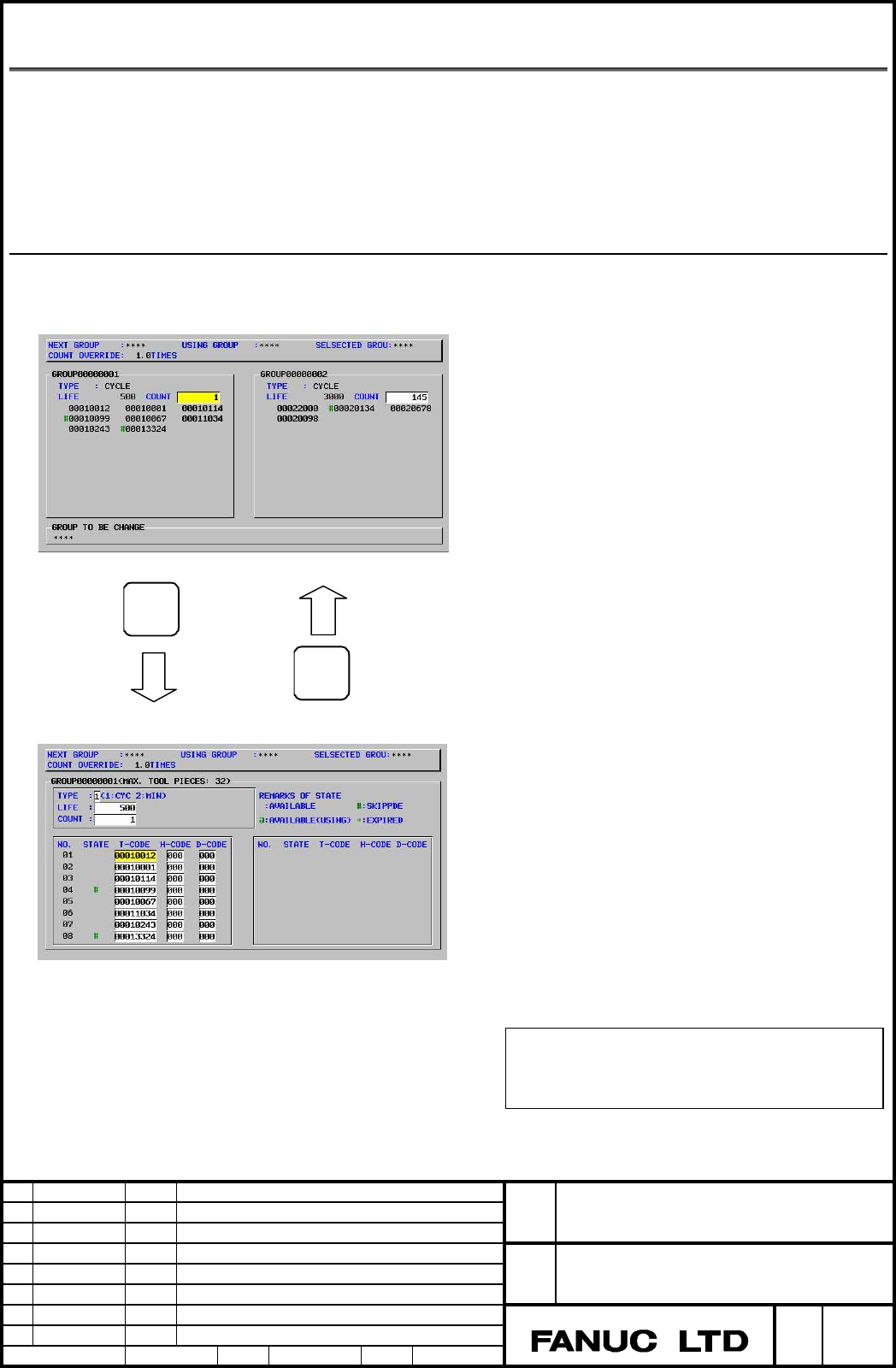
1.2 DISPLAYING AND SETTING TOOL LIFE MANAGEMENT DATA
Tool life management data can be displayed on the screen, and you can understand the
current tool life management status. In addition, tool life management data can be edited
on the screen. There are two types of screen as follows:
- Tool life management (list screen)
- Tool life management screen (group edit screen)
Overview
EDIT
END
Group edit screen
List screen
Tool life management (list screen)
Display items:
- Group to be used next
- Selected group
- Group number
- Life value
- Tool management status
- Group requiring tool change
Functions:
- Search for a group
- Clear execution data
・寿命カウンタの設定
Tool life management (group edit screen)
Display items:
- Group to be used next
- Selected group
- Maximum number of tools
- Life value
- T code
- T code and D code
Functions:
- Set tool data
- Set tool status
- Skip a tool
- Set life count type, life value, and life counter
To switch between the list screen and the group
edit screen, press the [EDIT] or [END] soft key.
Contents Summary of FANUC Series 30i/31i/32i-MODEL A Tool Life Management Specifications Additional Manual
- Page 1FANUC Series 30i/31i/32i-MODEL A Tool Life Management Specifications FANUC Series 30i/31i/32i−MODEL A Title Tool Life Management Specifications Draw A-79409E No. Edit Date Design Description page 1/67 Date Sep.10.’04 Desig. Apprv.
- Page 2CONTENTS 1.1 TOOL LIFE MANAGEMENT FUNCTION ........... 3 1.1.1 Tool Life Management Data ............... 5 1.1.2 Registering, Changing, and Deleting Tool Life Management Data ................... 9 1.1.3 Tool Life Management Commands in Machining Programs .. 17 1.1.4 Tool Life Counting and Tool Selec
- Page 31.1 TOOL LIFE MANAGEMENT FUNCTION Tools are classified into several groups, and a tool life (use count or use duration) is specified for each group in advance. Each time a tool is used, its life is counted, and when the tool life expires, a new tool that is sequenced next within the same group is se
- Page 4The T series has two tool change types (the turret type and the ATC type). The turret type uses only a T code to select a group, specify a tool offset value, and start tool life counting, whereas the ATC type, like the M series, uses a T code to select a group and an M06 command to start tool life c
- Page 5Multipath system (when tool life management is performed for three paths) Suppose that, of the total groups in the system (256 groups), 128 groups are allocated to path 1, 65 groups to path 2, and 64 groups to path 3. Then, set parameter No. 6813 as follows: Tool life management data file Parameter
- Page 6Table 1.1.1 (a) Maximum numbers of registerable groups and tools GS2 GS1 Number of groups Number of (No. 6800#1) (No. 6800#0) tools 0 0 1/8 of maximum number of groups 32 (parameter No. 6813) 0 1 1/4 of maximum number of groups 16 (parameter No. 6813) 1 0 1/2 of maximum number of groups 8 (parameter
- Page 7- Code specifying a tool offset value M Codes specifying a tool offset value include an H code (for tool length offset) and a D code (for cutter compensation). Numbers up to 999 (up to three digits long) can be registered as codes specifying tool offset values. However, the number of registered code
- Page 8used is selected by bit 3 (GRP) of parameter No. 6802). When a value set for each group is used (bit 3 (GRP) of parameter No. 6802 = 1), the value is registered as tool life management data. A value ranging from 1 to 100000 minutes (or 60000 minutes when the life is counted every 0.1 second) can be
- Page 91.1.2 Registering, Changing, and Deleting Tool Life Management Data By programming, tool life management data can be registered in the CNC, and registered tool life management data can be changed or deleted. Explanation The program format varies depending on the following four types of operation: -
- Page 10Format Registration after deletion of all groups M Format Meaning G10L3; G10L3: Register data after deleting data of all groups P-L-; P-: Group number T-H-D-; L-: Tool life value T-H-D-; T-: Tool number ・ H-: Code specifying tool offset value (H code) P-L-; D-: Code specifying tool offset value (D c
- Page 11When more than one offset value is used for the same tool within one process, specify the command as shown below. (When tool offset numbers are two digits long) Format Meaning G10L3; P-L-; T0101; Tool number 01, tool offset number 01 T0102; Tool number 01, tool offset number 02 T0103; Tool number 01
- Page 12M02(M30); 1) Code specifying tool offset value NOTE Even when the tool change type is the ATC type (bit 3 (TCT) of parameter No. 5040 = 1), the H code is not used. Deletion of tool life management data Format Meaning G10L3P2; G10L3P2: Start deleting group data P-; P-: Group number P-; G11: End of de
- Page 13Arbitrary group number M When the tool life management B function is enabled (bit 4 (LFB) of parameter No. 6805 = 1), and use of the function for specifying an arbitrary group number is set (bit 5 (TGN) of parameter No. 6802 = 1), an arbitrary group number can be registered by programming a command.
- Page 14Remaining life setting When the tool life management B function is enabled (bit 4 (LFB) of parameter No. 6805 = 1), and a remaining life value is to be set for each group (bit 3 (GRP) of parameter No. 6802 = 1), a remaining life value can be set as tool life management data by programming a command.
- Page 15Tool life value - When the life management B function is disabled When the tool life management B function is disabled (bit 4 (LFB) of parameter No. 6805 = 0), a tool life value is registered as a duration or a use count according to the setting of bit 2 (LTM) of parameter No. 6800 or the setting of
- Page 16- When the life management B function is enabled When the tool life management B function is disabled (bit 4 (LFB) of parameter No. 6805 = 1) Table 1.1.2 (c) Life count types and maximum life values LFB LTM Life count type Maximum life value (No.6805#4 ) (No.6800#2) 0 Use count specification 9999999
- Page 171.1.3 Tool Life Management Commands in Machining Programs Explanation M - Commands The following commands are used for tool life management: T○○○○○○○○; Specifies a tool group number. The tool life management function selects, from a specified group, a tool whose life has not expired, and outputs its
- Page 18Selects the H code registered in tool life management data for the currently used tool to perform tool length offset. An H code other than H99 can also be used to enable compensation by setting parameter No. 13265. H00; Cancels tool length offset. D99; Selects the D code registered in tool life mana
- Page 19- Types For tool life management, the four tool change types (types A to D) indicated below are used. The type used varies from one machine to another. For details, refer to the relevant manual of each machine tool builder. Table 1.1.3 Differences among tool change types Tool change type A B C D Par
- Page 20T When the tool change type is the ATC type (bit 3 (TCT) of parameter No. 5040 = 1), commands are specified in the same manner as for the M series except that H99 and H00 are not used for the T series. See the description for the M series. For details on the tool compensation types applied when the
- Page 21T○○○○○○88; The offset of the tool of which life is currently counted by tool life management is canceled. The tool offset code is set to 00, and the tool number is output as a T code signal. Example: Suppose that the tool number of the tool currently used by the life management function is 100. Then
- Page 22T○○○○○○△△; If the tool offset number in △△ is neither 99 nor 88, the T code is treated as an ordinary T code. If life counting is currently performed, it is ended. FANUC Series 30i/31i/32i−MODEL A Title Tool Life Management Specifications Draw A-79409E No. Edit Date Design Description page 22/67 Dat
- Page 23Examples M - Tool change type A When a block specifying a tool change command (M06) also contains a tool group command (T code), the T code is used as a command for return to a cartridge. By specifying a tool group number with a T code, the number of the tool used so far is output as a T code signal
- Page 24- Tool change types B and C When a block specifying a tool change command (M06) also contains a tool group command (T code), the T code is used to specify a tool group number for which life counting is to be performed by the next tool change command. Example: Suppose that the tool life management ig
- Page 25・ - Tool change type D For a tool selected by a tool group command (T code), life counting is performed by a tool change command (M06) specified in the same block as the tool group command. Specifying a T code alone does not results in an alarm; however, specifying an M06 command alone results in an
- Page 26T For the ATC type (bit 3 (TCT) of parameter No. 5040 = 1), commands are specified in the same manner as for the M series except that H99 is not used but D99 is used. For the ATC type, see the description for the M series. The following shows how commands are specified when the turret type is used (
- Page 271.1.4 Tool Life Counting and Tool Selection As the tool life count type, use count or duration is selected by setting bit 2 (LTM) of parameter No. 6800. Life counting is performed on a group-by-group basis, and the life counter contents are maintained after the power is turned off. Table 1.1.4 Tool
- Page 28of parameter No. 6805. The time required for single block stop, feed hold, rapid traverse, dwell, machine lock, and interlock operations is not counted. By setting bit 2 (LFV) of parameter No. 6801, the life count can be overridden using tool life count override signals. An override from 0 to 99.9 c
- Page 29M T NOTE 1 When a tool is selected, tools are searched starting from the current tool toward the last tool to find a tool whose life has not expired. When the last tool is reached during this search, the search restarts from the first tool. When it has been determined that there are no tools whose l
- Page 301.1.5 Tool Life Count Restart M Code Explanation M If the life count is specified by use count, the tool change signal is output if the life of at least one tool group has expired when a tool life count restart M code is specified. After the tool life count restart M code is specified, a tool group
- Page 31a tool whose life has not expired is selected from a specified group, and the tool life counter is incremented by one. This enables the tool life to be counted by a tool group command (T code) even when the command is not the first tool group command issued since the CNC enters the automatic operati
- Page 321.2 DISPLAYING AND SETTING TOOL LIFE MANAGEMENT DATA Tool life management data can be displayed on the screen, and you can understand the current tool life management status. In addition, tool life management data can be edited on the screen. There are two types of screen as follows: - Tool life man
- Page 33M When the tool life management B function is enabled (bit 4 (LFB) of parameter No. 6805 = 1), arbitrary groups and remaining life setting are displayed by setting the following parameters: - When bit 5 (TGN) of parameter No. 6802 = 1: Arbitrary groups are displayed on the list screen and the group
- Page 341.2.1 Tool Life Management (List Screen) On this screen, you can check the life management status of all tools in tool groups and a tool group whose life has expired. You can also set a tool life counter and clear execution data. 1.2.1.1 Displaying the list screen Display the list screen by followin
- Page 35NOTE When the arbitrary group number function is enabled, NEXT GROUP, USING GROUP, and SELECTED GROUP are indicated by arbitrary group numbers instead of tool group numbers. - Explanation of (B) The tool life setting, the current tool life counter value, and the registered tool numbers (in the order
- Page 36When the arbitrary group number function is enabled, an arbitrary group number is indicated in parentheses beside a tool group number. When no arbitrary group number is set, "********" is indicated. Fig. 1.2 (b) Display of an arbitrary group number Arbitrary group numbers are made usable by setting
- Page 371.2.1.2 Setting data on the list screen Tool life management data can be set in the reset state (when the OP signal is "0", and the RST signal is "0"). By setting bit 1 (TCI) of parameter No. 6804 to 1, tool life management data can be set during automatic operation (when the OP signal is "1"). NOTE
- Page 38- Selecting a tool group A tool group is selected. Procedure 1 (1) Type a tool group number. (2) Press the [NO.SRH] soft key. NOTE When the arbitrary group number function is enabled, a tool group is searched for using an arbitrary group number instead of a tool group number. Procedure 2 PAGE (1) Pr
- Page 391.2.2 Tool Life Management (Group Edit Screen) On the group edit screen, you can edit tool life management data (such as the tool life value, tool life counter, and tool data) in a group. 1.2.2.1 Displaying the group edit screen Follow the procedure below to display the group edit screen: (1) On the
- Page 40COUNT OVERRIDE: When the tool life count override signals are invalid (bit 2 (LFV) of parameter No. 6801 = 0), 1.0 is indicated. NOTE When the arbitrary group number function is enabled, NEXT GROUP, USING GROUP, and SELECTED GROUP are indicated by arbitrary group numbers instead of tool group number
- Page 41NOTE 1 The tool life counter shows the count value for the tool marked with "@". 2 If bit 3 (EMD) of parameter No. 6801 is set to 0, even when the life of a tool has expired, the mark "@" does not disappear for the tool until another tool is selected. 3 If bit 3 (EMD) of parameter No. 6801 is set to
- Page 42- OPTION GROUP: Arbitrary group number (When bit 5 (TGN) of parameter No. 6802 = 1) - RESET COUNT: Remaining life setting till a new tool is selected (When bit 3 (GRP) of parameter No. 6802 = 1) 1.2.2.2 Setting data on the group edit screen Tool life management data can be set in the reset state (th
- Page 43M T When there is no tool registered in a tool group, the life count type, tool life value, and tool life counter value cannot be set. First, add a tool number (T code). NOTE Editing for USING GROUP or NEXT GROUP <1> While automatic operation is in progress (when the OP signal is "1", and bit 1 (TCI
- Page 44- Setting the life count type, tool life value, tool life counter value, tool data, arbitrary group number, and remaining life value Setting the life count type, tool life value, tool life counter value, tool data, arbitrary group number, and remaining life value Procedure 1 (1) Position the cursor
- Page 45- RESET COUNT: A remaining life value until a new tool is selected can be set. (When bit 3 (GRP) of parameter No. 6802 = 1) - Adding a tool number A tool number is added to a tool group. (1) Select the MDI mode. (2) Move the cursor to the tool data (T, H, or D code) after which a new number is to be
- Page 46NOTE 1 Deleting all tools in a tool group is equivalent to deleting the tool group. 2 When a tool marked with "@" (being used) is deleted, the mark "@" shifts to the tool whose life has expired or has been skipped most recently. - Skipping a tool Tool data is skipped. (1) Select the MDI mode. (2) Mo
- Page 471.3 SIGNALS Tool change signal TLCH
- Page 48NOTE Set tool change reset signal TLRST from "0" to "1" when the control unit is not in the reset state (the RST signal is "1") and the following conditions are satisfied: 1) If bit 5 (TRS) of parameter No. 6805 = 0 Reset state (the OP signal set to "0") 2) If bit 5 (TRS) of parameter No. 6805 = 1 <
- Page 49Tool skip signal TLSKP
- Page 50- A new tool of a tool group specified with a tool group number by a T code command is selected because the life of the tool used so far in the group has expired. After the code signal for the new tool is sent, TLNW is set to "1" at the same time when tool function strobe signal TF is sent. The sign
- Page 51TL512 TL256 TL128 TL64 TL32 TL16 TL8 TL4 TL2 TL1 Tool group number 0 0 0 0 0 0 0 0 0 0 1 0 0 0 0 0 0 0 0 0 1 2 0 0 0 0 0 0 0 0 1 0 3 0 0 0 0 0 0 0 0 1 1 4 0 0 0 0 0 0 0 1 0 0 5 0 0 0 0 0 0 1 0 0 1 10 0 0 0 0 0 0 1 1 1 0 15 0 0 0 0 0 1 0 0 1 1 20 0 0 0 0 0 1 1 1 0 1 30 0 0 0 0 1 1 0 0 0 1 40 0 0 0 0
- Page 52Tool life count override signals *TLV0 to *TLV9
- Page 53Tool life arrival notice signal TLCHB
- Page 54[Function] These signals allow MDI panel operations that change memory contents. There are four signals, and target memory contents vary depending on the setting of bit 7 (KEY) of parameter No. 3290 as follows: When KEY is set to 0 KEY1: Allows input of a tool compensation value, workpiece origin of
- Page 55Signal address G0046 KEY4 KEY3 KEY2 KEY1 NOTE For a multipath system, the signal addresses are common to all paths. Gn047 TL128 TL64 TL32 TL16 TL08 TL04 TL02 TL01 Gn048 TLRST TLRSTI TLSKP TL512 TL256 Gn049 *TLV7 *TLV6 *TLV5 *TLV4 *TLV3 *TLV2 *TLV1 *TLV0 Gn050 *TLV9 *TLV8 #7 #6 #5 #4 #3 #2 #1 #0 Fn06
- Page 561.4 PARAMETERS #7 #6 #5 #4 #3 #2 #1 #0 6800 M6T IGI SNG GRS SIG LTM GS2 GS1 [Input type] Parameter input [Data type] Bit path #0 GS1 #1 GS2 For the maximum number of groups set in parameter No. 6813, up to four tools can be registered per group. The combination of the number of registerable groups a
- Page 57#3 SIG When a tool is skipped by a signal, the group number is: 0: Not input by the tool group number selection signals. 1: Input by the tool group number selection signals. NOTE When this parameter is set to 0, a tool of the currently used group is skipped. #4 GRS When the tool change reset signal
- Page 58#2 LVF When the life value is counted by duration in the tool management function or tool life management function, tool life count override signals *TLV0 to *TLV9
- Page 59#1 TCO #2 E17 Specifies whether to allow the FOCAS2 or PMC window function to write tool information of a group being used or a group to be used next during automatic operation (the OP signal is set to "1"). 6802#1(TCO) 1 Condition 0 6802#2(E17) 1 0 During Group being used or Tool being used × △ ○ a
- Page 60#4 ARL Tool life arrival notice signal TLCHB of tool life management is: 0: Output for each tool. 1: Output for the last tool of a group. This parameter is valid only when bit 3 (GRP) of parameter No. 6802 is set to 1. #5 TGN In the tool life management function, the optional group number function i
- Page 61#1 TCI During automatic operation (the OP signal is "1"), editing of tool life data is: 0: Disabled. 1: Enabled. NOTE When this parameter is set to 1, tool life data can be edited even during automatic operation (the OP signal is "1"). If the target group for editing is the group being used or the g
- Page 62#4 LFB The tool life management B function is: 0: Disabled. 1: Enabled. When the tool life management B function is enabled, the following functions can be used: <1> Tool life value extension (count specification: 99999999 times, duration specification: 100000 minutes) <2> Optional group number func
- Page 636810 Tool life management ignore number [Input type] Parameter input [Data type] 2-word path [Valid data range] 0 to 99999999 This parameter sets the tool life management ignore number. When the value specified in a T code exceeds the value set in this parameter, the value obtained by subtracting th
- Page 646813 Maximum number of groups in tool life management NOTE After this parameter has been set, the power must be turned off then back on for the setting to become effective. [Input type] Parameter input [Data type] Word path [Unit of data] Group [Valid data range] 0, 8, 16 to 256 This parameter sets
- Page 656845 Remaining tool life (use duration) [Input type] Parameter input [Data type] 2-word path [Unit of data] min [Valid data range] Not greater than the tool life value This parameter sets the remaining tool life (use duration) used to output the tool life arrival notice signal when the tool life is
- Page 66#7 KEY For the memory protection key: 0: The KEY1, KEY2, KEY3, and KEY4 signals are used. 1: Only the KEY1 signal is used. NOTE 1. The usage of the signals varies depending on whether KEY is set to 0 or 1 as follows: If KEY is set to 0 - KEY1: Allows input of a tool offset value, workpiece origin of
- Page 671.5 ALARMS AND MESSAGES No. Message Description PS0149 FORMAT ERROR IN G10L3 In tool life management data registration (G10L3 to G11), an address other than Q1, Q2, P1, and P2 or an illegal address is specified. PS0150 ILLEGAL LIFE GROUP NUMBER A tool group number exceeds the maximum allowable value