AC Servo Motor Alpha i/is Series, Maintenance manual Page 131
Maintenance manual
B-65285EN/03 TROUBLESHOOTING 3.TROUBLESHOOTING AND ACTION
- 101 -
3.3 SERVO SOFTWARE
If a servo alarm is issued, an alarm message is output, and details of the
alarm are also displayed on the servo adjustment screen or the
diagnosis screen. Using the alarm identification table given in this
section, determine the alarm, and take a proper action.
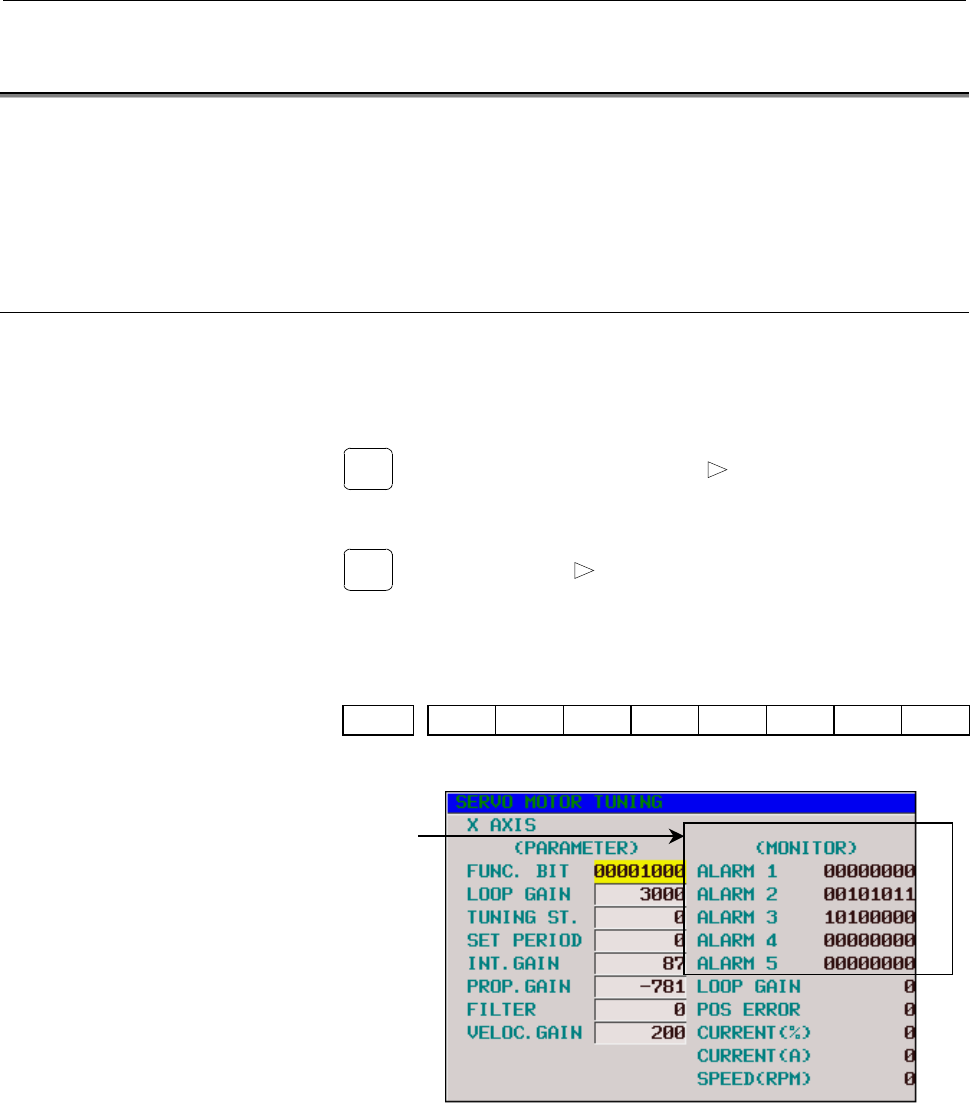
3.3.1 Servo Adjustment Screen
The following procedure can be used to display the servo adjustment
screen.
(The DPL/MDI of the Power Mate has no servo adjustment screen.)
l
ll
l Series 15i
SYSTEM
→
[CHAPTER]
→
[SERVO]
→
[ ]
→
[SERVO ALARM]
l
ll
l Series 16i, 18i, 20i, 21i, 0i
SYSTEM
→
[SYSTEM]
→
[ ]
→
[SV-PRM]
→
[SV-TUN]
If the servo setting screen does not appear, specify the following
parameter, then switch the CNC off and on again.
#7 #6 #5 #4 #3 #2 #1 #0
3111 SVS
SVS (#0)=1 (to display the servo setting screen)
Alarm detail
information
<1>
<2>
<3>
<4>
<5>
Fig. 3.3.1(a) Servo adjustment screen
Contents Summary of AC Servo Motor Alpha i/is Series, Maintenance manual
- Page 1FANUC AC SERVO MOTOR @*s series FANUC AC SERVO MOTOR @* series FANUC AC SPINDLE MOTOR @* series FANUC SERVO AMPLIF IER @* series MAINTENANCE MANUAL B-65285EN/03
- Page 2Ȧ No part of this manual may be reproduced in any form. Ȧ All specifications and designs are subject to change without notice. In this manual we have tried as much as possible to describe all the various matters. However, we cannot describe all the matters which must not be done, or which cannot be
- Page 3B-65285EN/03 SAFETY PRECAUTIONS SAFETY PRECAUTIONS The "Safety Precautions" section describes the safety precautions relating to the use of FANUC servo motors, spindle motors, and servo amplifiers (power supply modules, servo amplifier modules, and spindle amplifier modules). Users of any servo moto
- Page 4SAFETY PRECAUTIONS B-65285EN/03 1.1 DEFINITION OF WARNING, CAUTION, AND NOTE This manual includes safety precautions for protecting the user and preventing damage to the machine. Precautions are classified into Warning and Caution according to their bearing on safety. Also, supplementary information
- Page 5B-65285EN/03 SAFETY PRECAUTIONS 1.2 FANUC AC SERVO MOTOR αis/α αi series FANUC AC SPINDLE MOTOR αi series 1.2.1 Warning WARNING - Be safely dressed when handling a motor. Wear safety shoes or gloves when handling a motor as you may get hurt on any edge or protrusion on it or electric shocks. - Use a
- Page 6SAFETY PRECAUTIONS B-65285EN/03 WARNING - Do not supply the power to the motor while any terminal is exposed. A failure to observe this caution is very dangerous because you may get electric shocks if your body or any conductive stuff touches an exposed terminal. - Do not bring any dangerous stuff n
- Page 7B-65285EN/03 SAFETY PRECAUTIONS - Do not touch a regenerative discharge unit for a while (at least 30 minutes) after the power to the motor is shut off. A regenerative discharge unit may get hot when the motor is running. Do not touch the regenerative discharge unit before it gets cool enough. Other
- Page 8SAFETY PRECAUTIONS B-65285EN/03 1.2.2 Caution CAUTION - FANUC motors are designed for use with machines. Do not use them for any other purpose. If a FANUC motor is used for an unintended purpose, it may cause an unexpected symptom or trouble. If you want to use a motor for an unintended purpose, pre
- Page 9B-65285EN/03 SAFETY PRECAUTIONS 1.2.3 Note NOTE - Do not step or sit on a motor. If you step or sit on a motor, it may get deformed or broken. Do not put a motor on another unless they are in packages. - When storing a motor, put it in a dry (non-condensing) place at room temperature (0 to 40°°C). I
- Page 10SAFETY PRECAUTIONS B-65285EN/03 NOTE - Use a motor under an appropriate environmental condition. Using a motor in an adverse environment may cause a failure or trouble in it. Refer to their respective specification manuals for details of the operating and environmental conditions for motors. - Do no
- Page 11B-65285EN/03 SAFETY PRECAUTIONS 1.3 FANUC SERVO AMPLIFIER αi series 1.3.1 Warnings and Cautions Relating to Mounting 1.3.1.1 Warning WARNING - Check the specification code of the amplifier. Check that the delivered amplifier is as originally ordered. - Mount a ground fault interrupter. To guard agai
- Page 12SAFETY PRECAUTIONS B-65285EN/03 WARNING - Never touch the regenerative discharge resistor or radiator directly. The surface of the radiator and regenerative discharge unit become extremely hot. Never touch them directly. An appropriate structure should also be considered. - Close the amplifier cover
- Page 13B-65285EN/03 SAFETY PRECAUTIONS 1.3.1.2 Caution CAUTION - Do not step or sit on the amplifier. Also, do not stack unpacked amplifiers on top of each other. - Use the amplifier in an appropriate environment. See the allowable ambient temperatures and other requirements, given in the corresponding des
- Page 14SAFETY PRECAUTIONS B-65285EN/03 CAUTION - Check that the amplifier is securely mounted in the power magnetics cabinet. If any clearance is left between the power magnetics cabinet and the surface on which the amplifier is mounted, dust entering the gap may build up and prevent the normal operation o
- Page 15B-65285EN/03 SAFETY PRECAUTIONS 1.3.1.3 Note NOTE - Keep the nameplate clearly visible. - Keep the legend on the nameplate clearly visible. - After unpacking the amplifier, carefully check for any damage. - Mount the amplifier in a location where it can be easily accessed periodic inspection and dai
- Page 16SAFETY PRECAUTIONS B-65285EN/03 1.3.2 Warnings and Cautions Relating to a Pilot Run 1.3.2.1 Warning WARNING - Before turning on the power, check that the cables connected to the power magnetics cabinet and amplifier, as well as the power lines and power supply lines, are securely connected. Also, ch
- Page 17B-65285EN/03 SAFETY PRECAUTIONS - Before opening a door or protective cover of a machine to enable adjustment of the machine, first place the machine in the emergency stop state and check that the motor has stopped. s-15
- Page 18SAFETY PRECAUTIONS B-65285EN/03 1.3.2.2 Caution CAUTION - Note whether an alarm status relative to the amplifier is displayed at power-up or during operation. If an alarm is displayed, take appropriate action as explained in the maintenance manual. If the work to be done requires that the door of th
- Page 19B-65285EN/03 SAFETY PRECAUTIONS 1.3.3 Warnings and Cautions Relating to Maintenance 1.3.3.1 Warning WARNING - Read the maintenance manual carefully and ensure that you are totally familiar with its contents. The maintenance manual describes daily maintenance and the procedures to be followed in the
- Page 20SAFETY PRECAUTIONS B-65285EN/03 WARNING - Notes on replacing the battery of the absolute pulse coder Replace the battery only while the power is on. If the battery is replaced while the power is turned off, the stored absolute positioning data will be lost. Some series servo amplifier modules have b
- Page 21B-65285EN/03 SAFETY PRECAUTIONS 1.3.3.2 Caution CAUTION - Ensure that all required components are mounted. When replacing a component or PC board, check that all components, including the snubber capacitor, are correctly mounted. If the snubber capacitor is not mounted, for example, the IPM will be
- Page 22SAFETY PRECAUTIONS B-65285EN/03 1.3.3.3 Note NOTE - Ensure that the battery connector is correctly inserted. If the power is shut off while the battery connector is not connected correctly, the absolute position data for the machine will be lost. - Store the manuals in a safe place. The manuals shou
- Page 23B-65285EN/03 PREFACE PREFACE Organization of this manual This manual describes information necessary to maintain FANUC servo amplifier αi series products, such as a power supply module, servo amplifier module, and spindle amplifier module and FANUC servo motor αis/αi series and FANUC spindle motor α
- Page 24
- Page 25B-65285EN/03 TABLE OF CONTENTS TABLE OF CONTENTS SAFETY PRECAUTIONS .......................................................................... s-1 PREFACE.................................................................................................. p-1 I. START-UP PROCEDURE 1 OVERVIEW ..........
- Page 26TABLE OF CONTENTS B-65285EN/03 4.3.2.3 The motor does not turn. ....................................................................................33 4.3.2.4 A specified speed cannot be obtained. ...............................................................33 4.3.2.5 When cutting is not performed
- Page 27B-65285EN/03 TABLE OF CONTENTS 2.1.2 Spindle Alarm........................................................................................................ 79 2.2 FOR Series 16i, 18i, 20i, 21i, 0i, AND Power Mate i...................................81 2.2.1 Servo Alarm................................
- Page 28TABLE OF CONTENTS B-65285EN/03 3.3.6 Invalid Servo Parameter Setting Alarm............................................................... 106 3.3.7 Alarms Related to Pulsecoder and Separate Serial Detector............................... 107 3.3.8 Other Alarms ........................................
- Page 29B-65285EN/03 TABLE OF CONTENTS 3.4.34 Alarm Code 73..................................................................................................... 128 3.4.35 Alarm Code 74..................................................................................................... 128 3.4.36 Alarm Code
- Page 30TABLE OF CONTENTS B-65285EN/03 III. MOTOR MAINTENANCE 1 SERVO MOTOR MAINTENANCE......................................................149 1.1 RECEIVING AND KEEPING AC SERVO MOTORS .................................150 1.2 DAILY INSPECTION OF AC SERVO MOTORS .......................................151 1
- Page 31I. START-UP PROCEDUR
- Page 32
- Page 33B-65285EN/03 START-UP PROCEDURE 1.OVERVIEW 1 OVERVIEW This part describes the units and components of the FANUC servo amplifier αi series. It also explains the following information necessary to start up the control motor amplifier: • Configurations • Start-up procedure • Confirmation of the operati
- Page 342.CONFIGURATIONS START-UP PROCEDURE B-65285EN/03 2 CONFIGURATIONS -4-
- Page 35B-65285EN/03 START-UP PROCEDURE 2.CONFIGURATIONS 2.1 CONFIGURATIONS The FANUC servo amplifier αi series consists of the units and components listed below: (1) Power supply module (PSM) (basic) (2) Servo amplifier module (SVM) (basic) (3) Spindle amplifier module (SPM) (basic) (4) AC reactor (basic)
- Page 362.CONFIGURATIONS START-UP PROCEDURE B-65285EN/03 Constituent (example) Power supply Spindle amplifier Servo amplifier module module module PSM SPM SVM2 DC link (300V DC) Circuit 200R,200S breaker 2 1φ Circuit Magnetic AC reactor breaker 1 contactor 3φ 200 to 240VAC 3φ fan motor 3φ Lightning Lightnin
- Page 37B-65285EN/03 START-UP PROCEDURE 2.CONFIGURATIONS 2.2 MAJOR COMPONENTS 2.2.1 Power Supply Modules (1) Power supply modules (PSM, 200VAC-input, power regeneration type) Order Printed circuit board Model Unit specification Wiring board specification specification specification PSM-5.5i A06B-6110-H006 A
- Page 382.CONFIGURATIONS START-UP PROCEDURE B-65285EN/03 2.2.2 Servo Amplifier Modules (1) Single-axis servo amplifier modules (SVM1, 200VAC-input) Wiring board Printed circuit board Model Order specification Unit specification specification specification SVM1-20i A06B-6114-H103 A06B-6114-C103 A16B-2203-069
- Page 39B-65285EN/03 START-UP PROCEDURE 2.CONFIGURATIONS 2.2.3 Spindle Amplifier Modules The order specification varies according to the sensor (function) used. (1) αi series spindle amplifier modules (SPM, 200VAC-input) TYPE A Printed circuit board Model Order specification Unit specification Wiring board
- Page 402.CONFIGURATIONS START-UP PROCEDURE B-65285EN/03 TYPE B Printed circuit board Model Order specification Unit specification Wiring board specification specification SPM-5.5HVi A06B-6122-H006 A06B-6121-C006 A16B-2203-0820 A20B-2100-0801 SPM-11HVi A06B-6122-H011 A06B-6121-C011 A16B-2203-0821 A20B-2100-
- Page 41B-65285EN/03 START-UP PROCEDURE 3.START-UP PROCEDURE 3 START-UP PROCEDURE - 11 -
- Page 423.START-UP PROCEDURE START-UP PROCEDURE B-65285EN/03 3.1 START-UP PROCEDURE (OVERVIEW) Make sure that the specifications of the CNC, servo motors, servo amplifiers, and other units you received are exactly what you ordered, and these units are connected correctly. Then, turn on the power. (1) Before
- Page 43B-65285EN/03 START-UP PROCEDURE 3.START-UP PROCEDURE 3.2 CONNECTING THE POWER 3.2.1 Checking the Voltage and Capacity of the Power Before connecting the power, you should measure the AC power voltage. Table 3.2.1(a) Action for the AC power (200-V input type) AC power Nominal Action voltage voltage T
- Page 443.START-UP PROCEDURE START-UP PROCEDURE B-65285EN/03 3.2.2 Connecting a Protective Ground Refer to the items in Chapter 5, "Installation," in "FANUC SERVO AMPLIFIER αi series Descriptions" B-65282EN, and check that the protective ground line is connected correctly. 3.2.3 Selecting the Ground Fault I
- Page 45B-65285EN/03 START-UP PROCEDURE 3.START-UP PROCEDURE 3.3 INITIALIZING PARAMETERS (1) Servo amplifier module For the initialization of servo parameters, refer to the following manual: FANUC AC SERVO MOTOR αis/αi series Parameter Manual (B-65270EN) (2) Spindle amplifier module For the initialization o
- Page 464.CONFIRMATION OF THE OPERATION START-UP PROCEDURE B-65285EN/03 4 CONFIRMATION OF THE OPERATION - 16 -
- Page 47B-65285EN/03 START-UP PROCEDURE 4.CONFIRMATION OF THE OPERATION 4.1 POWER SUPPLY MODULE Check each item according to the procedure described below. 1. Supply control power (200 VAC) to the power supply module at the emergency stop state. 2. Check the STATUS LEDs. See Section 4.1.1. Alarm occurs. OK
- Page 484.CONFIRMATION OF THE OPERATION START-UP PROCEDURE B-65285EN/03 4.1.1 Checking the Status LEDs Position of the STATUS LEDs No. STATUS LEDs Description The STATUS display LED is off. Control power has not been supplied. 1 The control power circuit is defective. See Section 4.1.3. Not ready The main c
- Page 49B-65285EN/03 START-UP PROCEDURE 4.CONFIRMATION OF THE OPERATION 4.1.2 Check Terminal on the Printed-circuit Board The input current check signal is output to connector JX1B. To observe the output, use the servo check pin board A06B-6071-K290 (see below). Table 4.1.2(a) Check pins Check Location of D
- Page 504.CONFIRMATION OF THE OPERATION START-UP PROCEDURE B-65285EN/03 About the servo check pin board A06B-6071-K290 The servo check pin board can be used to observe signals in the PSM. (1) Specification Order specification Description Remark Printed-circuit board Printed-circuit board with A20B-1005-0340
- Page 51B-65285EN/03 START-UP PROCEDURE 4.CONFIRMATION OF THE OPERATION 4.1.3 The PIL LED (Power ON Indicator) Is Off. Table 4.1.3 Check method and action No. Cause of trouble Check method Action AC power for the Check that power is 1 control circuit not connected to connector supplied CX1A. (1) If the AC p
- Page 524.CONFIRMATION OF THE OPERATION START-UP PROCEDURE B-65285EN/03 4.1.4 Checking Method when Magnetic Contactor Is not Switched On (1) The system is still in an emergency stop status. → Check the connection. (2) There is a connector problem. (a) Check that the connectors are attached to correct locati
- Page 53B-65285EN/03 START-UP PROCEDURE 4.CONFIRMATION OF THE OPERATION 4.2 SERVO AMPLIFIER MODULE Check each item according to the procedure described below. 1. Check the connection, and supply control power (200 VAC) to the power supply module. 2. Check the STATUS LEDs. See Section 4.2.1. Alarm occurs. Se
- Page 544.CONFIRMATION OF THE OPERATION START-UP PROCEDURE B-65285EN/03 4.2.1 Checking the STATUS Display The STATUS display (a 7-segment LED) on the front of the SVM indicates the operation status. Position of the STATUS LEDs STATUS display Description • The STATUS display LED is not on. <1> Power is not t
- Page 55B-65285EN/03 START-UP PROCEDURE 4.CONFIRMATION OF THE OPERATION 4.2.2 VRDY-OFF Alarm Indicated on the CNC Screen When the VRDY-OFF alarm is indicated on the CNC, check the items listed below. In addition, VRDY-OFF can occur also for reasons other than listed below. If the following items turn out to
- Page 564.CONFIRMATION OF THE OPERATION START-UP PROCEDURE B-65285EN/03 4.2.3 Method for Observing Motor Current This subsection explains how to observe the current that flows through the servo motor. Method of using the SERVO GUIDE Refer to online help for explanations about how to connect to and use the s
- Page 57B-65285EN/03 START-UP PROCEDURE 4.CONFIRMATION OF THE OPERATION Method of using the servo check board For details on how to connect and use the servo check board, refer to the following: Section 4.18 in the FANUC AC SERVO MOTOR αis/αi series Parameter Manual (B-65270EN) - Required units - Servo chec
- Page 584.CONFIRMATION OF THE OPERATION START-UP PROCEDURE B-65285EN/03 Setting the output period of motor current data (for the 90B0 series only) Parameter No. 1746 / Output period Bit 7 of parameter No. 2206 Velocity loop period 0 (default) Current loop period 1 (Note 3) NOTE 3 If the current loop period
- Page 59B-65285EN/03 START-UP PROCEDURE 4.CONFIRMATION OF THE OPERATION 4.3 SPINDLE AMPLIFIER MODULE Check each item according to the procedure described below. 1. Supply control power (200 VAC) to the power supply module, and turn on the power to the CNC. 2. Check the STATUS display. See Subsection 4.3.1.
- Page 604.CONFIRMATION OF THE OPERATION START-UP PROCEDURE B-65285EN/03 4.3.1 STATUS Display STATUS ALM ERR No. ALM ERR STATUS Description The control power supply has not been No switched on. 1 indication The power supply circuit is defective. See Section 3.1.2. For about 1.0 s after the control power supp
- Page 61B-65285EN/03 START-UP PROCEDURE 4.CONFIRMATION OF THE OPERATION 4.3.2 Troubleshooting at Startup 4.3.2.1 The PIL LED (power-on indicator) is off. (1) When the PIL LED on the spindle amplifier module does not come on after the main circuit breaker is turned on No. Cause of trouble Check method Action
- Page 624.CONFIRMATION OF THE OPERATION START-UP PROCEDURE B-65285EN/03 4.3.2.2 The STATUS display is blinking with "--." (1) When no spindle communication alarm message is indicated on the CNC Check whether the CNC software option setting or bit setting is correct. (2) When a communication alarm message is
- Page 63B-65285EN/03 START-UP PROCEDURE 4.CONFIRMATION OF THE OPERATION 4.3.2.3 The motor does not turn. (1) When "--" is indicated on the STATUS display of the SPM Check whether spindle control signals are input. (An example for the first spindle is shown below.) FS15i FS16i #7 #6 #5 #4 #3 #2 #1 #0 G227 G0
- Page 644.CONFIRMATION OF THE OPERATION START-UP PROCEDURE B-65285EN/03 4.3.2.5 When cutting is not performed, the spindle vibrates, making noise. (1) The spindle vibrates only when the spindle speed has reached or is at a particular speed level. Check whether the spindle also vibrates when the motor is tur
- Page 65B-65285EN/03 START-UP PROCEDURE 4.CONFIRMATION OF THE OPERATION 4.3.2.7 Cutting power weakens or acceleration/deceleration slows down. (1) When the load meter does not indicate the maximum output A. A mechanical cause such as a belt slip may occur. (2) When the load meter indicates the maximum outpu
- Page 664.CONFIRMATION OF THE OPERATION START-UP PROCEDURE B-65285EN/03 4.3.3 Status Error Indication Function When there is a sequence or parameter error, the error LED (yellow) in the display section of the spindle amplifier module (SPM) goes on with an error code displayed. This can ease troubleshooting
- Page 67B-65285EN/03 START-UP PROCEDURE 4.CONFIRMATION OF THE OPERATION No. Description Action Although Cs contour control mode is input, neither SFR (forward rotation 07 Check the sequence. signal) nor SRV (reverse rotation signal) is input. Although servo mode (rigid tapping or spindle positioning) contro
- Page 684.CONFIRMATION OF THE OPERATION START-UP PROCEDURE B-65285EN/03 No. Description Action Although parameter settings are such that that there is no position sensor (position control is not to be performed, that is, "bits 3, 2, 1, and 0 Check the setting of the 18 of parameter No. 4002 are, parameter a
- Page 69B-65285EN/03 START-UP PROCEDURE 4.CONFIRMATION OF THE OPERATION 4.3.4 Checking the Feedback Signal Waveform The measurement locations and the method for attaching connectors vary depending on the configuration of the detector. Check the waveform while seeing Table 4.3.4. The check terminals are on t
- Page 704.CONFIRMATION OF THE OPERATION START-UP PROCEDURE B-65285EN/03 4.3.4.1 Mi, MZi, and BZi sensors Measurement Measurement Sample waveform location condition PA1, PB1 The speed must be -1 Waveforms of phase 1500 min or less. A and phase B PA1 (PA2) Vpp Separate sensors PA2, PB2 Rotation direction: CW
- Page 71B-65285EN/03 START-UP PROCEDURE 4.CONFIRMATION OF THE OPERATION 4.3.4.2 α position coder S Measurement Measurement Sample waveform location condition PA2, PB2 CW rotation direction as Waveforms of phase viewed from the flange A and phase B PA1 (PA2) Vpp Vphase Voffs PB1 (PB2) 0V Waveform of phase Z
- Page 724.CONFIRMATION OF THE OPERATION START-UP PROCEDURE B-65285EN/03 4.3.5 Spindle Check Board When connecting the check board, you can: <1> Observe signal waveforms. <2> Observe internal data. <3> Check spindle parameter values. 4.3.5.1 Spindle check board specifications Spindle check board specificatio
- Page 73B-65285EN/03 START-UP PROCEDURE 4.CONFIRMATION OF THE OPERATION (2) αCi series SPMC JY1 Spindle JY1A JX4A check board A20B-2001-0830 JY1B JX4B Output equivalent to JY1 - 43 -
- Page 744.CONFIRMATION OF THE OPERATION START-UP PROCEDURE B-65285EN/03 4.3.5.3 Check terminal output signals (1) αi series Check terminal Signal name Check terminal Signal name LM Load meter signal PA1 Phase A sine wave signal 1 SM Speedometer signal PB1 Phase B sine wave signal 1 Analog output for interna
- Page 75B-65285EN/03 START-UP PROCEDURE 4.CONFIRMATION OF THE OPERATION Check terminal arrangement PIL LM CH1 Display LSA2 LSA1 SM CH1D EXTSC2 EXTSC1 VRM CH2 PAD CH2D 0V 0V PBD PA3 PA2 Operation PA1 PSD buttons PB3 PB2 PB1 5V MODE UP PA4 PS2 PS1 15V DATA PB4 SET DOWN 0V 0V -15V OVR2 - 45 -
- Page 764.CONFIRMATION OF THE OPERATION START-UP PROCEDURE B-65285EN/03 4.3.6 Observing Data Using the Spindle Check Board 4.3.6.1 Overview By using the check board, you can convert digital signals used for control in the spindle amplifier module to analog voltage, and observe the conversion result with an
- Page 77B-65285EN/03 START-UP PROCEDURE 4.CONFIRMATION OF THE OPERATION 4.3.6.4 Specifying data to be monitored <1> Press the four setting switches at the same time for at least a second ."FFFFF" will be displayed on the indicator. <2> Turn off the switches and press the "MODE" switch. "d-00" will be displa
- Page 784.CONFIRMATION OF THE OPERATION START-UP PROCEDURE B-65285EN/03 4.3.6.5 Address descriptions and initial values (SPM) [Output to the indicator] Address Description Initial value d-01 Specifies a data number. 0 d-02 Shift at data output (0 to 31 bits) 0 Data shift direction d-03 0 : Data is shifted r
- Page 79B-65285EN/03 START-UP PROCEDURE 4.CONFIRMATION OF THE OPERATION 4.3.6.6 Principles in outputting the internal data of the serial spindle The length of data is 32 bits (BIT31 TO BIT00) unless it is described as 16 bits. BIT31 …… BIT03 BIT02 BIT01 BIT00 (1) Example of output to the indicator Example1
- Page 804.CONFIRMATION OF THE OPERATION START-UP PROCEDURE B-65285EN/03 Example4 Shifting data right When the number of digits to shift data (d-02)=5, shift direction is right (d-03=0), and display format (d-04)=0 (decimal notation): Data in BIT20 to BIT05 is converted into decimal (0 to 65535 max.) and dis
- Page 81B-65285EN/03 START-UP PROCEDURE 4.CONFIRMATION OF THE OPERATION (2) Example of output to the channel 1 Internal data is output to channel 1 by setting it in an 8-bit D/A convertor. The D/A converter output ranges from -5 to +5 V, depending on a set value of internal data. See the table below. Intern
- Page 824.CONFIRMATION OF THE OPERATION START-UP PROCEDURE B-65285EN/03 Example4 Shifting data right when the data length is 16 bits When the data length is 16 bits, data shift (d-06)=10, shift direction is right (d-07=0), and no offset is provided (d-08=0): The first two bits of data (=0) and data in BIT15
- Page 83B-65285EN/03 START-UP PROCEDURE 4.CONFIRMATION OF THE OPERATION 4.3.6.7 Data numbers (1) Data numbers Data Data Description Remarks No. length Main data The 12th bit (BIT12) indicates a units 16 Motor speed command 32 -1 in min . The 12th bit (BIT12) indicates a units -1 19 Motor speed 32 in min . (
- Page 844.CONFIRMATION OF THE OPERATION START-UP PROCEDURE B-65285EN/03 (2) Internal data conversion Description (All are voltage values on check pins Data No. Signal name when the shift amount is 8.) 218 IU Phase U current The current is positive when it is 219 IV Phase V current input to the amplifier. (*
- Page 85B-65285EN/03 START-UP PROCEDURE 4.CONFIRMATION OF THE OPERATION (c) Data number 12 : Spindle status signal 1 #15 #14 #13 #12 #11 #10 #9 #8 RCFN RCHP CFIN CHP #7 #6 #5 #4 #3 #2 #1 #0 ORAR TLM LDT2 LDT1 SAR SDT SST ALM (d) Data number 182 : Spindle status signal 2 #15 #14 #13 #12 #11 #10 #9 #8 #7 #6 #
- Page 864.CONFIRMATION OF THE OPERATION START-UP PROCEDURE B-65285EN/03 4.3.6.8 Example of observing data (1) Example of observing a positioning error using the channel 1 Address Description Set Data d-05 Data number 9 9 9 9 d-06 Data shift 0 1 1 2 d-07 Data shift direction 0 1 1 1 d-08 Offset 1 1 1 1 Data
- Page 87B-65285EN/03 START-UP PROCEDURE 4.CONFIRMATION OF THE OPERATION 4.3.7 Checking Parameters Using the Spindle Check Board 4.3.7.1 Overview By using the check board, you can check parameter values transferred to the spindle amplifier module. Specify parameter numbers using the four setting switches on
- Page 884.CONFIRMATION OF THE OPERATION START-UP PROCEDURE B-65285EN/03 4.3.8 Observing Data Using the SERVO GUIDE 4.3.8.1 Overview Using the servo adjustment tool, SERVO GUIDE, enables you to observe internal data for the spindle. This subsection describes the spindle data that can be observed using the SE
- Page 89B-65285EN/03 START-UP PROCEDURE 4.CONFIRMATION OF THE OPERATION 4.3.8.4 About the spindle control and spindle status signals As stated in the previous item, the SERVO GUIDE can be used to observe the PMC signals (spindle control signals 1 and 2 and spindle status signals 1 and 2) used by the spindle
- Page 904.CONFIRMATION OF THE OPERATION START-UP PROCEDURE B-65285EN/03 4.3.8.5 Example of observing data The following figure shows an example of data (synchronization error and motor speed at rigid tapping) observed using the SERVO GUIDE. DRAW1 : SYNC DRAW2 : SPEED DRAW1 : SYNC (synchronization error) *1
- Page 91B-65285EN/03 START-UP PROCEDURE 5.PERIODIC MAINTENANCE OF SERVO AMPLIFIER 5 PERIODIC MAINTENANCE OF SERVO AMPLIFIER - 61 -
- Page 925.PERIODIC MAINTENANCE OF SERVO AMPLIFIER START-UP PROCEDURE B-65285EN/03 5.1 BATTERY FOR THE ABSOLUTE PULSECODER The battery unit for the absolute Pulsecoder can be connected using [Connection scheme 1] and [Connection scheme 2] explained below. Refer to Subsection 9.3.2.6, "Battery" in "FANUC SERV
- Page 93B-65285EN/03 START-UP PROCEDURE 5.PERIODIC MAINTENANCE OF SERVO AMPLIFIER WARNING 1 Do not connect more than one battery to the same BATL (B3) line. If the output voltage is different between the batteries, they may be short-circuited, resulting in the batteries becoming very hot. 2 Install the batt
- Page 945.PERIODIC MAINTENANCE OF SERVO AMPLIFIER START-UP PROCEDURE B-65285EN/03 [Connection scheme 2] Incorporating each SVM with batteries SVM SVM Battery case Battery case A06B-6114-K500 A06B-6114-K500 Battery Battery A06B-6073-K001 A06B-6073-K001 CX5X CX5X - If a low battery voltage or a battery voltag
- Page 95B-65285EN/03 START-UP PROCEDURE 5.PERIODIC MAINTENANCE OF SERVO AMPLIFIER WARNING 1 When using the built-in batteries (A06B-6073- K001), do not connect them to the BATL (B3) of connector CXA2A/CXA2B. The output voltages from different SVM batteries may be short-circuited, resulting in the batteries
- Page 965.PERIODIC MAINTENANCE OF SERVO AMPLIFIER START-UP PROCEDURE B-65285EN/03 [Caution No. 1 for battery replacement] The Pulsecoder for the α series servo motor is not incorporated with a backup capacitor as standard. To keep the absolute position information in the absolute Pulsecoder, you need to kee
- Page 97B-65285EN/03 START-UP PROCEDURE 5.PERIODIC MAINTENANCE OF SERVO AMPLIFIER [Caution No. 2 for battery replacement] If an excessive strain is applied to a connector when it is inserted or removed, a poor contact may result. When inserting and removing the battery connector, therefore, be careful not t
- Page 985.PERIODIC MAINTENANCE OF SERVO AMPLIFIER START-UP PROCEDURE B-65285EN/03 (2) Detaching the connector <1> Hold both the sides of the cable insulator and the cable, and pull them horizontally. <2> Pull out the cable side while raising it slightly. 10 degrees or less <3> Here, the angle of the cable t
- Page 99B-65285EN/03 START-UP PROCEDURE 5.PERIODIC MAINTENANCE OF SERVO AMPLIFIER 5.2 PERIODIC MAINTENANCE OF SERVO AMPLIFIER To use the servo amplifier for a long time and keep its high performance and reliability, you should perform maintenance and inspection on it routinely. Inspection Inspection Inspect
- Page 1005.PERIODIC MAINTENANCE OF SERVO AMPLIFIER START-UP PROCEDURE B-65285EN/03 Specification number of fan unit - PSM Fan for circulating the inside air Fan for cooling external heat sink fins PSM name Fan unit (*1) Fan motor Fan unit (*1) Fan motor PSM-5.5i - A90L-0001-0441/39 - - PSM-11i PSM-15i - A90L
- Page 101B-65285EN/03 START-UP PROCEDURE 5.PERIODIC MAINTENANCE OF SERVO AMPLIFIER (3) 3-axis (SVM3) Fan for circulating the inside air Fan for cooling internal heat sink fins SVM name Fan unit (*1) Fan motor Fan unit Fan motor SVM3-4/4/4i A06B-6110-C605 A90L-0001-0510 - - SVM3-20/20/20i A06B-6110-C605 A90L-
- Page 1025.PERIODIC MAINTENANCE OF SERVO AMPLIFIER START-UP PROCEDURE B-65285EN/03 - SPM Fan for circulating the inside air Fan for cooling external heat sink fins SPM name Fan unit (*1) Fan motor Fan unit (*1) Fan motor SPM-2.2i A06B-6110-C605 A90L-0001-0510 - - SPM-5.5i A06B-6110-C605 A90L-0001-0510 A06B-6
- Page 103II. TROUBLESHOOTIN
- Page 104
- Page 105B-65285EN/03 TROUBLESHOOTING 1.OVERVIEW 1 OVERVIEW This part describes the troubleshooting procedure for each module. Read the section related to your current trouble to locate it and take an appropriate action. First, check the alarm number and STATUS display indicated on your module with each list
- Page 1062.ALARM NUMBERS AND BRIEF DESCRIPTIONS TROUBLESHOOTING B-65285EN/03 2 ALARM NUMBERS AND BRIEF DESCRIPTIONS - 76 -
- Page 107B-65285EN/03 TROUBLESHOOTING 2.ALARM NUMBERS AND BRIEF DESCRIPTIONS 2.1 FOR Series 15i 2.1.1 Servo Alarm Alarm No. SVM PSM Description Remarks SV0027 Invalid digital servo parameter setting 3.3.6 SV0361 Pulsecoder phase error (built-in) 3.3.7 (1) SV0364 Soft phase alarm (built-in) 3.3.7 (1) SV0365 L
- Page 1082.ALARM NUMBERS AND BRIEF DESCRIPTIONS TROUBLESHOOTING B-65285EN/03 Alarm No. SVM PSM Description Remarks SV0603 8. Inverter: IPM alarm (OH) (L axis) 3.2 SV0603 9. Inverter: IPM alarm (OH) (M axis) 3.2 SV0603 A. Inverter: IPM alarm (OH) (N axis) 3.2 SV0604 P Communication error between amplifier and
- Page 109B-65285EN/03 TROUBLESHOOTING 2.ALARM NUMBERS AND BRIEF DESCRIPTIONS 2.1.2 Spindle Alarm Alarm No. SPM PSM Description Remarks SP0001 01 Motor overheat 3.4.1 SP0002 02 Excessive speed deviation 3.4.2 SP0003 03 DC link fuse blown 3.4.3 SP0004 04 E Open phase in the converter main power supply 3.1.10 S
- Page 1102.ALARM NUMBERS AND BRIEF DESCRIPTIONS TROUBLESHOOTING B-65285EN/03 Alarm No. SPM PSM Description Remarks SP0075 75 CRC test alarm 3.4.36 SP0076 76 Safety function not executed 3.4.37 SP0077 77 Axis number mismatch 3.4.38 SP0078 78 Safety parameter mismatch 3.4.39 SP0079 79 Abnormal initial test ope
- Page 111B-65285EN/03 TROUBLESHOOTING 2.ALARM NUMBERS AND BRIEF DESCRIPTIONS 2.2 FOR Series 16i, 18i, 20i, 21i, 0i, AND Power Mate i 2.2.1 Servo Alarm Alarm No. SVM PSM Description Remarks 361 Pulsecoder phase error (built-in) 3.3.7 (1) 364 Soft phase alarm (built-in) 3.3.7 (1) 365 LED error (built-in) 3.3.7
- Page 1122.ALARM NUMBERS AND BRIEF DESCRIPTIONS TROUBLESHOOTING B-65285EN/03 Alarm No. SVM PSM Description Remarks 602 6 Inverter: overheat 3.2 603 8. Inverter: IPM alarm (OH) (L axis) 3.2 603 9. Inverter: IPM alarm (OH) (M axis) 3.2 603 A. Inverter: IPM alarm (OH) (N axis) 3.2 Communication error between am
- Page 113B-65285EN/03 TROUBLESHOOTING 2.ALARM NUMBERS AND BRIEF DESCRIPTIONS 2.2.2 Spindle Alarm Alarm No. SPM PSM Description Remarks 9001 7n01 01 Motor overheat 3.4.1 9002 7n02 02 Excessive speed deviation 3.4.2 9003 7n03 03 DC link fuse blown 3.4.3 9004 7n04 04 E Open phase in the converter main power sup
- Page 1142.ALARM NUMBERS AND BRIEF DESCRIPTIONS TROUBLESHOOTING B-65285EN/03 Alarm No. SPM PSM Description Remarks 9075 7n75 75 CRC test alarm 3.4.36 9076 7n76 76 Safety function not executed 3.4.37 9077 7n77 77 Axis number mismatch 3.4.38 9078 7n78 78 Safety parameter mismatch 3.4.39 9079 7n79 79 Abnormal i
- Page 115B-65285EN/03 TROUBLESHOOTING 3.TROUBLESHOOTING AND ACTION 3 TROUBLESHOOTING AND ACTION - 85 -
- Page 1163.TROUBLESHOOTING AND ACTION TROUBLESHOOTING B-65285EN/03 3.1 POWER SUPPLY MODULE (PSM, PSMR) If an alarm occurs, in the STATUS display, the ALM LED lights red, and the one-digit 7-segment display indicates an alarm code or warning code. The meaning of each warning code is the same as that of the co
- Page 117B-65285EN/03 TROUBLESHOOTING 3.TROUBLESHOOTING AND ACTION 3.1.2 Alarm Code 2 (PSM, PSMR) (1) Meaning A cooling fan for the control circuit has stopped. (2) Cause and troubleshooting (a) Cooling fan broken Check whether the cooling fan rotates normally. → Replace it. 3.1.3 Alarm Code 3 (PSM) (1) Mean
- Page 1183.TROUBLESHOOTING AND ACTION TROUBLESHOOTING B-65285EN/03 3.1.5 Alarm Code 5 (PSM, PSMR) (1) Meaning The main circuit capacitor was not recharged within the specified time. (2) Cause and troubleshooting (a) Too many SVM and/or SPM units are connected. → Check the specification of the PSM. (b) The DC
- Page 119B-65285EN/03 TROUBLESHOOTING 3.TROUBLESHOOTING AND ACTION 3.1.8 Alarm Code 8 (PSMR) (1) Meaning There is excessive short-term regenerative power. (2) Cause and troubleshooting (a) Insufficient regenerative resistance → Review the specification of the regenerative resistance. (b) Regenerative circuit
- Page 1203.TROUBLESHOOTING AND ACTION TROUBLESHOOTING B-65285EN/03 3.1.11 Alarm Code H (PSMR) (1) Meaning The temperature of the regenerative resistor has arisen abnormally. (2) Cause and troubleshooting (a) Regenerative resistance not detected → Check the wiring for the regenerative resistance. (b) Insuffic
- Page 121B-65285EN/03 TROUBLESHOOTING 3.TROUBLESHOOTING AND ACTION 3.2 SERVO AMPLIFIER MODULE The following table lists alarms related to the servo amplifier. See this table while comparing the CNC alarm codes presented in Chapter 2, "Alarm Numbers and Brief Description" with the LED displays of the SVM. LED
- Page 1223.TROUBLESHOOTING AND ACTION TROUBLESHOOTING B-65285EN/03 LED Alarm Major cause Reference display Inverter: FSSB communication error - Connector or cable (COP10A) failure L 3.2.13 (COP10A) - SVM failure - 92 -
- Page 123B-65285EN/03 TROUBLESHOOTING 3.TROUBLESHOOTING AND ACTION 3.2.1 Alarm Code 1 (1) Meaning Inverter: internal cooling fan stopped (2) Cause and troubleshooting (a) Check whether there is any foreign material in the fan. (b) Be sure to push the faceplate (control printed-circuit board) as far as it wil
- Page 1243.TROUBLESHOOTING AND ACTION TROUBLESHOOTING B-65285EN/03 3.2.4 Alarm Code 6 (1) Meaning Inverter: overheat (2) Cause and troubleshooting (a) Check that the motor is being used at or below its continuous rating. (b) Check that the cooling capacity of the cabinet is sufficient (inspect the fans and f
- Page 125B-65285EN/03 TROUBLESHOOTING 3.TROUBLESHOOTING AND ACTION 3.2.7 Alarm Code 8 (1) Meaning Inverter: DC link current alarm (2) Cause and troubleshooting (a) Disconnect the motor power leads from the SVM, and release the SVM from an emergency stop condition. <1> If no abnormal DC link current alarm con
- Page 1263.TROUBLESHOOTING AND ACTION TROUBLESHOOTING B-65285EN/03 3.2.8 Alarm Codes 8., 9., and A. (1) Meaning Inverter: IPM alarm (2) Cause and troubleshooting (a) Be sure to push the faceplate (control printed-circuit board) as far as it will go. (b) Disconnect the motor power leads from the SVM, and rele
- Page 127B-65285EN/03 TROUBLESHOOTING 3.TROUBLESHOOTING AND ACTION 3.2.10 Alarm Codes b, c, and d (1) Meaning Inverter: DC link current alarm (2) Cause and troubleshooting (a) Checking the servo parameters Referring to "FANUC AC SERVO MOTOR αis/αi series Parameter Manual (B-65270EN)," check whether the follo
- Page 1283.TROUBLESHOOTING AND ACTION TROUBLESHOOTING B-65285EN/03 3.2.11 Alarm Code "-" Blinking (1) Meaning Inverter: abnormal control power supply (2) Cause and troubleshooting (a) Disconnect the feedback cable (JF*) from the SVM, and then switch on the power. <1> If blinking continues → Replace the SVM.
- Page 129B-65285EN/03 TROUBLESHOOTING 3.TROUBLESHOOTING AND ACTION 3.2.12 Alarm Code U (1) Meaning Inverter: FSSB communication error (COP10B) (NOTE) (2) Cause and troubleshooting (a) Replace the SVM optical cable (COP10B) that is nearest to the CNC on which "U" is displayed (in Fig. 3.2.12, the cable betwee
- Page 1303.TROUBLESHOOTING AND ACTION TROUBLESHOOTING B-65285EN/03 3.2.13 Alarm Code L (1) Meaning Inverter: FSSB communication error (COP10A) (2) Cause and troubleshooting (a) Replace the SVM optical cable (COP10A) that is farthest to the CNC on which "L" is displayed (in Fig. 3.2.13, the cable between UNIT
- Page 131B-65285EN/03 TROUBLESHOOTING 3.TROUBLESHOOTING AND ACTION 3.3 SERVO SOFTWARE If a servo alarm is issued, an alarm message is output, and details of the alarm are also displayed on the servo adjustment screen or the diagnosis screen. Using the alarm identification table given in this section, determi
- Page 1323.TROUBLESHOOTING AND ACTION TROUBLESHOOTING B-65285EN/03 Alarm detail information <1> <6> <2> <7> <3> <8> <4> <9> <5> Fig. 3.3.1(b) Series 15i servo alarm screen The table below indicates the names of the alarm bits. Table 3.3.1 List of alarm bit names #7 #6 #5 #4 #3 #2 #1 #0 <1> Alarm 1 OVL LVA OV
- Page 133B-65285EN/03 TROUBLESHOOTING 3.TROUBLESHOOTING AND ACTION 3.3.2 Diagnosis Screen The alarm items of the servo adjustment screen correspond to the diagnosis screen numbers indicated in the table below. Table 3.3.2 Correspondence between the servo adjustment screen and diagnosis screen Alarm No. Serie
- Page 1343.TROUBLESHOOTING AND ACTION TROUBLESHOOTING B-65285EN/03 3.3.3 Overload Alarm (Soft Thermal, OVC) (Alarm identification method) #7 #6 #5 #4 #3 #2 #1 #0 <1> Alarm 1 OVL LVA OVC HCA HVA DCA FBA OFA (Action) (1) Make sure that the motor is not vibrating. Þ If a motor vibrates, the current flowing in i
- Page 135B-65285EN/03 TROUBLESHOOTING 3.TROUBLESHOOTING AND ACTION 3.3.4 Feedback Disconnected Alarm (Alarm identification method) #7 #6 #5 #4 #3 #2 #1 #0 <1> Alarm 1 OVL LVA OVC HCA HVA DCA FBA OFA <2> Alarm 2 ALD EXP <6> Alarm 6 SFA FBA ALD EXP SFA Alarm description Action 1 1 1 0 Hard disconnection (separ
- Page 1363.TROUBLESHOOTING AND ACTION TROUBLESHOOTING B-65285EN/03 3.3.5 Overheat Alarm (Alarm identification method) #7 #6 #5 #4 #3 #2 #1 #0 <1> Alarm 1 OVL LVA OVC HCA HVA DCA FBA OFA <2> Alarm 2 ALD EXP OVL ALD EXP Alarm description Action 1 1 0 Motor overheat 1 1 0 0 Amplifier overheat 1 (Action) Action
- Page 137B-65285EN/03 TROUBLESHOOTING 3.TROUBLESHOOTING AND ACTION 3.3.7 Alarms Related to Pulsecoder and Separate Serial Detector (Bits for alarm identification) #7 #6 #5 #4 #3 #2 #1 #0 <1> Alarm 1 OVL LVA OVC HCA HVA DCA FBA OFA <2> Alarm 2 ALD EXP <3> Alarm 3 CSA BLA PHA RCA BZA CKA SPH <4> Alarm 4 DTE CR
- Page 1383.TROUBLESHOOTING AND ACTION TROUBLESHOOTING B-65285EN/03 (2) For a separate serial detector An alarm is determined from the bits of alarm 7. The table below indicates the meaning of each bit. Alarm 7 Alarm description Action OHA LDA BLA PHA CMA BZA PMA SPH 1 Soft phase alarm 2 1 Pulse error alarm 1
- Page 139B-65285EN/03 TROUBLESHOOTING 3.TROUBLESHOOTING AND ACTION (3) Alarms related to serial communication An alarm is determined from the bits of alarms 4 and 8. Alarm 4 Alarm 8 Alarm description DTE CRC STB DTE CRC STB 1 1 Serial Pulsecoder communication alarm 1 1 1 Separate serial Pulsecoder communicat
- Page 1403.TROUBLESHOOTING AND ACTION TROUBLESHOOTING B-65285EN/03 3.3.8 Other Alarms (Alarm identification method) #7 #6 #5 #4 #3 #2 #1 #0 <5> Alarm 5 OFS MCC LDM PMS FAN DAL ABF OFS DAL ABF Alarm description Action 1 Feedback mismatch alarm 1 1 Excessive semi-full error alarm 2 1 Current offset error alarm
- Page 141B-65285EN/03 TROUBLESHOOTING 3.TROUBLESHOOTING AND ACTION Action 2: This alarm is issued when the difference between the motor position and separate detector position exceeds the excessive semi-full error level. Check if the conversion efficient for dual position feedback is set correctly. If the co
- Page 1423.TROUBLESHOOTING AND ACTION TROUBLESHOOTING B-65285EN/03 3.4 SPINDLE AMPLIFIER MODULE If an alarm occurs in the spindle amplifier module, the ALM LED lights red in the STATUS display, and the two-digit 7-segment LEDs indicate the alarm code. The ALM LED lights red. status Alarm code 01, 02 or above
- Page 143B-65285EN/03 TROUBLESHOOTING 3.TROUBLESHOOTING AND ACTION (b) The parameters specific to the motor are not set correctly. Referring to "FANUC AC SPINDLE MOTOR αi series Parameter Manual (B-65280EN)," check the motor-specific parameters. FS15i FS16i For α series motor For αi series motor 3134 4134 0
- Page 1443.TROUBLESHOOTING AND ACTION TROUBLESHOOTING B-65285EN/03 3.4.3 Alarm Code 03 The fuse of the DC link has blown. (The voltage at the DC link is insufficient.) This alarm is checked when emergency stop is cancelled. (1) If this alarm is issued during spindle operation (rotation) The fuse of the DC li
- Page 145B-65285EN/03 TROUBLESHOOTING 3.TROUBLESHOOTING AND ACTION 3.4.5 Alarm Code 07 The motor rotates at a speed exceeding 115% (standard setting) of the maximum allowable speed. (1) If this alarm is issued during spindle synchronization If one of the motors operating in spindle synchronization is deactiv
- Page 1463.TROUBLESHOOTING AND ACTION TROUBLESHOOTING B-65285EN/03 3.4.6 Alarm Code 09 The temperature of the heat sink of the SPM main circuit has risen abnormally. This alarm is issued for SPM-15i and later. With SPM-2.2i to SPM-11i, however, Alarm 12 is issued for the same cause. (1) If this alarm is issu
- Page 147B-65285EN/03 TROUBLESHOOTING 3.TROUBLESHOOTING AND ACTION 3.4.7 Alarm Code 12 An excessively large current flowed into the DC link of the main circuit. With SPM-2.2i to SPM-11i, this alarm indicates that the power module (IPM) of the main circuit detected an error such as an excessive load, overcurr
- Page 1483.TROUBLESHOOTING AND ACTION TROUBLESHOOTING B-65285EN/03 (c) Speed sensor signal error Check the spindle sensor signal waveform. If an error is found, make an adjustment or replace the sensor as required. 3.4.8 Alarm Code 15 In output switching control or spindle switching control, the switching op
- Page 149B-65285EN/03 TROUBLESHOOTING 3.TROUBLESHOOTING AND ACTION 3.4.11 Alarm Code 21 The specified polarity of the position sensor is incorrect. Troubleshooting when this alarm is issued (a) Check the position sensor polarity parameter (bit 4 of parameter No. 4001). (b) Check the feedback cable of the pos
- Page 1503.TROUBLESHOOTING AND ACTION TROUBLESHOOTING B-65285EN/03 3.4.13 Alarm Code 27 The signal of the α position coder is disconnected. (1) If this alarm is issued when the motor is deactivated (a) The setting of a parameter is incorrect. Referring to "FANUC AC SPINDLE MOTOR αi series Parameter Manual (B
- Page 151B-65285EN/03 TROUBLESHOOTING 3.TROUBLESHOOTING AND ACTION 3.4.14 Alarm Code 29 An excessive load (standard setting: load meter reading of 9 V) has been applied continuously for a certain period (standard setting: 30 seconds). (1) If this alarm is issued during cutting Check the load meter, and revie
- Page 1523.TROUBLESHOOTING AND ACTION TROUBLESHOOTING B-65285EN/03 3.4.15 Alarm Code 31 The motor failed to rotate as specified, and has stopped or is rotating at a very low speed. (1) If the motor rotates at a very low speed and this alarm is issued (a) The setting of a parameter is incorrect. Referring to
- Page 153B-65285EN/03 TROUBLESHOOTING 3.TROUBLESHOOTING AND ACTION 3.4.18 Alarm Code 36 The error counter overflowed. (1) The setting of a parameter is incorrect. (a) The gear ratio set in a parameter is incorrect. Check if an excessively large gear ratio is set. (b) The setting of a position gain is incorre
- Page 1543.TROUBLESHOOTING AND ACTION TROUBLESHOOTING B-65285EN/03 3.4.20 Alarm Code 41 The position where the one-rotation signal of the α position coder is generated is incorrect. Troubleshooting when this alarm is issued α position coder (a) The setting of a parameter is incorrect. Shielded cable Referrin
- Page 155B-65285EN/03 TROUBLESHOOTING 3.TROUBLESHOOTING AND ACTION 3.4.23 Alarm Code 47 The count value of α position coder signal pulses is abnormal. Phases A and B for the position coder have a feedback pulse count of 4096 p/rev per spindle rotation. The SPM checks the pulse counts of phases A and B equiva
- Page 1563.TROUBLESHOOTING AND ACTION TROUBLESHOOTING B-65285EN/03 3.4.25 Alarm Codes 52 and 53 The synchronization signal (ITP) in communication data transferred to and from the CNC stopped. Troubleshooting when this alarm is issued (a) The SPM is faulty. Replace the SPM or SPM control printed circuit board
- Page 157B-65285EN/03 TROUBLESHOOTING 3.TROUBLESHOOTING AND ACTION 3.4.29 Alarm Code 66 An error occurred during communication (connector JX4) between spindle and amplifier. Troubleshooting when this alarm is issued (a) Check the connection between the spindle and amplifier. (b) Replace the cable. 3.4.30 Ala
- Page 1583.TROUBLESHOOTING AND ACTION TROUBLESHOOTING B-65285EN/03 3.4.34 Alarm Code 73 The signal of the motor sensor is disconnected. (1) If this alarm is issued when the motor is deactivated (a) The setting of a parameter is incorrect. Referring to "FANUC AC SPINDLE MOTOR αi series MZi or BZi sensor Param
- Page 159B-65285EN/03 TROUBLESHOOTING 3.TROUBLESHOOTING AND ACTION 3.4.37 Alarm Code 76 This alarm can be issued only when Dual Check Safety is in use. The spindle safety function has not been executed. If the alarm occurs, replace the SPM control printed-circuit board. 3.4.38 Alarm Code 77 This alarm can be
- Page 1603.TROUBLESHOOTING AND ACTION TROUBLESHOOTING B-65285EN/03 3.4.41 Alarm Code 81 The position where the one-rotation signal of the motor sensor is generated is incorrect. (1) If the external one-rotation signal is used (a) The settings of parameters are incorrect. Check that the gear ratio data matche
- Page 161B-65285EN/03 TROUBLESHOOTING 3.TROUBLESHOOTING AND ACTION 3.4.42 Alarm Code 82 The one-rotation signal of the motor sensor is not generated. Troubleshooting when this alarm is issued (a) The setting of a parameter is incorrect. Referring to "FANUC AC SPINDLE MOTOR αi series Parameter Manual (B-65280
- Page 1623.TROUBLESHOOTING AND ACTION TROUBLESHOOTING B-65285EN/03 3.4.44 Alarm Code 84 The spindle sensor signal was disconnected. Refer to Alarm Code 73 for this alarm trouble shooting. 3.4.45 Alarm Code 85 The one-rotation signal of the spindle sensor occurred in an incorrect location. Refer to Alarm Code
- Page 163B-65285EN/03 TROUBLESHOOTING 3.TROUBLESHOOTING AND ACTION 3.4.50 Alarm Code b0 An error occurred in communication between amplifier modules (SPM, SVM, and PSM). Troubleshooting when this alarm is issued (1) If this alarm is issued immediately after the power supply of CNC is turned on (a) Check the
- Page 1643.TROUBLESHOOTING AND ACTION TROUBLESHOOTING B-65285EN/03 3.4.53 Other Alarms (1) If the SPM status display is 4, 11, 30, 33, 51, 57, 58, b1, b2, or b3 This status display means that an alarm condition occurred in the PSM. Check the status display of the PSM, and see Section 2.3. (2) About CNC alarm
- Page 165B-65285EN/03 TROUBLESHOOTING 3.TROUBLESHOOTING AND ACTION 3.5 αCi SERIES SPINDLE AMPLIFIER MODULE This section explains those alarm codes for the αCi series which require troubleshooting sequences that are different from those for the αi series even when the alarm numbers are the same. For explanati
- Page 1663.TROUBLESHOOTING AND ACTION TROUBLESHOOTING B-65285EN/03 (c) The SPMC is faulty. A power element (IGBT, IPM) may be destroyed. Replace the SPMC. If the amplifier setting condition is not satisfied, or cooling is insufficient because the heat sink is dirty, the power elements may be destroyed. When
- Page 167B-65285EN/03 TROUBLESHOOTING 4.HOW TO REPLACE THE FUSES AND PRINTED CIRCUIT BOARDS 4 HOW TO REPLACE THE FUSES AND PRINTED CIRCUIT BOARDS WARNING Before replacing fuses or printed-circuit boards, make sure that the recharge-under-way LED (red) is off. Before replacing fuses or printed circuit boards,
- Page 1684.HOW TO REPLACE THE FUSES AND PRINTED CIRCUIT BOARDS TROUBLESHOOTING B-65285EN/03 4.1 HOW TO REPLACE THE FUSES AND PRINTED CIRCUIT BOARDS In the αi series, a printed-circuit board can be removed and inserted from the front of the servo amplifier. The printed-circuit board removal/insertion procedur
- Page 169B-65285EN/03 TROUBLESHOOTING 4.HOW TO REPLACE THE FUSES AND PRINTED CIRCUIT BOARDS 4.1.1 Ordering Number of Printed Circuit Board PSM Model Ordering number PSM-5.5i to -15i A20B-2100-0760 PSM-11HVi to -18HVi, 100HVi PSM-26i to -55i A20B-2100-0761 PSM-30HVi to -75HVi SVM - SVM1 Model Ordering number
- Page 1704.HOW TO REPLACE THE FUSES AND PRINTED CIRCUIT BOARDS TROUBLESHOOTING B-65285EN/03 4.1.2 Fuse Locations 4.1.2.1 PSM There are two different fuses on the PSM printed-circuit board. Be careful not to confuse their ratings during replacement. FU1 (5A) (Rating indicated in red) Cooling fin FU2 (2A) (Rat
- Page 171B-65285EN/03 TROUBLESHOOTING 4.HOW TO REPLACE THE FUSES AND PRINTED CIRCUIT BOARDS 4.1.2.2 SVM There is one fuse on the SVM printed-circuit board. (1) A20B-2100-074* FU1 (3.2A) (Rating indicated in white) Printed circuit board (2) A20B-2100-083* FU1 (3.2A) (Rating indicated in white) Printed circuit
- Page 1724.HOW TO REPLACE THE FUSES AND PRINTED CIRCUIT BOARDS TROUBLESHOOTING B-65285EN/03 4.1.2.3 SPM F1 (3.2A) (Rating indicated in white) Printed circuit board Fuse specification Symbol Ordering number F1 A60L-0001-0290/LM32C - 142 -
- Page 173B-65285EN/03 TROUBLESHOOTING 4.HOW TO REPLACE THE FUSES AND PRINTED CIRCUIT BOARDS 4.2 HOW TO REPLACE THE FAN MOTOR 4.2.1 Internal-Fan Motor Replacement Procedure Common to 60, 90, and 150 mm Wide Units 1 Holding the two lugs on the fan unit, lift the fan unit in the direction of the arrow (toward t
- Page 1744.HOW TO REPLACE THE FUSES AND PRINTED CIRCUIT BOARDS TROUBLESHOOTING B-65285EN/03 4.2.2 External-Fan Motor Replacement Procedure for 60 and 90 mm Wide Units 1 Remove the sheet metal mounting screws (two), and detach the fan motor together with the sheet metal from the unit. 2 Remove the fan motor m
- Page 175B-65285EN/03 TROUBLESHOOTING 4.HOW TO REPLACE THE FUSES AND PRINTED CIRCUIT BOARDS 4.2.3 External-Fan Motor Replacement Procedure for 150 mm Wide Unit 1 Remove the fan motor mounting screws (two). 2 Remove the connector mounting screws (two). Connector mounting screw Fan motor mounting screw - 145 -
- Page 1764.HOW TO REPLACE THE FUSES AND PRINTED CIRCUIT BOARDS TROUBLESHOOTING B-65285EN/03 4.2.4 External-Fan Motor Replacement Procedure for 300 mm Wide Unit 1 Remove the fan motor mounting screws (two pieces×two places). 2 Remove the connector mounting screws (two pieces×two places). Connector mounting sc
- Page 177III. MOTOR MAINTENANC
- Page 178
- Page 179B-65285EN/03 MOTOR MAINTENANCE 1.SERVO MOTOR MAINTENANCE 1 SERVO MOTOR MAINTENANCE Generally, αis/αi series AC servo motors have no parts that wear off or that must be replaced periodically, unlike DC servo motors, which have brushes that must be replaced periodically. However, you should perform pe
- Page 1801.SERVO MOTOR MAINTENANCE MOTOR MAINTENANCE B-65285EN/03 1.1 RECEIVING AND KEEPING AC SERVO MOTORS When you receive an AC servo motor, make sure that: • The motor is exactly the one you ordered, in terms of model, shaft, and sensor specifications. • No damage has been caused on the motor. Because FA
- Page 181B-65285EN/03 MOTOR MAINTENANCE 1.SERVO MOTOR MAINTENANCE 1.2 DAILY INSPECTION OF AC SERVO MOTORS Before starting operation, or periodically (once a week or month), you should inspect the AC servo motors in terms of the following: (1) Vibration and noise Check the motor for abnormal vibration (by the
- Page 1821.SERVO MOTOR MAINTENANCE MOTOR MAINTENANCE B-65285EN/03 (3) Stains and smudges Check the motor surface and bolt holes for oil or cutting fluid. Wipe off oil and cutting fluid on the motor surface periodically. Oil or cutting fluid can damage the coating by chemical reaction, possibly leading to a f
- Page 183B-65285EN/03 MOTOR MAINTENANCE 1.SERVO MOTOR MAINTENANCE 1.3 PERIODIC INSPECTION OF AC SERVO MOTORS We recommend that you inspect the AC servo motors for the following items at least once a year. (1) Observation of torque command (TCMD) and speed command (VCMD) waveforms Observe normal voltage wavef
- Page 1841.SERVO MOTOR MAINTENANCE MOTOR MAINTENANCE B-65285EN/03 [Table 1] Current Models value α2/5000HViS, α4/5000HViS 10Ap α2/5000iS, α4/5000iS, α1/5000i, α2/5000i, 20Ap α4/4000HVi, α8/3000HVi α8/4000HViS, α12/4000HViS 40Ap α4/4000i, α8/3000i, α12/3000HVi, α22/3000HVi, α8/4000iS, α12/4000iS, α22/4000HViS
- Page 185B-65285EN/03 MOTOR MAINTENANCE 1.SERVO MOTOR MAINTENANCE If you find anything unusual in relation to the above items <1> to <3>, contact your FANUC service staff. (3) Winding and insulation resistances. Measure heck its winding and insulation resistances. Note that extremely severe inspections (such
- Page 1861.SERVO MOTOR MAINTENANCE MOTOR MAINTENANCE B-65285EN/03 1.4 REPLACING THE PULSECODER This section explains how to replace the Pulsecoder and motor cover, assuming that the Pulsecoder has broken down and is in need of immediate replacement. When replacing the Pulsecoder and motor cover, be careful n
- Page 187B-65285EN/03 MOTOR MAINTENANCE 1.SERVO MOTOR MAINTENANCE <3> Set a new Pulsecoder and a new Oldham's coupling in the motor. Place the Oldham's coupling with the correct orientation, and engage the teeth. Push in the Pulsecoder until the O ring on the Pulsecoder settles in between the motor pocket an
- Page 1881.SERVO MOTOR MAINTENANCE MOTOR MAINTENANCE B-65285EN/03 1.5 SPECIFICATION NUMBERS OF REPLACEMENT PARTS The following lists the ordering specification numbers for maintenance: (1) Ordering specifications of Pulsecoders A860-2000-T301: α1000iA A860-2001-T301: α16000iA A860-2005-T301: α1000iI (2) Oldh
- Page 189B-65285EN/03 MOTOR MAINTENANCE 2.SPINDLE MOTOR MAINTENANCE 2 SPINDLE MOTOR MAINTENANCE - 159 -
- Page 1902.SPINDLE MOTOR MAINTENANCE MOTOR MAINTENANCE B-65285EN/03 2.1 PREVENTIVE MAINTENANCE To maintain the original performance and reliability of the spindle motor for a long time, it is necessary to inspect them as described below. (1) Visual inspection WARNING Be careful not to be struck by electric s
- Page 191B-65285EN/03 MOTOR MAINTENANCE 2.SPINDLE MOTOR MAINTENANCE (2) Checking the insulation between the winding and frame Use a megohmmeter to measure the insulation resistance on 500 VDC. From the measurement result, determine whether the insulation is acceptable or not according to the following criter
- Page 1922.SPINDLE MOTOR MAINTENANCE MOTOR MAINTENANCE B-65285EN/03 (3) Check items for the coolant through spindle motor αiT series <1> Check whether coolant is always leaking out from the drains of the rotary joint support housing. (See Fig. 2.1(b).) <1> Check whether coolant is always leaking out from the
- Page 193B-65285EN/03 MOTOR MAINTENANCE 2.SPINDLE MOTOR MAINTENANCE 2.2 MAINTENANCE PARTS αi, αiP, and αCi series) (1) Parts of the terminal box (α Terminal box Lid of terminal Model assembly box α1/10000i, α1/15000i α1.5/10000i, α1.5/15000i A290-1402-T400 A290-0853-V410 αC1/6000i α2/10000i, α2/15000i α3/100
- Page 1942.SPINDLE MOTOR MAINTENANCE MOTOR MAINTENANCE B-65285EN/03 α(HV)i and α(HV)iP series) (3) Parts of the terminal box (α Terminal box Lid of terminal Model assembly box α1/10000HVi A290-1502-T400 A290-0853-V410 α1.5/10000HVi α2/10000HVi A290-1504-T400 A290-0853-V410 α3/10000HVi α6/10000HVi to α22/7000
- Page 195B-65285EN/03 MOTOR MAINTENANCE 2.SPINDLE MOTOR MAINTENANCE (5) Fan motor parts (ααi, αiP, and αCi series) Exhaust Model Fan cover (*) Fan motor direction α1/10000i, α1/15000i A290-1402-T500 A90L-0001-0523/R Rear α1.5/10000i, α1.5/15000i A290-1402-T501 A90L-0001-0523/F Front αC1/6000i α2/10000i, α2/1
- Page 1962.SPINDLE MOTOR MAINTENANCE MOTOR MAINTENANCE B-65285EN/03 α(HV)i and α(HV)iP series) (7) Fan motor parts (α Exhaust Model Fan cover (*) Fan motor direction α1/10000HVi A290-1502-T500 A90L-0001-0524/R Rear α1.5/10000HVi A290-1502-T501 A90L-0001-0524/F Front α2/10000HVi A290-1504-T500 A90L-0001-0518/
- Page 197B-65285EN/03 MOTOR MAINTENANCE 2.SPINDLE MOTOR MAINTENANCE 2.3 ALLOWABLE RADIAL LOAD (1) αi, αiP, and αCi series Use motor output axes under the allowable radial load listed below or less: Allowable radial load Model Output axis end Center of output axis α0.5/10000i 294N (30kgf) 323N (33kgf) α1/1000
- Page 1982.SPINDLE MOTOR MAINTENANCE MOTOR MAINTENANCE B-65285EN/03 NOTE 1 When using a belt, adjust the tension of the belt so that the allowable value listed above is not exceeded. If the machine tool is to run with the allowable value exceeded, examine use of support bearings in the machine tool so that i
- Page 199B-65285EN/03 MOTOR MAINTENANCE 2.SPINDLE MOTOR MAINTENANCE (2) α(HV)i and α(HV)iP series Use motor output axes under the allowable radial load listed below or less: Allowable radial load Model Output axis end Center of output axis α0.5/10000HVi 294N (30kgf) 323N (33kgf) α1/10000HVi 392N (40kgf) 441N
- Page 200
- Page 201B-65285EN/03 INDEX INDEX Alarm Code 66.............................................................. 127 Alarm Code 69.............................................................. 127 A specified speed cannot be obtained............................. 33 Alarm Code 7 (PSM, PSMR) .................
- Page 202INDEX B-65285EN/03 An overshoot or hunting occurs...................................... 34 HOW TO REPLACE THE FUSES AND PRINTED CIRCUIT BOARDS ....................................... 137, 138 BATTERY FOR THE ABSOLUTE PULSECODER..... 62 INITIALIZING SERVO PARAMETERS...................... 15 <
- Page 203B-65285EN/03 INDEX Servo Adjustment Screen.............................................. 101 Servo Alarm.............................................................. 77, 81 SERVO AMPLIFIER MODULE ............................. 23, 91 Servo Amplifier Modules ..........................................
- Page 204
- Page 205Revision Record FANUC AC SERVO MOTOR αis/αi series, AC SPINDLE MOTOR αi series, SERVO AMPLIFIER αi series MAINTENANCE MANUAL (B-65285EN) 03 Mar., 2003 - Changing of model names of Servo motor and Spindle motor - Addition of contents related α(HV)i series 02 Sep., 2002 - Addition of contents related
- Page 206