Profibus-DP Board Operators manual Page 72
Operators manual
2.Series 15i-A OPERATION B-62924EN/04
- 62 -
2.2.1 Bus Parameter Setting
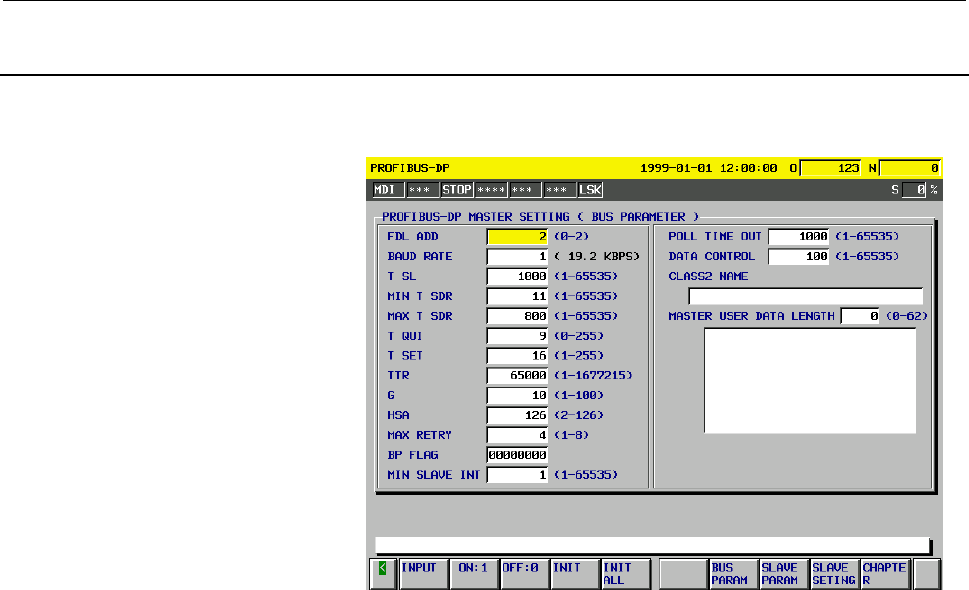
Setting bus parameters
Set parameters on the bus parameter screen.
Screen 2-1
Display procedure
Procedure 1
(1) Press the function key <SYSTEM> several times until the bus
parameter screen, slave parameter screen, or slave function
setting screen appears.
(2) When the slave parameter screen or slave function setting screen
appears, press the soft key [BUS PARAM].
Procedure 2
(1) Press the function key <SYSTEM>.
(2) Press the soft key [PROFIBUS].
(3) When the slave parameter screen or slave function setting screen
appears, press the soft key [BUS PARAM].
Cursor/paging
1 Use of the cursor keys moves the cursor.
• Pressing the cursor key <↓> in MASTER USER DATA
LENGTH moves the cursor to DISABLE/ENABLE on the
slave parameter screen for slave No. 000.
• Pressing the cursor key <↑> in FDL ADD displays the
slave function setting screen.
2 Pressing the page key <PAGE ↓> displays the slave parameter
screen for slave No. 000.
Pressing the page key <PAGE ↑> displays the slave function
setting screen.
Initialization
Use the soft key [INIT] to initialize the bus parameter values to
standard values used with a transfer rate of 12 Mbps.
Contents Summary of Profibus-DP Board Operators manual
- Page 1OPERATOR’S MANUAL B-62924EN/04
- Page 2Ȧ No part of this manual may be reproduced in any form. Ȧ All specifications and designs are subject to change without notice. The export of this product is subject to the authorization of the government of the country from where the product is exported. In this manual we have tried as much as possi
- Page 3B-63734EN/01 SAFETY PRECAUTIONS SAFETY PRECAUTIONS This section describes the safety precautions related to the use of CNC units, to ensure safe operation of machines fitted with FANUC CNC units. Read this section carefully before attempting to use any funcction described in this manaul. Users ahoul
- Page 4SAFETY PRECAUTIONS B-63734EN/01 1.1 DEFINITION OF WARNING, CAUTION, AND NOTE This manual includes safety precautions for protecting the user and preventing damage to the machine. Precautions are classified into Warning and Caution according to their bearing on safety. Also, supplementary information
- Page 5B-63734EN/01 SAFETY PRECAUTIONS 1.2 GENERAL WARNINGS AND NOTES WARNING 1 Before operating the machine, thoroughly check the entered data. Operating the machine with incorrect data may result in the machine behaving unexpectedly, possibly causing damage to the workpiece and/or machine itself, or inju
- Page 6SAFETY PRECAUTIONS B-63734EN/01 CAUTION 1 Immediately after switching on the power, do not touch any of the keys on the MDI panel until the position display or alarm screen appears on the CNC unit. Some of the keys on the MDI panel are dedicated to maintenance or other special operations. Pressing a
- Page 7B-62924EN/04 TABLE OF CONTENTS TABLE OF CONTENTS SAFETY PRECAUTIONS .......................................................................... s-1 I. GENERAL 1 GENERAL ..............................................................................................3 1.1 ORGANIZATION....................
- Page 8TABLE OF CONTENTS B-62924EN/04 2.4 SETTING THE SLAVE PARAMETERS FOR USING A SLAVE STATION MANUFACTURED BY FANUC ..............80 2.5 GSD FILE OF THE FANUC CNCS ..............................................................81 3 Power Mate-D/H ..........................................................
- Page 9B-62924EN/04 TABLE OF CONTENTS 3.2.2 Mounting the Board............................................................................................. 125 3.2.3 Mounting the Adapter Unit ................................................................................. 126 3.2.4 Connection between the
- Page 10TABLE OF CONTENTS B-62924EN/04 2.2.2 LED Indicators of the DP-Slave Function........................................................... 156 3 PROFIBUS FOR THE STAND-ALONE TYPE Series 16i/18i/21i, Series 15i, AND Power Mate i ..........................................................157 3.1 COMPONENT
- Page 11I. GENERA
- Page 12
- Page 13B-62924EN/02 GENERAL 1.GENERAL 1 GENERAL This chapter explains the organization of this manual and applied models. -3-
- Page 141.GENERAL GENERAL B-62924EN/02 1.1 ORGANIZATION This manual consists of the following parts: About this manual SAFETY PRECAUTIONS Describes the precautions which must be observed when any of the functions explained in this manual is used. I. GENERAL Describes the organization of this manual, and lis
- Page 15B-62924EN/02 GENERAL 1.GENERAL 1.2 APPLICABLE MODELS The models covered by this manual are as follows. The abbreviations listed below may be used to refer to the corresponding models. Model name Abbreviation Series 16-MODEL C Series 16-C Series 160-MODEL C 16/18-C Series 18-MODEL C Series 18-C Serie
- Page 162.OVERVIEW OF PROFIBUS-DP FUNCTIONS GENERAL B-62924EN/02 2 OVERVIEW OF PROFIBUS-DP FUNCTIONS This chapter explains overview of FANUC PROFIBUS-DP functions. -6-
- Page 17B-62924EN/02 GENERAL 2.OVERVIEW OF PROFIBUS-DP FUNCTIONS 2.1 SOFTWARE FOR PROFIBUS-DP FUNCTIONS Table 2-1 lists each model and the series of each software component that is applicable to the model. In this manual, the software component required for using each PROFIBUS-DP function is expressed as fo
- Page 182.OVERVIEW OF PROFIBUS-DP FUNCTIONS GENERAL B-62924EN/02 2.2 MASTER FUNCTIONS The specifications of the PROFIBUS-DP Master function differ depending on the CNC model and the series of CONTROL SOFTWARE. Table 2-2 Overview of the Master Function LCD-mounted type Series 16i/18i/21i-A/B, Condition CNC S
- Page 19B-62924EN/02 GENERAL 2.OVERVIEW OF PROFIBUS-DP FUNCTIONS 2.3 SLAVE FUNCTIONS The specifications of the PROFIBUS-DP Slave function differ depending on the CNC model and the series of CONTROL SOFTWARE. Table 2-3 Overview of the Slave Function (1/2) LCD-mounted type Series 16i/18i/21i-A/B, CNC Stand-al
- Page 20
- Page 21II. OPERATIO
- Page 22
- Page 23B-62924EN/04 OPERATION 1.16i/18i/21i-A/B, Power Mate i-D/H, AND 16/18-C 1 16i/18i/21i-A/B, Power Mate i-D/H, AND 16/18-C This chapter describes PROFIBUS-DP functions for LCD-mounted type 16i/18i/21i-A/B, stand-alone type 16i/18i/21i-A, Power Mate i- D/H, and 16/18-C. NOTE PROFIBUS-DP cannot be used
- Page 241.16i/18i/21i-A/B, Power Mate i-D/H, AND 16/18-C OPERATION B-62924EN/04 1.1 OVERVIEW In PROFIBUS-DP communication, two types of nodes are involved: a master station (also referred to as a DP-Master) and a slave station (also referred to as a DP-Slave). DI/DO data is exchanged between a DP-Master and
- Page 25B-62924EN/04 OPERATION 1.16i/18i/21i-A/B, Power Mate i-D/H, AND 16/18-C 1.2 MASTER FUNCTION SETTING To use the master function, bus parameters and slave parameters must be set, and addresses must be assigned. The bus parameters are referenced by the network, and the slave parameters are set for each
- Page 261.16i/18i/21i-A/B, Power Mate i-D/H, AND 16/18-C OPERATION B-62924EN/04 (3) Pressing soft key [MASTER] displays Screen 1-2. Screen 1-2 (4) The following parameters can be set by pressing the corresponding soft keys on the screen 1-2: <1> Bus parameters [BUS] <2> Slave parameters [SLAVE] <3> Operatio
- Page 27B-62924EN/04 OPERATION 1.16i/18i/21i-A/B, Power Mate i-D/H, AND 16/18-C A setting error message may be displayed at the lower left of Screen 1-2. In this case, take appropriate action, referencing the table below. Table 1-1 Setting error message Message Caution and action The number of slave station
- Page 281.16i/18i/21i-A/B, Power Mate i-D/H, AND 16/18-C OPERATION B-62924EN/04 1.2.1 Bus Parameter Setting Pressing soft key [BUS] on Screen 1-2 displays Screen 1-3 to enable bus parameter setting. The bus parameters consist of two pages. Use the page keys to switch between the pages. Switch between pages
- Page 29B-62924EN/04 OPERATION 1.16i/18i/21i-A/B, Power Mate i-D/H, AND 16/18-C Soft key [INIT] on Screen 1-3 initializes the bus parameters to the standard values used when the transfer rate is 12 Mbps. CAUTION To change the transfer rate from 12 Mbps to a different value, set the bus parameters again acco
- Page 301.16i/18i/21i-A/B, Power Mate i-D/H, AND 16/18-C OPERATION B-62924EN/04 Table 1-2 summarizes the bus parameters. Table 1-3 lists the bus parameter values to be set for each transfer rate. For details, refer to the following documents issued by PROFIBUS Nutzerorganisation e.V.: ¡ PROFIBUS STANDARD DI
- Page 31B-62924EN/04 OPERATION 1.16i/18i/21i-A/B, Power Mate i-D/H, AND 16/18-C Remarks) Explanation of terms used in the above table Bit time : Time (sec) required to send one bit of data at a specified transfer rate. This is equivalent to the reciprocal of a transfer rate (bps). Gap maintenance : Period d
- Page 321.16i/18i/21i-A/B, Power Mate i-D/H, AND 16/18-C OPERATION B-62924EN/04 Table 1-3 Bus Parameter Settings Corresponding to Each Transfer Rate Bus parameter Setting 1: FDL ADD 0 to 125 2: BAUDRATE (Kbps) ≤187.5 500 1500 3000 6000 12000 3: T SL 100 200 300 400 600 1000 4: MIN T SDR 11 11 11 11 11 11 5:
- Page 33B-62924EN/04 OPERATION 1.16i/18i/21i-A/B, Power Mate i-D/H, AND 16/18-C 1.2.2 Slave Parameter Setting Pressing soft key [SLAVE] on Screen 1-2 displays Screen 1-5 to enable slave parameter setting. By pressing soft keys [PRV.NO] and [NXT.NO], the station number of a DP-Slave to be set can be changed.
- Page 341.16i/18i/21i-A/B, Power Mate i-D/H, AND 16/18-C OPERATION B-62924EN/04 pressing soft key [DETAIL] when the cursor is placed at the item of 15 CONFIG DATA.) Detailed data as long as the number of bytes specified in each of these items can be set. NOTE Before a DP-Slave manufactured by FANUC can be c
- Page 35B-62924EN/04 OPERATION 1.16i/18i/21i-A/B, Power Mate i-D/H, AND 16/18-C Table 1-4 summarizes the slave parameters. For details, refer to the following documents issued by PROFIBUS Nutzerorganisation e.V.: ¡ PROFIBUS STANDARD DIN 19 245 Part 1 This document describes data transfer, access methods, pr
- Page 361.16i/18i/21i-A/B, Power Mate i-D/H, AND 16/18-C OPERATION B-62924EN/04 Remarks) Explanation of terms used in the above table Sync control : Command for specifying operation in Sync command mode. When operation is performed in Sync mode, the DP-Slave updates the output signals only when the Sync con
- Page 37B-62924EN/04 OPERATION 1.16i/18i/21i-A/B, Power Mate i-D/H, AND 16/18-C 1.2.3 Setting for Address Assignment Pressing soft key [ADDR] on Screen 1-5 displays Screen 1-7. By pressing soft keys [PRV.NO] and [NXT.NO], the station number of a DP-Slave to be set can be changed. To move to the screen of a
- Page 381.16i/18i/21i-A/B, Power Mate i-D/H, AND 16/18-C OPERATION B-62924EN/04 Each item must be set as described below. DI/DO SETTING Set the area to be used as a DI/DO data buffer. The total of the DI/DO sizes for one slave station must not exceed 244 bytes. NOTE Diagnose data is classified as standard d
- Page 39B-62924EN/04 OPERATION 1.16i/18i/21i-A/B, Power Mate i-D/H, AND 16/18-C Table 1-5 Standard Diagnose data Item Description STATION STATUS 1 The state of a DP-Slave is indicated. (Size: 1 byte) Bit 7: Diag.Master_Lock This bit indicates that the parameters of the DP-Slave are set by another DP-Master.
- Page 401.16i/18i/21i-A/B, Power Mate i-D/H, AND 16/18-C OPERATION B-62924EN/04 For details, refer to the following documents issued by PROFIBUS Nutzerorganisation e.V.: ¡ PROFIBUS STANDARD DIN 19 245 Part 1 This document describes data transfer, access methods, protocols, and interfacing with the applicati
- Page 41B-62924EN/04 OPERATION 1.16i/18i/21i-A/B, Power Mate i-D/H, AND 16/18-C 1.2.4 Setting for Operation mode Pressing soft key [MODE] on Screen 1-2 displays Screen 1-8. On this screen, you can set the STOP, CLEAR, or OPERATE mode defined in the PROFIBUS-DP specifications. Screen 1-8 On this screen, the
- Page 421.16i/18i/21i-A/B, Power Mate i-D/H, AND 16/18-C OPERATION B-62924EN/04 NOTE For the operation mode, pay careful attention to the following points: (1) When the power is turned on in the status in which at least one slave station is ACTIVE, the master station automatically starts in the OPERATE mode
- Page 43B-62924EN/04 OPERATION 1.16i/18i/21i-A/B, Power Mate i-D/H, AND 16/18-C 1.2.5 Updating DI/DO Data for the Master Function When creating a ladder program, fully consider the data refresh time and data simultaneity described below. Data refresh time The data refresh time for the master function means
- Page 441.16i/18i/21i-A/B, Power Mate i-D/H, AND 16/18-C OPERATION B-62924EN/04 Z: The one-scan time within the CNC is determined by expression (A) shown below: a1+a2×(N-1)+a3×SIZE≤1000.................................................(A) a1, a2, a3: Constant parameters N : Number of communication slave stat
- Page 45B-62924EN/04 OPERATION 1.16i/18i/21i-A/B, Power Mate i-D/H, AND 16/18-C - Calculation for station Nos. 3 to 5: 294+50×(3-1)+1.0×(244+244+244)=1126≥1000 → The values of N and SIZE are cleared. • Second ITP process - Calculation for station Nos. 5 to 6: 294+50×(2-1)+1.0×(244+244)=832≤1000 → The ITP pr
- Page 461.16i/18i/21i-A/B, Power Mate i-D/H, AND 16/18-C OPERATION B-62924EN/04 Data simultaneity With the FANUC master function and Slave function, when DI/DO signals are handled with a ladder program, data simultaneity is guaranteed in each of long data (4-byte data) units and word data (2- byte data) uni
- Page 47B-62924EN/04 OPERATION 1.16i/18i/21i-A/B, Power Mate i-D/H, AND 16/18-C 1.3 SLAVE FUNCTION SETTING Addresses must be assigned on a DP-Slave before the slave function can be used. By address assignment, a PMC address is set, and the sizes of the DI/DO areas used for the DI/DO signal transfer between
- Page 481.16i/18i/21i-A/B, Power Mate i-D/H, AND 16/18-C OPERATION B-62924EN/04 CAUTION On Screen 1-9, check the following items: (1) CONTROL SOFTWARE is Edition 08 or later of series 6557. (2) SLAVE SOFTWARE (series 6553 or 6551) is Edition 07 or later. When CONTROL SOFTWARE is Edition 07 or earlier of ser
- Page 49B-62924EN/04 OPERATION 1.16i/18i/21i-A/B, Power Mate i-D/H, AND 16/18-C NOTE If either of the following messages is displayed on Screen 1-10, take appropriate action corresponding the message: - "SET I/O SIZE[MAS+SLV<=256],POWER OFF" When this node is shared by both master and slave stations, the to
- Page 501.16i/18i/21i-A/B, Power Mate i-D/H, AND 16/18-C OPERATION B-62924EN/04 (4) Each item must be set as described below. STATION NO. Set the station number of the DP-Slave. DI DATA Set an area to be used as a DI data buffer. Set the start address and size of the buffer. DO DATA Set an area to be used a
- Page 51B-62924EN/04 OPERATION 1.16i/18i/21i-A/B, Power Mate i-D/H, AND 16/18-C (5) STATUS on Screen 1-10 indicates the state of the DP-Slave. Each item under STATUS has the meaning described below. CONFIG STATUS This item indicates whether slave parameter CONFIG DATA of the DP-Master matches the configurat
- Page 521.16i/18i/21i-A/B, Power Mate i-D/H, AND 16/18-C OPERATION B-62924EN/04 Other setting procedure (Supplement for using the slave function for Power Mate i-D/H) Procedure using the DPL/MDI operation package (PC) (1) Press
the key to switch between display of the parameter screen, diagnose - Page 53B-62924EN/04 OPERATION 1.16i/18i/21i-A/B, Power Mate i-D/H, AND 16/18-C Table 1-9 Dianosis data Diagnose No. Item Description Indicates whether slave parameter Configuration CONFIG DATA for the DP-Master S0101 Status matches the configuration data recognized by the DP-Slave. Indicates whether slave
- Page 541.16i/18i/21i-A/B, Power Mate i-D/H, AND 16/18-C OPERATION B-62924EN/04 1.3.1 Status Register With the DP-Master, DP-Master status is set as diagnose data in the R area of the PMC as described in Section 1.2.3, "Setting for Address Assignment." With a DP-Slave, a status register is used. This is equ
- Page 55B-62924EN/04 OPERATION 1.16i/18i/21i-A/B, Power Mate i-D/H, AND 16/18-C 1.3.2 Updating DI/DO Data for the Slave Function When creating a ladder program, fully consider the data simultaneity described below. Data simultaneity With the FANUC master function and slave function, when DI/DO signals are h
- Page 561.16i/18i/21i-A/B, Power Mate i-D/H, AND 16/18-C OPERATION B-62924EN/04 1.4 SETTING THE SLAVE PARAMETERS FOR USING A SLAVE STATION MANUFACTURED BY FANUC Before the slave station manufactured by FANUC can be used, data dependent on the FANUC slave station must be set in the slave parameters of the ma
- Page 57B-62924EN/04 OPERATION 1.16i/18i/21i-A/B, Power Mate i-D/H, AND 16/18-C [Explanation of CONFIG DATA] CAUTION Input and output described below indicate the input and output viewed from the master station, respectively. DI and DO indicate the input and output viewed from the FANUC slave station, respe
- Page 581.16i/18i/21i-A/B, Power Mate i-D/H, AND 16/18-C OPERATION B-62924EN/04 <2> When the input size is 65 to 128 and the output size is 65 to 128 (DI SIZE + DO SIZE ≤ 244 must be satisfied, however.) Data length: 6 Data: C0 XX YY C0 XX YY <3> When the input size is 1 to 64 and the output size is 65 to 1
- Page 59B-62924EN/04 OPERATION 1.16i/18i/21i-A/B, Power Mate i-D/H, AND 16/18-C <3> When the input size is 0 and the output size is 129 to 192 Data length: 6 Data: 80 XX 80 XX 80 XX <4> When the input size is 0 and the output size is 193 to 244 Data length: 8 Data: 80 XX 80 XX 80 XX 80 XX 80 XX (c) Format f
- Page 601.16i/18i/21i-A/B, Power Mate i-D/H, AND 16/18-C OPERATION B-62924EN/04 Tables 1-12 to 1-14 list examples of setting CONFIG DATA for a master station for reference purposes. Table 1-12 Examples of “(a) Setting CONFIG DATA for Using Both Input/Output” Input/output sizes for the DI/DO sizes set for a
- Page 61B-62924EN/04 OPERATION 1.16i/18i/21i-A/B, Power Mate i-D/H, AND 16/18-C 1.5 GSD FILE OF THE FANUC CNCS A GSD file is attached to all PROFIBUS products that can be used as master stations and slave stations. Each GSD file contains product- specific information in a specified format. This section desc
- Page 621.16i/18i/21i-A/B, Power Mate i-D/H, AND 16/18-C OPERATION B-62924EN/04 GSD file for a DP-Master using a FANUC CNC #Profibus_DP Vendor_Name = "FANUC" Model_Name = "FANUC CNC" Revision = "1.0" Ident_Number = 0x00CB Protocol_Ident =0 Station_Type =1 FMS_supp =0 Hardware_Release = "Release 1.0" Softwar
- Page 63B-62924EN/04 OPERATION 1.16i/18i/21i-A/B, Power Mate i-D/H, AND 16/18-C ; Master specific parameters ; Download_supp =1 Upload_supp =1 Act_Para_Brct_supp =1 Act_Param_supp =1 Max_MPS_Length = 65532 Max_Lsdu_MS = 244 Max_Lsdu_MM = 244 Min_Poll_Timeout = 100 ; Trdy_9.6 = 11 Trdy_19.2 = 11 Trdy_93.75 =
- Page 641.16i/18i/21i-A/B, Power Mate i-D/H, AND 16/18-C OPERATION B-62924EN/04 LAS_Len = 32 ; Tsdi_9.6 = 70 Tsdi_19.2 = 70 Tsdi_93.75 = 70 Tsdi_187.5 = 70 Tsdi_500 = 150 Tsdi_1.5M = 200 Tsdi_3M = 250 Tsdi_6M = 450 Tsdi_12M = 800 ; Max_Slaves_supp = 32 ; - 54 -
- Page 65B-62924EN/04 OPERATION 1.16i/18i/21i-A/B, Power Mate i-D/H, AND 16/18-C GSD file for a DP-Slave using a FANUC CNC #Profibus_DP Vendor_Name = "FANUC" Model_Name = "FANUC CNC" Revision = "1.0" Ident_Number = 0x00A0 Protocol_Ident =0 Station_Type =0 FMS_supp =0 Hardware_Release = "Release 1.0" Software
- Page 661.16i/18i/21i-A/B, Power Mate i-D/H, AND 16/18-C OPERATION B-62924EN/04 ; Slave specific parameters ; Freeze_Mode_supp =0 Sync_Mode_supp =0 Auto_Baud_supp =1 Set_Slave_Add_supp =0 User_Prm_Data_Len =0 Min_Slave_Intervall =1 Modular_Station =1 Max_Module =1 Max_Input_Len = 244 Max_Output_Len = 244 Ma
- Page 67B-62924EN/04 OPERATION 1.16i/18i/21i-A/B, Power Mate i-D/H, AND 16/18-C GSD file for a DP-Slave using a FANUC Power Mate CNC #Profibus_DP Vendor_Name = "FANUC" Model_Name = "FANUC Power Mate CNC" Revision = "1.0" Ident_Number = 0x00A1 Protocol_Ident =0 Station_Type =0 FMS_supp =0 Hardware_Release =
- Page 681.16i/18i/21i-A/B, Power Mate i-D/H, AND 16/18-C OPERATION B-62924EN/04 EndModule Module = "24 Byte Out, 24 Byte In" 0xC0,0x17,0x17 EndModule Module = "20 Byte Out, 20 Byte In" 0xC0,0x13,0x13 EndModule Module = "16 Byte Out, 16 Byte In" 0xC0,0x0F,0x0F EndModule Module = "12 Byte Out, 12 Byte In" 0xC
- Page 69B-62924EN/04 OPERATION 2.Series 15i-A 2 Series 15i-A This chapter describes PROFIBUS-DP functions for Series 15i. NOTE PROFIBUS-DP cannot be used with DeviceNet. - 59 -
- Page 702.Series 15i-A OPERATION B-62924EN/04 2.1 OVERVIEW In PROFIBUS-DP communication, two types of nodes are involved: a master station (also referred to as a DP-Master) and a slave station (also referred to as a DP-Slave). DI/DO data is exchanged between a DP-Master and DP-Slave according to a data exch
- Page 71B-62924EN/04 OPERATION 2.Series 15i-A 2.2 MASTER FUNCTION SETTING To use the master function, bus parameters and slave parameters must be set, and addresses must be assigned. The bus parameters are referenced by the network, and the slave parameters are set for each slave. In address assignment, PMC
- Page 722.Series 15i-A OPERATION B-62924EN/04 2.2.1 Bus Parameter Setting Setting bus parameters Set parameters on the bus parameter screen. Screen 2-1 Display procedure Procedure 1 (1) Press the function key
several times until the bus parameter screen, slave parameter screen, or slave function se - Page 73B-62924EN/04 OPERATION 2.Series 15i-A Table 2-1 summarizes the bus parameters. Table 2-2 lists the bus parameter values to be set for each transfer rate. For details, refer to the following documents issued by PROFIBUS Nutzerorganisation e.V.: ¡ PROFIBUS STANDARD DIN 19 245 Part 1 This document desc
- Page 742.Series 15i-A OPERATION B-62924EN/04 Remarks) Explanation of terms used in the above table Bit time : Time (sec) required to send one bit of data at a specified transfer rate. This is equivalent to the reciprocal of a transfer rate (bps). Gap maintenance : Period during which the list for managing
- Page 75B-62924EN/04 OPERATION 2.Series 15i-A Table 2-2 Bus Parameter Settings Corresponding to Each Transfer Rate Bus parameter Setting 1: FDL ADD 0 to 2 2: BAUDRATE (Kbps) ≤187.5 500 1500 3000 6000 12000 3: T SL 100 200 300 400 600 1000 4: MIN T SDR 11 11 11 11 11 11 5: MAX T SDR 60 100 150 250 450 800 6:
- Page 762.Series 15i-A OPERATION B-62924EN/04 2.2.2 Slave Parameter Setting Set slave parameters and address assignment on the slave parameter screen. Screen 2-2(a) Screen 2-2(b) - 66 -
- Page 77B-62924EN/04 OPERATION 2.Series 15i-A Display procedure Procedure 1 (1) Press the function key
several times until the bus parameter screen, slave parameter screen, or slave function setting screen appears. (2) When the bus parameter screen or slave function setting screen appears, enter a - Page 782.Series 15i-A OPERATION B-62924EN/04 Initialization Pressing the soft key [INIT] initializes the slave parameter values for a specified station number to the basic settings used for connecting the DP-Slave of FANUC CNC. NOTE 1 Normally, use of the soft key [INIT] allows initialization for connectin
- Page 79B-62924EN/04 OPERATION 2.Series 15i-A Table 2-3 summarizes the slave parameters. For details, refer to the following documents issued by PROFIBUS Nutzerorganisation e.V.: ¡ PROFIBUS STANDARD DIN 19 245 Part 1 This document describes data transfer, access methods, protocols, and interfacing with the
- Page 802.Series 15i-A OPERATION B-62924EN/04 Remarks) Explanation of terms used in the above table Sync control : Command for specifying operation in Sync command mode. When operation is performed in Sync mode, the DP-Slave updates the output signals only when the Sync control command is received. Freeze c
- Page 81B-62924EN/04 OPERATION 2.Series 15i-A 2.2.3 Setting for Address Assignment Set address assignment on the slave parameter screen described above (Screen 2-2 (a)). Screen 2-2(a) CAUTION When assigning addresses, pay careful attention to the following points: 1 Assign addresses to all DP-Slaves that ar
- Page 822.Series 15i-A OPERATION B-62924EN/04 Each item must be set as described below. DI/DO ADDRESS AND DI/DO SIZE Set the area to be used as a DI/DO data buffer. DIAGNOSE ADDRESS AND DGN DATA SIZE Set an area for storing diagnose data. For details of standard diagnose data, see Table 2-4. NOTE Diagnose d
- Page 83B-62924EN/04 OPERATION 2.Series 15i-A Table 2-4 Standard Diagnose data Item Description STATION STATUS 1 The state of a DP-Slave is indicated. (Size: 1 byte) Bit 7: Diag.Master_Lock This bit indicates that the parameters of the DP-Slave are set by another DP-Master. When the value of MASTER_ADDRESS
- Page 842.Series 15i-A OPERATION B-62924EN/04 For details, refer to the following documents issued by PROFIBUS Nutzerorganisation e.V.: ¡ PROFIBUS STANDARD DIN 19 245 Part 1 This document describes data transfer, access methods, protocols, and interfacing with the application layer. ¡ Draft Standard PROFIBU
- Page 85B-62924EN/04 OPERATION 2.Series 15i-A 2.3 SLAVE FUNCTION SETTING Addresses must be assigned on a DP-Slave before the slave function can be used. By address assignment, a PMC address is set, and the sizes of the DI/DO areas used for the DI/DO signal transfer between the DP- Master and DP-Slave are se
- Page 862.Series 15i-A OPERATION B-62924EN/04 Display procedure Procedure 1 (1) Press the
function key several times until the bus parameter screen, slave parameter screen, or slave function setting screen appears. (2) When the bus parameter screen or slave parameter screen appears, press the soft - Page 87B-62924EN/04 OPERATION 2.Series 15i-A Each item must be set as described below. STATION NO. Set the station number of the DP-Slave. INPUT DATA Set an area to be used as a DI data buffer. Set the start address and size of the buffer. OUTPUT DATA Set an area to be used as a DO data buffer. Set the sta
- Page 882.Series 15i-A OPERATION B-62924EN/04 STATUS on Screen 2-4 indicates the state of the DP-Slave. Each item under STATUS has the meaning described below. CFG STATUS This item indicates whether slave parameter CONFIG DATA of the DP-Master matches the configuration data recognized by the DP-Slave. If th
- Page 89B-62924EN/04 OPERATION 2.Series 15i-A 2.3.1 Status Register With the DP-Master, DP-Master status is set as diagnose data in the R area of the PMC as described in Section 2.2.3, "Setting for Address Assignment." With a DP-Slave, a status register is used. This is equivalent to the diagnose data used
- Page 902.Series 15i-A OPERATION B-62924EN/04 2.4 SETTING THE SLAVE PARAMETERS FOR USING A SLAVE STATION MANUFACTURED BY FANUC Before the slave station manufactured by FANUC can be used, data dependent on the FANUC slave station must be set in the slave parameters of the master station. Table 2-6 indicates
- Page 91B-62924EN/04 OPERATION 2.Series 15i-A 2.5 GSD FILE OF THE FANUC CNCS A GSD file is attached to all PROFIBUS products that can be used as master stations and slave stations. Each GSD file contains product- specific information in a specified format. This section describes three GSD files for a DP-Mas
- Page 922.Series 15i-A OPERATION B-62924EN/04 GSD file for a DP-Master using a FANUC CNC #Profibus_DP Vendor_Name = "FANUC" Model_Name = "FANUC CNC" Revision = "1.0" Ident_Number = 0x00CB Protocol_Ident =0 Station_Type =1 FMS_supp =0 Hardware_Release = "Release 1.0" Software_Release = "Release 3.0" 9.6_supp
- Page 93B-62924EN/04 OPERATION 2.Series 15i-A ; Master specific parameters ; Download_supp =1 Upload_supp =1 Act_Para_Brct_supp =1 Act_Param_supp =1 Max_MPS_Length = 65532 Max_Lsdu_MS = 244 Max_Lsdu_MM = 244 Min_Poll_Timeout = 100 ; Trdy_9.6 = 11 Trdy_19.2 = 11 Trdy_93.75 = 11 Trdy_187.5 = 11 Trdy_500 = 11
- Page 942.Series 15i-A OPERATION B-62924EN/04 LAS_Len = 32 ; Tsdi_9.6 = 70 Tsdi_19.2 = 70 Tsdi_93.75 = 70 Tsdi_187.5 = 70 Tsdi_500 = 150 Tsdi_1.5M = 200 Tsdi_3M = 250 Tsdi_6M = 450 Tsdi_12M = 800 ; Max_Slaves_supp = 32 ; - 84 -
- Page 95B-62924EN/04 OPERATION 2.Series 15i-A GSD file for a DP-Slave using a FANUC CNC #Profibus_DP Vendor_Name = "FANUC" Model_Name = "FANUC CNC" Revision = "1.0" Ident_Number = 0x00A0 Protocol_Ident =0 Station_Type =0 FMS_supp =0 Hardware_Release = "Release 1.0" Software_Release = "Release 3.0" 9.6_supp
- Page 962.Series 15i-A OPERATION B-62924EN/04 Module = "28 Byte Out, 28 Byte In" 0xC0,0x1B,0x1B EndModule Module = "24 Byte Out, 24 Byte In" 0xC0,0x17,0x17 EndModule Module = "20 Byte Out, 20 Byte In" 0xC0,0x13,0x13 EndModule Module = "16 Byte Out, 16 Byte In" 0xC0,0x0F,0x0F EndModule Module = "12 Byte Out,
- Page 97B-62924EN/04 OPERATION 3.Power Mate-D/H 3 Power Mate-D/H This chapter describes PROFIBUS-DP functions for Power Mate- D/H. NOTE PROFIBUS-DP cannot be used with DeviceNet. - 87 -
- Page 983.Power Mate-D/H OPERATION B-62924EN/04 3.1 SLAVE FUNCTION SETTING Procedure using the CRT/MDI (1) Press function key
, then press soft key [PARAMETER] to display the parameter screen of the Power Mate-D/H. (2) Set the parameters described below in the same way as for ordinary parameters. (3 - Page 99B-62924EN/04 OPERATION 3.Power Mate-D/H 3.2 SETTING THE SLAVE PARAMETERS FOR USING A SLAVE STATION MANUFACTURED BY FANUC Before the slave station manufactured by FANUC can be used, data dependent on the FANUC slave station must be set in the slave parameters of the master station. Table 3-1 indicate
- Page 1003.Power Mate-D/H OPERATION B-62924EN/04 3.3 GSD FILE OF THE FANUC CNCS A GSD file is attached to all PROFIBUS products that can be used as master stations and slave stations. Each GSD file contains product- specific information in a specified format. This section describes three GSD files for a DP-S
- Page 101B-62924EN/04 OPERATION 3.Power Mate-D/H GSD file for a DP-Slave using a FANUC Power Mate CNC #Profibus_DP Vendor_Name = "FANUC" Model_Name = "FANUC Power Mate CNC" Revision = "1.0" Ident_Number = 0x00A1 Protocol_Ident =0 Station_Type =0 FMS_supp =0 Hardware_Release = "Release 1.0" Software_Release =
- Page 1023.Power Mate-D/H OPERATION B-62924EN/04 EndModule Module = "24 Byte Out, 24 Byte In" 0xC0,0x17,0x17 EndModule Module = "20 Byte Out, 20 Byte In" 0xC0,0x13,0x13 EndModule Module = "16 Byte Out, 16 Byte In" 0xC0,0x0F,0x0F EndModule Module = "12 Byte Out, 12 Byte In" 0xC0,0x0B,0x0B EndModule Module = "
- Page 103B-62924EN/04 OPERATION 4.BUILDING A SAFE SYSTEM 4 BUILDING A SAFE SYSTEM This chapter describes how to build a safe system using the PROFIBUS-DP function. - 93 -
- Page 1044.BUILDING A SAFE SYSTEM OPERATION B-62924EN/04 4.1 SYSTEM SAFETY The PROFIBUS-DP Master function manufactured by FANUC is designed so that all DI signals are set to 0 when communication is not performed normally. For this reason, to enable or disable a function with a DI signal, build the system so
- Page 105B-62924EN/04 OPERATION 4.BUILDING A SAFE SYSTEM Table 4-1 Processing Related to Building a Safe System (1/2) Processing performed by the FANUC master function Processing to be performed Communication state Diagnose data for the DI/DO data exchanged with by the user on the FANUC relevant slave statio
- Page 1064.BUILDING A SAFE SYSTEM OPERATION B-62924EN/04 Table 4-1 Processing Related to Building a Safe System (2/2) Processing performed by the FANUC master function Processing to be performed Communication state Diagnose data for the DI/DO data exchanged with by the user on the FANUC relevant slave statio
- Page 107B-62924EN/04 OPERATION 5.EXAMPLE OF CONNECTION 5 EXAMPLE OF CONNECTION This chapter describes an example of connecting the PROFIBUS-DP function of the FANUC CNCs. - 97 -
- Page 1085.EXAMPLE OF CONNECTION OPERATION B-62924EN/04 5.1 EXAMPLE OF CONFIGURATION Using the example configuration shown below, the setting of each parameter is explained. Series 16i-A DP-Master (class1) #1 16 bytes 16 bytes 16 bytes PROFIBUS (12 Mbps) 4 bytes 4 bytes 4 bytes Series 18i-A Series 18-C Power
- Page 109B-62924EN/04 OPERATION 5.EXAMPLE OF CONNECTION 5.1.1 Master Station Setting Bus parameter setting When a transfer rate of 12 Mbps is used, press soft key [INIT] on the bus parameter screen. Then, the bus parameters are set as indicated in Table 5-1. To change the transfer rate from 12 Mbps to anothe
- Page 1105.EXAMPLE OF CONNECTION OPERATION B-62924EN/04 Slave parameter setting Only FANUC CNCs are connected as the DP-Slaves. So, the values set by pressing soft key [INIT] on the slave parameter setting screen are used for each DP-Slave. However, IDENT NO. and CONFIG DATA must be set. Set these slave para
- Page 111B-62924EN/04 OPERATION 5.EXAMPLE OF CONNECTION Settings for address assignment When the address map shown in Fig.5-2 is assumed, the settings indicated in Table 5-3 are required. Table 5-3 Settings for Address Assignment Slave No. Item Setting DI ADDRESS R0000 DI SIZE 4 DO ADDRESS R0020 3 DO SIZE 16
- Page 1125.EXAMPLE OF CONNECTION OPERATION B-62924EN/04 R0000 DI data from DP-Slave #3 R0004 DI data from DP-Slave #4 R0008 DI data from DP-Slave #5 R0012 Not used R0020 DO data to DP-Slave #3 R0036 DO data to DP-Slave #4 R0052 DO data to DP-Slave #5 R0068 Not used R0070 Diagnose data of DP-Slave #3 R0076 Di
- Page 113B-62924EN/04 OPERATION 5.EXAMPLE OF CONNECTION 5.1.2 Slave Station Setting When the address map shown in Fig.5-3 is assumed for each DP- Slave, the settings indicated in Table 5-4 to Table 5-6 are required. Table 5-4 Settings for DP-Slave #3 Item Setting STATION NO. 3 DI ADDRESS R0000 DI SIZE 16 DO
- Page 1145.EXAMPLE OF CONNECTION OPERATION B-62924EN/04 DP-Slave #3, #4 R0000 DI area R0016 Not used R0020 DO area R0024 DP-Slave #5 X1032 DI area X1048 Y1032 DO area Y1036 Fig.5-3 DP-Slave Address Map - 104 -
- Page 115III. CONNECTIO
- Page 116
- Page 117B-62924EN/04 CONNECTION 1.CONNECTING THE PROFIBUS FUNCTIONS 1 CONNECTING THE PROFIBUS FUNCTIONS This chapter provides an explanation of how to connect the PROFIBUS-DP. CAUTION Isolating the PROFIBUS cables from noise sources. The PROFIBUS cables are of the group C classification. Refer to the Sectio
- Page 1181.CONNECTING THE PROFIBUS FUNCTIONS COONECTION B-62924EN/04 1.1 PROFIBUS CONNECTION • Example of a PROFIBUS-DP system with a single DP-Master DP-Master (Class1) #1 #3 #4 #5 #6 #N DP-Slaves Up to 30 DP-Slaves can be connected to a single DP-Master (Class1). - 108 -
- Page 119B-62924EN/04 CONNECTION 1.CONNECTING THE PROFIBUS FUNCTIONS 1.2 PROFIBUS CABLE PARAMETERS PROFIBUS communication uses shielded twisted-pair cable. The cable must satisfy the requirements listed below. Item Rating Characteristic impedance 150 Ω (f < 2 MHz) Capacitance < 30 nF/Km Resistance < 110 Ω/Km
- Page 1201.CONNECTING THE PROFIBUS FUNCTIONS COONECTION B-62924EN/04 1.3 CABLE LENGTH AND TRANSFER RATE The maximum allowable bus cable length varies depending on the transfer rate for which the cable is used. Determine the length from the following table. Baud rate (kbps) 9.6 to 93.75 187.5 500 1500 3000 to
- Page 121B-62924EN/04 CONNECTION 1.CONNECTING THE PROFIBUS FUNCTIONS 1.4 CONNECTOR Nine-pin D-Sub female connector 1 PE PE : Shielding 6 VP RxD/TxD (+) : Transmission/reception 2 data (+) 7 3 RxD/TxD (+) CNTR-P : Not used (repeater control) 8 RxD/TxD (-) 4 DGND : Signal ground 9 VP : Not used (+5V output) 5
- Page 1221.CONNECTING THE PROFIBUS FUNCTIONS COONECTION B-62924EN/04 1.5 CABLE CONNECTION Connect the PROFIBUS cable as shown in the following diagram. CNC D-sub connector Shield PROFIBUS (03) A Station at the A previous stage B (08) B Shield PROFIBUS A Station at the next stage B Connect two wires to each o
- Page 123B-62924EN/04 CONNECTION 1.CONNECTING THE PROFIBUS FUNCTIONS 1.6 TERMINATING RESISTOR Each end of the bus cable must be terminated with a resistor as shown below. VP (6) Ru = 390 Ω, 1/4 W RxD/TxD (+) (3) Rt = 220 Ω, 1/4 W RxD/TxD (-) (8) Rd = 390 Ω, 1/4 W DGND (5) The numbers in parentheses are the c
- Page 1241.CONNECTING THE PROFIBUS FUNCTIONS COONECTION B-62924EN/04 1.7 CABLE SHIELDING Clamp the PROFIBUS bus cable as shown in the following diagram. The clamping method shown below has two purposes: Cable fastening and shielding. It is very important to clamp the cable to maintain stable system operation
- Page 125B-62924EN/04 CONNECTION 2.PROFIBUS FOR THE Series 16/18-C 2 PROFIBUS FOR THE Series 16/18-C This chapter provides information about the connection of the PROFIBUS board for the Series 16/18-C. - 115 -
- Page 1262.PROFIBUS FOR THE Series 16/18-C CONNECTION B-62924EN/04 2.1 CONFIGURATION A single PROFIBUS board for the Series 16/18-C has both the master function and the slave function. Master function Slave function - 116 -
- Page 127B-62924EN/04 CONNECTION 2.PROFIBUS FOR THE Series 16/18-C 2.2 INSTALLATION 2.2.1 Environmental Conditions When installing the PROFIBUS board in the CNC control unit, observe the installation conditions for the CNC control unit (environmental conditions in the cabinet). 2.2.2 Cable Installation In th
- Page 1282.PROFIBUS FOR THE Series 16/18-C CONNECTION B-62924EN/04 NOTE 6ES7 972-0BA11-0XA0 is a right-angled connector. When it is used with this board, its cable is drawn up, as shown in the figure. When using this connector, always pay careful attention to its orientation. - 118 -
- Page 129B-62924EN/04 CONNECTION 2.PROFIBUS FOR THE Series 16/18-C 2.2.3 PROFIBUS Board Connector Layout Function Connector name and other markings PROFIBUS MASTER DP-Master interface JN1 Frame ground pin FG1 (not used) LED indicator LED1 LED2 SLAVE DP-Slave interface JN2 Frame ground pin FG2 (not used) LED1
- Page 1302.PROFIBUS FOR THE Series 16/18-C CONNECTION B-62924EN/04 2.3 CONNECTION DIAGRAM An overview of the complete connection is shown below. For connections that are not shown in the figure below, refer to the Connection Manual (Hardware) (B-62753EN) of the CNC main unit. DP-Slave DP-Slave DP-Slave #2 #3
- Page 131B-62924EN/04 CONNECTION 3.PROFIBUS FOR THE LCD-MOUNTED TYPE Series 16i/18i/21i 3 PROFIBUS FOR THE LCD-MOUNTED TYPE Series 16i/18i/21i This chapter describes the connection of the PROFIBUS board for the LCD-mounted type Series 16i/18i/21i. - 121 -
- Page 1323.PROFIBUS FOR THE LCD-MOUNTED TYPE Series 16i/18i/21i CONNECTION B-62924EN/04 3.1 CONFIGURATION The hardware of the PROFIBUS function comprises a PROFIBUS board and a PROFIBUS adapter unit (hereafter simply referred to as an adapter unit). [PROFIBUS board] The PROFIBUS board consists of two printed
- Page 133B-62924EN/04 CONNECTION 3.PROFIBUS FOR THE LCD-MOUNTED TYPE Series 16i/18i/21i [Adapter unit] The CNC control unit is usually mounted on the machine operator's panel (pendant). The adapter unit allows the PROFIBUS cable to be extended and connected in the power magnetics cabinet. This makes it easy
- Page 1343.PROFIBUS FOR THE LCD-MOUNTED TYPE Series 16i/18i/21i CONNECTION B-62924EN/04 [Connection between the PROFIBUS board and adapter unit] PROFIBUS board Adapter unit Internal cable The figure above shows a connection of the master function board. The slave function board is connected in the same way.
- Page 135B-62924EN/04 CONNECTION 3.PROFIBUS FOR THE LCD-MOUNTED TYPE Series 16i/18i/21i 3.2 INSTALLATION 3.2.1 Environmental Conditions When using the PROFIBUS board, the installation conditions for the CNC control unit in which the board is installed (environmental conditions in the cabinet) must be observe
- Page 1363.PROFIBUS FOR THE LCD-MOUNTED TYPE Series 16i/18i/21i CONNECTION B-62924EN/04 3.2.3 Mounting the Adapter Unit The adapter unit is mounted in the power magnetics cabinet, using the DIN rail. For the procedure for mounting and removing the adapter unit on and from the DIN rail, refer to "Connection o
- Page 137B-62924EN/04 CONNECTION 3.PROFIBUS FOR THE LCD-MOUNTED TYPE Series 16i/18i/21i [Connector pins] PROFIBUS board JN1/JN2 JN2 Adapter unit 1 TXD+ 11 1 TXD+ 11 2 TXD- 12 0V 2 TXD- 12 0V 3 RXD+ 13 3 RXD+ 13 4 RXD- 14 0V 4 RXD- 14 0V 5 RTS+ 15 5 RTS+ 15 6 RTS- 16 0V 6 RTS- 16 0V 7 17 7 17 8 18 +5V 8 18 +5
- Page 1383.PROFIBUS FOR THE LCD-MOUNTED TYPE Series 16i/18i/21i CONNECTION B-62924EN/04 3.2.5 Connector Layout [PROFIBUS board] Master function board JN1 (master function) for connection with an adapter unit Slave function board JN2 (slave function) for connection with an adapter unit - 128 -
- Page 139B-62924EN/04 CONNECTION 3.PROFIBUS FOR THE LCD-MOUNTED TYPE Series 16i/18i/21i [Adapter unit] The outside dimensions are the same as those of the connector panel I/O module. For details, refer to "Connection Manual (Hardware)" of the corresponding CNC. CN1: Nine-pin D-Sub female connector PROFIBUS b
- Page 1403.PROFIBUS FOR THE LCD-MOUNTED TYPE Series 16i/18i/21i CONNECTION B-62924EN/04 3.3 COMPLETE CONNECTION DIAGRAM An overview of the complete connection is shown below. For connections that are not shown in the figure below, refer to the "Connection Manual (Hardware)" of the CNC main unit. DP-Slave DP-
- Page 141B-62924EN/04 CONNECTION 4.PROFIBUS FOR THE STAND-ALONE TYPE Series 16i/18i/21i, Series 15i, and Power Mate i 4 PROFIBUS FOR THE STAND-ALONE TYPE Series 16i/18i/21i, Series 15i, and Power Mate i This chapter describes the connection of the PROFIBUS board for the stand-alone type Series 16i/18i/21i, S
- Page 1424.PROFIBUS FOR THE STAND-ALONE TYPE Series 16i/18i/21i, Series 15i, and Power Mate i CONNECTION B-62924EN/04 4.1 CONFIGURATION The PROFIBUS hardware for the stand-alone type Series 16i/18i/21i is a set of two printed circuit boards of the minislot size. One board is for the master function, and the
- Page 143B-62924EN/04 CONNECTION 4.PROFIBUS FOR THE STAND-ALONE TYPE Series 16i/18i/21i, Series 15i, and Power Mate i 4.2 INSTALLATION 4.2.1 Environmental Conditions When using the PROFIBUS board, the installation conditions for the CNC control unit in which the board is installed (environmental conditions i
- Page 1444.PROFIBUS FOR THE STAND-ALONE TYPE Series 16i/18i/21i, Series 15i, and Power Mate i CONNECTION B-62924EN/04 4.2.3 Connector Layout [PROFIBUS master board] CN1 CN1: Nine-pin D-Sub female connector PROFIBUS bus interface (master function) [PROFIBUS slave board] CN2 CN2: Nine-pin D-Sub female connecto
- Page 145B-62924EN/04 CONNECTION 4.PROFIBUS FOR THE STAND-ALONE TYPE Series 16i/18i/21i, Series 15i, and Power Mate i 4.3 COMPLETE CONNECTION DIAGRAM An overview of the complete connection is shown below. For connections that are not shown in the figure below, refer to the Connection Manual (Hardware) of the
- Page 1464.PROFIBUS FOR THE STAND-ALONE TYPE Series 16i/18i/21i, Series 15i, and Power Mate i CONNECTION B-62924EN/04 4.4 NOTES ON CONNECTING PROFIBUS BOARDS FOR THE Power Mate i When axis control card C is specified for the Power Mate i, there are restrictions on connection of FANUC PROFIBUS-DP boards. 1) W
- Page 147B-62924EN/04 CONNECTION 5.PROFIBUS FOR THE Power Mate-D/H 5 PROFIBUS FOR THE Power Mate-D/H This chapter describes information about the connection of the PROFIBUS card for the Power Mate-D/H. - 137 -
- Page 1485.PROFIBUS FOR THE Power Mate-D/H CONNECTION B-62924EN/04 5.1 CONNECTION DIAGRAM PROFIBUS PROFIBUS at previous at next stage stage Power Mate-D/H PROFIBUS card J141 CN2 J139 Machine CE49 The meaning of each abbreviation used in the above diagram is as follows: CN2 : PROFIBUS connector CE49 : Connect
- Page 149B-62924EN/04 CONNECTION 5.PROFIBUS FOR THE Power Mate-D/H 5.2 ENVIRONMENTAL CONDITIONS When using the PROFIBUS card in the Power Mate-D/H, observe the installation conditions for the Power Mate-D/H. - 139 -
- Page 1505.PROFIBUS FOR THE Power Mate-D/H CONNECTION B-62924EN/04 5.3 SIGNALS 5.3.1 PROFIBUS Interface <1> DI signals: X1032 to X1063 (up to 256 points) <2> DO signals: Y1032 to Y1063 (up to 256 points) 5.3.2 Built-in I/O Machine Interface <1> DI signal (DC input signal B: 16 points) 7 6 5 4 3 2 1 0 X1000 S
- Page 151B-62924EN/04 CONNECTION 5.PROFIBUS FOR THE Power Mate-D/H 5.4 BUILT-IN I/O MACHINE INTERFACE 5.4.1 Overview PROFIBUS card CE49 34-pin ribbon cable connector A B Hirose HIF3BA-34D-2.564R 01 +24E +24E 02 X1000.0 X1000.1 03 X1000.2 X1000.3 04 X1000.4 X1000.5 05 DIC1 X1000.7 06 X1000.6 DOC Machine-side
- Page 1525.PROFIBUS FOR THE Power Mate-D/H CONNECTION B-62924EN/04 <1> Connector specification MIL-C-83503 standard-compliant (with center key to prevent reverse insertion) The cable-end connector must also comply with this standard. FANUC specification: A02B-0124-K300 (Hirose HIF3BA-34D- 2.564R) Refer to th
- Page 153B-62924EN/04 CONNECTION 5.PROFIBUS FOR THE Power Mate-D/H 5.4.2 Details of DI Connection Power Mate Pin number Example of connection +24E Bit number +24E CE49(A01, B01) Address number CE49(A02) X1000.0 l l CE49(B02) X1000.1 l l l CE49(A03) X1000.2 l l l CE49(B03) X1000.3 l l CE49(A04) X1000.4 l l l
- Page 1545.PROFIBUS FOR THE Power Mate-D/H CONNECTION B-62924EN/04 Power Mate Example of connection Pin number +24E Bit number +24E CE49(A01, B01) Address number CE49(A07) X1002.0 l l CE49(B07) X1002.1 l l l CE49(A08) X1002.2 l l l CE49(B08) X1002.3 l l CE49(A09) X1002.4 l l l CE49(B09) X1002.5 l l l CE49(A1
- Page 155B-62924EN/04 CONNECTION 5.PROFIBUS FOR THE Power Mate-D/H 5.4.3 Details of DO Connection Power Mate Pin number Example of Bit number connection Voltage Address CE49(B06, B15) DOC number l regulator Y1000.0 CE49(A11) l l l Y1000.1 CE49(B11) l l l CE49(A17, B17) 0V Fig. 6-3 PROFIBUS Card Machine Inter
- Page 156
- Page 157IV. MAINTENANC
- Page 158
- Page 159B-62924EN/04 MAINTENANCE 1.PROFIBUS FOR THE Series 16/18-C 1 PROFIBUS FOR THE Series 16/18-C This chapter provides information about the maintenance of the PROFIBUS board for the Series 16/18-C. - 149 -
- Page 1601.PROFIBUS FOR THE Series 16/18-C MAINTENANCE B-62924EN/04 1.1 COMPONENT LAYOUT Connector name and other markings PROFIBUS DC/DC MASTER LSI chip for JN1 communi- cation CPU FG1 ROM LED1 LED2 DC/DC SLAVE JN2 LSI chip CPU for FG2 communi -cation LED1 LED2 ROM LED3 Ordering information Name Code Remark
- Page 161B-62924EN/04 MAINTENANCE 1.PROFIBUS FOR THE Series 16/18-C 1.2 LED INDICATORS AND THEIR MEANINGS The PROFIBUS interface board for the Series 16/18-C has two functions (DP-Master and DP-Slave functions). Each function uses separate LED indicators. 1.2.1 DP-Master Function LED Indicators SYSFAIL P-WKR
- Page 1621.PROFIBUS FOR THE Series 16/18-C MAINTENANCE B-62924EN/04 1.2.2 DP-Slave Function LED Indicators SYSFAIL P-C32 LED1 ALARM P-WIN LED2 RUN LED3 BUS FAULT When the power During normal is switched on operation (communication) Name Color l: On Description SYSFAIL Red Indicates¡: the Offstate of the SYSF
- Page 163B-62924EN/04 MAINTENANCE 2.LCD-MOUNTED TYPE PROFIBUS FOR THE Series 16i/18i/21i 2 LCD-MOUNTED TYPE PROFIBUS FOR THE Series 16i/18i/21i This chapter describes the maintenance information of the LCD- mounted type PROFIBUS board for the Series 16i/18i/21i. - 153 -
- Page 1642.LCD-MOUNTED TYPE PROFIBUS FOR THE Series 16i/18i/21i MAINTENANCE B-62924EN/04 2.1 COMPONENT LAYOUT [PROFIBUS master board] CPU LSI chip for communi- cation ADD1 JN2 LED JN1 [PROFIBUS slave board] LED LSI chip for communication CPU ADD1 The master board and slave board are connected by the ADD1 con
- Page 165B-62924EN/04 MAINTENANCE 2.LCD-MOUNTED TYPE PROFIBUS FOR THE Series 16i/18i/21i 2.2 LED INDICATORS AND THEIR MEANINGS The integral-type PROFIBUS interface board for the Series 16i/18i/21i comprises two boards. Each board uses separate LED indicators. 2.2.1 LED Indicators of the DP-Master Function LE
- Page 1662.LCD-MOUNTED TYPE PROFIBUS FOR THE Series 16i/18i/21i MAINTENANCE B-62924EN/04 2.2.2 LED Indicators of the DP-Slave Function The LED indicators of the DP-Slave function are mounted on the PROFIBUS slave board (daughter board). LED1 LED2 LED3 LEDB Name Color Description LED1 Green Indicates whether
- Page 167B-62924EN/04 MAINTENANCE 3.PROFIBUS FOR THE STAND-ALONE TYPE Series 16i/18i/21i, Series 15i, AND Power Mate i 3 PROFIBUS FOR THE STAND-ALONE TYPE Series 16i/18i/21i, Series 15i, AND Power Mate i This chapter describes the maintenance information of the PROFIBUS board for the stand-alone type Series
- Page 1683.PROFIBUS FOR THE STAND-ALONE TYPE Series 16i/18i/21i, Series 15i, AND Power Mate i MAINTENANCE B-62924EN/04 3.1 COMPONENT LAYOUT [PROFIBUS master board] DC/DC CPU CN1 LSI chip for communi- cation [PROFIBUS slave board] CPU DC/DC CN1 LSI chip for communication Ordering information Name Code Remarks
- Page 169B-62924EN/04 MAINTENANCE 3.PROFIBUS FOR THE STAND-ALONE TYPE Series 16i/18i/21i, Series 15i, AND Power Mate i 3.2 LED INDICATORS AND THEIR MEANINGS 3.2.1 LED Indicators of the DP-Master Function CN1 LED2 LED1 NOTE The face plate is indicated by the broken line. Name Color Description LED1 Green Indi
- Page 1703.PROFIBUS FOR THE STAND-ALONE TYPE Series 16i/18i/21i, Series 15i, AND Power Mate i MAINTENANCE B-62924EN/04 3.2.2 LED Indicators of the DP-Slave Function CN2 LEDB LED3 LED2 LED1 NOTE The face plate is indicated by the broken line. Name Color Description LED1 Green Indicates whether the CPU of this
- Page 171B-62924EN/04 MAINTENANCE 4.PROFIBUS FOR THE Power Mate-D/H 4 PROFIBUS FOR THE Power Mate-D/H This chapter provides information about the maintenance of the PROFIBUS card for the Power Mate-D/H. - 161 -
- Page 1724.PROFIBUS FOR THE Power Mate-D/H MAINTENANCE B-62924EN/04 4.1 PROFIBUS DRAWING NUMBER Name Drawing number Remark PROFIBUS card A20B-2100-0120 SUB BOARD 1 A20B-8001-0500 SUB BOARD 2 NOTE The PROFIBUS card for the Power Mate consists of two boards, SUB BOARD 1 and SUB BOARD 2. - 162 -
- Page 173B-62924EN/04 MAINTENANCE 4.PROFIBUS FOR THE Power Mate-D/H 4.2 ALARM MESSAGES AND MEANINGS (1) P/S alarms If an error occurs in the PROFIBUS function, the alarm listed below is displayed on the CRT screen, and the machine is brought to an emergency stop. P/S alarm Alarm message and meaning There is
- Page 174
- Page 175SUPPLEMEN
- Page 176
- Page 177B-62924EN/04 SUPPLEMENT A.SETTING WHEN EDITION 07 OR EARLIER OF SERIES 6557 IS USED A SETTING WHEN EDITION 07 OR EARLIER OF SERIES 6557 IS USED This chapter described the setting methods when Edition 07 or earlier of series 6557 of CONTROL SOFTWARE is used. - 167 -
- Page 178A.SETTING WHEN EDITION 07 OR EARLIER OF SERIES 6557 IS USED SUPPLEMENT B-62924EN/04 A.1 MASTER FUNCTION SETTING To use the master function, bus parameters and slave parameters must be set, and addresses must be assigned. The bus parameters are referenced by the network, and the slave parameters are
- Page 179B-62924EN/04 SUPPLEMENT A.SETTING WHEN EDITION 07 OR EARLIER OF SERIES 6557 IS USED (3) Pressing soft key [MASTER] displays Screen A-2. Screen A-2 (4) The following parameters can be set by pressing the corresponding soft keys on the Screen A-2: <1> Bus parameters [BUS] <2> Slave parameters [SLAVE]
- Page 180A.SETTING WHEN EDITION 07 OR EARLIER OF SERIES 6557 IS USED SUPPLEMENT B-62924EN/04 A.1.1 Bus Parameter Setting Pressing soft key [BUS] on Screen A-2 displays Screen A-3 to enable bus parameter setting. The bus parameters consist of two pages. Use the page keys to switch between the pages. Switch be
- Page 181B-62924EN/04 SUPPLEMENT A.SETTING WHEN EDITION 07 OR EARLIER OF SERIES 6557 IS USED The data in the parentheses indicated to the right of each item represents a range of settable values. For 2 BAUDRATE only, however, the transfer rate corresponding to a set value is displayed. Soft key [INIT] on Scr
- Page 182A.SETTING WHEN EDITION 07 OR EARLIER OF SERIES 6557 IS USED SUPPLEMENT B-62924EN/04 Table A-1 summarizes the bus parameters. Table A-2 lists the bus parameter values to be set for each transfer rate. For details, refer to the following documents issued by PROFIBUS Nutzerorganisation e.V.: ¡ PROFIBUS
- Page 183B-62924EN/04 SUPPLEMENT A.SETTING WHEN EDITION 07 OR EARLIER OF SERIES 6557 IS USED Remarks) Explanation of terms used in the above table Bit time : Time (sec) required to send one bit of data at a specified transfer rate. This is equivalent to the reciprocal of a transfer rate (bps). Gap maintenanc
- Page 184A.SETTING WHEN EDITION 07 OR EARLIER OF SERIES 6557 IS USED SUPPLEMENT B-62924EN/04 Table A-2 Bus Parameter Settings Corresponding to Each Transfer Rate Bus parameter Setting 1: FDL ADD 0 to 125 2: BAUDRATE (Kbps) ≤187.5 500 1500 3000 6000 12000 3: T SL 100 200 300 400 600 1000 4: MIN T SDR 11 11 11
- Page 185B-62924EN/04 SUPPLEMENT A.SETTING WHEN EDITION 07 OR EARLIER OF SERIES 6557 IS USED A.1.2 Slave Parameter Setting Pressing soft key [SLAVE] on Screen A-2 displays Screen A-5 to enable slave parameter setting. By pressing soft keys [PRV.NO] and [NXT.NO], the station number of a DP-Slave to be set can
- Page 186A.SETTING WHEN EDITION 07 OR EARLIER OF SERIES 6557 IS USED SUPPLEMENT B-62924EN/04 pressing soft key [DETAIL] when the cursor is placed at the item of 15 CONFIG DATA.) Detailed data as long as the number of bytes specified in each of these items can be set. NOTE Before a DP-Slave manufactured by FA
- Page 187B-62924EN/04 SUPPLEMENT A.SETTING WHEN EDITION 07 OR EARLIER OF SERIES 6557 IS USED Table A-3 summarizes the slave parameters. For details, refer to the following documents issued by PROFIBUS Nutzerorganisation e.V.: ¡ PROFIBUS STANDARD DIN 19 245 Part 1 This document describes data transfer, access
- Page 188A.SETTING WHEN EDITION 07 OR EARLIER OF SERIES 6557 IS USED SUPPLEMENT B-62924EN/04 Remarks) Explanation of terms used in the above table Sync control : Command for specifying operation in Sync command mode. When operation is performed in Sync mode, the DP-Slave updates the output signals only when
- Page 189B-62924EN/04 SUPPLEMENT A.SETTING WHEN EDITION 07 OR EARLIER OF SERIES 6557 IS USED A.1.3 Setting for Address Assignment Pressing soft key [ADDR] on Screen A-5 displays Screen A-7. By pressing soft keys [PRV.NO] and [NXT.NO], the station number of a DP-Slave to be set can be changed. To move to the
- Page 190A.SETTING WHEN EDITION 07 OR EARLIER OF SERIES 6557 IS USED SUPPLEMENT B-62924EN/04 Each item must be set as described below. DI/DO SETTING Set the area to be used as a DI/DO data buffer. DIAGNOSE DATA SETTING Set an area for storing diagnose data. For details of standard diagnose data, see Table A-
- Page 191B-62924EN/04 SUPPLEMENT A.SETTING WHEN EDITION 07 OR EARLIER OF SERIES 6557 IS USED Table A-4 Standard Diagnose data Item Description STATION STATUS 1 The state of a DP-Slave is indicated. (Size: 1 byte) Bit 7: Diag.Master_Lock This bit indicates that the parameters of the DP-Slave are set by anothe
- Page 192A.SETTING WHEN EDITION 07 OR EARLIER OF SERIES 6557 IS USED SUPPLEMENT B-62924EN/04 For details, refer to the following documents issued by PROFIBUS Nutzerorganisation e.V.: ¡ PROFIBUS STANDARD DIN 19 245 Part 1 This document describes data transfer, access methods, protocols, and interfacing with t
- Page 193B-62924EN/04 SUPPLEMENT A.SETTING WHEN EDITION 07 OR EARLIER OF SERIES 6557 IS USED A.2 SLAVE FUNCTION SETTING Addresses must be assigned on a DP-Slave before the slave function can be used. By address assignment, a PMC address is set, and the sizes of the DI/DO areas used for the DI/DO signal trans
- Page 194A.SETTING WHEN EDITION 07 OR EARLIER OF SERIES 6557 IS USED SUPPLEMENT B-62924EN/04 (3) Pressing soft key [SLAVE] on this screen displays Screen A-9. Screen A-9 CAUTION When assigning addresses, pay careful attention to the following points: 1 Ensure that the specified DI and DO areas do not overlap
- Page 195B-62924EN/04 SUPPLEMENT A.SETTING WHEN EDITION 07 OR EARLIER OF SERIES 6557 IS USED (4) Each item must be set as described below. STATION NO. Set the station number of the DP-Slave. INPUT DATA Set an area to be used as a DI data buffer. Set the start address and size of the buffer. OUTPUT DATA Set a
- Page 196A.SETTING WHEN EDITION 07 OR EARLIER OF SERIES 6557 IS USED SUPPLEMENT B-62924EN/04 (5) STATUS on Screen A-9 indicates the state of the DP-Slave. Each item under STATUS has the meaning described below. CONFIG STATUS This item indicates whether slave parameter CONFIG DATA of the DP-Master matches the
- Page 197B-62924EN/04 SUPPLEMENT A.SETTING WHEN EDITION 07 OR EARLIER OF SERIES 6557 IS USED A.2.1 Status Register With the DP-Master, DP-Master status is set as diagnose data in the R area of the PMC as described in Section A.1.3, "Setting for Address Assignment." With a DP-Slave, a status register is used.
- Page 198A.SETTING WHEN EDITION 07 OR EARLIER OF SERIES 6557 IS USED SUPPLEMENT B-62924EN/04 A.3 SETTING THE SLAVE PARAMETERS FOR USING A SLAVE STATION MANUFACTURED BY FANUC Before the slave station manufactured by FANUC can be used, data dependent on the FANUC slave station must be set in the slave paramete
- Page 199B-62924EN/04 SUPPLEMENT A.SETTING WHEN EDITION 07 OR EARLIER OF SERIES 6557 IS USED A.4 GSD FILE OF THE FANUC CNCS A GSD file is attached to all PROFIBUS products that can be used as master stations and slave stations. Each GSD file contains product- specific information in a specified format. This
- Page 200A.SETTING WHEN EDITION 07 OR EARLIER OF SERIES 6557 IS USED SUPPLEMENT B-62924EN/04 GSD file for a DP-Master using a FANUC CNC #Profibus_DP Vendor_Name = "FANUC" Model_Name = "FANUC CNC" Revision = "1.0" Ident_Number = 0x00CB Protocol_Ident =0 Station_Type =1 FMS_supp =0 Hardware_Release = "Release
- Page 201B-62924EN/04 SUPPLEMENT A.SETTING WHEN EDITION 07 OR EARLIER OF SERIES 6557 IS USED ; Master specific parameters ; Download_supp =1 Upload_supp =1 Act_Para_Brct_supp =1 Act_Param_supp =1 Max_MPS_Length = 65532 Max_Lsdu_MS = 244 Max_Lsdu_MM = 244 Min_Poll_Timeout = 100 ; Trdy_9.6 = 11 Trdy_19.2 = 11
- Page 202A.SETTING WHEN EDITION 07 OR EARLIER OF SERIES 6557 IS USED SUPPLEMENT B-62924EN/04 LAS_Len = 32 ; Tsdi_9.6 = 70 Tsdi_19.2 = 70 Tsdi_93.75 = 70 Tsdi_187.5 = 70 Tsdi_500 = 150 Tsdi_1.5M = 200 Tsdi_3M = 250 Tsdi_6M = 450 Tsdi_12M = 800 ; Max_Slaves_supp = 32 ; - 192 -
- Page 203B-62924EN/04 SUPPLEMENT A.SETTING WHEN EDITION 07 OR EARLIER OF SERIES 6557 IS USED GSD file for a DP-Slave using a FANUC CNC #Profibus_DP Vendor_Name = "FANUC" Model_Name = "FANUC CNC" Revision = "1.0" Ident_Number = 0x00A1 Protocol_Ident =0 Station_Type =0 FMS_supp =0 Hardware_Release = "Release 1
- Page 204A.SETTING WHEN EDITION 07 OR EARLIER OF SERIES 6557 IS USED SUPPLEMENT B-62924EN/04 ; Slave specific parameters ; Freeze_Mode_supp =0 Sync_Mode_supp =0 Auto_Baud_supp =1 Set_Slave_Add_supp =0 User_Prm_Data_Len =0 Min_Slave_Intervall =1 Modular_Station =1 Max_Module =1 Max_Input_Len = 32 Max_Output_L
- Page 205B-62924EN/04 SUPPLEMENT A.SETTING WHEN EDITION 07 OR EARLIER OF SERIES 6557 IS USED GSD file for a DP-Slave using a FANUC Power Mate CNC #Profibus_DP Vendor_Name = "FANUC" Model_Name = "FANUC Power Mate CNC" Revision = "1.0" Ident_Number = 0x00A1 Protocol_Ident =0 Station_Type =0 FMS_supp =0 Hardwar
- Page 206A.SETTING WHEN EDITION 07 OR EARLIER OF SERIES 6557 IS USED SUPPLEMENT B-62924EN/04 EndModule Module = "24 Byte Out, 24 Byte In" 0xC0,0x17,0x17 EndModule Module = "20 Byte Out, 20 Byte In" 0xC0,0x13,0x13 EndModule Module = "16 Byte Out, 16 Byte In" 0xC0,0x0F,0x0F EndModule Module = "12 Byte Out, 12
- Page 207B-62924EN/04 SUPPLEMENT B.SETTING WHEN SERIES 6556 IS USED B SETTING WHEN SERIES 6556 IS USED This chapter described the setting methods when series 6556 of CONTROL SOFTWARE is used. - 197 -
- Page 208B.SETTING WHEN SERIES 6556 IS USED SUPPLEMENT B-62924EN/04 B.1 MASTER FUNCTION SETTING To use the master function, bus parameters and slave parameters must be set, and addresses must be assigned. The bus parameters are referenced by the network, and the slave parameters are set for each slave. In ad
- Page 209B-62924EN/04 SUPPLEMENT B.SETTING WHEN SERIES 6556 IS USED (3) Pressing soft key [MASTER] displays Screen B-2. Screen B-2 (4) The following parameters can be set by pressing the corresponding soft keys on the Screen B-2: <1> Bus parameters [BUS] <2> Slave parameters [SLAVE] <3> Address assignment [A
- Page 210B.SETTING WHEN SERIES 6556 IS USED SUPPLEMENT B-62924EN/04 B.1.1 Bus Parameter Setting Pressing soft key [BUS] on Screen B-2 displays Screen B-3 to enable bus parameter setting. The bus parameters consist of two pages. Use the page keys to switch between the pages. Switch between pages by pressing p
- Page 211B-62924EN/04 SUPPLEMENT B.SETTING WHEN SERIES 6556 IS USED The data in the parentheses indicated to the right of each item represents a range of settable values. For 2 BAUDRATE only, however, the transfer rate corresponding to a set value is displayed. CAUTION To change the transfer rate from 12 Mbp
- Page 212B.SETTING WHEN SERIES 6556 IS USED SUPPLEMENT B-62924EN/04 B.1.2 Slave Parameter Setting Pressing soft key [SLAVE] on Screen B-2 displays Screen B-5 to enable slave parameter setting. By pressing soft keys [PRV.NO] and [NXT.NO], the station number of a DP-Slave to be set can be changed. To move to t
- Page 213B-62924EN/04 SUPPLEMENT B.SETTING WHEN SERIES 6556 IS USED pressing soft key [DETAIL] when the cursor is placed at the item of 15 CONFIG DATA.) Detailed data as long as the number of bytes specified in each of these items can be set. NOTE Before a DP-Slave manufactured by FANUC can be connected, dat
- Page 214B.SETTING WHEN SERIES 6556 IS USED SUPPLEMENT B-62924EN/04 B.1.3 Setting for Address Assignment Pressing soft key [ADDR] on Screen B-2 displays Screen B-7. Screen B-7 CAUTION When assigning addresses, pay careful attention to the following points: 1 Ensure that a specified DI data area, DO data area
- Page 215B-62924EN/04 SUPPLEMENT B.SETTING WHEN SERIES 6556 IS USED Each item must be set as described below. MAX SLAVE NO. This parameter specifies the maximum DP-Slave station number currently being used. The maximum DP-Slave station number with which the FANUC CNC master function can communicate is 32. Th
- Page 216B.SETTING WHEN SERIES 6556 IS USED SUPPLEMENT B-62924EN/04 Soft key [INIT] on Screen B-7 clears the value of each address assignment parameter (the address specification fields are set to R0000). So, specify valid values. Example) On Screen B-7, MAX SLAVE NO. is 5. This indicates that three DP-Slave
- Page 217B-62924EN/04 SUPPLEMENT B.SETTING WHEN SERIES 6556 IS USED B.2 SLAVE FUNCTION SETTING The contents of this section are the same as those of Section A.2, "SLAVE FUNCTION SETTING." See Section A.2. CAUTION When 6556 series of CONTROL SOFTWARE is used, INPUT DATA SIZE = 0 or OUTPUT DATA SIZE = 0 can be
- Page 218B.SETTING WHEN SERIES 6556 IS USED SUPPLEMENT B-62924EN/04 B.3 SETTING THE SLAVE PARAMETERS FOR USING A SLAVE STATION MANUFACTURED BY FANUC The contents of this section are the same as those of Section A.3, " SETTING THE SLAVE PARAMETERS FOR USING A SLAVE STATION MANUFACTURED BY FANUC." See Section
- Page 219B-62924EN/04 SUPPLEMENT B.SETTING WHEN SERIES 6556 IS USED B.4 GSD FILE OF THE FANUC CNCS The contents of this section are the same as those of Section A.4, " GSD FILE OF THE FANUC CNCS." See Section A.4. - 209 -
- Page 220C.SETTING USING A PERSONAL COMPUTER SUPPLEMENT B-62924EN/04 C SETTING USING A PERSONAL COMPUTER To set the communication parameters for a FANUC master station, you can use PROFIBUS DP-Configurator (tool running on a PC) manufactured by Softing as well as the local station. This chapter explains how
- Page 221B-62924EN/04 SUPPLEMENT C.SETTING USING A PERSONAL COMPUTER C.1 SETTING USING DP-Configurator MANUFACTURED BY Softing For a FANUC master station, you can use PROFIBUS-DP Configurator manufactured by Softing to remotely download bus and slave parameters. Softing PROFIBUS-DP Configurator is currently
- Page 222C.SETTING USING A PERSONAL COMPUTER SUPPLEMENT B-62924EN/04 Initial setting of PROFIBUS-DP Configurator (1) Mount a PROFIboard or PROFIcard on your personal computer according to the instructions described in the corresponding manual. (2) Install PROFIBUS/DP DMK package, which is an I/F board driver
- Page 223B-62924EN/04 SUPPLEMENT C.SETTING USING A PERSONAL COMPUTER (5) Start PROFIBUS-DP Configurator and open Options, then PC Interface. Screen C-2 is displayed. On Screen C-2, select an I/F board type for PROFIBUS Interface under Type. When PROFIcard is selected, Screen C-2 below is displayed. Screen C-
- Page 224C.SETTING USING A PERSONAL COMPUTER SUPPLEMENT B-62924EN/04 Operation procedure on a FANUC master station (1) Press function key
, then press soft key [PMC] to switch to the PMC screen. (2) Pressing soft keys [PMCDGN], [IOCHK], and [PROFI] in the stated order displays Screen C-3. Screen C-3 - Page 225B-62924EN/04 SUPPLEMENT C.SETTING USING A PERSONAL COMPUTER (4) On Screen C-4, press soft key [INI.AL]. All of bus parameters, slave parameters, and address assignment are initialized. (5) Turn the power to the FANUC master station, then on again. Screen C-4 is displayed again. Press soft key [MODE]
- Page 226C.SETTING USING A PERSONAL COMPUTER SUPPLEMENT B-62924EN/04 PROFIBUS-DP Configurator operation procedure (1) Start PROFIBUS-DP Configurator. Screen C-6 is displayed. Screen C-6 (2) Open DDB, then Import. Screen C-7 is displayed. Screen C-7 On this screen, click Add to select the GSD file for each de
- Page 227B-62924EN/04 SUPPLEMENT C.SETTING USING A PERSONAL COMPUTER (3) Open Project, then New Project. Screen C-8 is displayed. Screen C-8 (4) Select a master station for remote downloading from Master Selection List under DDB Selection List on Screen C-8. Screen C-9 is displayed. These parameters are used
- Page 228C.SETTING USING A PERSONAL COMPUTER SUPPLEMENT B-62924EN/04 (5) Select a slave station for remote downloading from Slave Selection List under DDB Selection List on Screen C-8. Screen C-10 is displayed. These parameters are used as the slave parameters to be remotely downloaded. Screen C-10 On Screen
- Page 229B-62924EN/04 SUPPLEMENT C.SETTING USING A PERSONAL COMPUTER The format for the FANUC slave stations is used for the module names in Available Modules on Screen C-11. CAUTION For a FANUC slave station, set only one item for Current Slots. (7) Select the Settings tab on Screen C-11. Screen C-12 is dis
- Page 230C.SETTING USING A PERSONAL COMPUTER SUPPLEMENT B-62924EN/04 Screen C-13 CAUTION Pay careful attention to the following points: - The station number specified for Station Address on Screen C-13 is used when PROFIBUS-DP Configurator is attached to the network. For this reason, do not specify the stati
- Page 231B-62924EN/04 SUPPLEMENT C.SETTING USING A PERSONAL COMPUTER CAUTION Pay careful attention to the following two points: <1> For Softing PROFIBUS-DP Configurator, the default TTR value is 50000. Change the TTR value to 65000. <2> Change the values of the following three parameters on Screen C-14 only
- Page 232
- Page 233B-62924EN/04 INDEX INDEX
16i/18i/21i-A/B, Power Mate i-D/H, AND 16/18-C....... 13 LCD-MOUNTED TYPE PROFIBUS FOR THE Series 16i/18i/21i .............................................................. 153 LED INDICATORS AND THEIR MEANINGS ALARM MESSAGES AND MEANINGS ................... - Page 234INDEX B-62924EN/04 SETTING THE SLAVE PARAMETERS FOR USING A SLAVE STATION MANUFACTURED BY FANUC 46, 80, 89, 188, 208 SETTING USING A PERSONAL COMPUTER......... 210 SETTING USING DP-Configurator MANUFACTURED BY Softing ............................................................. 211 SETTING WHEN EDI
- Page 235Revision Record FANUC PROFIBUS-DP Board OPERATOR’S MANUAL (B-63294EN) 04 Nov., 2001 Addition of descriptions for Series 16i/18i/21i-MODEL B 03 Nov., 1999 Addition of descriptions for Series 15i 02 Jul., 1999 Total revision 01 Aug., 1996 Edition Date Contents Edition Date Contents
- Page 236
- Page 237TECHNICAL REPORT (MANUAL) NO. TMN 02/084E Date 08. October. 2002 General Manager of Software Laboratory FANUC PROFIBUS-DP Board OPERATOR’S MANUAL (Additional explanation of PROFIBUS-DP Master functions) 1. Communicate this report to: Your information only O GE Fanuc-N, GE Fanuc-E FANUC Robotics CINC
- Page 238Additional explanation of PROFIBUS-DP Master function I/O Module Assignment function 1.Type of applied technical documents Name FANUC PROFIBUS-DP Board OPERATOR'S MANUAL Spec.No./Ed. B-62924EN/04 2.Summary of Change Group Name/Outline New Applicable Add Correct Date Delete Basic I/O Module Assignmen
- Page 239Additional explanation of PROFIBUS-DP Master function I/O Module Assignment function When using the I/O Module Assignment function with the PROFIBUS application software 6558, please refer to this additional explanation, instead of Section 1.2.2, 1.2.3 and 1.2.4 of FANUC PROFIBUS-DP board OPERATOR’S
- Page 2401.2 MASTER FUNCTION SETTING To use the master function, bus parameters and slave parameters must be set, and addresses must be assigned. The bus parameters and slave parameters are referenced by the PROFIBUS network. As for address assignment, PMC addresses used by the DP-Master to transfer DI/DO si
- Page 241(3) Pressing the soft key [MASTER] displays Screen 1-2. After installing the PROFIBUS software 6558 into CNC, if PROFIBUS parameter settings are set for the first time, the soft key [INI.AL] should be pressed. By pressing [INI.AL], all of PROFIBUS master parameters are initialized. Screen 1-2 (4) Th
- Page 242A error message may be displayed at the lower left of Screen 1-2. In this case, take appropriate action, referencing the table below. Table 1-1 Error messages of Screen 1-2 Message Caution and action “INVALID MASTER When CONTROL SOFTWARE is PARAMETERS” changed from 6557 Series to 6558, this message
- Page 2431.2.1 Bus Parameter Setting (1) Pressing soft key [BUS] on Screen 1-2 displays Screen 1-3 to enable bus parameter setting. Screen 1-3 (2) By pressing the soft key [MS.USR] on Screen 1-3, the detail parameter screen [MASTER USER DATA] will appear. Please refer to “Detail parameter setting” of this se
- Page 244Table 1-2 summarizes the bus parameters. Table 1-3 lists the bus parameter values to be set for each transfer rate. For details, refer to the following documents issued by PROFIBUS Nutzerorganisation e.V.: { PROFIBUS STANDARD DIN 19 245 Part 1 This document describes data transfer, access methods, p
- Page 245Table 1-2 Bus Parameters Item Description FDL ADD Fieldbus data link address. Station number of the DP-Master. BAUDRATE Transfer rate code number. (0:9.6 kbps, 1:19.2 kbps, 2:93.75 kbps, 3:187.5 kbps, 4:500 kbps, 6:1.5 Mbps, 7:3 Mbps, 8:6 Mbps, 9:12 Mbps) T SL Slot time. Maximum time from token fram
- Page 246Remarks) Explanation of terms used in the above table Bit time : Time (sec) required to send one bit of data at a specified transfer rate. This is equivalent to the reciprocal of a transfer rate (bps). Gap maintenance : Period during which the list for managing the period address of the connected DP
- Page 247Table 1-3 Bus Parameter Settings Corresponding to Each Transfer Rate Bus parameter Setting 1: FDL ADD 0 to 125 2: BAUDRATE (Kbps) ≤187.5 500 1500 3000 6000 12000 3: T SL 100 200 300 400 600 1000 4: MIN T SDR 11 11 11 11 11 11 5: MAX T SDR 60 100 150 250 450 800 6: T QUI 0 0 0 3 6 9 7: T SET 1 1 1 4
- Page 248The following error message may be displayed at the lower left of Screen 1-3 and 1-4. In this case, take appropriate action, referencing the table below. Table 1-4 Error messages of Screen 1-3 and 1-4 Message Caution and action “INVALID INPUT” Invalid value was inputted. (For example, in the case of
- Page 2491.2.2. Slave Index Setting (1) By pressing the soft key [SLAVE] on Screen 1-2, Screen 1-5 will appear. According to Table 1-5, please configure “NO”, “NSL”, “DGN ADDR” and “SIZ” per every slave. If Power-OFF and ON is done once, the configured entries are sorted in the order of “NO” (Slave number) a
- Page 250Table 1-5 Parameters of Slave Index setting screen Parameters Explanation IDX Index number of slaves Max.48 slaves can be configured. NO Slave number Available slaves are marked with “*” at the slave number “NO” on the screen. Range : 0 to 125 NSL Slot number. The number of I/O module units which ar
- Page 251CAUTION When assigning PROFIBUS data to PMC address, please note the following. (1) Only PMC R address area is available. (When using PMC-SB5, PMC-SB6 or PMC-NB6, more than R2999 can not be configured. (2) Ensure that a specified DI data area, DO data area, and Diagnostic data area do not overlap on
- Page 252[ INIT.AL ] : This key initializes the parameter values of the selected slave and the following slaves , including the slave parameter and DI/DO address assignment. (3) With the following keys, the sub-setting screens appear. [ SLV.PR ] : Slave Parameter Setting -> Please refer to “1.2.3. Slave Para
- Page 253Table 1-6 Standard Diagnostic data Item Description STATION STATUS 1 The state of a DP-Slave is indicated. (Size: 1 byte) Bit 7: Diag.Master_Lock This bit indicates that the parameters of the DP-Slave are set by another DP-Master. When the value of MASTER_ADDRESS is neither 255 nor the address of th
- Page 254Table 1-6 Standard Diagnostic data Item Description STATION STATUS 3 The state of a DP-Slave is indicated. MASTER ADDRESS The address of the DP-Master that set the parameters of the DP-Slave is set. If the (Size: 1 byte) parameters are not set by the DP-Master, 255 is set. IDENT NUMBER The identific
- Page 2551.2.3. Slave Parameter Setting (1) By pressing the soft key [SLV.PR] on Screen 1-5, Screen 1-6 will appear. According to Table 1-8, please configure the slave parameters. Screen 1-6 (2) By pressing the soft key [USR.PR], the detail parameter setting screen appears and “USER PARAM DATA” can be config
- Page 256Table 1-8 shows the explanations of the slave parameters For details, refer to the documents issued by PROFIBUS Nutzerorganisation e.V. Table 1-8 Slave Parameters Item Description IDENT NO. DP-Slave identification number. This parameter specifies the identification number of a DP-Slave to be connect
- Page 257Remarks) Explanation of terms used in the table Sync control : Command for specifying operation in Sync mode. When command operation is performed in Sync mode, the DP-Slave updates the output signals only when the Sync control command is received. Freeze control : Command for specifying operation in
- Page 258Detail parameter setting The detail data of [USER PARAM DATA] and [SLAVE USER DATA] can be configured as follows. As a example, the way of inputting values is explained with the screen of [USER PARAM DATA]. (1) By pressing the soft key [USR.PR] on Screen 1-6, Screen 1-7 will appear. Screen 1-7 (2) B
- Page 259The following error message may be displayed at the lower left of Screen 1-6. In this case, take appropriate action, referencing the table below. Table 1-9 Error messages of Screen 1-6 Message Caution and action “INVALID INPUT” Invalid value was inputted. (For example, in the case of attempting to i
- Page 2601.2.4. DI/DO Parameter Setting (1) By pressing the soft key [DI/DO] of Screen 1-5 or Screen 1-6, the Screen 1-8 will appear. Screen 1-8 Table 1-10 Parameters of DI/DO Parameter Setting screen Paramter Explanation NO Slave number “RSV” means its column and later are not configured yet. SLT Slot numbe
- Page 261CAUTION When assigning PROFIBUS data to PMC address, please note the following. (1) Only PMC R address area is available. (When using PMC-SB5, PMC-SB6 or PMC-NB6, more than R2999 can not be configured. (2) Ensure that a specified DI data area, DO data area, and Diagnostic data area do not overlap on
- Page 262Table 1-11 Parameters of Module Setting screen Parameter Explanation MODULE LENGTH Set the byte-size of a [MODULE] data of the GSD file. Range : 0 to 128 (byte) NOTE : Further, as for one slave, the total of every module size should be within 128 bytes. MODULE(HEX) Set byte-data of [Module] accordin
- Page 263(5) After inputting module data, by pressing the return key [<], the display returns to Screen 1-8. Please confirm that “MOD” indicates either of the following conditions; (a) through (e). [Explanation of MOD] (a)” - - - ” : The module is not configured yet. (This module is regarded as “MODULE LENGH
- Page 264[ ADR.AT ] : This key assigns the serial address to the slave which the cursor is located on and the following slaves. For example, in Screen 1-8, when this key is pushed at the position of SLT 00 of NO 7 (Slave number 7), each DI/DO_ADDR of SLT01-03 will be configured automatically as R0204/R0704,
- Page 265Thus, each module parameter should be configured as follows. SLAVE NO/ SLOT NO Example of Parameter setting SLAVE NO. = 3 MODULE LENGTH = 1 SLOT NO. = 0 MODULE(HEX) = 00 SLAVE NO. = 3 MODULE LENGTH = 2 SLOT NO. = 1 MODULE(HEX) = 10 20 SLAVE NO. = 3 MODULE LENGTH = 1 SLOT NO. = 2 MODULE(HEX) = 20 SLA
- Page 2661.2.5 Setting for Operation mode (1) By pressing the soft key [MODE] on Screen 1-2, Screen 1-10 will appear. The current operation mode is displayed at [CURRENT MODE]. Screen 1-10 (2) By pressing the soft key [STOP], [CLEAR], or [OPERA], the operation mode will be changed to the corresponding one. T
- Page 267(3) The current operation mode can also be indicated at the PMC R address which is configured with [INDICATION ADDRESS]. The following table shows the explanation of each mode and its value. Table 1-13 Explanation of Operation mode Mode status Explanation OFFLINE Communication with all nodes is disa
- Page 268NOTE For the operation mode, pay careful attention to the following points: (1) When the power is turned on in the status in which at least one slave station is ACTIVE, the master station automatically becomes to the OPERATE mode. (2) In a case other than (1), that is, when the power is turned on in
- Page 269A message may be displayed at the lower left of Screen 1-10. In this case, take appropriate action, referencing the table below. Table 1-14 Messages of Screen 1-10 Message Caution and action “MODE SET OK” Mode setting was performed normally. Mode setting was performed in an invalid order. “INVALID O
- Page 2701.2.6 Updating DI/DO Data for the Master Function When making a ladder program, fully consider “Data refresh time”, “Data simultaneity” and “Relation with ladder program” described below. Data refresh time The data refresh time for the master function means the time required for updating DI/DO data
- Page 271The data refresh time can be estimated roughly by using the following expression. CAUTION -The answer led from this expression can not be guaranteed as the actual refresh time. Please use an estimated value for a reference. As for the actual refresh time, please see REFRESH TIME of Screen 1-2. The a
- Page 272With the following procedure, the slaves are divided into several groups. <1> Add N_slot and SIZE respectively for each communication slave station in ascending order of slave numbers. Each time N_slave, N_slot and SIZE for a slave is added, substitute the cumulative number of communication slave st
- Page 273When both the master and slave functions are used together In this case, the data refresh time is similar to that described in "When only the master function is used" above. However, SIZE: DI/DO data size in expression (A) is as follows: SIZE = SIZEmas + SIZEslv SIZEmas : DI/DO data size for the mas
- Page 274Data simultaneity With the master function and Slave function, when DI/DO signals are handled with a ladder program, data simultaneity is guaranteed in each of long data (4-byte data) units and word data (2-byte data) units under the following constraints. NOTE If the following constraints are not s
- Page 275Relation with ladder program The refresh processing of PROFIBUS DI/DO data does not synchronize with the processing of a ladder program. (Without relation to the processing of a ladder program, the refresh processing of PROFIBUS DI/DO data is executed.) Thus, the following cautions should be conside
- Page 2761.3 SLAVE FUNCTION SETTING Addresses must be assigned on a DP-Slave before the slave function can be used. By address assignment, a PMC address is set, and the sizes of the DI/DO areas used for the DI/DO signal transfer between the DP-Master and DP-Slave are set. The method of setting each parameter
- Page 277(3) Pressing the soft key [SLAVE] on this screen displays Screen 1-16. If PROFIBUS parameter settings are set for the first time, the soft key [INI.AL] should be pressed. By pressing [INI.AL], all of PROFIBUS master parameters are initialized. Screen 1-12 Table 1-16 Parameters for Slave function Ite
- Page 278CAUTION When assigning addresses, pay careful attention to the following points: 1 Ensure that the specified DI and DO areas do not overlap one another. 2 Ensure that specified addresses do not overlap a work area used for a ladder program. 3 Use the R area only. (When using the PMC-SB5, be careful
- Page 279LIVELIST STATUS This item indicates whether the software of the slave function is operating normally. During normal operation, this item counts up from 00 to FF. When FF is reached, another count operation starts from 00. This status indicates whether the software of the slave function is operating
- Page 280FANUC PROFIBUS-DP Board OPERATOR'S MANUAL I. Note about the number of available I/O module units II. Setting method of address mapping for PMC-SD7 1.Type of applied technical documents Name FANUC PROFIBUS-DP Board OPERATOR'S MANUAL Spec.No./Ed. B-62924EN/04 B-62924EN/04-1 2.Summary of Change Group N
- Page 281I. Note about the number of available I/O module units TITLE: PROFIBUS-DP Board OPERATOR ’S MANUAL I. Note about the number of available I/O module Units II. Setting method of address mapping for PMC-SD7 01 04.11.04 0106298 Hiramatsu Newly registered DRAW.NO. B-62924EN/04-2 EDIT DATE DESIGN DESCRIPT
- Page 282Replace “Table 2-2 Overview of the Master Function” on page 8 of B-62924EN/04 to the following table. - Revised point: “Maximum user parameter data size per slave station” of “Edition 08 or later of series 6557” has been modified to “201”. Table 2-2 Overview of the Master Function LCD-mounted type S
- Page 283Replace “Outline of the Master Function” on page 2 of B-62924EN/04-1 to the following table. - Revised point: “Maximum user parameter data size per slave station” has been modified to “201”. Overview of the series 6558 Master Function LCD-mounted type Series 16i/18i/21i-A/B, Stand-alone type Series
- Page 284Add the following explanation to Section II.1.2.6 of B-62924EN/04 and Section 1.2.7 of B-62924EN04-1. About the number of available I/O module units The maximum number of I/O module units per slave station is determined by Slave parameter length which can be calculated with the following expression.
- Page 285NOTE (1) If Slave parameter length exceeds 240 bytes, the following message is displayed at the top-menu of PROFIBUS setting screen on CNC. · In case of series 6557 of CONTROL SOFTWARE “SET VALID SLAVE PARAM AND POWER OFF” · In case of series 6558 of CONTROL SOFTWARE “INVALID SLAVE EXISTS” (2) Accor
- Page 286II. Setting method of address mapping for PMC-SD7 TITLE: PROFIBUS-DP Board OPERATOR ’S MANUAL I. Note about the number of available I/O module Units II. Setting method of address mapping for PMC-SD7 01 04.11.04 0106298 Hiramatsu Newly registered DRAW.NO. B-62924EN/04-2 EDIT DATE DESIGN DESCRIPTION F
- Page 287Add the following explanation to Section “SUPPLEMENT” of B-62924EN04-1. A SETTING METHOD FOR PMC-SD7 This chapter describes the setting method when PMC-SD7 is used. NOTE · When PMC-SD7 is used, CONTROL SOFTWARE 6558 must be Edition 03 or later. · When using PMC-SD7, the setting method of PMC address
- Page 288A.1 PMC ADDRESS SETTING FOR MASTER FUNCTOIN The method of PMC address setting is described below when using PMC-SD7. Table PMC address setting when using PMC-SD7 Item. Description The available PMC address Name is %M PMC address Name and %ME. Example) "M", "ME" The available range is from 1 to 63993
- Page 289NOTE When PMC address setting is invalid, an error message "INVALID INPUT" or "INVALID RANGE" is displayed. Causes : · When PMC address name was input, input character was not "M" or "ME". · When PMC address number was input, input value was not (8*n)+1 [n = from 0 to 7999]. · When PMC Size was inpu
- Page 290Operation mode setting screen TITLE: PROFIBUS-DP Board OPERATOR ’S MANUAL I. Note about the number of available I/O module Units II. Setting method of address mapping for PMC-SD7 01 04.11.04 0106298 Hiramatsu Newly registered DRAW.NO. B-62924EN/04-2 EDIT DATE DESIGN DESCRIPTION FANUC LTD. SHEET 11/2
- Page 291A.2 PMC ADDRESS SETTING FOR SLAVE FUNCTOIN The method of PMC address setting is described below when using PMC-SD7. Table PMC address setting when using PMC-SD7 Item. Description The available PMC address Name is %M PMC address Name and %ME. Example) "M", "ME" The available range is from 1 to 63993.
- Page 292NOTE When PMC address setting is invalid, an error message "INVALID INPUT" or "INVALID RANGE" is displayed. Causes : · When PMC address name was input, input character was not "M" or "ME". · When PMC address number was input, input value was not (8*n)+1 [n = from 0 to 7999]. · When PMC Size was inpu
- Page 293A.3 EXAMPLE OF CONFIGURATION Using the example of configuration shown below, the setting of each parameter is explained. Series 16i-B DP-Master(class1) #1 16Bytes 16Bytes 16Bytes PROFIBUS-DP (12Mbps) 4Bytes 4Bytes 4Bytes Series 18i-B Series 18i-B Series 18i-B DP-Slave #3 DP-Slave #4 DP-Slave #5 Fig.
- Page 294A.3.1 Master Station Setting If the following PMC address map is designed for DP-Master#1 (Series16i-B), the setting examples of each setting screen are shown in the next pages. %M00001 DI data from DP-Slave#3 (4bytes) %M00033 DI data from DP-Slave#4 (4bytes) %M00065 DI data from DP-Slave#5 (4bytes)
- Page 295Bus Parameter setting screen When the transfer rate is 12Mbps, for example, the bus parameters are set up as above. Refer to Section 1.2.1 "Bus Parameter Setting" for the details of this setting screen. TITLE: PROFIBUS-DP Board OPERATOR ’S MANUAL I. Note about the number of available I/O module Unit
- Page 296Slave Index setting screen Refer to Section 1.2.2 "Slave Index Setting" for the details of this setting screen. TITLE: PROFIBUS-DP Board OPERATOR ’S MANUAL I. Note about the number of available I/O module Units II. Setting method of address mapping for PMC-SD7 01 04.11.04 0106298 Hiramatsu Newly reg
- Page 297Slave Parameter setting screen (SLAVE NO.=3) The slave parameters are set up as above when FANUC CNC is connected as the DP-Slave. These setting values are set up in the same way for the Slave parameter setting screens of the other DP-Slaves (SLAVE NO. = 4, SLAVE NO. = 5). Refer to Section 1.2.3 "Sl
- Page 298DI/DO Parameter setting screen Refer to Section 1.2.4 "DI/DO Parameter Setting" for the details of this setting screen. The column of "MOD" is refreshed after the next Module setting screen is set up. TITLE: PROFIBUS-DP Board OPERATOR ’S MANUAL I. Note about the number of available I/O module Units
- Page 299Module setting screen The module parameters are set up as above when Input/Output size is 4bytes/16bytes. These setting values are set up in the same way for the Module setting screens of the other Slots (SLAVE NO. = 4/SLOT NO. = 0, SLAVE NO. = 5/SLOT NO. = 0). Refer to Section 1.2.4 "DI/DO Paramete
- Page 300Operation mode setting screen Refer to Section 1.2.5 "Setting for Operation mode" for the details of this setting screen. TITLE: PROFIBUS-DP Board OPERATOR ’S MANUAL I. Note about the number of available I/O module Units II. Setting method of address mapping for PMC-SD7 01 04.11.04 0106298 Hiramatsu
- Page 301A.3.2 Slave Station Setting If the following PMC address map is designed for DP-Slave#3 (Series18i-B), the setting example of setting screen is shown in the next page. %M00001 DI data from DP-Mater#1 (16bytes) %M00129 Not used %M00161 DO data to DP-Master#1 (4bytes) %M00193 Not used %M64000 Fig. PMC
- Page 302Slave function setting screen Refer to Section 1.3 "SLAVE FUNCTION SETTING" for the details of this setting screen. These setting values are set up in the same way for the Slave function setting screens of the other DP-Slaves (#4, #5) if the PMC address map is the same. TITLE: PROFIBUS-DP Board OPER
- Page 303FANUC PROFIBUS-DP Board OPERATOR'S MANUAL Setting method of address mapping for PMC-SD7“%I,%Q” 1.Type of applied technical documents Name FANUC PROFIBUS-DP Board OPERATOR'S MANUAL Spec.No./Ed. B-62924EN/04-2 2.Summary of Change Group Name/Outline New Applicable Add Correct Date Delete The setting me
- Page 304Replace Section II “Setting method of address mapping for PMC-SD7” of B-62924EN/04-2 to this report. II. Setting method of address mapping for PMC-SD7 TITLE: PROFIBUS-DP Board OPERATOR’S MANUAL Setting method of address mapping for PMC-SD7“%I,%Q” 01 04.12.27 Hiramatsu Newly registered DRAW.NO. B-629
- Page 305A SETTING METHOD FOR PMC-SD7 This chapter describes the setting method when PMC-SD7 is used. NOTE ・ When PMC-SD7 is used, CONTROL SOFTWARE must be 6559. ・ When using PMC-SD7, the setting method of PMC address is different from other PMC. About other settings, refer to Section 1.2 "MASTER FUNCTION SE
- Page 306A.1 PMC ADDRESS SETTING FOR MASTER FUNCTOIN The method of PMC address setting is described below when using PMC-SD7. Table PMC address setting when using PMC-SD7 Item. Description PMC address Name The available PMC address Name is %M, %ME, %I and %Q. Example) "M", "ME", "I", "Q" PMC address Number F
- Page 307Example of Slave Index setting screen is below. Slave Index setting screen On this setting screen, “DGN ADDR” column corresponds to PMC address Name and PMC address Number, “SIZ” column corresponds to PMC Size. TITLE: PROFIBUS-DP Board OPERATOR’S MANUAL Setting method of address mapping for PMC-SD7“
- Page 308NOTE When PMC address setting is invalid, an error message "INVALID INPUT" or "INVALID RANGE" is displayed. Causes : ・ When PMC address name was input, input character was not "M", "ME", "I" or "Q". ・ When "I/O Link expansion" function is used, input PMC address name was "I" or "Q". ・ The setting pa
- Page 309Other setting screens are set up in the same way, too. Examples of other setting screens are below. DI/DO Address setting screen Operation mode setting screen TITLE: PROFIBUS-DP Board OPERATOR’S MANUAL Setting method of address mapping for PMC-SD7“%I,%Q” 01 04.12.27 Hiramatsu Newly registered DRAW.N
- Page 310A.2 PMC ADDRESS SETTING FOR SLAVE FUNCTOIN The method of PMC address setting is described below when using PMC-SD7. Table PMC address setting when using PMC-SD7 Item. Description PMC address Name The available PMC address Name is %M, %ME, %I and %Q. Example) "M", "ME", "I", "Q" PMC address Number Fo
- Page 311Example of Slave function setting screen is below. Slave function setting screen On this setting screen, “DI/DO ADDR” column corresponds to PMC address Name and PMC address Number, “DI/DO SIZ” column corresponds to PMC Size. TITLE: PROFIBUS-DP Board OPERATOR’S MANUAL Setting method of address mappin
- Page 312NOTE When PMC address setting is invalid, an error message "INVALID INPUT" or "INVALID RANGE" is displayed. Causes : ・ When PMC address name was input, input character was not "M", "ME", "I" or "Q". ・ When "I/O Link expansion" function is used, input PMC address name was "I" or "Q". ・ The setting pa
- Page 313A.3 EXAMPLE OF CONFIGURATION Using the example of configuration shown below, the setting of each parameter is explained. Series 16i-B DP-Master(class1) #1 16Bytes 16Bytes 16Bytes PROFIBUS-DP (12Mbps) 4Bytes 4Bytes 4Bytes Series 18i-B Series 18i-B Series 18i-B DP-Slave #3 DP-Slave #4 DP-Slave #5 Fig.
- Page 314A.3.1 Master Station Setting If the following PMC address map is designed for DP-Master#1 (Series16i-B), the setting examples of each setting screen are shown in the next pages. %M00001 DI data from DP-Slave#3 (4bytes) %M00033 DI data from DP-Slave#4 (4bytes) %M00065 DI data from DP-Slave#5 (4bytes)
- Page 315Bus Parameter setting screen When the transfer rate is 12Mbps, for example, the bus parameters are set up as above. Refer to Section 1.2.1 "Bus Parameter Setting" for the details of this setting screen. TITLE: PROFIBUS-DP Board OPERATOR’S MANUAL Setting method of address mapping for PMC-SD7“%I,%Q” 0
- Page 316Slave Index setting screen Refer to Section 1.2.2 "Slave Index Setting" for the details of this setting screen. TITLE: PROFIBUS-DP Board OPERATOR’S MANUAL Setting method of address mapping for PMC-SD7“%I,%Q” 01 04.12.27 Hiramatsu Newly registered DRAW.NO. B-62924EN/04-3 EDIT DATE DESIGN DESCRIPTION
- Page 317Slave Parameter setting screen (SLAVE NO.=3) The slave parameters are set up as above when FANUC CNC is connected as the DP-Slave. These setting values are set up in the same way for the Slave parameter setting screens of the other DP-Slaves (SLAVE NO. = 4, SLAVE NO. = 5). Refer to Section 1.2.3 "Sl
- Page 318DI/DO Parameter setting screen Refer to Section 1.2.4 "DI/DO Parameter Setting" for the details of this setting screen. The column of "MOD" is refreshed after the next Module setting screen is set up. TITLE: PROFIBUS-DP Board OPERATOR’S MANUAL Setting method of address mapping for PMC-SD7“%I,%Q” 01
- Page 319Module setting screen The module parameters are set up as above when Input/Output size is 4bytes/16bytes. These setting values are set up in the same way for the Module setting screens of the other Slots (SLAVE NO. = 4/SLOT NO. = 0, SLAVE NO. = 5/SLOT NO. = 0). Refer to Section 1.2.4 "DI/DO Paramete
- Page 320Operation mode setting screen Refer to Section 1.2.5 "Setting for Operation mode" for the details of this setting screen. TITLE: PROFIBUS-DP Board OPERATOR’S MANUAL Setting method of address mapping for PMC-SD7“%I,%Q” 01 04.12.27 Hiramatsu Newly registered DRAW.NO. B-62924EN/04-3 EDIT DATE DESIGN DE
- Page 321A.3.2 Slave Station Setting If the following PMC address map is designed for DP-Slave#3 (Series18i-B), the setting example of setting screen is shown in the next page. %M00001 DI data from DP-Mater#1 (16bytes) %M00129 Not used %M00161 DO data to DP-Master#1 (4bytes) %M00193 Not used %M64000 Fig. PMC
- Page 322Slave function setting screen Refer to Section 1.3 "SLAVE FUNCTION SETTING" for the details of this setting screen. These setting values are set up in the same way for the Slave function setting screens of the other DP-Slaves (#4, #5) if the PMC address map is the same. TITLE: PROFIBUS-DP Board OPER